
Skip to content
  • Categories
  • Recent
  • Tags
  • Popular
  • Users
  • Groups
  • Search
  • Get Qt Extensions
  • Unsolved
Collapse
Brand Logo
  1. Home
  2. Qt Development
  3. General and Desktop
  4. How to splash screen a gif video
Forum Updated to NodeBB v4.3 + New Features

How to splash screen a gif video

Scheduled Pinned Locked Moved Solved General and Desktop
53 Posts 3 Posters 17.3k Views 1 Watching
  • Oldest to Newest
  • Newest to Oldest
  • Most Votes
Reply
  • Reply as topic
Log in to reply
This topic has been deleted. Only users with topic management privileges can see it.
  • mrjjM mrjj

    @ManiRon

    • QLabel *processLabel = new QLabel(NULL); ?
      Yes. will make it window.'

    Yes, it should be.
    Just dont call w.show() before u want to.

    ManiRonM Offline
    ManiRonM Offline
    ManiRon
    wrote on last edited by ManiRon
    #22

    @mrjj

    QTimer::singleShot(5000,movie,SLOT(stop()));
    QTimer::singleShot(2500,&w,SLOT(show()));

    this is what i use but this gif is not displaying now . Now it directly comes to the mainwindow but after the timeout which i have given in that QTimer

    1 Reply Last reply
    0
    • mrjjM mrjj

      @ManiRon

      • QLabel *processLabel = new QLabel(NULL); ?
        Yes. will make it window.'

      Yes, it should be.
      Just dont call w.show() before u want to.

      ManiRonM Offline
      ManiRonM Offline
      ManiRon
      wrote on last edited by
      #23

      @mrjj
      Now This is my code in Main.cpp
      QMovie *movie = new QMovie("C:/Users/data/Documents/untitled14/200w.gif");
      QLabel *processLabel = new QLabel(NULL);
      processLabel->setMovie(movie);
      movie->start();

      QTimer::singleShot(2500,movie,SLOT(stop()));
      QTimer::singleShot(2500,&w,SLOT(show()));
      
      mrjjM 1 Reply Last reply
      0
      • ManiRonM ManiRon

        @mrjj
        Now This is my code in Main.cpp
        QMovie *movie = new QMovie("C:/Users/data/Documents/untitled14/200w.gif");
        QLabel *processLabel = new QLabel(NULL);
        processLabel->setMovie(movie);
        movie->start();

        QTimer::singleShot(2500,movie,SLOT(stop()));
        QTimer::singleShot(2500,&w,SLOT(show()));
        
        mrjjM Offline
        mrjjM Offline
        mrjj
        Lifetime Qt Champion
        wrote on last edited by
        #24

        @ManiRon
        maybe u need processLabel->show();

        ManiRonM 4 Replies Last reply
        0
        • mrjjM mrjj

          @ManiRon
          maybe u need processLabel->show();

          ManiRonM Offline
          ManiRonM Offline
          ManiRon
          wrote on last edited by
          #25

          @mrjj 0_1536120715857_Maniakndan.jpg

          Now its showing sir,
          But is there anyway to make show it in a different way

          1 Reply Last reply
          0
          • mrjjM mrjj

            @ManiRon
            maybe u need processLabel->show();

            ManiRonM Offline
            ManiRonM Offline
            ManiRon
            wrote on last edited by
            #26

            @mrjj those maximize and minimize and that close options should not be displayed. only the gif video and the background should be like a hide out one . Donno how to explain it

            1 Reply Last reply
            0
            • mrjjM mrjj

              @ManiRon
              maybe u need processLabel->show();

              ManiRonM Offline
              ManiRonM Offline
              ManiRon
              wrote on last edited by ManiRon
              #27

              @mrjj while installing an application an pop up will come in which it blurs the background portion and only that pop up will be displayed to select yes or no . In that manner i want the loading gif video should be displayed . Is there any way possible ?

              1 Reply Last reply
              0
              • mrjjM mrjj

                @ManiRon
                maybe u need processLabel->show();

                ManiRonM Offline
                ManiRonM Offline
                ManiRon
                wrote on last edited by
                #28

                @mrjj is there any way sir?

                mrjjM 1 Reply Last reply
                0
                • ManiRonM ManiRon

                  @mrjj is there any way sir?

                  mrjjM Offline
                  mrjjM Offline
                  mrjj
                  Lifetime Qt Champion
                  wrote on last edited by
                  #29

                  @ManiRon
                  hi
                  Yes, you can remove the decorations.
                  https://stackoverflow.com/questions/3948441/how-to-remove-the-window-border-containing-minimize-maximize-and-close-buttons

                  ManiRonM 3 Replies Last reply
                  1
                  • mrjjM mrjj

                    @ManiRon
                    hi
                    Yes, you can remove the decorations.
                    https://stackoverflow.com/questions/3948441/how-to-remove-the-window-border-containing-minimize-maximize-and-close-buttons

                    ManiRonM Offline
                    ManiRonM Offline
                    ManiRon
                    wrote on last edited by
                    #30

                    @mrjj itsworking sir,

                    Now i want to align the gif video to play at the centre of the screen.

                    QLayout *data = new QLayout;
                    data->alignment(Qt::AlignCenter);
                    QLabel *processLabel = new QLabel(NULL);
                    processLabel->setLayout(data);

                    but it showed error . Note : these i am using it in main.cpp

                    1 Reply Last reply
                    0
                    • mrjjM mrjj

                      @ManiRon
                      hi
                      Yes, you can remove the decorations.
                      https://stackoverflow.com/questions/3948441/how-to-remove-the-window-border-containing-minimize-maximize-and-close-buttons

                      ManiRonM Offline
                      ManiRonM Offline
                      ManiRon
                      wrote on last edited by
                      #31

                      @mrjj I found it sir,

                      i used
                      QLabel *processLabel = new QLabel(NULL);
                      processLabel->setAlignment(Qt::AlignCenter);

                      Now my doubt is , Its not aligning at all.

                      mrjjM 1 Reply Last reply
                      0
                      • mrjjM mrjj

                        @ManiRon
                        hi
                        Yes, you can remove the decorations.
                        https://stackoverflow.com/questions/3948441/how-to-remove-the-window-border-containing-minimize-maximize-and-close-buttons

                        ManiRonM Offline
                        ManiRonM Offline
                        ManiRon
                        wrote on last edited by ManiRon
                        #32
                        This post is deleted!
                        1 Reply Last reply
                        0
                        • ManiRonM ManiRon

                          @mrjj I found it sir,

                          i used
                          QLabel *processLabel = new QLabel(NULL);
                          processLabel->setAlignment(Qt::AlignCenter);

                          Now my doubt is , Its not aligning at all.

                          mrjjM Offline
                          mrjjM Offline
                          mrjj
                          Lifetime Qt Champion
                          wrote on last edited by
                          #33

                          @ManiRon
                          HI
                          Thats the internal aligment :)

                          I assume you mean to center window onthe screen / desktop
                          https://wiki.qt.io/How_to_Center_a_Window_on_the_Screen

                          ManiRonM 1 Reply Last reply
                          0
                          • mrjjM mrjj

                            @ManiRon
                            HI
                            Thats the internal aligment :)

                            I assume you mean to center window onthe screen / desktop
                            https://wiki.qt.io/How_to_Center_a_Window_on_the_Screen

                            ManiRonM Offline
                            ManiRonM Offline
                            ManiRon
                            wrote on last edited by
                            #34

                            @mrjj 0_1536140517541_Untitled.jpg its coming like this when i use code from the above mentioned link
                            mrjjM 1 Reply Last reply
                            0
                            • ManiRonM ManiRon

                              @mrjj 0_1536140517541_Untitled.jpg its coming like this when i use code from the above mentioned link

                              mrjjM Offline
                              mrjjM Offline
                              mrjj
                              Lifetime Qt Champion
                              wrote on last edited by mrjj
                              #35

                              @ManiRon
                              you do that on label ?

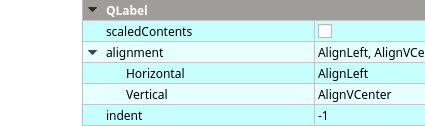
                              anyway, you should set both alignments so movie is in center
                              alt text

                              ManiRonM 1 Reply Last reply
                              0
                              • mrjjM mrjj

                                @ManiRon
                                you do that on label ?

                                anyway, you should set both alignments so movie is in center
                                alt text

                                ManiRonM Offline
                                ManiRonM Offline
                                ManiRon
                                wrote on last edited by
                                #36

                                @mrjj

                                This is my code

                                processLabel->setGeometry(
                                QStyle::alignedRect(
                                Qt::LeftToRight,
                                Qt::AlignCenter,
                                processLabel->size(),
                                qApp->desktop()->availableGeometry()

                                mrjjM 1 Reply Last reply
                                0
                                • ManiRonM ManiRon

                                  @mrjj

                                  This is my code

                                  processLabel->setGeometry(
                                  QStyle::alignedRect(
                                  Qt::LeftToRight,
                                  Qt::AlignCenter,
                                  processLabel->size(),
                                  qApp->desktop()->availableGeometry()

                                  mrjjM Offline
                                  mrjjM Offline
                                  mrjj
                                  Lifetime Qt Champion
                                  wrote on last edited by
                                  #37

                                  @ManiRon
                                  ok.
                                  well u need to center the movie also or
                                  set size of label to size of movie.

                                  ManiRonM 1 Reply Last reply
                                  0
                                  • mrjjM mrjj

                                    @ManiRon
                                    ok.
                                    well u need to center the movie also or
                                    set size of label to size of movie.

                                    ManiRonM Offline
                                    ManiRonM Offline
                                    ManiRon
                                    wrote on last edited by
                                    #38

                                    @mrjj

                                    i have to do both sir .

                                    mrjjM 1 Reply Last reply
                                    0
                                    • ManiRonM ManiRon

                                      @mrjj

                                      i have to do both sir .

                                      mrjjM Offline
                                      mrjjM Offline
                                      mrjj
                                      Lifetime Qt Champion
                                      wrote on last edited by
                                      #39

                                      @ManiRon
                                      well to be on safe size u can do that.
                                      use resize to size label to width, height of movie

                                      ManiRonM 2 Replies Last reply
                                      0
                                      • mrjjM mrjj

                                        @ManiRon
                                        well to be on safe size u can do that.
                                        use resize to size label to width, height of movie

                                        ManiRonM Offline
                                        ManiRonM Offline
                                        ManiRon
                                        wrote on last edited by
                                        #40

                                        @mrjj not getting your point

                                        mrjjM 1 Reply Last reply
                                        0
                                        • mrjjM mrjj

                                          @ManiRon
                                          well to be on safe size u can do that.
                                          use resize to size label to width, height of movie

                                          ManiRonM Offline
                                          ManiRonM Offline
                                          ManiRon
                                          wrote on last edited by
                                          #41

                                          @mrjj

                                          QMovie *movie = new QMovie("C:/Users/data/Documents/untitled14/200w.gif");
                                          QLabel *processLabel = new QLabel(NULL);
                                          processLabel->setMovie(movie);
                                          movie->start();
                                          processLabel->setWindowFlags(Qt::FramelessWindowHint);
                                          processLabel->setGeometry(
                                          QStyle::alignedRect(
                                          Qt::RightToLeft,
                                          Qt::AlignCenter,
                                          processLabel->size(),
                                          qApp->desktop()->availableGeometry()
                                          ));
                                          processLabel->show();

                                          This Is my current code

                                          1 Reply Last reply
                                          0

                                          • Login

                                          • Login or register to search.
                                          • First post
                                            Last post
                                          0
                                          • Categories
                                          • Recent
                                          • Tags
                                          • Popular
                                          • Users
                                          • Groups
                                          • Search
                                          • Get Qt Extensions
                                          • Unsolved