
Skip to content
  • Categories
  • Recent
  • Tags
  • Popular
  • Users
  • Groups
  • Search
  • Get Qt Extensions
  • Unsolved
Collapse
Brand Logo
  1. Home
  2. Qt Development
  3. General and Desktop
  4. problem in adding many Widgets to QScrollArea and keep the size gentle

problem in adding many Widgets to QScrollArea and keep the size gentle

Scheduled Pinned Locked Moved Solved General and Desktop
qscrollarea
8 Posts 3 Posters 2.2k Views 2 Watching
  • Oldest to Newest
  • Newest to Oldest
  • Most Votes
Reply
  • Reply as topic
Log in to reply
This topic has been deleted. Only users with topic management privileges can see it.
  • A Offline
    A Offline
    Arash Shirvan
    wrote on last edited by Arash Shirvan
    #1

    Hi,
    It a while I am working on a project with Qt and need to add many Widgets on a QScrollArea. All Widgets added to QFormLayout and layout added to scroll area. The problem is that after execution my dialog size expand to fit all widgets (without any scroll bar!). What I want is that the size doesn't change and I could scroll over widgets.

    I tried setWidgetResizable function (set to true) but didn't work.

    The whole layout of my software is like this:

    • there is a QDialog,
    • inside Dialog there is a QTabWidget (and each tab has a QWidget)
    • some tab widget composed of many (QLabel, QLineEdit) which addedd to a QFormLayout
    • QFormLayout added to QScrollArea as layout
    • QScrollArea added to QVBoxLayout as widget
    • and finally QVBoxLayout set as main layout of QDIalog with (setLayout)

    Thanks

    1 Reply Last reply
    0
    • mrjjM Offline
      mrjjM Offline
      mrjj
      Lifetime Qt Champion
      wrote on last edited by
      #2

      Hi
      The setup sounds ok. But i wonder if you use QLabel to show images ?
      Those tend to expand to full image size and make parent grow.

      1 Reply Last reply
      0
      • A Offline
        A Offline
        Arash Shirvan
        wrote on last edited by Arash Shirvan
        #3

        no just simple label for every QLineEdit
        accually it is combination of QLabel and either QLineEdit/QCheckBox/QComboBox

        mrjjM 1 Reply Last reply
        0
        • A Arash Shirvan

          no just simple label for every QLineEdit
          accually it is combination of QLabel and either QLineEdit/QCheckBox/QComboBox

          mrjjM Offline
          mrjjM Offline
          mrjj
          Lifetime Qt Champion
          wrote on last edited by mrjj
          #4

          @Arash-Shirvan
          hmm, i cant reproduce from the layout u describe
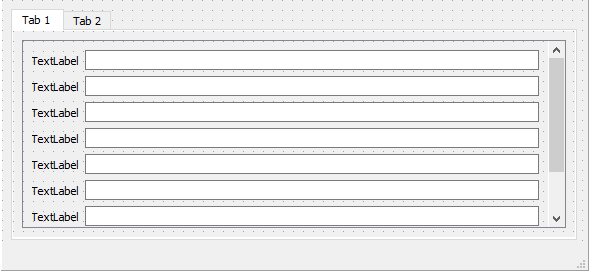
          alt text

          it stays the same size when executed.

          I wonder if its due to dialog and not mainwindow or something completely else.

          Hmm nope
          Dialog stays same size too
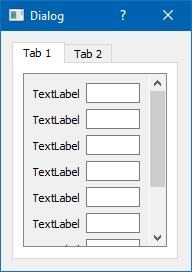
          alt text

          A 1 Reply Last reply
          1
          • SGaistS Offline
            SGaistS Offline
            SGaist
            Lifetime Qt Champion
            wrote on last edited by
            #5

            Hi and welcome to devnet,

            QScrollArea takes a widget to make its magic, setting a layout on the area is wrong.

            Interested in AI ? www.idiap.ch
            Please read the Qt Code of Conduct - https://forum.qt.io/topic/113070/qt-code-of-conduct

            1 Reply Last reply
            2
            • A Offline
              A Offline
              Arash Shirvan
              wrote on last edited by
              #6

              Thanks guys for the tips, exactly the problem was I didin't use a widget in scroll area.

              well I think next time I should give some source code :)

              again thanks for the help.

              1 Reply Last reply
              1
              • mrjjM mrjj

                @Arash-Shirvan
                hmm, i cant reproduce from the layout u describe
                alt text

                it stays the same size when executed.

                I wonder if its due to dialog and not mainwindow or something completely else.

                Hmm nope
                Dialog stays same size too
                alt text

                A Offline
                A Offline
                Arash Shirvan
                wrote on last edited by
                #7

                @mrjj my problem solved, but I just wanted to say that the only different about the setup I mentioned was that there was a MainWindow and splitter which contained the Dialog.

                I wish I had enough priviledge to share the striped portion of the source code for reference.

                mrjjM 1 Reply Last reply
                0
                • A Arash Shirvan

                  @mrjj my problem solved, but I just wanted to say that the only different about the setup I mentioned was that there was a MainWindow and splitter which contained the Dialog.

                  I wish I had enough priviledge to share the striped portion of the source code for reference.

                  mrjjM Offline
                  mrjjM Offline
                  mrjj
                  Lifetime Qt Champion
                  wrote on last edited by
                  #8

                  @Arash-Shirvan
                  well i didnt get issue as im using Designer that comes with a widget
                  in place ( for scrollArea) . so i missed the fact you didnt add widget and layout to that. :)

                  1 Reply Last reply
                  0

                  • Login

                  • Login or register to search.
                  • First post
                    Last post
                  0
                  • Categories
                  • Recent
                  • Tags
                  • Popular
                  • Users
                  • Groups
                  • Search
                  • Get Qt Extensions
                  • Unsolved