Skip to content
  • Categories
  • Recent
  • Tags
  • Popular
  • Users
  • Groups
  • Search
  • Get Qt
  • Unsolved
Collapse
Brand Logo
  1. Home
  2. Qt Development
  3. General and Desktop
  4. change font of stackwidget
Qt 6.12 LTS is out! See what's new in the release blog

change font of stackwidget

Scheduled Pinned Locked Moved Unsolved General and Desktop
30 Posts 5 Posters 9.2k Views 2 Watching
  • Oldest to Newest
  • Newest to Oldest
  • Most Votes
Reply
  • Reply as topic
Log in to reply
This topic has been deleted. Only users with topic management privileges can see it.
  • zhmhZ zhmh

    @SGaist I use the stack widget and I want to set the font for the content on it like push button, combobox ....
    So why the font doesn't change?

    JonBJ Offline
    JonBJ Offline
    JonB
    wrote on last edited by
    #4

    @zhmh
    I use QStackedWidget and just set application font and it works everywhere, QStackedWidget is not relevant.

    zhmhZ 1 Reply Last reply
    1
    • JonBJ JonB

      @zhmh
      I use QStackedWidget and just set application font and it works everywhere, QStackedWidget is not relevant.

      zhmhZ Offline
      zhmhZ Offline
      zhmh
      wrote on last edited by
      #5

      @JonB you set font application like my code?
      I use it on test project with QStackWidget and it works but in my project doesn't work ,so what's the problem ?

      1 Reply Last reply
      0
      • SGaistS Offline
        SGaistS Offline
        SGaist
        Lifetime Qt Champion
        wrote on last edited by
        #6

        If you want all your widgets to use the same font, then just set it through QApplication::setFont.

        Interested in AI ? www.idiap.ch
        Please read the Qt Code of Conduct - https://forum.qt.io/topic/113070/qt-code-of-conduct

        zhmhZ 1 Reply Last reply
        2
        • SGaistS SGaist

          If you want all your widgets to use the same font, then just set it through QApplication::setFont.

          zhmhZ Offline
          zhmhZ Offline
          zhmh
          wrote on last edited by zhmh
          #7

          @SGaist I use this:

          QFont newFont(":/new/prefix1/Nastaliq.ttf", 8, QFont::Bold, true);
              QApplication::setFont(newFont);
          

          The size is set, but the font does not change

          1 Reply Last reply
          0
          • SGaistS Offline
            SGaistS Offline
            SGaist
            Lifetime Qt Champion
            wrote on last edited by
            #8

            QFont doesn't take a path as parameter but the family name.

            Use QFontDatabase to load your custom font, build the QFont object using the correct family name and then set it on QApplication.

            Interested in AI ? www.idiap.ch
            Please read the Qt Code of Conduct - https://forum.qt.io/topic/113070/qt-code-of-conduct

            zhmhZ 1 Reply Last reply
            2
            • SGaistS SGaist

              QFont doesn't take a path as parameter but the family name.

              Use QFontDatabase to load your custom font, build the QFont object using the correct family name and then set it on QApplication.

              zhmhZ Offline
              zhmhZ Offline
              zhmh
              wrote on last edited by
              #9

              @SGaist can you show me with code?
              I used the qfontdatabase at first an doesn’t work!

              RatzzR 1 Reply Last reply
              0
              • SGaistS Offline
                SGaistS Offline
                SGaist
                Lifetime Qt Champion
                wrote on last edited by
                #10

                Then show the current code you use.

                Interested in AI ? www.idiap.ch
                Please read the Qt Code of Conduct - https://forum.qt.io/topic/113070/qt-code-of-conduct

                1 Reply Last reply
                0
                • zhmhZ zhmh

                  @SGaist can you show me with code?
                  I used the qfontdatabase at first an doesn’t work!

                  RatzzR Offline
                  RatzzR Offline
                  Ratzz
                  wrote on last edited by
                  #11

                  @zhmh said in change font of stackwidget:

                  I used the qfontdatabase at first an doesn’t work!

                  Can you check if addApplicationFont function returns -1 ?
                  as mentioned here

                  --Alles ist gut.

                  zhmhZ 1 Reply Last reply
                  2
                  • RatzzR Ratzz

                    @zhmh said in change font of stackwidget:

                    I used the qfontdatabase at first an doesn’t work!

                    Can you check if addApplicationFont function returns -1 ?
                    as mentioned here

                    zhmhZ Offline
                    zhmhZ Offline
                    zhmh
                    wrote on last edited by zhmh
                    #12

                    @Ratzz yes I checked it before, this is

                    int fnt=QFontDatabase::addApplicationFont(":/new/prefix1/Nastaliq.ttf");
                         qDebug()<< fnt;
                    

                    returns 0 to me!

                    RatzzR 1 Reply Last reply
                    0
                    • zhmhZ zhmh

                      @Ratzz yes I checked it before, this is

                      int fnt=QFontDatabase::addApplicationFont(":/new/prefix1/Nastaliq.ttf");
                           qDebug()<< fnt;
                      

                      returns 0 to me!

                      RatzzR Offline
                      RatzzR Offline
                      Ratzz
                      wrote on last edited by Ratzz
                      #13

                      @zhmh said in change font of stackwidget:

                      returns 0 to me

                      Which means the fond is loaded properly.

                      Use http://doc.qt.io/qt-5/qfontdatabase.html#applicationFontFamilies to get the font and set back to application.

                      Can you show the code ?

                      --Alles ist gut.

                      zhmhZ 1 Reply Last reply
                      1
                      • RatzzR Ratzz

                        @zhmh said in change font of stackwidget:

                        returns 0 to me

                        Which means the fond is loaded properly.

                        Use http://doc.qt.io/qt-5/qfontdatabase.html#applicationFontFamilies to get the font and set back to application.

                        Can you show the code ?

                        zhmhZ Offline
                        zhmhZ Offline
                        zhmh
                        wrote on last edited by
                        #14

                        @Ratzz

                        int fnt=QFontDatabase::addApplicationFont(":/new/prefix1/Nastaliq.ttf");
                              qDebug() << fnt << QFontDatabase::applicationFontFamilies(fnt);
                        

                        returns: 0 ("Nastaliq")

                        @Ratzz said in change font of stackwidget:

                        Can you show the code ?

                        this is my main.cpp:

                        int main(int argc, char *argv[])
                        {
                            QApplication a(argc, argv);
                            MainWindow w;
                            int fnt=QFontDatabase::addApplicationFont(":/new/prefix1/Nastaliq.ttf");
                             qDebug() << fnt << QFontDatabase::applicationFontFamilies(fnt);
                            QFont nastaliq("Nastaliq",20,QFont::Normal);
                            w.setFont(nastaliq);
                            w.show();
                        
                            return a.exec();
                        }
                        
                        RatzzR 1 Reply Last reply
                        0
                        • zhmhZ zhmh

                          @Ratzz

                          int fnt=QFontDatabase::addApplicationFont(":/new/prefix1/Nastaliq.ttf");
                                qDebug() << fnt << QFontDatabase::applicationFontFamilies(fnt);
                          

                          returns: 0 ("Nastaliq")

                          @Ratzz said in change font of stackwidget:

                          Can you show the code ?

                          this is my main.cpp:

                          int main(int argc, char *argv[])
                          {
                              QApplication a(argc, argv);
                              MainWindow w;
                              int fnt=QFontDatabase::addApplicationFont(":/new/prefix1/Nastaliq.ttf");
                               qDebug() << fnt << QFontDatabase::applicationFontFamilies(fnt);
                              QFont nastaliq("Nastaliq",20,QFont::Normal);
                              w.setFont(nastaliq);
                              w.show();
                          
                              return a.exec();
                          }
                          
                          RatzzR Offline
                          RatzzR Offline
                          Ratzz
                          wrote on last edited by
                          #15

                          @zhmh said in change font of stackwidget:

                          QFont nastaliq("Nastaliq",20,QFont::Normal);

                          You should set the font which you got from the http://doc.qt.io/qt-5/qfontdatabase.html#applicationFontFamilies

                          --Alles ist gut.

                          zhmhZ 1 Reply Last reply
                          0
                          • RatzzR Ratzz

                            @zhmh said in change font of stackwidget:

                            QFont nastaliq("Nastaliq",20,QFont::Normal);

                            You should set the font which you got from the http://doc.qt.io/qt-5/qfontdatabase.html#applicationFontFamilies

                            zhmhZ Offline
                            zhmhZ Offline
                            zhmh
                            wrote on last edited by
                            #16

                            @Ratzz how ?

                            int fnt=QFontDatabase::addApplicationFont(":/new/prefix1/Nastaliq.ttf");
                            QString family = QFontDatabase::applicationFontFamilies(fnt).at(0);
                             w.setFont(family);
                            

                            is it true?

                            RatzzR 1 Reply Last reply
                            0
                            • zhmhZ zhmh

                              @Ratzz how ?

                              int fnt=QFontDatabase::addApplicationFont(":/new/prefix1/Nastaliq.ttf");
                              QString family = QFontDatabase::applicationFontFamilies(fnt).at(0);
                               w.setFont(family);
                              

                              is it true?

                              RatzzR Offline
                              RatzzR Offline
                              Ratzz
                              wrote on last edited by
                              #17

                              @zhmh said in change font of stackwidget:

                              is it true?

                              Yes. Does it work that way?

                              --Alles ist gut.

                              zhmhZ 1 Reply Last reply
                              0
                              • RatzzR Ratzz

                                @zhmh said in change font of stackwidget:

                                is it true?

                                Yes. Does it work that way?

                                zhmhZ Offline
                                zhmhZ Offline
                                zhmh
                                wrote on last edited by
                                #18

                                @Ratzz No :(

                                1 Reply Last reply
                                0
                                • SGaistS Offline
                                  SGaistS Offline
                                  SGaist
                                  Lifetime Qt Champion
                                  wrote on last edited by
                                  #19

                                  Where did you get that font from ?

                                  Interested in AI ? www.idiap.ch
                                  Please read the Qt Code of Conduct - https://forum.qt.io/topic/113070/qt-code-of-conduct

                                  zhmhZ 1 Reply Last reply
                                  0
                                  • SGaistS SGaist

                                    Where did you get that font from ?

                                    zhmhZ Offline
                                    zhmhZ Offline
                                    zhmh
                                    wrote on last edited by
                                    #20

                                    @SGaist font work with other program

                                    1 Reply Last reply
                                    0
                                    • SGaistS Offline
                                      SGaistS Offline
                                      SGaist
                                      Lifetime Qt Champion
                                      wrote on last edited by
                                      #21

                                      That's beside the question. If people knows where to download the font, they can test it on their system to find out what's going wrong.

                                      Interested in AI ? www.idiap.ch
                                      Please read the Qt Code of Conduct - https://forum.qt.io/topic/113070/qt-code-of-conduct

                                      zhmhZ 1 Reply Last reply
                                      0
                                      • SGaistS SGaist

                                        That's beside the question. If people knows where to download the font, they can test it on their system to find out what's going wrong.

                                        zhmhZ Offline
                                        zhmhZ Offline
                                        zhmh
                                        wrote on last edited by
                                        #22

                                        @SGaist here you are: https://fonts2u.com/irannastaliq.font

                                        RatzzR 1 Reply Last reply
                                        0
                                        • zhmhZ zhmh

                                          @SGaist here you are: https://fonts2u.com/irannastaliq.font

                                          RatzzR Offline
                                          RatzzR Offline
                                          Ratzz
                                          wrote on last edited by Ratzz
                                          #23

                                          @zhmh
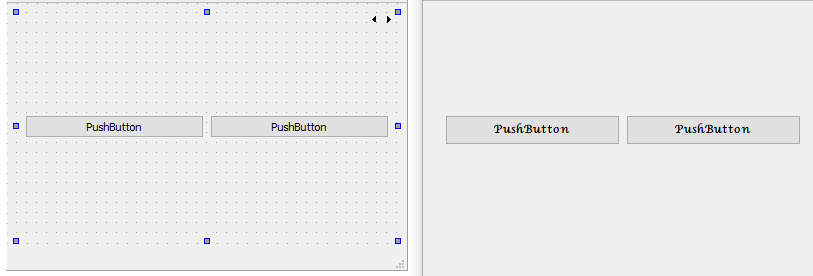
                                          I tried same font an QStackedWidget with QPushButton in it and seems fine for me.

                                              QStringList list= QFontDatabase::applicationFontFamilies(fnt);
                                              QFont nastaliq(list.at((0)));
                                              w.setFont(nastaliq);
                                          

                                          alt text

                                          --Alles ist gut.

                                          zhmhZ 1 Reply Last reply
                                          3

                                          • Login

                                          • Login or register to search.
                                          • First post
                                            Last post
                                          0
                                          • Categories
                                          • Recent
                                          • Tags
                                          • Popular
                                          • Users
                                          • Groups
                                          • Search
                                          • Get Qt
                                          • Unsolved