
Skip to content
  • Categories
  • Recent
  • Tags
  • Popular
  • Users
  • Groups
  • Search
  • Get Qt Extensions
  • Unsolved
Collapse
Brand Logo
  1. Home
  2. Qt Development
  3. General and Desktop
  4. QProgressDialog doesn't update
Qt 6.11 is out! See what's new in the release blog

QProgressDialog doesn't update

Scheduled Pinned Locked Moved Solved General and Desktop
13 Posts 3 Posters 3.5k Views 3 Watching
  • Oldest to Newest
  • Newest to Oldest
  • Most Votes
Reply
  • Reply as topic
Log in to reply
This topic has been deleted. Only users with topic management privileges can see it.
  • D Offline
    D Offline
    DoubleC122
    wrote on last edited by
    #1

    I am using the example from http://doc.qt.io/qt-5/qprogressdialog.html. The dialog will show only if I call exec(), but there will be displayed only an empty progress bar. I also use processEvents() inside the loop.

    1 Reply Last reply
    0
    • mrjjM Offline
      mrjjM Offline
      mrjj
      Lifetime Qt Champion
      wrote on last edited by
      #2

      Hi
      The exact code ?

      1 Reply Last reply
      1
      • D Offline
        D Offline
        DoubleC122
        wrote on last edited by
        #3

        This is it: QApplication a(argc, argv);

        QProgressDialog progress("Copying files...", "Abort Copy", 0, 10);
        progress.setWindowModality(Qt::WindowModal);
        
        progress.exec();
        for (int i = 1; i <= 10; i++) {
        
            QCoreApplication::processEvents();
            progress.setValue(i);
            if (progress.wasCanceled())
                break;
            std::cout<<"i: "<<i<<"\n";
        }
        progress.close();```
        
        SGaistS 1 Reply Last reply
        0
        • D DoubleC122

          This is it: QApplication a(argc, argv);

          QProgressDialog progress("Copying files...", "Abort Copy", 0, 10);
          progress.setWindowModality(Qt::WindowModal);
          
          progress.exec();
          for (int i = 1; i <= 10; i++) {
          
              QCoreApplication::processEvents();
              progress.setValue(i);
              if (progress.wasCanceled())
                  break;
              std::cout<<"i: "<<i<<"\n";
          }
          progress.close();```
          
          SGaistS Offline
          SGaistS Offline
          SGaist
          Lifetime Qt Champion
          wrote on last edited by
          #4

          Hi,

          @DoubleC122 said in QProgressDialog doesn't update:

          progress.exec();
          for (int i = 1; i <= 10; i++) {

          exec starts an event loop, so currently, your for loop is only executed after the dialog is closed.

          Interested in AI ? www.idiap.ch
          Please read the Qt Code of Conduct - https://forum.qt.io/topic/113070/qt-code-of-conduct

          D 1 Reply Last reply
          0
          • SGaistS SGaist

            Hi,

            @DoubleC122 said in QProgressDialog doesn't update:

            progress.exec();
            for (int i = 1; i <= 10; i++) {

            exec starts an event loop, so currently, your for loop is only executed after the dialog is closed.

            D Offline
            D Offline
            DoubleC122
            wrote on last edited by
            #5

            @SGaist I see. Well, otherwise my dialog won't show. Is there another way?

            1 Reply Last reply
            0
            • SGaistS Offline
              SGaistS Offline
              SGaist
              Lifetime Qt Champion
              wrote on last edited by
              #6

              Call show on the dialog.

              Just in case, QProgressDialog's documentation offers some example on how to use it.

              Interested in AI ? www.idiap.ch
              Please read the Qt Code of Conduct - https://forum.qt.io/topic/113070/qt-code-of-conduct

              1 Reply Last reply
              0
              • D Offline
                D Offline
                DoubleC122
                wrote on last edited by
                #7

                Yes, but unfortunately, it won't appear when I call show().

                1 Reply Last reply
                0
                • SGaistS Offline
                  SGaistS Offline
                  SGaist
                  Lifetime Qt Champion
                  wrote on last edited by
                  #8

                  Something I didn't realise... Your loop is just too short and too fast for the dialog to appear.

                  Interested in AI ? www.idiap.ch
                  Please read the Qt Code of Conduct - https://forum.qt.io/topic/113070/qt-code-of-conduct

                  1 Reply Last reply
                  0
                  • D Offline
                    D Offline
                    DoubleC122
                    wrote on last edited by
                    #9

                    Hm, I thought it would appear anyway...Still, I changed the limit to something bigger, like 100 and 1000, and still won't show. Quite strange.

                    mrjjM 1 Reply Last reply
                    0
                    • D DoubleC122

                      Hm, I thought it would appear anyway...Still, I changed the limit to something bigger, like 100 and 1000, and still won't show. Quite strange.

                      mrjjM Offline
                      mrjjM Offline
                      mrjj
                      Lifetime Qt Champion
                      wrote on last edited by
                      #10

                      @DoubleC122
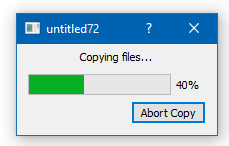
                      Well its just still too fast as it do no real work.
                      It does show very fast. (flashing)

                      for test, you can do

                      #include <QThread>
                      ...
                       progress.show();
                        for (int i = 1; i <= 13330; i++) {
                      
                          QCoreApplication::processEvents();
                          progress.setValue(i);
                          if (progress.wasCanceled())
                          { break; }
                          QThread::sleep(1); // bad in real code! but just to show it does work.
                        }
                      
                        progress.close();
                      

                      alt text

                      D 1 Reply Last reply
                      1
                      • mrjjM mrjj

                        @DoubleC122
                        Well its just still too fast as it do no real work.
                        It does show very fast. (flashing)

                        for test, you can do

                        #include <QThread>
                        ...
                         progress.show();
                          for (int i = 1; i <= 13330; i++) {
                        
                            QCoreApplication::processEvents();
                            progress.setValue(i);
                            if (progress.wasCanceled())
                            { break; }
                            QThread::sleep(1); // bad in real code! but just to show it does work.
                          }
                        
                          progress.close();
                        

                        alt text

                        D Offline
                        D Offline
                        DoubleC122
                        wrote on last edited by
                        #11

                        @mrjj Yes, it works indeed. So I guess the dialog will appear only when there is a for loop big enough?

                        mrjjM 1 Reply Last reply
                        0
                        • D DoubleC122

                          @mrjj Yes, it works indeed. So I guess the dialog will appear only when there is a for loop big enough?

                          mrjjM Offline
                          mrjjM Offline
                          mrjj
                          Lifetime Qt Champion
                          wrote on last edited by mrjj
                          #12

                          @DoubleC122
                          yes, if it does real stuff like copy file or anything that takes time.
                          even with high for loop it just too fast to see :)
                          But if u do something real, it works. Thats what i used sleep to emulate.
                          but dont use sleep for anything production code as u sleep the app .)

                          1 Reply Last reply
                          1
                          • D Offline
                            D Offline
                            DoubleC122
                            wrote on last edited by
                            #13

                            Got it. Thanks.

                            1 Reply Last reply
                            0

                            • Login

                            • Login or register to search.
                            • First post
                              Last post
                            0
                            • Categories
                            • Recent
                            • Tags
                            • Popular
                            • Users
                            • Groups
                            • Search
                            • Get Qt Extensions
                            • Unsolved