Is drawPath Method Inefficient?
-
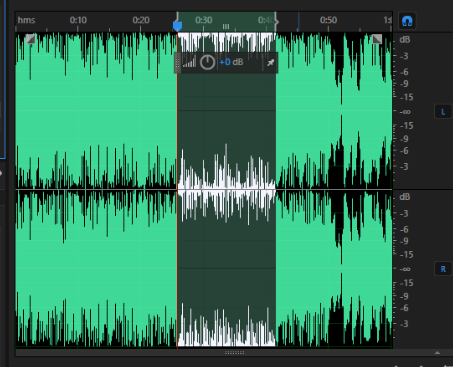
@jsulm Well,I want to draw wave graph for a .wav music file,it consists of millions frames at least.But Adobe audition Application can draw the wave fluently.
@enhao The thing is: you cannot really put so many points at the same time. A screen like the one I was talking about above can show 1920 points horizontally at max at the same time, so what's the point to try to squeeze 2 million points there? Reduce the number of points to what can be actually shown on the screen.
"But Adobe audition Application can draw the wave fluently" - I'm sure it does not paint millions of points at the same time, but scales the data to what can be displayed.
Another example: if you display a pictures with, lets say, 20 million pixels - do you think the picture viewer really tries to draw all these 20 million pixels? What it does: it scales the picture size to what can be displayed on the used screen.
-
@enhao The thing is: you cannot really put so many points at the same time. A screen like the one I was talking about above can show 1920 points horizontally at max at the same time, so what's the point to try to squeeze 2 million points there? Reduce the number of points to what can be actually shown on the screen.
"But Adobe audition Application can draw the wave fluently" - I'm sure it does not paint millions of points at the same time, but scales the data to what can be displayed.
Another example: if you display a pictures with, lets say, 20 million pixels - do you think the picture viewer really tries to draw all these 20 million pixels? What it does: it scales the picture size to what can be displayed on the used screen.
@jsulm Actually, the .wav music file consists of 10 million frames, I choose a point every ten points,so I get 2 million points(left channel and right channel).
In this way, the wave graph likes Adobe audition in details,But It is very slow in Qt.
When I choose a point every 100 points,the wave graph lose some details,but I can draw it fluently,berable at least.That's why I think adobe audition draw 2 million points. -
@jsulm Actually, the .wav music file consists of 10 million frames, I choose a point every ten points,so I get 2 million points(left channel and right channel).
In this way, the wave graph likes Adobe audition in details,But It is very slow in Qt.
When I choose a point every 100 points,the wave graph lose some details,but I can draw it fluently,berable at least.That's why I think adobe audition draw 2 million points.@enhao said in Is drawPath Method Inefficient?:
That's why I think adobe audition draw 2 million points
I really doubt that, because it doesn't make sense as you cannot even show so many points.
You just need to scale all these pixels to what can be shown. -
Because we don't see any code, I'm making some asumptions here.
On startup, you create a (wave)path from all of your points.
that path coveres way, way more width than your display will ever have.
than you show a section of that path and "scroll" sideways in a way.Only draw path based on the points that are actually possible to be seen! If you want to "scroll", periodically change your start and end point of your path and redraw it.
That should be way faster, than what you're doing right now. -
@enhao said in Is drawPath Method Inefficient?:
That's why I think adobe audition draw 2 million points
I really doubt that, because it doesn't make sense as you cannot even show so many points.
You just need to scale all these pixels to what can be shown.@jsulm Maybe I cant not say it clearly.I got 2 million datas sotred in leftVal(QVector<int>) and rightVal(QVector<int>).So I get every datas position in screen like this.
QPainterPath pathL;
for( int i = 0; i < leftVal.size(); i++)
{
qreal x = i * this->width() /leftVal.size();
qreal y = 0.45 - (leftVal.at(i) - m_minL) */(m_maxL - m_minL) * this->height() * 0.4);
pathL.lineTo(QPointF(x,y));
}
I got the right points at the same way. -
@jsulm Maybe I cant not say it clearly.I got 2 million datas sotred in leftVal(QVector<int>) and rightVal(QVector<int>).So I get every datas position in screen like this.
QPainterPath pathL;
for( int i = 0; i < leftVal.size(); i++)
{
qreal x = i * this->width() /leftVal.size();
qreal y = 0.45 - (leftVal.at(i) - m_minL) */(m_maxL - m_minL) * this->height() * 0.4);
pathL.lineTo(QPointF(x,y));
}
I got the right points at the same way. -
Hi
Did you try with
http://doc.qt.io/qt-5/qpainter.html#drawLine-3
Wonder if its faster than QPainterPath. -
Because we don't see any code, I'm making some asumptions here.
On startup, you create a (wave)path from all of your points.
that path coveres way, way more width than your display will ever have.
than you show a section of that path and "scroll" sideways in a way.Only draw path based on the points that are actually possible to be seen! If you want to "scroll", periodically change your start and end point of your path and redraw it.
That should be way faster, than what you're doing right now.@J.Hilk said in Is drawPath Method Inefficient?:
On startup, you create a (wave)path from all of your points.
This is not an ideal approach. It's almost certainly lazily evaluated. No user will ever look at every part of a long file at the highest level of detail. They will only zoom in to carefully inspect some small parts. So a low resolution or partial image is quickly generated to show the user initially, and then generate more detailed visualisations as needed if the user zooms in to a particular spot.
Modern software may also do something clever with the GPU. Perhaps using the audio data as a 1D texture to effect a vertex shader, and then using the resulting geometry to draw the shape of the audio. Or perhaps drawing a quad with a pixel shader that interprets the audio data as an input texture and then basically shades a point with something analogous to
if y > texture(x,0)  {
  color = black
} else {
  color = shaded
}
without any actual points being plotted at all.
-
@J.Hilk said in Is drawPath Method Inefficient?:
On startup, you create a (wave)path from all of your points.
This is not an ideal approach. It's almost certainly lazily evaluated. No user will ever look at every part of a long file at the highest level of detail. They will only zoom in to carefully inspect some small parts. So a low resolution or partial image is quickly generated to show the user initially, and then generate more detailed visualisations as needed if the user zooms in to a particular spot.
Modern software may also do something clever with the GPU. Perhaps using the audio data as a 1D texture to effect a vertex shader, and then using the resulting geometry to draw the shape of the audio. Or perhaps drawing a quad with a pixel shader that interprets the audio data as an input texture and then basically shades a point with something analogous to
if y > texture(x,0)  {
  color = black
} else {
  color = shaded
}
without any actual points being plotted at all.
-
@mrjj like this.Well,what i think out is to choose typical data from wav file,there are so many points in the wav file,it needs not to draw all the data.But I can not find the right rule to choose points from data.
@enhao
Hi
Often this is done by so called sliding window
say we have 500 pixels for the area of graph area.
we can then draw 0-500 from the values.
if we then scroll, we offset the start and now
draw 300-800. Often its combined with zooming
which narrows the window ( say 0-200) but still uses
same 500 pixel area so it allows for better details.