
Skip to content
  • Categories
  • Recent
  • Tags
  • Popular
  • Users
  • Groups
  • Search
  • Get Qt Extensions
  • Unsolved
Collapse
Brand Logo
  1. Home
  2. Qt Development
  3. General and Desktop
  4. Project hierarchy with subfolders
Qt 6.11 is out! See what's new in the release blog

Project hierarchy with subfolders

Scheduled Pinned Locked Moved Solved General and Desktop
7 Posts 3 Posters 3.7k Views 1 Watching
  • Oldest to Newest
  • Newest to Oldest
  • Most Votes
Reply
  • Reply as topic
Log in to reply
This topic has been deleted. Only users with topic management privileges can see it.
  • Y Offline
    Y Offline
    YoniBE
    wrote on last edited by
    #1

    hello!
    when I create new project, I don't have subfolders such as header, source and form folders for my project files. all my files are located at one folder (project folder).
    How can I change the organization of project files?

    this is part of my .pro file

    SOURCES += \
            album.cpp \
        pictures.cpp \
        databasemanager.cpp \
        albumdao.cpp
    
    HEADERS += \
            album.h \
            gallery-core_global.h \ 
        pictures.h \
        databasemanager.h \
        albumdao.h
    

    and this is screen shot of the project hierarchy:
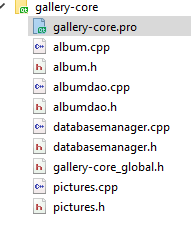
    alt text

    thanks for help! :)

    jsulmJ 1 Reply Last reply
    0
    • Y YoniBE

      hello!
      when I create new project, I don't have subfolders such as header, source and form folders for my project files. all my files are located at one folder (project folder).
      How can I change the organization of project files?

      this is part of my .pro file

      SOURCES += \
              album.cpp \
          pictures.cpp \
          databasemanager.cpp \
          albumdao.cpp
      
      HEADERS += \
              album.h \
              gallery-core_global.h \ 
          pictures.h \
          databasemanager.h \
          albumdao.h
      

      and this is screen shot of the project hierarchy:
      alt text

      thanks for help! :)

      jsulmJ Online
      jsulmJ Online
      jsulm
      Lifetime Qt Champion
      wrote on last edited by
      #2

      @YoniBE You can put your files in subdirectories and edit the pro file to reflect these changes:

      SOURCES += \
              somedir/album.cpp \
          somedir/pictures.cpp \
          somedir/databasemanager.cpp \
          somedir/albumdao.cpp
      
      HEADERS += \
              someotherdir/album.h \
              someotherdir/gallery-core_global.h \ 
          someotherdir/pictures.h \
          someotherdir/databasemanager.h \
          someotherdir/albumdao.h
      

      https://forum.qt.io/topic/113070/qt-code-of-conduct

      1 Reply Last reply
      3
      • J.HilkJ Offline
        J.HilkJ Offline
        J.Hilk
        Moderators
        wrote on last edited by
        #3

        to add to @jsulm

        if you include files from an other directory you'll have to adjust the include statement:

        #include "someotherdir/pictures.h"
        

        or add the directory to your Includepath in your *pro file

        INCLUDEPATH +=$$PWD/someotherdir
        

        Be aware of the Qt Code of Conduct, when posting : https://forum.qt.io/topic/113070/qt-code-of-conduct


        Q: What's that?
        A: It's blue light.
        Q: What does it do?
        A: It turns blue.

        1 Reply Last reply
        3
        • Y Offline
          Y Offline
          YoniBE
          wrote on last edited by
          #4

          @jsulm @J-Hilk
          Dosen't work..
          I create new folder at the project folder named "sources", then I added to pro file

          SOURCES += \
                  sources/album.cpp \
              sources/pictures.cpp \
              sources/databasemanager.cpp \
              sources/albumdao.cpp
          

          But I don't see any difference at the project hierarchy. I tried to create a new project and do the same but still I don't see any difference.
          I remember that once it was automatically... like in visual studio

          jsulmJ 1 Reply Last reply
          0
          • Y YoniBE

            @jsulm @J-Hilk
            Dosen't work..
            I create new folder at the project folder named "sources", then I added to pro file

            SOURCES += \
                    sources/album.cpp \
                sources/pictures.cpp \
                sources/databasemanager.cpp \
                sources/albumdao.cpp
            

            But I don't see any difference at the project hierarchy. I tried to create a new project and do the same but still I don't see any difference.
            I remember that once it was automatically... like in visual studio

            jsulmJ Online
            jsulmJ Online
            jsulm
            Lifetime Qt Champion
            wrote on last edited by
            #5

            @YoniBE You should run qmake after editing pro file

            https://forum.qt.io/topic/113070/qt-code-of-conduct

            1 Reply Last reply
            1
            • Y Offline
              Y Offline
              YoniBE
              wrote on last edited by
              #6

              @jsulm
              still, I don't see any differences.
              this is the output of the qmake

              11:35:33: Running steps for project untitled...
              11:35:33: Starting: "C:\Qt\5.11.1\msvc2017_64\bin\qmake.exe" "C:\Users\yonib\Documents\QT\Mastering QT\1\untitled\untitled.pro" -spec win32-msvc "CONFIG+=debug" "CONFIG+=qml_debug"
              11:35:33: The process "C:\Qt\5.11.1\msvc2017_64\bin\qmake.exe" exited normally.
              11:35:33: Starting: "C:\Qt\Tools\QtCreator\bin\jom.exe" qmake_all
              
              jom 1.1.2 - empower your cores 
              
              11:35:33: The process "C:\Qt\Tools\QtCreator\bin\jom.exe" exited normally.
              11:35:33: Elapsed time: 00:01.
              
              1 Reply Last reply
              0
              • Y Offline
                Y Offline
                YoniBE
                wrote on last edited by
                #7

                slove it.
                I changed the hierarchy view to file system view instead of project view and it worked.
                Thanks!!

                1 Reply Last reply
                0

                • Login

                • Login or register to search.
                • First post
                  Last post
                0
                • Categories
                • Recent
                • Tags
                • Popular
                • Users
                • Groups
                • Search
                • Get Qt Extensions
                • Unsolved