
QTreeView, how to get the scrollbars when resizing if we don't use ElideMode?
-
@mbruel No, the splitter is the "layout" of the two widgets. Press somewhere in your central widget and press "Lay Out in a Grid".
-
@mbruel said in QTreeView, how to get the scrollbars when resizing if we don't use ElideMode?:
In Designer, uncheck "headerStretchLastSection"
@mpergand
Well this make it worst. My items are all the time truncated even when there is space in the QTreeView.
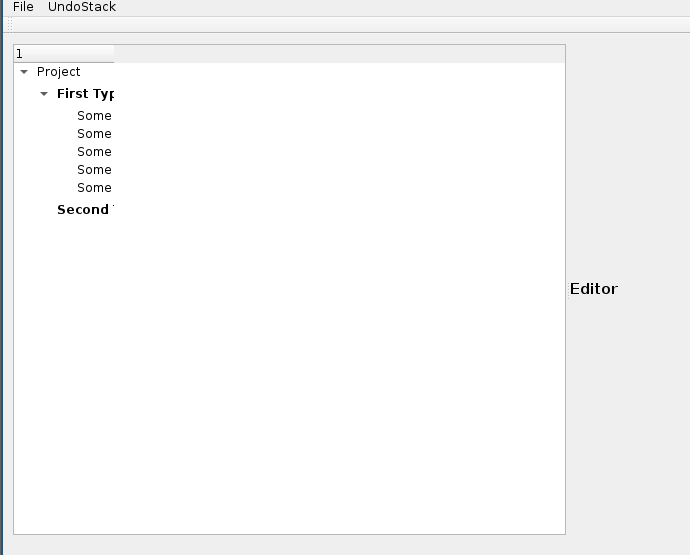
It seems the size of the viewport is the one of the header? how could the size of the longest row? and set it to be this? I found it strange that there is not an option to do this automatically...
-
It seems that it is the header DefaultSectionSize that defines when the scrollbar will kicks in.
I've tried to use the visualRect of my items but I'm getting a invalid one for all the items except the first one...MainWindow::MainWindow(QWidget *parent) : QMainWindow(parent), _ui(new Ui::MainWindow), _treeModel(new TreeModel()), _treeItemDelegate(new TreeItemDelegate()) { _ui->setupUi(this); .... int maxWidth = 0; _setTreeViewMaxWith(maxWidth); _ui->treeView->header()->setDefaultSectionSize(maxWidth); } #include <QDebug> void MainWindow::_setTreeViewMaxWith(int &maxWidth, QModelIndex parent) { for(int r = 0; r < _treeModel->rowCount(parent); ++r) { QModelIndex index = _treeModel->index(r, 0, parent); int width = _ui->treeView->visualRect(index).width(); qDebug() << "width row " << r << " : " << width; if (width > maxWidth) maxWidth = width; if( _treeModel->hasChildren(index) ) _setTreeViewMaxWith(maxWidth, index); } }Here is the output:
width row 0 : 180
width row 0 : 0
width row 0 : 0
width row 1 : 0
width row 2 : 0
width row 3 : 0
width row 4 : 0
width row 1 : 0 -
_ui->treeView->header()->setSectionResizeMode(QHeaderView::ResizeToContents);Work well with elideMode ...
Infinite loop detected :)Well, the only solution seems to resize the column yourself, you can memorize the larger item in TreeItemDelegate::sizeHint
and set the column width accordingly. -
_ui->treeView->header()->setSectionResizeMode(QHeaderView::ResizeToContents);Work well with elideMode ...
Infinite loop detected :)Well, the only solution seems to resize the column yourself, you can memorize the larger item in TreeItemDelegate::sizeHint
and set the column width accordingly.@mpergand
Cool, thanks, good advise :)
You're right, instead of resizing the header, I can just resize the first column.
What I've done is that my Delegate emit a signal in SizeHint when the size max increase. My MainWindow catch the signal and resize the column accordingly taking the indent of the index in consideration...
This works but I'm quite surprised that we've to do it manually and that the functionality is not offered by the QTreeView directly.Here is my code for the people interested
QSize TreeItemDelegate::sizeHint(const QStyleOptionViewItem &option, const QModelIndex &index) const
{
    QStyleOptionViewItem myOption = option;
    myOption.textElideMode = Qt::ElideNone;

    QStandardItem *item = static_cast<const TreeModel*>(index.model())->itemFromIndex(index);
    if (static_cast<TreeItem*>(item)->getType() == TreeItemType::TreeTypeItem)
    {
        myOption.font.setBold(true);
        myOption.decorationSize = QSize(24,24);
    }

    QSize size = QStyledItemDelegate::sizeHint(myOption, index);
    if (size.width() > _maxWidth)
    {
        _maxWidth = size.width();
        emit maxWidthIncreased(_maxWidth, index);
    }

    if (item)
    {
        if (static_cast<TreeItem*>(item)->getType() == TreeItemType::TreeTypeItem)
            size.setHeight(26);
        else
            size.setHeight(18);
    }

    return size;
}
and in MainWindow:
void MainWindow::handleTreeViewMaxWidthChanged(int maxWidth, QModelIndex index)
{
    int indent = _ui->treeView->indentation();
    while (index.parent().isValid())
    {
        indent += _ui->treeView->indentation();
        index = index.parent();
    }

    qDebug() << "Max width from Delegate: " << maxWidth << ", indent: " << indent;
    _ui->treeView->setColumnWidth(0, maxWidth+indent);
}
PS: for this to work, TreeItemDelegate::_maxWidth is mutable and the signal is const
class TreeItemDelegate : public QStyledItemDelegate { Q_OBJECT ... signals: void maxWidthIncreased(int maxSize, QModelIndex index) const; private: mutable int _maxWidth; }; -
_ui->treeView->header()->setSectionResizeMode(QHeaderView::ResizeToContents);Work well with elideMode ...
Infinite loop detected :)Well, the only solution seems to resize the column yourself, you can memorize the larger item in TreeItemDelegate::sizeHint
and set the column width accordingly. -
Following another this other thread about customizing delegates with the display of the icons, here is a more efficient version of this one:
QSize TreeItemDelegate::sizeHint(const QStyleOptionViewItem &option, const QModelIndex &index) const
{
    QSize size = QStyledItemDelegate::sizeHint(option, index);
    if (size.width() > _maxWidth)
    {
        _maxWidth = size.width();
        emit maxWidthIncreased(_maxWidth, index);
    }
    return size;
}

void TreeItemDelegate::initStyleOption(QStyleOptionViewItem *option, const QModelIndex &index) const
{
    QStyledItemDelegate::initStyleOption(option, index);
    option->textElideMode = Qt::ElideNone;

    TreeItem *item = nullptr;
    if (_useProxy)
        item = static_cast<const TreeProxyModel*>(index.model())->itemFromIndex(index);
    else
        item = static_cast<const TreeModel*>(index.model())->itemFromIndex(index);

    if (item && static_cast<TreeItem*>(item)->isRootItem())
    {
//        option->palette.setColor(QPalette::Normal, QPalette::Text,Qt::blue);
        option->font.setBold(true);
        option->decorationSize = QSize(24,24);
    }
}
No need to override the paint method but instead the protected initStyleOption
-
Thanks for the feedback !


