Skip to content
  • Categories
  • Recent
  • Tags
  • Popular
  • Users
  • Groups
  • Search
  • Get Qt Extensions
  • Unsolved
Collapse
Brand Logo
  1. Home
  2. General talk
  3. Brainstorm
  4. best practices: I'm doing it wrong
Qt 6.11 is out! See what's new in the release blog

best practices: I'm doing it wrong

Scheduled Pinned Locked Moved Solved Brainstorm
40 Posts 7 Posters 18.4k Views 4 Watching
  • Oldest to Newest
  • Newest to Oldest
  • Most Votes
Reply
  • Reply as topic
Log in to reply
This topic has been deleted. Only users with topic management privileges can see it.
  • mzimmersM Offline
    mzimmersM Offline
    mzimmers
    wrote on last edited by
    #20

    I gather that a QDialog is the right UI object to use for this. I'd like to use Designer to create the dialog, so what is the mechanism for attaching it to my main display widget? Do I use an analog to the main widget:

    namespace Ui {
    class Widget;
    }
    
    class Widget : public QWidget
    {
        Q_OBJECT
    
    private:
        Ui::Widget *ui;
    

    or is there a preferred method? One of the examples drew heavily on layouts and addWidget() calls, but this was for a considerably more elaborate dialog than I anticipate needing.

    Thanks...

    mrjjM 1 Reply Last reply
    0
    • mzimmersM mzimmers

      I gather that a QDialog is the right UI object to use for this. I'd like to use Designer to create the dialog, so what is the mechanism for attaching it to my main display widget? Do I use an analog to the main widget:

      namespace Ui {
      class Widget;
      }
      
      class Widget : public QWidget
      {
          Q_OBJECT
      
      private:
          Ui::Widget *ui;
      

      or is there a preferred method? One of the examples drew heavily on layouts and addWidget() calls, but this was for a considerably more elaborate dialog than I anticipate needing.

      Thanks...

      mrjjM Offline
      mrjjM Offline
      mrjj
      Lifetime Qt Champion
      wrote on last edited by
      #21

      hi
      Its 100% like a QWidget except

      class MyDialog: public QDialog

      I made a sample for some other poster about sending signals to mainwindow from dialog
      But i guess it also shows how to use dialogs.
      https://www.dropbox.com/s/w1qo7xpjhhxjzhi/myotherdialog.zip?dl=0

      note, there is a difference.
      if you show it using exec() it blocks access to mainwindow while open.
      if you show it with show() it wont.
      That is different from QWidget windows as they cant block that way.

      mzimmersM 1 Reply Last reply
      2
      • mrjjM mrjj

        hi
        Its 100% like a QWidget except

        class MyDialog: public QDialog

        I made a sample for some other poster about sending signals to mainwindow from dialog
        But i guess it also shows how to use dialogs.
        https://www.dropbox.com/s/w1qo7xpjhhxjzhi/myotherdialog.zip?dl=0

        note, there is a difference.
        if you show it using exec() it blocks access to mainwindow while open.
        if you show it with show() it wont.
        That is different from QWidget windows as they cant block that way.

        mzimmersM Offline
        mzimmersM Offline
        mzimmers
        wrote on last edited by
        #22

        @mrjj thanks for the example. It appears that I was on the right track.

        I'm trying to use your example as a model, but I'm getting a compiler error. Here's the header file:

        #ifndef EDITDIALOG_H
        #define EDITDIALOG_H
        
        #include <QDialog>
        
        namespace Ui {
        class EditDialog;
        }
        
        class EditDialog : public QDialog
        {
            Q_OBJECT
        
        public:
            explicit EditDialog(QWidget *parent = nullptr);
        
        private:
            Ui::EditDialog *ui;
        
        signals:
        
        public slots:
        };
        
        #endif // EDITDIALOG_H
        

        and here's the source:

        #include "editdialog.h"
        
        EditDialog::EditDialog(QWidget *parent) : QDialog(parent), ui(new Ui::EditDialog)
        {
        }
        

        But I'm getting a compiler error about an incomplete type Ui::EditDialog. I can't see what I'm missing; does anything look wrong to you?

        Thanks...

        mrjjM 1 Reply Last reply
        0
        • mzimmersM mzimmers

          @mrjj thanks for the example. It appears that I was on the right track.

          I'm trying to use your example as a model, but I'm getting a compiler error. Here's the header file:

          #ifndef EDITDIALOG_H
          #define EDITDIALOG_H
          
          #include <QDialog>
          
          namespace Ui {
          class EditDialog;
          }
          
          class EditDialog : public QDialog
          {
              Q_OBJECT
          
          public:
              explicit EditDialog(QWidget *parent = nullptr);
          
          private:
              Ui::EditDialog *ui;
          
          signals:
          
          public slots:
          };
          
          #endif // EDITDIALOG_H
          

          and here's the source:

          #include "editdialog.h"
          
          EditDialog::EditDialog(QWidget *parent) : QDialog(parent), ui(new Ui::EditDialog)
          {
          }
          

          But I'm getting a compiler error about an incomplete type Ui::EditDialog. I can't see what I'm missing; does anything look wrong to you?

          Thanks...

          mrjjM Offline
          mrjjM Offline
          mrjj
          Lifetime Qt Champion
          wrote on last edited by
          #23

          @mzimmers
          Did you make it with UI ?
          You seems to be missing
          #include "ui_EditDialog .h"

          1 Reply Last reply
          0
          • mzimmersM Offline
            mzimmersM Offline
            mzimmers
            wrote on last edited by
            #24

            I've never needed a line like #include "ui_EditDialog .h" before. But I did try including it, and I get the same error message.

            Not sure what yopu mean by "make it with UI" though...

            mrjjM 1 Reply Last reply
            0
            • mzimmersM mzimmers

              I've never needed a line like #include "ui_EditDialog .h" before. But I did try including it, and I get the same error message.

              Not sure what yopu mean by "make it with UI" though...

              mrjjM Offline
              mrjjM Offline
              mrjj
              Lifetime Qt Champion
              wrote on last edited by
              #25

              @mzimmers
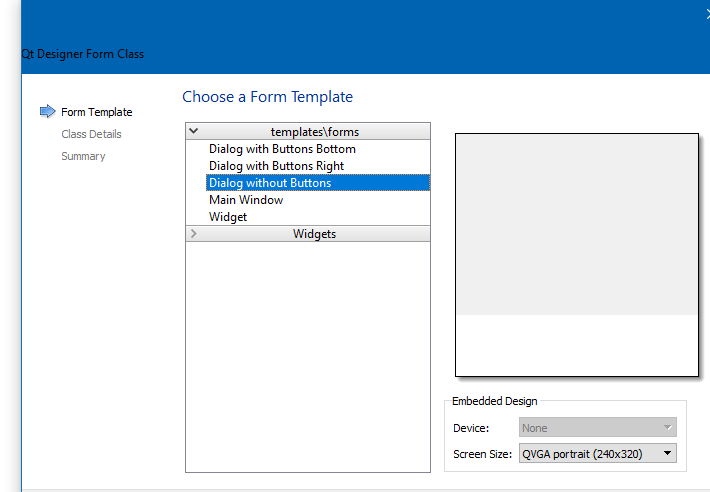
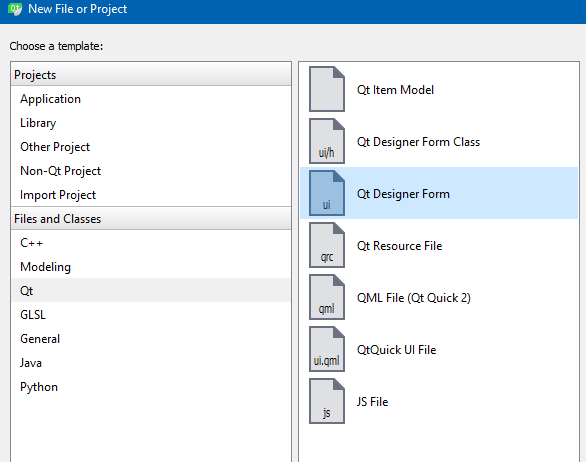
              when you use the wizard to make a new class, you can select
              alt text
              and then base class
              alt text

              Then the besides .h and .cpp u have .ui file which you can use for visual designing.
              that also adds the Ui::EditDialog *ui; to the class def.

              if you dont want it, you can simply remove all of it.
              and create widgets in code.

              1 Reply Last reply
              1
              • mzimmersM Offline
                mzimmersM Offline
                mzimmers
                wrote on last edited by mzimmers
                #26

                I'm doing something wrong. I deleted all my editdialog files, and recreated the .ui file. I then added the class, but Creator doesn't add the UI::EditDialog *ui for me.
                EDIT: I think I found the problem -- used Qt Designer Form instead of Qt Designer Form Class. Will report back momentarily.

                mrjjM kshegunovK 2 Replies Last reply
                0
                • mzimmersM mzimmers

                  I'm doing something wrong. I deleted all my editdialog files, and recreated the .ui file. I then added the class, but Creator doesn't add the UI::EditDialog *ui for me.
                  EDIT: I think I found the problem -- used Qt Designer Form instead of Qt Designer Form Class. Will report back momentarily.

                  mrjjM Offline
                  mrjjM Offline
                  mrjj
                  Lifetime Qt Champion
                  wrote on last edited by
                  #27

                  @mzimmers
                  Yep the Designer form is without .h and cpp.
                  Use the Class version to get complete kit.

                  1 Reply Last reply
                  0
                  • mzimmersM mzimmers

                    I'm doing something wrong. I deleted all my editdialog files, and recreated the .ui file. I then added the class, but Creator doesn't add the UI::EditDialog *ui for me.
                    EDIT: I think I found the problem -- used Qt Designer Form instead of Qt Designer Form Class. Will report back momentarily.

                    kshegunovK Offline
                    kshegunovK Offline
                    kshegunov
                    Moderators
                    wrote on last edited by
                    #28

                    The name of the class follows what you give it for the root object in the form editor - right pane, topmost entry.

                    Read and abide by the Qt Code of Conduct

                    1 Reply Last reply
                    1
                    • mzimmersM Offline
                      mzimmersM Offline
                      mzimmers
                      wrote on last edited by
                      #29

                      Based on input from a few people here, I've decided to leave the details in the main display disabled. The user will press an "edit" button which will create a QDialog with the details enabled for editing.

                      It's not a huge deal, but I will be performing redundant work if I just re-create the display elements for the details in the QDialog. Does it make sense to create an aggregate display element with all the details, and use this element in both the main and edit windows? Can .ui files be nested?

                      1 Reply Last reply
                      0
                      • mzimmersM Offline
                        mzimmersM Offline
                        mzimmers
                        wrote on last edited by
                        #30

                        I've created an edit dialog, but I'm not able to map the individual elements to the model as I did in the main widget. I create the edit dialog like this:

                        DeviceModel *m_d;
                        ...
                        void Widget::on_pushButtonEdit_clicked()
                        {
                            EditDialog editDialog(m_d);
                            QObject::connect(&editDialog, &EditDialog::editCommitPressed, this, &Widget::sendCommit);
                            editDialog.exec();
                        }
                        

                        And I try to map to the model like this (seemingly identical to how I do it in the main widget):

                        EditDialog::EditDialog(DeviceModel *d, QWidget *parent) :
                            QDialog(parent),
                            ui(new Ui::EditDialog)
                        {
                            ui->setupUi(this);
                            m_mapper = new QDataWidgetMapper(this);
                            m_mapper->setModel(d->getModel());
                        
                            m_mapper->addMapping(ui->deviceName, TAG_DEVICENAME);
                        

                        The mapping works in the main widget, but not for my edit dialog. Any ideas what I'm doing wrong? Thanks.

                        1 Reply Last reply
                        0
                        • VRoninV Offline
                          VRoninV Offline
                          VRonin
                          wrote on last edited by
                          #31

                          Did you forget to connect to setCurrentModelIndex?

                          "La mort n'est rien, mais vivre vaincu et sans gloire, c'est mourir tous les jours"
                          ~Napoleon Bonaparte

                          On a crusade to banish setIndexWidget() from the holy land of Qt

                          1 Reply Last reply
                          1
                          • mzimmersM Offline
                            mzimmersM Offline
                            mzimmers
                            wrote on last edited by
                            #32

                            Well...maybe.

                            In my main widget, I have this line:

                                QObject::connect(ui->tableView->selectionModel(), &QItemSelectionModel::currentRowChanged,
                                                 m_mapper, &QDataWidgetMapper::setCurrentModelIndex);
                            

                            Wouldn't that be sufficient for anything using the same model?

                            VRoninV 1 Reply Last reply
                            0
                            • mzimmersM mzimmers

                              Well...maybe.

                              In my main widget, I have this line:

                                  QObject::connect(ui->tableView->selectionModel(), &QItemSelectionModel::currentRowChanged,
                                                   m_mapper, &QDataWidgetMapper::setCurrentModelIndex);
                              

                              Wouldn't that be sufficient for anything using the same model?

                              VRoninV Offline
                              VRoninV Offline
                              VRonin
                              wrote on last edited by
                              #33

                              @mzimmers said in best practices: I'm doing it wrong:

                              for anything using the same model

                              The connect uses the selection of the view and the mapper so has nothing to do with the model.
                              If either the view or the m_mapper are different objects from those in the main window then you have to redo the connection

                              "La mort n'est rien, mais vivre vaincu et sans gloire, c'est mourir tous les jours"
                              ~Napoleon Bonaparte

                              On a crusade to banish setIndexWidget() from the holy land of Qt

                              1 Reply Last reply
                              0
                              • mzimmersM Offline
                                mzimmersM Offline
                                mzimmers
                                wrote on last edited by
                                #34

                                Oh, OK, I think I see the problem: since my edit dialog doesn't have a QTableView, there's no way to select a row (no table --> no rows). I guess I can't just have the details mapped without some table to give it context, right?

                                So, do I need an invisible table in my edit dialog, or is there some more clever way around this?

                                1 Reply Last reply
                                0
                                • VRoninV Offline
                                  VRoninV Offline
                                  VRonin
                                  wrote on last edited by VRonin
                                  #35

                                  No, you can also just straight call m_mapper->setCurrentModelIndex(index); where index is the index of the model you want to load without doing any connection

                                  "La mort n'est rien, mais vivre vaincu et sans gloire, c'est mourir tous les jours"
                                  ~Napoleon Bonaparte

                                  On a crusade to banish setIndexWidget() from the holy land of Qt

                                  1 Reply Last reply
                                  0
                                  • mzimmersM Offline
                                    mzimmersM Offline
                                    mzimmers
                                    wrote on last edited by
                                    #36

                                    I'm getting a bad index back. Here's my c'tor:

                                    EditDialog::EditDialog(DeviceModel *d, QWidget *parent) :
                                        QDialog(parent),
                                        ui(new Ui::EditDialog)
                                    {
                                        ui->setupUi(this);
                                        m_mapper = new QDataWidgetMapper(this);
                                        m_mapper->setModel(d->getModel());
                                    
                                        int i = m_mapper->currentIndex();
                                        QModelIndex qmi = d->getModel()->index(i, 0);
                                        m_mapper->setCurrentModelIndex(qmi);
                                    

                                    The variable i is set to (-1). What might I be doing wrong?

                                    1 Reply Last reply
                                    0
                                    • VRoninV Offline
                                      VRoninV Offline
                                      VRonin
                                      wrote on last edited by VRonin
                                      #37

                                      create a public method in the dialog:
                                      void EditDialog::loadIndex(const QModelIndex& idx){m_mapper->setCurrentModelIndex(idx);}

                                      After EditDialog editDialog(m_d);, add
                                      editDialog.loadIndex(ui->tableView->selectionModel()->currentIndex());

                                      "La mort n'est rien, mais vivre vaincu et sans gloire, c'est mourir tous les jours"
                                      ~Napoleon Bonaparte

                                      On a crusade to banish setIndexWidget() from the holy land of Qt

                                      mzimmersM 1 Reply Last reply
                                      0
                                      • VRoninV VRonin

                                        create a public method in the dialog:
                                        void EditDialog::loadIndex(const QModelIndex& idx){m_mapper->setCurrentModelIndex(idx);}

                                        After EditDialog editDialog(m_d);, add
                                        editDialog.loadIndex(ui->tableView->selectionModel()->currentIndex());

                                        mzimmersM Offline
                                        mzimmersM Offline
                                        mzimmers
                                        wrote on last edited by
                                        #38

                                        @VRonin a couple questions, please:

                                        1. EditDialog doesn't have a method setCurrentModelIndex(). Perhaps you meant:
                                        QDataWidgetMapper *m_mapper;
                                        ...
                                        m_mapper.setCurrentModelIndex(ui->tableView->selectionModel()->currentIndex());
                                        
                                        1. How does loadIndex() get invoked?

                                        Thanks...

                                        1 Reply Last reply
                                        0
                                        • VRoninV Offline
                                          VRoninV Offline
                                          VRonin
                                          wrote on last edited by
                                          #39

                                          Edited the answer above. editDialog.setCurrentModelIndex should have been editDialog.loadIndex sorry

                                          "La mort n'est rien, mais vivre vaincu et sans gloire, c'est mourir tous les jours"
                                          ~Napoleon Bonaparte

                                          On a crusade to banish setIndexWidget() from the holy land of Qt

                                          1 Reply Last reply
                                          2

                                          • Login

                                          • Login or register to search.
                                          • First post
                                            Last post
                                          0
                                          • Categories
                                          • Recent
                                          • Tags
                                          • Popular
                                          • Users
                                          • Groups
                                          • Search
                                          • Get Qt Extensions
                                          • Unsolved