Skip to content
  • Categories
  • Recent
  • Tags
  • Popular
  • Users
  • Groups
  • Search
  • Get Qt Extensions
  • Unsolved
Collapse
Brand Logo
  1. Home
  2. Qt Development
  3. General and Desktop
  4. Change QLabel background without affecting the current style
Qt 6.11 is out! See what's new in the release blog

Change QLabel background without affecting the current style

Scheduled Pinned Locked Moved Solved General and Desktop
15 Posts 4 Posters 11.2k Views 4 Watching
  • Oldest to Newest
  • Newest to Oldest
  • Most Votes
Reply
  • Reply as topic
Log in to reply
This topic has been deleted. Only users with topic management privileges can see it.
  • SGaistS Offline
    SGaistS Offline
    SGaist
    Lifetime Qt Champion
    wrote on last edited by
    #2

    Hi,

    Can you show your stylesheet ?

    Interested in AI ? www.idiap.ch
    Please read the Qt Code of Conduct - https://forum.qt.io/topic/113070/qt-code-of-conduct

    1 Reply Last reply
    1
    • M Offline
      M Offline
      Mark81
      wrote on last edited by
      #3

      The stylesheet of the whole form is this: http://www.yasinuludag.com/darkorange.stylesheet

      But I discovered an odd behavior... it seems to me more a bug than a feature.
      I printed out the stylesheet of a QLabel:

      qDebug() << ui->label->stylesheet();
      

      and it returned an empty string "". But if I set the stylesheet to the same value:

      ui->label->setStylesheet("");
      

      it loses some styling properties (i.e. font settings) - I guess inherit from the stylesheet above. It sounds weird to me.

      mrjjM 1 Reply Last reply
      0
      • M Mark81

        The stylesheet of the whole form is this: http://www.yasinuludag.com/darkorange.stylesheet

        But I discovered an odd behavior... it seems to me more a bug than a feature.
        I printed out the stylesheet of a QLabel:

        qDebug() << ui->label->stylesheet();
        

        and it returned an empty string "". But if I set the stylesheet to the same value:

        ui->label->setStylesheet("");
        

        it loses some styling properties (i.e. font settings) - I guess inherit from the stylesheet above. It sounds weird to me.

        mrjjM Offline
        mrjjM Offline
        mrjj
        Lifetime Qt Champion
        wrote on last edited by
        #4

        @Mark81
        Hi
        Style sheets are cascading so it affect all children of a parent.
        Often you set 1 stylesheet on QApplication to have it work for all
        widgets, windows and dialog application wide.
        so in short, if you set on say MainWindow, it will have effect on all widgets
        MainWindow owns.

        1 Reply Last reply
        1
        • M Offline
          M Offline
          Mark81
          wrote on last edited by
          #5

          Yes, I know this, but:

          • it should be fully retrieved in each children (instead of an empty string)

          OR

          • setting a stylesheet when one is already inherited from the parent should lead to override only the properties set (hence: empty string overrides nothing, QLabel background overrides QLabel background only, etc...)

          Back to the original question: when setting a general stylesheet for the whole application, how am I supposed to override a specific property programmatically?

          mrjjM K 2 Replies Last reply
          0
          • M Mark81

            Yes, I know this, but:

            • it should be fully retrieved in each children (instead of an empty string)

            OR

            • setting a stylesheet when one is already inherited from the parent should lead to override only the properties set (hence: empty string overrides nothing, QLabel background overrides QLabel background only, etc...)

            Back to the original question: when setting a general stylesheet for the whole application, how am I supposed to override a specific property programmatically?

            mrjjM Offline
            mrjjM Offline
            mrjj
            Lifetime Qt Champion
            wrote on last edited by
            #6

            @Mark81
            No, cascading do NOT mean it will copy the style string to each children.
            It doesn't work that way. that would be extremely wasteful.

            The issue in your case here is that when a QLabel is under stylesheet
            effect, it no longer uses its own palette, but the stylesheets. and hence
            the palette.setColor do not work.

            You might be able to change it using #name selector when event happens.
            I assume it ONE that you want to change, not all QLabels?

            1 Reply Last reply
            2
            • M Offline
              M Offline
              Mark81
              wrote on last edited by
              #7

              Exactly. I have plenty of QLabel on the QWidget, but I'm interested to override the background (or any other properties) of only one of those.

              1 Reply Last reply
              0
              • M Mark81

                Yes, I know this, but:

                • it should be fully retrieved in each children (instead of an empty string)

                OR

                • setting a stylesheet when one is already inherited from the parent should lead to override only the properties set (hence: empty string overrides nothing, QLabel background overrides QLabel background only, etc...)

                Back to the original question: when setting a general stylesheet for the whole application, how am I supposed to override a specific property programmatically?

                K Offline
                K Offline
                kenchan
                wrote on last edited by
                #8

                Hi, @Mark81. You can set the stylesheet for a particular widget with the setStyleSheet() function. You just add the bits you want to see in this widget.
                Other than that you use the selectors which you can find in the style sheet documentation here.
                You should find all you need about style sheets in that document.

                1 Reply Last reply
                2
                • M Offline
                  M Offline
                  Mark81
                  wrote on last edited by
                  #9

                  @mrjj , @kenchan ,

                  I'm going to try.
                  To be sure: are you suggesting to change the high-level stylesheet adding a #name selector instead of changing the stylesheet of the specific object only? Did I understand correctly?

                  K mrjjM 2 Replies Last reply
                  0
                  • M Mark81

                    @mrjj , @kenchan ,

                    I'm going to try.
                    To be sure: are you suggesting to change the high-level stylesheet adding a #name selector instead of changing the stylesheet of the specific object only? Did I understand correctly?

                    K Offline
                    K Offline
                    kenchan
                    wrote on last edited by
                    #10

                    @Mark81
                    Either should work. Just use the one which works best for you :-). I use both.
                    You can do the equivalent of setStyleSheet() on a widget using Designer in the properties for that widget.

                    1 Reply Last reply
                    0
                    • M Mark81

                      @mrjj , @kenchan ,

                      I'm going to try.
                      To be sure: are you suggesting to change the high-level stylesheet adding a #name selector instead of changing the stylesheet of the specific object only? Did I understand correctly?

                      mrjjM Offline
                      mrjjM Offline
                      mrjj
                      Lifetime Qt Champion
                      wrote on last edited by mrjj
                      #11

                      @Mark81
                      Hi
                      I check with your stylesheet

                      you can do the following
                      add
                      QLabel[active=true] {
                      background-color: rgb(255, 170, 0);
                      }
                      very last in (global) stylesheet.

                      then when you want to change it to show other background.

                      ui->theone->setProperty("active",true);
                      ui->theone->style()->unpolish(ui->theone);
                      ui->theone->style()->polish(ui->theone);

                      seems to work ok
                      alt text

                      1 Reply Last reply
                      3
                      • M Offline
                        M Offline
                        Mark81
                        wrote on last edited by Mark81
                        #12

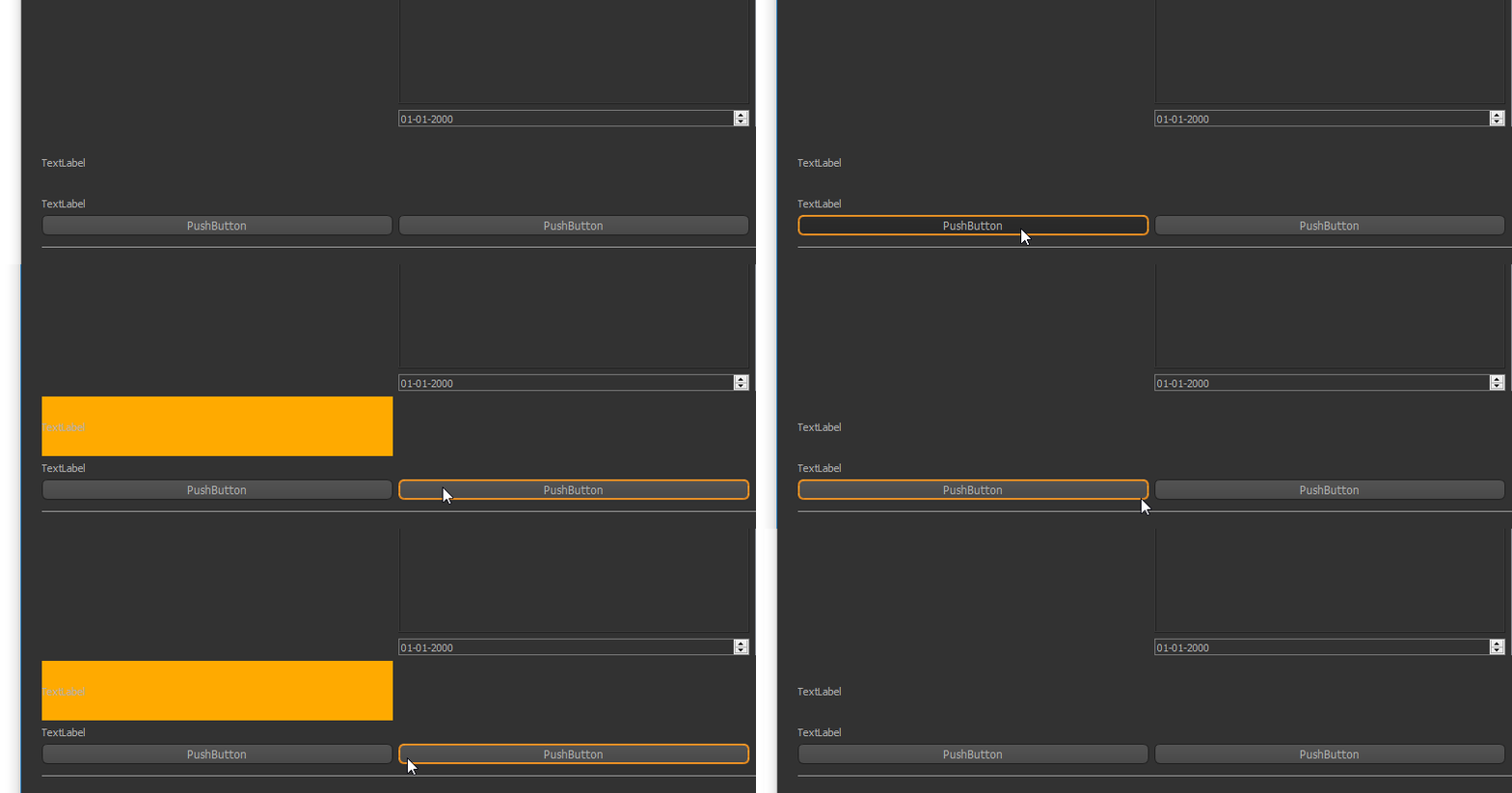
                        It's a very good solution!!! But... the behavior is exactly the same :( I lose the font settings.
                        Here some screenshots, sorry for the quality but I'm not able to dump the framebuffer (yet).

                        Before
                        2_1528618525014_before.jpg
                        Active
                        0_1528618525013_active.jpg
                        After
                        1_1528618525014_after.jpg

                        Perhaps it depends on the platform?

                        mrjjM 1 Reply Last reply
                        0
                        • M Mark81

                          It's a very good solution!!! But... the behavior is exactly the same :( I lose the font settings.
                          Here some screenshots, sorry for the quality but I'm not able to dump the framebuffer (yet).

                          Before
                          2_1528618525014_before.jpg
                          Active
                          0_1528618525013_active.jpg
                          After
                          1_1528618525014_after.jpg

                          Perhaps it depends on the platform?

                          mrjjM Offline
                          mrjjM Offline
                          mrjj
                          Lifetime Qt Champion
                          wrote on last edited by
                          #13

                          @Mark81
                          Hmm, i assume you change the Dark sheet ?

                          If i do
                          QLabel {
                          font: xxx
                          }
                          in global sheet over the Active check

                          it still stays the same with active flipflop

                          So how did you (if you did ) change its font in first place?

                          1 Reply Last reply
                          1
                          • M Offline
                            M Offline
                            Mark81
                            wrote on last edited by
                            #14

                            mmm... you're right. Now I (partially) understand. I set the font in the main QWidget and because it worker I thought it had priority over the stylesheet (and it should, because is a setting that differs than the default value).

                            Moving the font customization inside the stylesheet did the trick.

                            Perhaps is by design, but it's a bit counter-intuitive: if I explicitly set a property in the Designer for an object it should override any stylesheet setting. It works only on startup but reloading the stylesheet leads to a different behavior - from there my confusion.

                            1 Reply Last reply
                            0
                            • SGaistS Offline
                              SGaistS Offline
                              SGaist
                              Lifetime Qt Champion
                              wrote on last edited by
                              #15

                              The style sheet introduction documentation states that the style sheet customisation will be applied on top of the current widget style. That is the important part. For example, you can modify the palette of your application, the style sheet takes precedence.

                              Interested in AI ? www.idiap.ch
                              Please read the Qt Code of Conduct - https://forum.qt.io/topic/113070/qt-code-of-conduct

                              1 Reply Last reply
                              2

                              • Login

                              • Login or register to search.
                              • First post
                                Last post
                              0
                              • Categories
                              • Recent
                              • Tags
                              • Popular
                              • Users
                              • Groups
                              • Search
                              • Get Qt Extensions
                              • Unsolved