Skip to content
  • Categories
  • Recent
  • Tags
  • Popular
  • Users
  • Groups
  • Search
  • Get Qt Extensions
  • Unsolved
Collapse
Brand Logo
  1. Home
  2. Qt Development
  3. General and Desktop
  4. Ressource File Url not opened by QFile

Ressource File Url not opened by QFile

Scheduled Pinned Locked Moved Unsolved General and Desktop
7 Posts 4 Posters 5.9k Views 2 Watching
  • Oldest to Newest
  • Newest to Oldest
  • Most Votes
Reply
  • Reply as topic
Log in to reply
This topic has been deleted. Only users with topic management privileges can see it.
  • C Offline
    C Offline
    Chrysmac 0
    wrote on last edited by
    #1

    Hello Everyone,

    I have attached herewith a simple project using a simple resource file that cannot be opened by QFile. I have just built the latest version of QT5.11 from source using Git and Qt Creator 4.7.82 from source (latest git version check out). For both, I used the same Visual Studio Enterprise 2017 version 15.7.2.

    Can anyone please tell me what could be wrong?

    Thanks in Advance.
    [0_1527563530808_TestQFile.rar](Uploading 100%)

    1 Reply Last reply
    0
    • Fuel 0F Offline
      Fuel 0F Offline
      Fuel 0
      wrote on last edited by
      #2

      I dont understand you cleary. You have a TestQFile.rar in your Resource and you just want to access it with the Url in a QFile? The Problem is maybe that everything in the Resource File, that is compiled into your Executable, is ReadOnly.

      1 Reply Last reply
      0
      • SGaistS Offline
        SGaistS Offline
        SGaist
        Lifetime Qt Champion
        wrote on last edited by
        #3

        Hi,

        What error do you get ?

        What code are you using ?

        By the way, upload of compressed archived are not enabled.

        Interested in AI ? www.idiap.ch
        Please read the Qt Code of Conduct - https://forum.qt.io/topic/113070/qt-code-of-conduct

        1 Reply Last reply
        0
        • C Offline
          C Offline
          Chrysmac 0
          wrote on last edited by
          #4

          Hello and thanks for the answers.
          I have a simple .txt file and I try to access it with QFile::open(). The following if always fails, no matter which projects[0_1527616248419_textfinder.cpp](Uploading 100%) :

          QFile inputFile("qrc:/Resources/input.txt");
              if (!inputFile.open(QIODevice::ReadOnly)){
                  qDebug() << "could not open " << inputFile.fileName() <<"\n";
                  if (QFile::exists("qrc:/Resources/input.txt")){
                      qDebug() << "could not find existing file " << inputFile.fileName() <<"\n";
                  }
                  return;
              }
          

          The console gives me:

          Starting E:\Qt\Tutorials\QtCreator\build-TextFinder-x64-Debug\debug\TextFinder...
          could not open  "qrc:/Resources/input.txt" 
          
          E:/Qt/Tutorials/QtCreator/build-TextFinder-x64-Debug/debug/TextFinder exited with code 0
          

          [0_1527616275931_textfinder.cpp](Uploading 100%)
          [0_1527616287093_textfinder.qrc](Uploading 100%)

          1 Reply Last reply
          0
          • SGaistS Offline
            SGaistS Offline
            SGaist
            Lifetime Qt Champion
            wrote on last edited by
            #5

            You should use :/ to access your resources like shown here.

            Can you post your .qrc file content ?

            Interested in AI ? www.idiap.ch
            Please read the Qt Code of Conduct - https://forum.qt.io/topic/113070/qt-code-of-conduct

            1 Reply Last reply
            1
            • C Offline
              C Offline
              Chrysmac 0
              wrote on last edited by Chrysmac 0
              #6

              Sorry for my absence. I have tried almost every combination of /,//,///,\ and so on.
              My Qrc file content is

              <RCC>
                  <qresource prefix="/" lang="C++">
                      <file>Resources/input.txt</file>
                  </qresource>
              </RCC>
              
              1 Reply Last reply
              0
              • mrjjM Offline
                mrjjM Offline
                mrjj
                Lifetime Qt Champion
                wrote on last edited by mrjj
                #7

                Hi
                And you are using the plugin and are sure the files are actually compiled into the code ?
                http://doc.qt.io/archives/vs-addin/vs-addin-managing-resources.html

                I would do something like

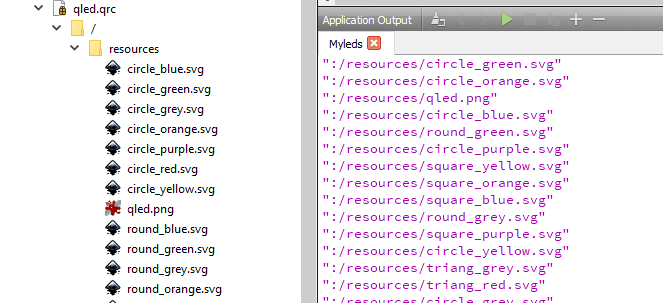
                QDirIterator it(":", QDirIterator::Subdirectories);
                while (it.hasNext()) {
                    qDebug() << it.next();
                }
                

                to see what you got.
                alt text
                alt text

                1 Reply Last reply
                5

                • Login

                • Login or register to search.
                • First post
                  Last post
                0
                • Categories
                • Recent
                • Tags
                • Popular
                • Users
                • Groups
                • Search
                • Get Qt Extensions
                • Unsolved