
Qt 5.10 with Creator 4.5 Valgrind error?
-
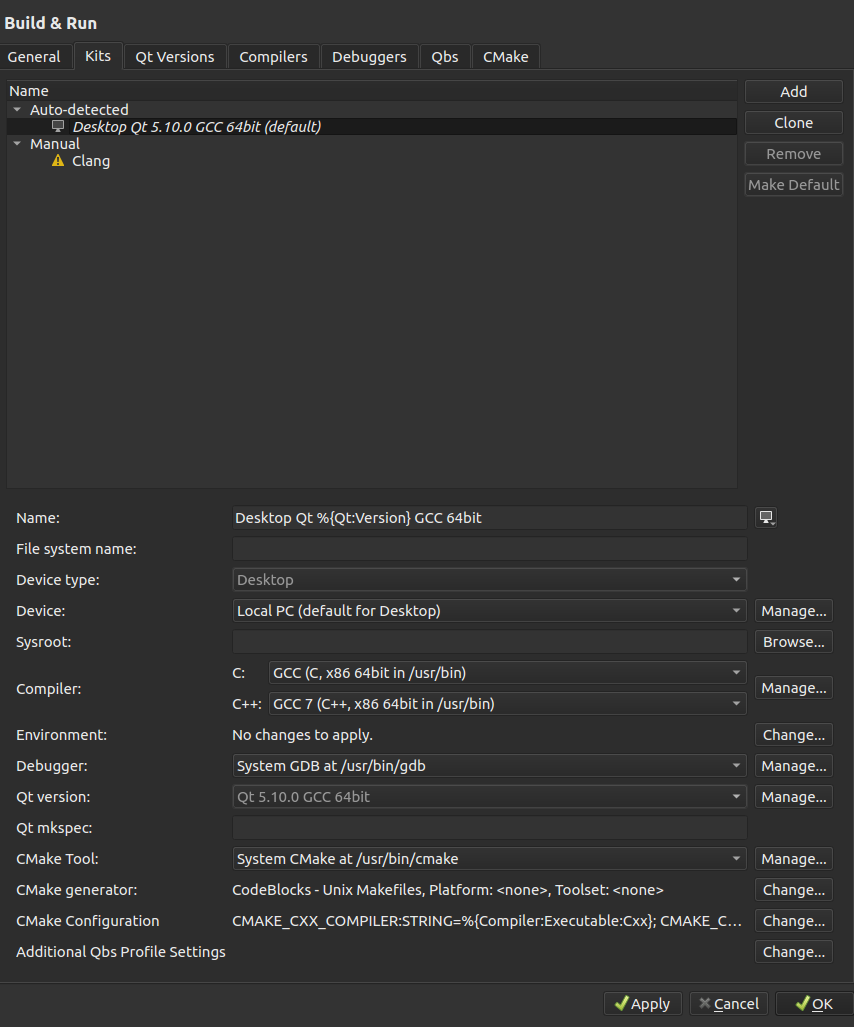
This? -
Anybody?
-
Your kits seem ok, Would you like to share the compiler output after you attempt of a run?
Thanks
-
You mean the assembly output? How can I get it with qtcreator?
-
@Jonathan-Levanon
I found out that can be either Qt problem or dependencies libraries problem, even more, sometimes only Valgrind detects this issue, you can check these posts and see that you aren't alone:https://stackoverflow.com/questions/21037530/why-does-qapplication-give-memory-leaks
https://stackoverflow.com/questions/12617212/valgrind-shows-many-warnings-errors-of-simple-qml-application
https://stackoverflow.com/questions/7049036/valgrind-on-basic-qt-application-reports-masive-leaksUnfortunately, they don't express a direct solution, so reinstalling all might solve this issue:
BTW, How did you install Qt? From online installer? Did you erase the older Qt version before installing? Can you update libraries- if you're using Linux a sudo apt-get install updates, sudo-apt install upgrade can help.
As a sanity check, remove Qt, I don't know from MAC OS, but in Linux, there is a folder called qtcreator-4.5.0 and inside it, there is an executable called QtCreatorUnistaller, run it and delete the whole package, then try reinstalling Qt Online.
After that create a similar project using the Creation Wizard and try both in Debug(F5) and Run (Ctrl+R) modes.
If the problem persists, I'd like to have 3 screenshots/text.
-
Compile Output (Alt+4) dock text.
-
Go to Project (on the left), there is a Build & Run area, select Run, and go to the Valgrind Settings, screenshot.
-
Go to Tools->Options->Analyzer->Valgrind and screenshot, you can reduce the level of analysis and see what happened. It's something like this:

I haven't had issues with valgrind, so I'm not sure about this issue.
-
-
So this is old but -
I've reinstalled my Ubuntu for unrelated issues. After that, installed only Qt 5.10 with the .run installer.Created an empty Qt widgets application, and got the same crash when profiling.
Compiler output -
home/Qt5.10.0/5.10.0/gcc_64/bin/uic ../mvce/mainwindow.ui -o ui_mainwindow.h
g++ -c -pipe -O2 -g -Wall -W -D_REENTRANT -fPIC -DQT_DEPRECATED_WARNINGS -DQT_QML_DEBUG -DQT_NO_DEBUG -DQT_WIDGETS_LIB -DQT_GUI_LIB -DQT_CORE_LIB -I../mvce -I. -I../Qt5.10.0/5.10.0/gcc_64/include -I../Qt5.10.0/5.10.0/gcc_64/include/QtWidgets -I../Qt5.10.0/5.10.0/gcc_64/include/QtGui -I../Qt5.10.0/5.10.0/gcc_64/include/QtCore -I. -isystem /usr/include/libdrm -I. -I../Qt5.10.0/5.10.0/gcc_64/mkspecs/linux-g++ -o main.o ../mvce/main.cpp
g++ -c -pipe -O2 -g -Wall -W -D_REENTRANT -fPIC -DQT_DEPRECATED_WARNINGS -DQT_QML_DEBUG -DQT_NO_DEBUG -DQT_WIDGETS_LIB -DQT_GUI_LIB -DQT_CORE_LIB -I../mvce -I. -I../Qt5.10.0/5.10.0/gcc_64/include -I../Qt5.10.0/5.10.0/gcc_64/include/QtWidgets -I../Qt5.10.0/5.10.0/gcc_64/include/QtGui -I../Qt5.10.0/5.10.0/gcc_64/include/QtCore -I. -isystem /usr/include/libdrm -I. -I../Qt5.10.0/5.10.0/gcc_64/mkspecs/linux-g++ -o mainwindow.o ../mvce/mainwindow.cpp
g++ -pipe -O2 -g -Wall -W -dM -E -o moc_predefs.h ../Qt5.10.0/5.10.0/gcc_64/mkspecs/features/data/dummy.cpp
/home/Qt5.10.0/5.10.0/gcc_64/bin/moc -DQT_DEPRECATED_WARNINGS -DQT_QML_DEBUG -DQT_NO_DEBUG -DQT_WIDGETS_LIB -DQT_GUI_LIB -DQT_CORE_LIB --include ./moc_predefs.h -I/home/Qt5.10.0/5.10.0/gcc_64/mkspecs/linux-g++ -I/home/mvce -I/home/Qt5.10.0/5.10.0/gcc_64/include -I/home/Qt5.10.0/5.10.0/gcc_64/include/QtWidgets -I/home/Qt5.10.0/5.10.0/gcc_64/include/QtGui -I/home/Qt5.10.0/5.10.0/gcc_64/include/QtCore -I. -I/usr/include/c++/7 -I/usr/include/x86_64-linux-gnu/c++/7 -I/usr/include/c++/7/backward -I/usr/lib/gcc/x86_64-linux-gnu/7/include -I/usr/local/include -I/usr/lib/gcc/x86_64-linux-gnu/7/include-fixed -I/usr/include/x86_64-linux-gnu -I/usr/include ../mvce/mainwindow.h -o moc_mainwindow.cpp
g++ -c -pipe -O2 -g -Wall -W -D_REENTRANT -fPIC -DQT_DEPRECATED_WARNINGS -DQT_QML_DEBUG -DQT_NO_DEBUG -DQT_WIDGETS_LIB -DQT_GUI_LIB -DQT_CORE_LIB -I../mvce -I. -I../Qt5.10.0/5.10.0/gcc_64/include -I../Qt5.10.0/5.10.0/gcc_64/include/QtWidgets -I../Qt5.10.0/5.10.0/gcc_64/include/QtGui -I../Qt5.10.0/5.10.0/gcc_64/include/QtCore -I. -isystem /usr/include/libdrm -I. -I../Qt5.10.0/5.10.0/gcc_64/mkspecs/linux-g++ -o moc_mainwindow.o moc_mainwindow.cpp
g++ -Wl,-rpath,/home/Qt5.10.0/5.10.0/gcc_64/lib -o mvce main.o mainwindow.o moc_mainwindow.o   -L/home/Qt5.10.0/5.10.0/gcc_64/lib -lQt5Widgets -lQt5Gui -lQt5Core -lGL -lpthread
objcopy --only-keep-debug mvce mvce.debug && objcopy --strip-debug mvce && objcopy --add-gnu-debuglink=mvce.debug mvce && chmod -x mvce.debug
Using valgrind-3.11.0
-
Hi,
What version of GCC were you using when you had it working ?
-
Exactly the same version, 7.2
-
Anybody?
-
Wonder if it's similar to this KDE bug report.
-
Only 5 months later, I've installed valgrind 3.13 and it's working :), though I had to patch it with
https://bugs.debian.org/cgi-bin/bugreport.cgi?att=1;bug=870419;filename=0001-Fix-parsing-of-xml-socket-argument.patch;msg=5to make it work

