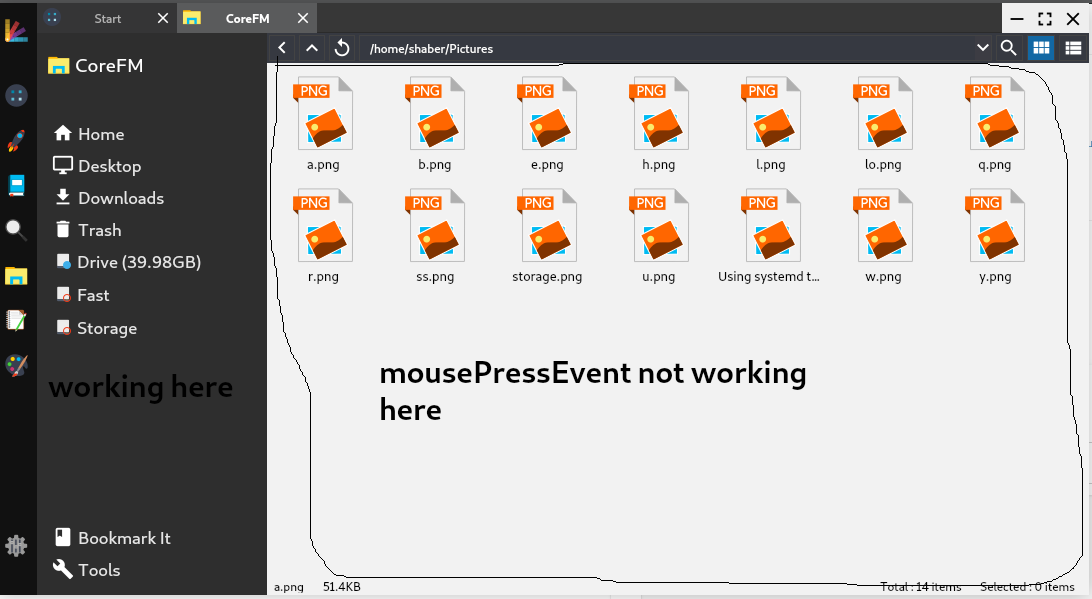
get mousePressEvent in qlistview
-
Hi
The viewport do not have a clicked() signal.
I meant for you use it with event filter to catch it that way. -
Hi
The viewport do not have a clicked() signal.
I meant for you use it with event filter to catch it that way.here is the 2 view for my file manager . first on is listview and second one is tree view.
but mouse mousePressEvent is not working.here is the cpp file corefm.cpp
ui->viewlist->viewport()->installEventFilter(this); ui->viewtree->viewport()->installEventFilter(this); -
Hi
The viewport do not have a clicked() signal.
I meant for you use it with event filter to catch it that way. -
Hmm, it dont recall it being that difficult.
And the listview is all the way down there ? -
@saber
Well what ever widget is under the mouse cursor gets the click.
So you need event filter on those too.
I though you just want to click outside the actual items,
not the whole wide window. -
Try this:
class ClickOutListView : public QListView{
Q_OBJECT
Q_DISABLE_COPY(ClickOutListView)
public:
explicit ClickOutListView(QWidget* parent = Q_NULLPTR) : QListView(parent){}
Q_SIGNALS:
void clickedOut();
protected:
void mousePressEvent(QMouseEvent *event){
if(!indexAt(event->pos()).isValid())
clickedOut();
QListView::mousePressEvent(event);
}
};
and right-click->promote your
QListViewtoClickOutListViewin designer -
Try this:
class ClickOutListView : public QListView{
Q_OBJECT
Q_DISABLE_COPY(ClickOutListView)
public:
explicit ClickOutListView(QWidget* parent = Q_NULLPTR) : QListView(parent){}
Q_SIGNALS:
void clickedOut();
protected:
void mousePressEvent(QMouseEvent *event){
if(!indexAt(event->pos()).isValid())
clickedOut();
QListView::mousePressEvent(event);
}
};
and right-click->promote your
QListViewtoClickOutListViewin designer -
@VRonin
sorry for late reply .
your code is working.
can i use this in treewidget to achieve same mouseevent?