
Skip to content
  • Categories
  • Recent
  • Tags
  • Popular
  • Users
  • Groups
  • Search
  • Get Qt Extensions
  • Unsolved
Collapse
Brand Logo
  1. Home
  2. Qt Development
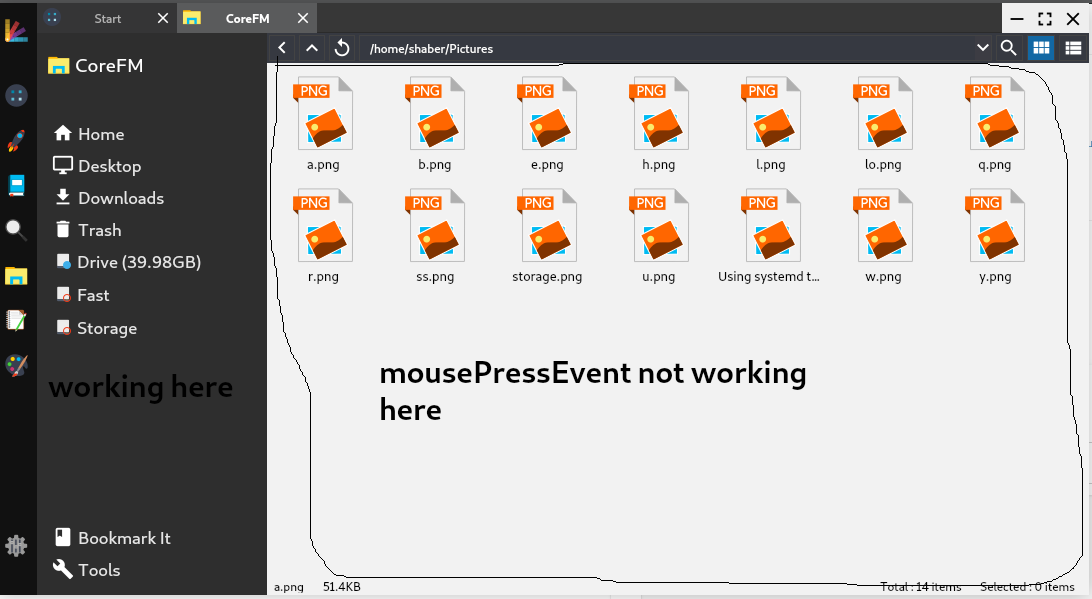
  3. General and Desktop
  4. get mousePressEvent in qlistview

get mousePressEvent in qlistview

Scheduled Pinned Locked Moved Solved General and Desktop
19 Posts 4 Posters 4.6k Views 1 Watching
  • Oldest to Newest
  • Newest to Oldest
  • Most Votes
Reply
  • Reply as topic
Log in to reply
This topic has been deleted. Only users with topic management privileges can see it.
  • S saber

    @mrjj i don't know what is viewport class.

    @Ratzz i tried connect method , but it only works when in click an item.

    i want a function , when i click no item or whitespace.

    mrjjM Offline
    mrjjM Offline
    mrjj
    Lifetime Qt Champion
    wrote on last edited by
    #6

    @saber
    Its sort of a inner widget that actually is covering the background of the ListView
    its the object that get events etc.
    You get get it via
    ui->listView->viewport();
    and use it in connect.

    S 1 Reply Last reply
    1
    • mrjjM mrjj

      @saber
      Its sort of a inner widget that actually is covering the background of the ListView
      its the object that get events etc.
      You get get it via
      ui->listView->viewport();
      and use it in connect.

      S Offline
      S Offline
      saber
      wrote on last edited by saber
      #7

      @mrjj here is how i tried

      // in constructor 
      connect(ui->viewlist->viewport(), SIGNAL(clicked()),this, SLOT(ll()));
      
      void corefm::ll(){
      
          qDebug() << "lllllll " ;
      }
      

      in application output i got this .

      QObject::connect: No such signal QWidget::clicked() in
      ../corebox/corefm/corefm.cpp:45
      QObject::connect:  (sender name:   'qt_scrollarea_viewport')
      QObject::connect:  (receiver name: 'corefm')
      

      and why this is not working ??

      void corefm::mousePressEvent(QMouseEvent *event)
      {
          qDebug() << "Mounting " ;
      }
      
      1 Reply Last reply
      0
      • mrjjM Offline
        mrjjM Offline
        mrjj
        Lifetime Qt Champion
        wrote on last edited by mrjj
        #8

        Hi
        The viewport do not have a clicked() signal.
        I meant for you use it with event filter to catch it that way.

        S 2 Replies Last reply
        3
        • mrjjM mrjj

          Hi
          The viewport do not have a clicked() signal.
          I meant for you use it with event filter to catch it that way.

          S Offline
          S Offline
          saber
          wrote on last edited by
          #9

          @mrjj

          here is the 2 view for my file manager . first on is listview and second one is tree view.
          but mouse mousePressEvent is not working.

          here is the cpp file corefm.cpp

          ui->viewlist->viewport()->installEventFilter(this);
          ui->viewtree->viewport()->installEventFilter(this);
          
          1 Reply Last reply
          0
          • mrjjM mrjj

            Hi
            The viewport do not have a clicked() signal.
            I meant for you use it with event filter to catch it that way.

            S Offline
            S Offline
            saber
            wrote on last edited by
            #10

            @mrjj i am getting mousePressEvent in outside of listview

            0_1525099082598_uu.png

            1 Reply Last reply
            0
            • mrjjM Offline
              mrjjM Offline
              mrjj
              Lifetime Qt Champion
              wrote on last edited by
              #11

              Hmm, it dont recall it being that difficult.
              And the listview is all the way down there ?

              S 1 Reply Last reply
              0
              • mrjjM mrjj

                Hmm, it dont recall it being that difficult.
                And the listview is all the way down there ?

                S Offline
                S Offline
                saber
                wrote on last edited by saber
                #12

                @mrjj
                no, that is another widget.
                i need that function . please help me

                mrjjM 1 Reply Last reply
                0
                • S saber

                  @mrjj
                  no, that is another widget.
                  i need that function . please help me

                  mrjjM Offline
                  mrjjM Offline
                  mrjj
                  Lifetime Qt Champion
                  wrote on last edited by
                  #13

                  @saber
                  Well what ever widget is under the mouse cursor gets the click.
                  So you need event filter on those too.
                  I though you just want to click outside the actual items,
                  not the whole wide window.

                  S 1 Reply Last reply
                  0
                  • mrjjM mrjj

                    @saber
                    Well what ever widget is under the mouse cursor gets the click.
                    So you need event filter on those too.
                    I though you just want to click outside the actual items,
                    not the whole wide window.

                    S Offline
                    S Offline
                    saber
                    wrote on last edited by saber
                    #14

                    @mrjj
                    yes , i just want to click outside the actual items in listview .
                    i just want click event on list view .
                    not whole window.

                    0_1525160332219_Screenshot_2018-05-01_13-34-34.png

                    but mouse press event not working there.

                    1 Reply Last reply
                    0
                    • S Offline
                      S Offline
                      saber
                      wrote on last edited by
                      #15

                      any light ?

                      1 Reply Last reply
                      0
                      • VRoninV Offline
                        VRoninV Offline
                        VRonin
                        wrote on last edited by VRonin
                        #16

                        Try this:

                        class ClickOutListView : public QListView{
                        Q_OBJECT
                        Q_DISABLE_COPY(ClickOutListView)
                        public:
                        explicit ClickOutListView(QWidget* parent = Q_NULLPTR) : QListView(parent){}
                        Q_SIGNALS:
                        void clickedOut();
                        protected:
                        void mousePressEvent(QMouseEvent *event){
                        if(!indexAt(event->pos()).isValid()) 
                        clickedOut();
                        QListView::mousePressEvent(event);
                        }
                        };
                        

                        and right-click->promote your QListView to ClickOutListView in designer

                        "La mort n'est rien, mais vivre vaincu et sans gloire, c'est mourir tous les jours"
                        ~Napoleon Bonaparte

                        On a crusade to banish setIndexWidget() from the holy land of Qt

                        S 1 Reply Last reply
                        4
                        • VRoninV VRonin

                          Try this:

                          class ClickOutListView : public QListView{
                          Q_OBJECT
                          Q_DISABLE_COPY(ClickOutListView)
                          public:
                          explicit ClickOutListView(QWidget* parent = Q_NULLPTR) : QListView(parent){}
                          Q_SIGNALS:
                          void clickedOut();
                          protected:
                          void mousePressEvent(QMouseEvent *event){
                          if(!indexAt(event->pos()).isValid()) 
                          clickedOut();
                          QListView::mousePressEvent(event);
                          }
                          };
                          

                          and right-click->promote your QListView to ClickOutListView in designer

                          S Offline
                          S Offline
                          saber
                          wrote on last edited by
                          #17

                          @VRonin
                          sorry for late reply .
                          your code is working.
                          can i use this in treewidget to achieve same mouseevent?

                          mrjjM 1 Reply Last reply
                          0
                          • S saber

                            @VRonin
                            sorry for late reply .
                            your code is working.
                            can i use this in treewidget to achieve same mouseevent?
                            mrjjM Offline
                            mrjjM Offline
                            mrjj
                            Lifetime Qt Champion
                            wrote on last edited by
                            #18

                            @saber
                            Hi
                            Yes QTreeWidget also have
                            mousePressEvent etc. so should work the same.

                            S 1 Reply Last reply
                            1
                            • mrjjM mrjj

                              @saber
                              Hi
                              Yes QTreeWidget also have
                              mousePressEvent etc. so should work the same.

                              S Offline
                              S Offline
                              saber
                              wrote on last edited by
                              #19

                              @mrjj

                              in treeview it's also working.
                              thanks.

                              1 Reply Last reply
                              1

                              • Login

                              • Login or register to search.
                              • First post
                                Last post
                              0
                              • Categories
                              • Recent
                              • Tags
                              • Popular
                              • Users
                              • Groups
                              • Search
                              • Get Qt Extensions
                              • Unsolved