Skip to content
  • Categories
  • Recent
  • Tags
  • Popular
  • Users
  • Groups
  • Search
  • Get Qt
  • Unsolved
Collapse
Brand Logo
  1. Home
  2. Qt Development
  3. General and Desktop
  4. Stop autoscrolling of QScrollArea
Qt 6.11 is out! See what's new in the release blog

Stop autoscrolling of QScrollArea

Scheduled Pinned Locked Moved Unsolved General and Desktop
14 Posts 4 Posters 3.8k Views 2 Watching
  • Oldest to Newest
  • Newest to Oldest
  • Most Votes
Reply
  • Reply as topic
Log in to reply
This topic has been deleted. Only users with topic management privileges can see it.
  • V Viki_Dev

    @Ratzz
    Actually, when we insert from the top, slider position is already 0 & resetting it to 0 won't work

    RatzzR Offline
    RatzzR Offline
    Ratzz
    wrote on last edited by
    #4

    @Viki_Dev
    Can you show what are you trying to do?

    --Alles ist gut.

    V 1 Reply Last reply
    1
    • RatzzR Ratzz

      @Viki_Dev
      Can you show what are you trying to do?

      V Offline
      V Offline
      Viki_Dev
      wrote on last edited by
      #5

      @Ratzz
      Ok I am sending you details in a file, plz guide
      [0_1524807757205_QtLazyLoading.rar](Uploading 100%)

      RatzzR 1 Reply Last reply
      0
      • V Viki_Dev

        @Ratzz
        Ok I am sending you details in a file, plz guide
        [0_1524807757205_QtLazyLoading.rar](Uploading 100%)

        RatzzR Offline
        RatzzR Offline
        Ratzz
        wrote on last edited by
        #6

        @Viki_Dev
        Where is the file?

        --Alles ist gut.

        V 1 Reply Last reply
        0
        • RatzzR Ratzz

          @Viki_Dev
          Where is the file?

          V Offline
          V Offline
          Viki_Dev
          wrote on last edited by
          #7

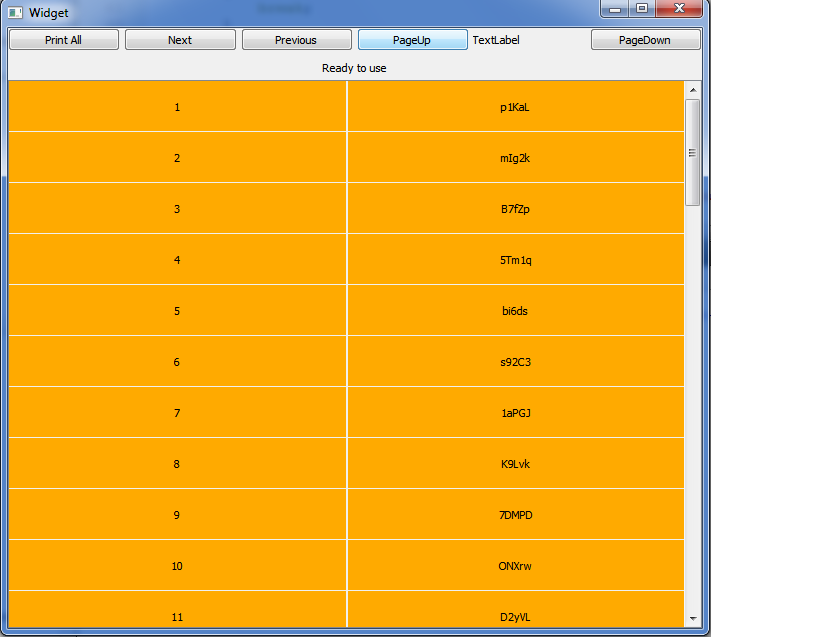
          0_1524812058948_1.png
          this is loaded on clicking - pageup

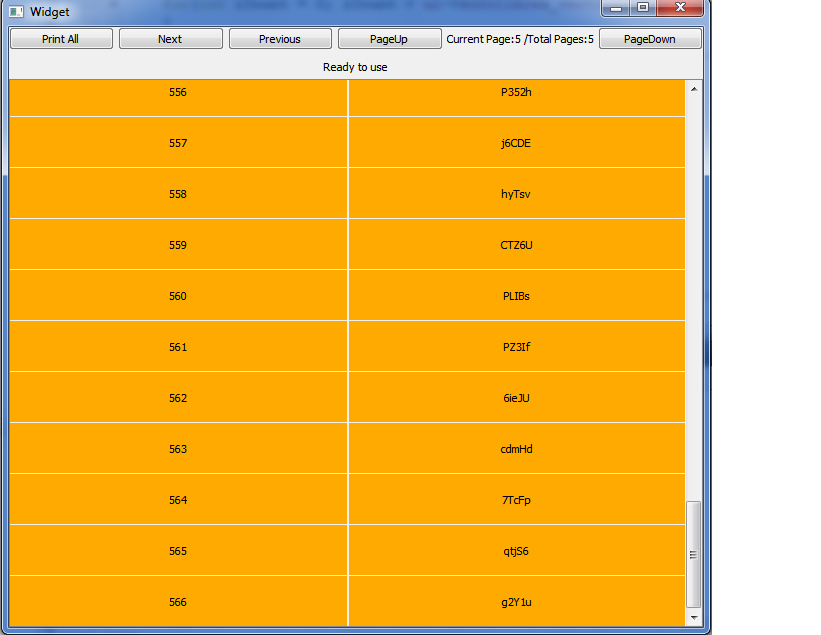
          1_1524812058948_2.png
          this is loaded on clicking - pagedown

          middle items are not loaded, the are loaded as scrolling, but when scrolling from bottom to top, scrollarea moves automatically up. it should not do so..

          RatzzR 1 Reply Last reply
          0
          • V Viki_Dev

            0_1524812058948_1.png
            this is loaded on clicking - pageup

            1_1524812058948_2.png
            this is loaded on clicking - pagedown

            middle items are not loaded, the are loaded as scrolling, but when scrolling from bottom to top, scrollarea moves automatically up. it should not do so..

            RatzzR Offline
            RatzzR Offline
            Ratzz
            wrote on last edited by
            #8

            @Viki_Dev

            Can you show what you do in "page up" and "page down" ?

            --Alles ist gut.

            V 1 Reply Last reply
            0
            • RatzzR Ratzz

              @Viki_Dev

              Can you show what you do in "page up" and "page down" ?

              V Offline
              V Offline
              Viki_Dev
              wrote on last edited by Viki_Dev
              #9

              @Ratzz
              There is a timer which calls a updateMainArea method which refreshes these 600 items in every 10ms, on page up & page down, I am just changing start & end index, due to which items are getting loaded from top/bottom as required & also increased as index changed

              void Widget::on_upButton_clicked()
              {
              clearScrollView();
              m_iStartIndex = 0;
              m_iEndIndex = m_iNumberOfVisibleRecord;
              }

              void Widget::on_downButton_clicked()
              {
              clearScrollView();
              m_iStartIndex = MAX_RECORD_COUNT-m_iNumberOfVisibleRecord;
              m_iEndIndex = MAX_RECORD_COUNT;
              updateMainArea();
              ui->scrollArea->verticalScrollBar()->setValue(ui->scrollArea->verticalScrollBar()->maximum());
              }

              Is there a way I can pass you this project.. ? I am new to this website...

              1 Reply Last reply
              0
              • SGaistS Offline
                SGaistS Offline
                SGaist
                Lifetime Qt Champion
                wrote on last edited by
                #10

                Hi,

                Out of curiosity, why not use a QTableView for that ?

                Interested in AI ? www.idiap.ch
                Please read the Qt Code of Conduct - https://forum.qt.io/topic/113070/qt-code-of-conduct

                V 1 Reply Last reply
                1
                • SGaistS SGaist

                  Hi,

                  Out of curiosity, why not use a QTableView for that ?

                  V Offline
                  V Offline
                  Viki_Dev
                  wrote on last edited by
                  #11

                  @SGaist lots of implementation have been done already, it not good to change now

                  DiracsbracketD 1 Reply Last reply
                  0
                  • V Viki_Dev

                    @SGaist lots of implementation have been done already, it not good to change now

                    DiracsbracketD Offline
                    DiracsbracketD Offline
                    Diracsbracket
                    wrote on last edited by
                    #12

                    @Viki_Dev

                    @Viki_Dev said in Stop autoscrolling of QScrollArea:

                    Is there a way I can pass you this project

                    Hi,
                    doesn't the Upload File option work when you edit a post (see image)?

                    0_1525573920336_0dd21206-12d2-4b8f-8bed-4eba809e5a18-image.png

                    V 1 Reply Last reply
                    0
                    • DiracsbracketD Diracsbracket

                      @Viki_Dev

                      @Viki_Dev said in Stop autoscrolling of QScrollArea:

                      Is there a way I can pass you this project

                      Hi,
                      doesn't the Upload File option work when you edit a post (see image)?

                      0_1525573920336_0dd21206-12d2-4b8f-8bed-4eba809e5a18-image.png

                      V Offline
                      V Offline
                      Viki_Dev
                      wrote on last edited by
                      #13

                      @Diracsbracket [0_1525958935598_QtLazyLoading.rar](Uploading 100%)
                      No its saying, not have enough rights..

                      DiracsbracketD 1 Reply Last reply
                      0
                      • V Viki_Dev

                        @Diracsbracket [0_1525958935598_QtLazyLoading.rar](Uploading 100%)
                        No its saying, not have enough rights..

                        DiracsbracketD Offline
                        DiracsbracketD Offline
                        Diracsbracket
                        wrote on last edited by
                        #14

                        @Viki_Dev said in Stop autoscrolling of QScrollArea:

                        not have enough rights

                        That's odd...
                        As a workaround, you could also use some temporary storage and pass the link.
                        For example, https://expirebox.com/. Files will only be available for download for 2 days though. There are plenty of other possibilities out there it seems.

                        1 Reply Last reply
                        0

                        • Login

                        • Login or register to search.
                        • First post
                          Last post
                        0
                        • Categories
                        • Recent
                        • Tags
                        • Popular
                        • Users
                        • Groups
                        • Search
                        • Get Qt
                        • Unsolved