
Skip to content
  • Categories
  • Recent
  • Tags
  • Popular
  • Users
  • Groups
  • Search
  • Get Qt Extensions
  • Unsolved
Collapse
Brand Logo
  1. Home
  2. Qt Development
  3. General and Desktop
  4. qtextbrowser text view problem
Qt 6.11 is out! See what's new in the release blog

qtextbrowser text view problem

Scheduled Pinned Locked Moved Solved General and Desktop
17 Posts 4 Posters 5.0k Views 2 Watching
  • Oldest to Newest
  • Newest to Oldest
  • Most Votes
Reply
  • Reply as topic
Log in to reply
This topic has been deleted. Only users with topic management privileges can see it.
  • VRoninV VRonin

    before writing anything in it, you can use

    textBrowser->setLineWrapMode(QTextEdit::NoWrap);
    textBrowser->setCurrentFont(QFontDatabase::systemFont(QFontDatabase::FixedFont));
    
    S Offline
    S Offline
    saber
    wrote on last edited by
    #3

    @VRonin
    0_1525252457628_a1.png

    spacing is not fixed

    1 Reply Last reply
    0
    • VRoninV Offline
      VRoninV Offline
      VRonin
      wrote on last edited by VRonin
      #4

      Text browser is just ignoring textBrowser->setCurrentFont(QFontDatabase::systemFont(QFontDatabase::FixedFont));

      Let's try this:

      QTextCursor textBrowCrsr(ui->tdetail->document());
      const int oldPos = textBrowCrsr.position();
      textBrowCrsr.movePosition(QTextCursor::End);
      QTextCharFormat textBrowFormat = textBrowCrsr.charFormat();
      textBrowFormat.setFont(QFontDatabase::systemFont(QFontDatabase::FixedFont));
      textBrowCrsr.insertText(output,textBrowFormat);
      textBrowCrsr.setPosition(oldPos);
      

      P.S.
      That's not a great way of reading from QProcess to QString. It probably blows up as soon as you have any non-ASCII char. Use QTextStream instead

      "La mort n'est rien, mais vivre vaincu et sans gloire, c'est mourir tous les jours"
      ~Napoleon Bonaparte

      On a crusade to banish setIndexWidget() from the holy land of Qt

      S 1 Reply Last reply
      3
      • VRoninV VRonin

        Text browser is just ignoring textBrowser->setCurrentFont(QFontDatabase::systemFont(QFontDatabase::FixedFont));

        Let's try this:

        QTextCursor textBrowCrsr(ui->tdetail->document());
        const int oldPos = textBrowCrsr.position();
        textBrowCrsr.movePosition(QTextCursor::End);
        QTextCharFormat textBrowFormat = textBrowCrsr.charFormat();
        textBrowFormat.setFont(QFontDatabase::systemFont(QFontDatabase::FixedFont));
        textBrowCrsr.insertText(output,textBrowFormat);
        textBrowCrsr.setPosition(oldPos);
        

        P.S.
        That's not a great way of reading from QProcess to QString. It probably blows up as soon as you have any non-ASCII char. Use QTextStream instead

        S Offline
        S Offline
        saber
        wrote on last edited by
        #5

        @VRonin said in qtextbrowser text view problem:

        QTextStream

        i tried it ,but no changes.

        please see the cpp file github
        i need the fix for my next release .
        so please give me a fix.

        0_1525426582991_f.png

        please show me how to use the QTextStream in that function .

        1 Reply Last reply
        0
        • VRoninV Offline
          VRoninV Offline
          VRonin
          wrote on last edited by
          #6

          The problem in your screenshot is that the last row (setText) overrides everything done above. just remove that row.

          how to use the QTextStream

          replace QString output(pl.readAllStandardOutput()); with

          QTextStream consoleStream(&pl);
          const QString output  = consoleStream.readAll();
          

          "La mort n'est rien, mais vivre vaincu et sans gloire, c'est mourir tous les jours"
          ~Napoleon Bonaparte

          On a crusade to banish setIndexWidget() from the holy land of Qt

          S 2 Replies Last reply
          2
          • VRoninV VRonin

            The problem in your screenshot is that the last row (setText) overrides everything done above. just remove that row.

            how to use the QTextStream

            replace QString output(pl.readAllStandardOutput()); with

            QTextStream consoleStream(&pl);
            const QString output  = consoleStream.readAll();
            
            S Offline
            S Offline
            saber
            wrote on last edited by
            #7

            @VRonin nothing
            0_1525496871078_i.png

            1 Reply Last reply
            0
            • VRoninV VRonin

              The problem in your screenshot is that the last row (setText) overrides everything done above. just remove that row.

              how to use the QTextStream

              replace QString output(pl.readAllStandardOutput()); with

              QTextStream consoleStream(&pl);
              const QString output  = consoleStream.readAll();
              
              S Offline
              S Offline
              saber
              wrote on last edited by
              #8

              @VRonin any other solution??

              1 Reply Last reply
              0
              • SGaistS Offline
                SGaistS Offline
                SGaist
                Lifetime Qt Champion
                wrote on last edited by
                #9

                Hi,

                You should add some checks to verify that the process did indeed run and it was successful.

                Interested in AI ? www.idiap.ch
                Please read the Qt Code of Conduct - https://forum.qt.io/topic/113070/qt-code-of-conduct

                S 1 Reply Last reply
                0
                • SGaistS SGaist

                  Hi,

                  You should add some checks to verify that the process did indeed run and it was successful.

                  S Offline
                  S Offline
                  saber
                  wrote on last edited by
                  #10

                  @SGaist
                  it run successfully and output is on the side window.

                  1 Reply Last reply
                  0
                  • SGaistS Offline
                    SGaistS Offline
                    SGaist
                    Lifetime Qt Champion
                    wrote on last edited by
                    #11

                    The fact that mediainfo runs successfully on the command line doesn't mean that it will necessarily run the way you expect it to with QProcess.

                    Are you sure the path to the media file you are using is correct ?
                    Is it a relative or are an absolute path ?
                    What if you use the recommended structure of calling QProcess::start with the command as first parameter and a QStringList with the options as second parameter ?
                    Did you actually checked that p1 starts successfully ?
                    Did you actually checked that p1 ends successfully ?

                    Interested in AI ? www.idiap.ch
                    Please read the Qt Code of Conduct - https://forum.qt.io/topic/113070/qt-code-of-conduct

                    1 Reply Last reply
                    1
                    • mrjjM Offline
                      mrjjM Offline
                      mrjj
                      Lifetime Qt Champion
                      wrote on last edited by
                      #12

                      Hi
                      As for other solution.
                      Use a QplainTextEdit
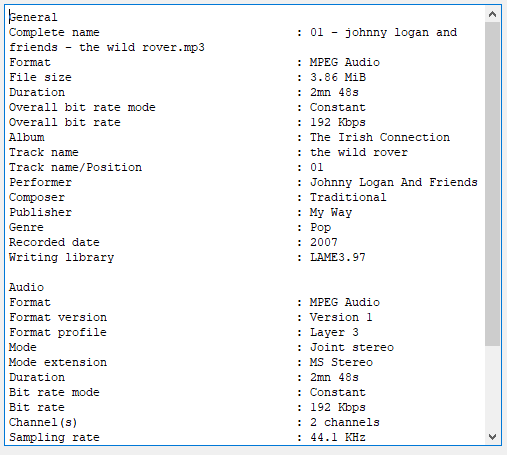
                      alt text

                      and just sets its font to monospaced
                      ui->plainTextEdit->setFont( (QFontDatabase::systemFont(QFontDatabase::FixedFont)) );

                      1 Reply Last reply
                      2
                      • VRoninV Offline
                        VRoninV Offline
                        VRonin
                        wrote on last edited by
                        #13

                        The only thing I can think of with QTextBrowser is that you are using a style sheet with a font that overrides the one we are setting

                        "La mort n'est rien, mais vivre vaincu et sans gloire, c'est mourir tous les jours"
                        ~Napoleon Bonaparte

                        On a crusade to banish setIndexWidget() from the holy land of Qt

                        mrjjM 1 Reply Last reply
                        2
                        • VRoninV VRonin

                          The only thing I can think of with QTextBrowser is that you are using a style sheet with a font that overrides the one we are setting

                          mrjjM Offline
                          mrjjM Offline
                          mrjj
                          Lifetime Qt Champion
                          wrote on last edited by mrjj
                          #14

                          @VRonin
                          Yep something like that - as your code and test file just works
                          with output from same command on linux.

                          Also, i noticed one thing in code shown on GITHUB

                          QTextCursor textBrowCrsr(ui->tdetail->document());
                              const int oldPos = textBrowCrsr.position();
                              textBrowCrsr.movePosition(QTextCursor::End);
                              QTextCharFormat textBrowFormat = textBrowCrsr.charFormat();
                              textBrowFormat.setFont(QFontDatabase::systemFont(QFontDatabase::FixedFont));
                              textBrowCrsr.insertText(output,textBrowFormat);
                              textBrowCrsr.setPosition(oldPos);
                          
                          
                              ui->tdetail->setText(output.toUtf8()); <<<<<<<<<<<<<<<<<< wont that override insertText ?
                          
                          S 1 Reply Last reply
                          2
                          • mrjjM mrjj

                            @VRonin
                            Yep something like that - as your code and test file just works
                            with output from same command on linux.

                            Also, i noticed one thing in code shown on GITHUB

                            QTextCursor textBrowCrsr(ui->tdetail->document());
                                const int oldPos = textBrowCrsr.position();
                                textBrowCrsr.movePosition(QTextCursor::End);
                                QTextCharFormat textBrowFormat = textBrowCrsr.charFormat();
                                textBrowFormat.setFont(QFontDatabase::systemFont(QFontDatabase::FixedFont));
                                textBrowCrsr.insertText(output,textBrowFormat);
                                textBrowCrsr.setPosition(oldPos);
                            
                            
                                ui->tdetail->setText(output.toUtf8()); <<<<<<<<<<<<<<<<<< wont that override insertText ?
                            
                            S Offline
                            S Offline
                            saber
                            wrote on last edited by
                            #15

                            @mrjj it was a old commit .

                            mrjjM 1 Reply Last reply
                            0
                            • S saber

                              @mrjj it was a old commit .

                              mrjjM Offline
                              mrjjM Offline
                              mrjj
                              Lifetime Qt Champion
                              wrote on last edited by
                              #16

                              @saber
                              ok.
                              I did make small test on linux and VRonin sample did in fact make
                              it uses fixed font so it looked correctly.
                              However, using plainTextEdit is a one liner so might be more optimal if you do not need the HTML textbrowse offer

                              1 Reply Last reply
                              1
                              • S Offline
                                S Offline
                                saber
                                wrote on last edited by
                                #17

                                i do't know how to fix that or what's wrong.
                                after long works i made an app with mediainfo as backend.
                                here is the app CoreInfo.
                                thanks.

                                1 Reply Last reply
                                0

                                • Login

                                • Login or register to search.
                                • First post
                                  Last post
                                0
                                • Categories
                                • Recent
                                • Tags
                                • Popular
                                • Users
                                • Groups
                                • Search
                                • Get Qt Extensions
                                • Unsolved