Skip to content
  • Categories
  • Recent
  • Tags
  • Popular
  • Users
  • Groups
  • Search
  • Get Qt Extensions
  • Unsolved
Collapse
Brand Logo
  1. Home
  2. Qt Development
  3. General and Desktop
  4. Qt Inferior stopped because it triggered an exception

Qt Inferior stopped because it triggered an exception

Scheduled Pinned Locked Moved Unsolved General and Desktop
9 Posts 2 Posters 4.8k Views
  • Oldest to Newest
  • Newest to Oldest
  • Most Votes
Reply
  • Reply as topic
Log in to reply
This topic has been deleted. Only users with topic management privileges can see it.
  • M Offline
    M Offline
    magicstar
    wrote on last edited by
    #1
    This post is deleted!
    jsulmJ 1 Reply Last reply
    0
    • M magicstar

      This post is deleted!

      jsulmJ Offline
      jsulmJ Offline
      jsulm
      Lifetime Qt Champion
      wrote on last edited by
      #2

      @magicstar What is config?
      Do you have stack trace?

      https://forum.qt.io/topic/113070/qt-code-of-conduct

      M 1 Reply Last reply
      0
      • jsulmJ jsulm

        @magicstar What is config?
        Do you have stack trace?

        M Offline
        M Offline
        magicstar
        wrote on last edited by
        #3

        @jsulm
        Thanks for the reply.
        config is std::string variable. The value of it exactly same in VS and QT.
        May I please know what is stack trace? I am new to QT.

        jsulmJ 1 Reply Last reply
        0
        • M magicstar

          @jsulm
          Thanks for the reply.
          config is std::string variable. The value of it exactly same in VS and QT.
          May I please know what is stack trace? I am new to QT.

          jsulmJ Offline
          jsulmJ Offline
          jsulm
          Lifetime Qt Champion
          wrote on last edited by
          #4

          @magicstar Start you app with debugger in QtCreator (F5) and when it crashes you should have a stack trace

          https://forum.qt.io/topic/113070/qt-code-of-conduct

          M 1 Reply Last reply
          0
          • jsulmJ jsulm

            @magicstar Start you app with debugger in QtCreator (F5) and when it crashes you should have a stack trace

            M Offline
            M Offline
            magicstar
            wrote on last edited by
            #5

            @jsulm
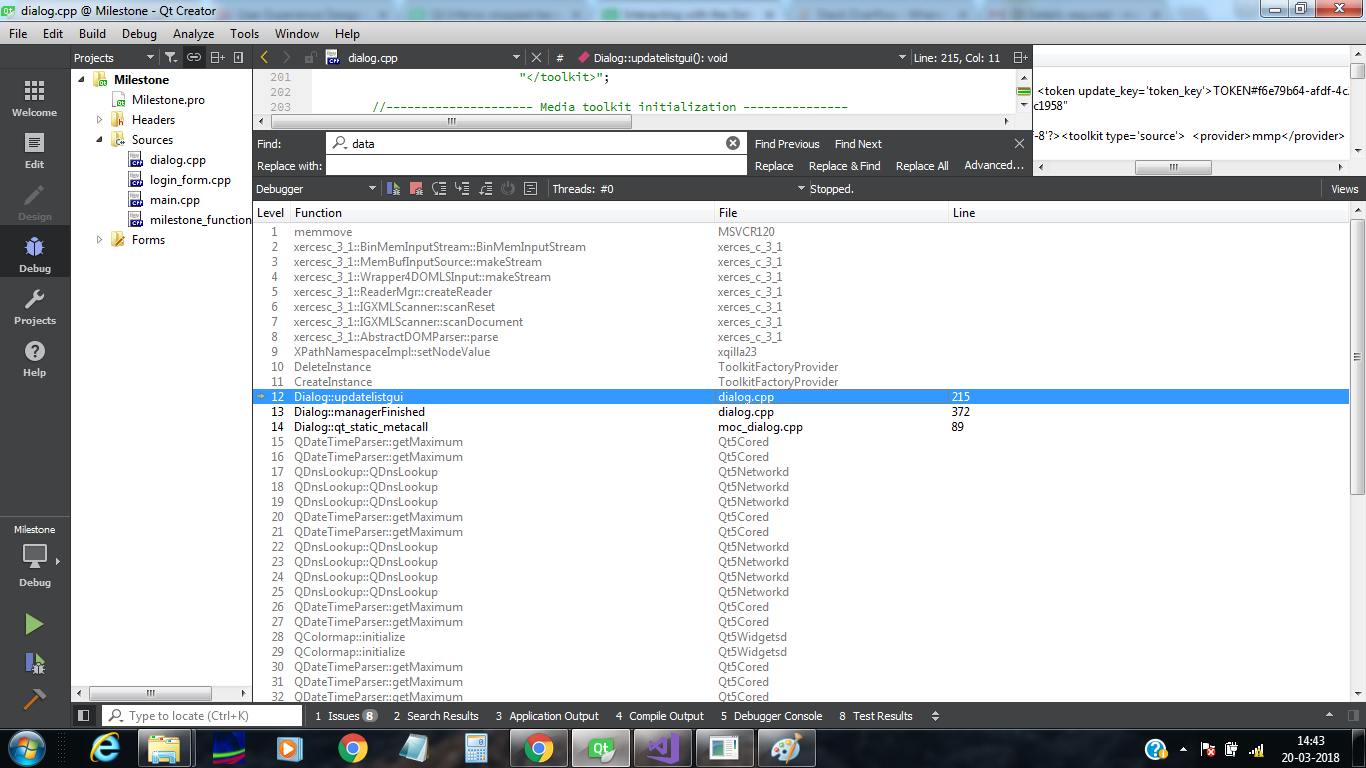
            0_1521535233827_stack_trace.png

            Here is the stack trace.

            jsulmJ 1 Reply Last reply
            0
            • M magicstar

              @jsulm
              0_1521535233827_stack_trace.png

              Here is the stack trace.

              jsulmJ Offline
              jsulmJ Offline
              jsulm
              Lifetime Qt Champion
              wrote on last edited by
              #6

              @magicstar this is not stack trace
              see http://doc.qt.io/qtcreator/creator-debug-mode.html

              https://forum.qt.io/topic/113070/qt-code-of-conduct

              M 1 Reply Last reply
              0
              • jsulmJ jsulm

                @magicstar this is not stack trace
                see http://doc.qt.io/qtcreator/creator-debug-mode.html

                M Offline
                M Offline
                magicstar
                wrote on last edited by
                #7

                @jsulm
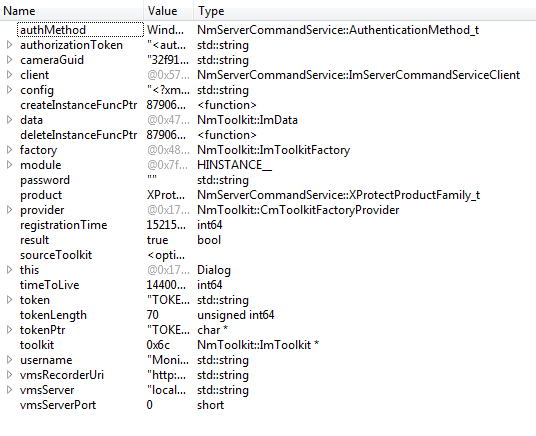
                0_1521537614626_Untitled.png

                As the stack trace suggests, problem is indeed at

                ImToolkit *toolkit = factory->CreateInstance(config);
                
                jsulmJ 1 Reply Last reply
                0
                • M magicstar

                  @jsulm
                  0_1521537614626_Untitled.png

                  As the stack trace suggests, problem is indeed at

                  ImToolkit *toolkit = factory->CreateInstance(config);
                  
                  jsulmJ Offline
                  jsulmJ Offline
                  jsulm
                  Lifetime Qt Champion
                  wrote on last edited by
                  #8

                  @magicstar Why is there DeleteInstance just after CreateInstance?

                  https://forum.qt.io/topic/113070/qt-code-of-conduct

                  M 1 Reply Last reply
                  0
                  • jsulmJ jsulm

                    @magicstar Why is there DeleteInstance just after CreateInstance?

                    M Offline
                    M Offline
                    magicstar
                    wrote on last edited by magicstar
                    #9

                    @jsulm
                    There am just creating instance and actual deletion is happening at end of the code. Removing that line does not solve the issue.

                    I just realised, code is building and executing correctly in release mode. But, I still don't understand why is it not working in debug mode.

                    1 Reply Last reply
                    0

                    • Login

                    • Login or register to search.
                    • First post
                      Last post
                    0
                    • Categories
                    • Recent
                    • Tags
                    • Popular
                    • Users
                    • Groups
                    • Search
                    • Get Qt Extensions
                    • Unsolved