
Skip to content
  • Categories
  • Recent
  • Tags
  • Popular
  • Users
  • Groups
  • Search
  • Get Qt Extensions
  • Unsolved
Collapse
Brand Logo
  1. Home
  2. Qt Development
  3. General and Desktop
  4. Coloring QStandardItem doesn't work

Coloring QStandardItem doesn't work

Scheduled Pinned Locked Moved Solved General and Desktop
8 Posts 3 Posters 3.5k Views 2 Watching
  • Oldest to Newest
  • Newest to Oldest
  • Most Votes
Reply
  • Reply as topic
Log in to reply
This topic has been deleted. Only users with topic management privileges can see it.
  • E Offline
    E Offline
    El3ctroGh0st
    wrote on last edited by
    #1

    Hello,

    I am trying to let the user color a cell in a QTableView. This is my code so far:

    void customTable::changeColor()
    {
        QItemSelectionModel *sModel = ui->tableView->selectionModel();
        QModelIndexList selectedLists;
    
        if(!sModel->hasSelection())
            return;
    
        selectedLists = sModel->selectedIndexes();
    
        QColor changeColor = pickColor();
    
        tableModel->item(0,0)->setData(QVariant(QBrush(changeColor)), Qt::BackgroundRole); //This works
        tableModel->item(1,1)->setData(QVariant(QBrush(changeColor)), Qt::BackgroundRole); //This will crash the program
    
        /*for(int i = 0; i < selectedLists.size(); ++i)
        {
            QModelIndex index = selectedLists.at(i);
            qDebug() << index.row() << " " << index.column();
            //tableModel->item(index.row(), index.column())->setData(QVariant(QBrush(changeColor)), Qt::BackgroundRole);
        }*/
    }
    

    However, even if there are way more than one column and one row, the program will execute the first call but not the second one. Does anyone know what the problem might be (ignore the other pieces of the code, those are for later)?

    1 Reply Last reply
    0
    • SGaistS Offline
      SGaistS Offline
      SGaist
      Lifetime Qt Champion
      wrote on last edited by
      #2

      Hi,

      Did you check whether you had a valid item before calling setData on it ?

      Interested in AI ? www.idiap.ch
      Please read the Qt Code of Conduct - https://forum.qt.io/topic/113070/qt-code-of-conduct

      E 1 Reply Last reply
      0
      • SGaistS SGaist

        Hi,

        Did you check whether you had a valid item before calling setData on it ?

        E Offline
        E Offline
        El3ctroGh0st
        wrote on last edited by
        #3

        @SGaist Both rowCount and columnCount are higher than one so yes, I presume that the indexes are valid.

        1 Reply Last reply
        0
        • SGaistS Offline
          SGaistS Offline
          SGaist
          Lifetime Qt Champion
          wrote on last edited by
          #4

          My suggestion stands. You may not have an item there hence your crash. You should check its validity.

          Interested in AI ? www.idiap.ch
          Please read the Qt Code of Conduct - https://forum.qt.io/topic/113070/qt-code-of-conduct

          E 1 Reply Last reply
          1
          • SGaistS SGaist

            My suggestion stands. You may not have an item there hence your crash. You should check its validity.

            E Offline
            E Offline
            El3ctroGh0st
            wrote on last edited by El3ctroGh0st
            #5

            @SGaist And how exactly can I check whether I have an item at a certain position?

            EDIT: Nevermind, I got what you meant and managed to fix it. Thank you!

            mrjjM 1 Reply Last reply
            2
            • E El3ctroGh0st

              @SGaist And how exactly can I check whether I have an item at a certain position?

              EDIT: Nevermind, I got what you meant and managed to fix it. Thank you!

              mrjjM Offline
              mrjjM Offline
              mrjj
              Lifetime Qt Champion
              wrote on last edited by
              #6

              Hi
              The model->item(row,col) will return NULL if no item is inserted there.
              I would use a function to check and set color.
              Like
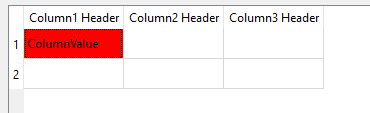
              alt text

              void MainWindow::setItemColor(QStandardItem* item, QColor color) {
                if (!item) {
                    qDebug() << "item NULL"; return;
                }
                item->setData(QVariant(QBrush(color)), Qt::BackgroundRole);
              }
              
              MainWindow::MainWindow(QWidget* parent) : QMainWindow(parent), ui(new Ui::MainWindow) {
                ui->setupUi(this);
              
                QStandardItemModel* model = new QStandardItemModel(2, 3, this); //2 Rows and 3 Columns
              
                model->setHorizontalHeaderItem(0, new QStandardItem(QString("Column1 Header")));
                model->setHorizontalHeaderItem(1, new QStandardItem(QString("Column2 Header")));
                model->setHorizontalHeaderItem(2, new QStandardItem(QString("Column3 Header")));
                 // insert one item
                QStandardItem* firstRow = new QStandardItem(QString("ColumnValue"));
                model->setItem(0, 0, firstRow);  
              
                setItemColor(firstRow, Qt::red); // color it
              
                ui->tableView->setModel(model);
              }
              
              E 1 Reply Last reply
              2
              • mrjjM mrjj

                Hi
                The model->item(row,col) will return NULL if no item is inserted there.
                I would use a function to check and set color.
                Like
                alt text

                void MainWindow::setItemColor(QStandardItem* item, QColor color) {
                  if (!item) {
                      qDebug() << "item NULL"; return;
                  }
                  item->setData(QVariant(QBrush(color)), Qt::BackgroundRole);
                }
                
                MainWindow::MainWindow(QWidget* parent) : QMainWindow(parent), ui(new Ui::MainWindow) {
                  ui->setupUi(this);
                
                  QStandardItemModel* model = new QStandardItemModel(2, 3, this); //2 Rows and 3 Columns
                
                  model->setHorizontalHeaderItem(0, new QStandardItem(QString("Column1 Header")));
                  model->setHorizontalHeaderItem(1, new QStandardItem(QString("Column2 Header")));
                  model->setHorizontalHeaderItem(2, new QStandardItem(QString("Column3 Header")));
                   // insert one item
                  QStandardItem* firstRow = new QStandardItem(QString("ColumnValue"));
                  model->setItem(0, 0, firstRow);  
                
                  setItemColor(firstRow, Qt::red); // color it
                
                  ui->tableView->setModel(model);
                }
                
                E Offline
                E Offline
                El3ctroGh0st
                wrote on last edited by
                #7

                @mrjj Yep. I hadn't realised that I had to insert a QStandardItem in every cell. Thanks for your help!

                mrjjM 1 Reply Last reply
                0
                • E El3ctroGh0st

                  @mrjj Yep. I hadn't realised that I had to insert a QStandardItem in every cell. Thanks for your help!

                  mrjjM Offline
                  mrjjM Offline
                  mrjj
                  Lifetime Qt Champion
                  wrote on last edited by
                  #8

                  @El3ctroGh0st
                  Ah, yes. well that is a classic as the cells look normal and can be selected but
                  its all NULL items.

                  1 Reply Last reply
                  0

                  • Login

                  • Login or register to search.
                  • First post
                    Last post
                  0
                  • Categories
                  • Recent
                  • Tags
                  • Popular
                  • Users
                  • Groups
                  • Search
                  • Get Qt Extensions
                  • Unsolved