Skip to content
  • Categories
  • Recent
  • Tags
  • Popular
  • Users
  • Groups
  • Search
  • Get Qt Extensions
  • Unsolved
Collapse
Brand Logo
  1. Home
  2. Qt Development
  3. Qt Creator and other tools
  4. my kit isn't showing up...

my kit isn't showing up...

Scheduled Pinned Locked Moved Unsolved Qt Creator and other tools
16 Posts 3 Posters 8.2k Views 3 Watching
  • Oldest to Newest
  • Newest to Oldest
  • Most Votes
Reply
  • Reply as topic
Log in to reply
This topic has been deleted. Only users with topic management privileges can see it.
  • SGaistS Offline
    SGaistS Offline
    SGaist
    Lifetime Qt Champion
    wrote on last edited by
    #4

    The kit and Qt versions

    Interested in AI ? www.idiap.ch
    Please read the Qt Code of Conduct - https://forum.qt.io/topic/113070/qt-code-of-conduct

    1 Reply Last reply
    0
    • mzimmersM Offline
      mzimmersM Offline
      mzimmers
      wrote on last edited by
      #5

      Here you go:

      0_1521148202069_kits.PNG

      0_1521148212899_versions.PNG

      JKSHJ 1 Reply Last reply
      0
      • SGaistS Offline
        SGaistS Offline
        SGaist
        Lifetime Qt Champion
        wrote on last edited by
        #6

        Are you setting up Qt Creator for bare metal development ?

        Interested in AI ? www.idiap.ch
        Please read the Qt Code of Conduct - https://forum.qt.io/topic/113070/qt-code-of-conduct

        1 Reply Last reply
        0
        • mzimmersM Offline
          mzimmersM Offline
          mzimmers
          wrote on last edited by
          #7

          Oh, gosh...I'd forgotten about that. OK, I've enabled the plugin, restarted Creator, changed my kit device type to "Bare Metal Device" and added a device "esp32" of type "default." I can't, however, see that device in the "Device:" pull-down on the Kits menu.

          1 Reply Last reply
          0
          • SGaistS Offline
            SGaistS Offline
            SGaist
            Lifetime Qt Champion
            wrote on last edited by
            #8

            Are you following Qt Creator's guide for bare metal ?

            Interested in AI ? www.idiap.ch
            Please read the Qt Code of Conduct - https://forum.qt.io/topic/113070/qt-code-of-conduct

            1 Reply Last reply
            2
            • mzimmersM Offline
              mzimmersM Offline
              mzimmers
              wrote on last edited by
              #9

              OK, I guess I have some reading to do. (I don't remember this at all from last year's Beagleboard exercise.)

              The esp32 runs FreeRTOS -- is a bare metal option the best way to go for this?

              1 Reply Last reply
              0
              • SGaistS Offline
                SGaistS Offline
                SGaist
                Lifetime Qt Champion
                wrote on last edited by
                #10

                That one I don't know sorry, I haven't developed for FreeRTOS.

                You should maybe asked the folks on the Qt Creator mailing list.

                Interested in AI ? www.idiap.ch
                Please read the Qt Code of Conduct - https://forum.qt.io/topic/113070/qt-code-of-conduct

                1 Reply Last reply
                1
                • mzimmersM Offline
                  mzimmersM Offline
                  mzimmers
                  wrote on last edited by mzimmers
                  #11

                  It's probably not important. I only asked because strictly speaking, FreeRTOS isn't bare metal.

                  I'm trying to follow the directions on the page you linked, but my device still doesn't show up. Also, step 4 mentions:

                  Select Tools > Options > Devices > Add > Bare Metal Device > Start Wizard:
                  In the GDB server provider field, select a GDB server or hardware debugger.
                  Select Apply to add the device.

                  I see no such "Start Wizard" command.

                  EDIT:

                  Oh - is this plugin valid for Linux only?

                  EDIT II:

                  OK, I found it. I'd probably word the instructions a little differently:

                  Tools > Options > Devices > Add

                  should be:

                  Tools > Options > Devices > Devices > Add...

                  That'll make it a little easier for boneheads like me to find when we're rushing...

                  1 Reply Last reply
                  0
                  • mzimmersM Offline
                    mzimmersM Offline
                    mzimmers
                    wrote on last edited by
                    #12

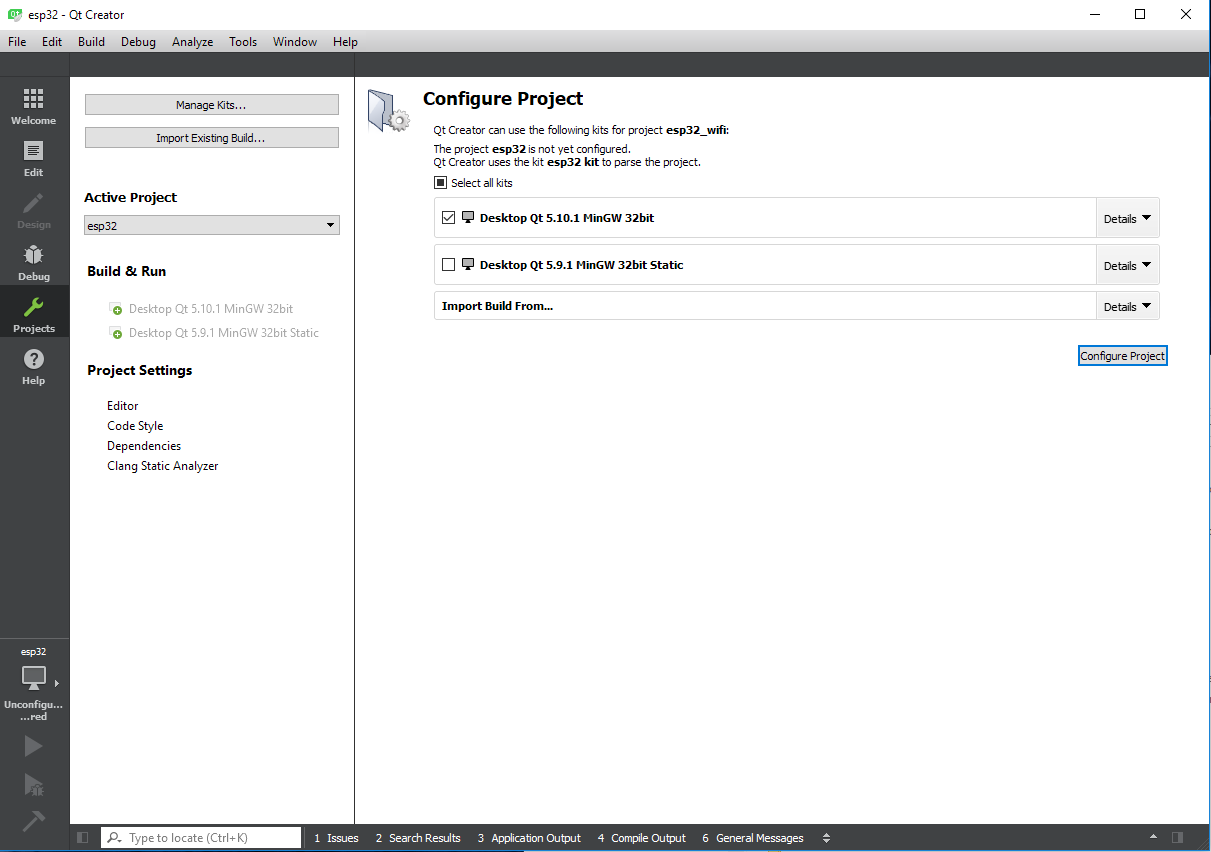
                    My kit is now displayed without errors (and with a device) but it is still not showing up in Build mode. Do I need to add a line to my .pro file to enable the visibility of my kit?

                    JKSHJ 1 Reply Last reply
                    0
                    • mzimmersM mzimmers

                      My kit is now displayed without errors (and with a device) but it is still not showing up in Build mode. Do I need to add a line to my .pro file to enable the visibility of my kit?

                      JKSHJ Offline
                      JKSHJ Offline
                      JKSH
                      Moderators
                      wrote on last edited by
                      #13

                      @mzimmers said in my kit isn't showing up...:

                      My kit is now displayed without errors (and with a device) but it is still not showing up in Build mode. Do I need to add a line to my .pro file to enable the visibility of my kit?

                      No, .pro files know nothing about kits.

                      1. Open your project in Qt Creator
                      2. Click "Projects" in the Mode Selector (the upper-left bar)
                      3. Under "Build & Run", click on your new kit to activate it for this project
                      4. Click the Kit Selector (the "Debug"/"Release" button on the lower-left) to select your new kit
                      5. Click "Run" button to build and run your project, using your new kit

                      See the top screenshot at http://doc.qt.io/qtcreator/creator-quick-tour.html for the Mode Selector and Kit Selector.

                      Qt Doc Search for browsers: forum.qt.io/topic/35616/web-browser-extension-for-improved-doc-searches

                      1 Reply Last reply
                      4
                      • mzimmersM Offline
                        mzimmersM Offline
                        mzimmers
                        wrote on last edited by
                        #14

                        Hi JKSH -

                        That's exactly what I've tried to do, a few times. The new kit just doesn't show up.

                        0_1521209625803_project.PNG

                        1 Reply Last reply
                        0
                        • mzimmersM mzimmers

                          Here you go:

                          0_1521148202069_kits.PNG

                          0_1521148212899_versions.PNG

                          JKSHJ Offline
                          JKSHJ Offline
                          JKSH
                          Moderators
                          wrote on last edited by
                          #15

                          @mzimmers said in my kit isn't showing up...:

                          0_1521148202069_kits.PNG

                          I just noticed: In this screenshot, your esp32 kit does not have a Qt version set. That could be why it doesn't appear in your list of selectable kits.

                          If you have set a valid Qt version but still can't apply the kit to your project, try creating a brand new project (Qt Console Application): Is the kit selectable then? What about a Qt Widgets Application?

                          Qt Doc Search for browsers: forum.qt.io/topic/35616/web-browser-extension-for-improved-doc-searches

                          mzimmersM 1 Reply Last reply
                          1
                          • JKSHJ JKSH

                            @mzimmers said in my kit isn't showing up...:

                            0_1521148202069_kits.PNG

                            I just noticed: In this screenshot, your esp32 kit does not have a Qt version set. That could be why it doesn't appear in your list of selectable kits.

                            If you have set a valid Qt version but still can't apply the kit to your project, try creating a brand new project (Qt Console Application): Is the kit selectable then? What about a Qt Widgets Application?

                            mzimmersM Offline
                            mzimmersM Offline
                            mzimmers
                            wrote on last edited by
                            #16

                            (just getting back to this)

                            @JKSH: yes, I think you're right. The page on configuring for bare-metal devices is a little unclear, but it does say this:

                            However, if the device does not have Qt libraries, you need a fake Qt installation.

                            Not sure what a "fake Qt installation is," though, and the page doesn't elaborate on this.

                            Currently, when I try to use one of my non-fake Qt installations, I predictably get this error:

                            warning: "C:\Qt\Tools\mingw530_32\bin\gcc.exe" is used by qmake, but "C:\msys32\opt\xtensa-esp32-elf\bin\xtensa-esp32-elf-gcc.exe" is configured in the kit.
                            Please update your kit or choose a mkspec for qmake that matches your target environment better.

                            I'm not sure how to proceed from here...I could create a mkspec for the cross compiler, but that doesn't solve the problem of what to use for a "fake Qt."

                            1 Reply Last reply
                            0

                            • Login

                            • Login or register to search.
                            • First post
                              Last post
                            0
                            • Categories
                            • Recent
                            • Tags
                            • Popular
                            • Users
                            • Groups
                            • Search
                            • Get Qt Extensions
                            • Unsolved