Skip to content
  • Categories
  • Recent
  • Tags
  • Popular
  • Users
  • Groups
  • Search
  • Get Qt
  • Unsolved
Collapse
qtws26_logo

The Qt Event of the Year: Qt World Summit 2026

Save Your Spot >
Brand Logo
  1. Home
  2. Qt Development
  3. General and Desktop
  4. How to run Camera on Linux?
Qt 6.12 LTS is out! See what's new in the release blog

How to run Camera on Linux?

Scheduled Pinned Locked Moved Unsolved General and Desktop
12 Posts 4 Posters 2.9k Views 2 Watching
  • Oldest to Newest
  • Newest to Oldest
  • Most Votes
Reply
  • Reply as topic
Log in to reply
This topic has been deleted. Only users with topic management privileges can see it.
  • R Offline
    R Offline
    Ramiz
    wrote on last edited by Ramiz
    #3

    yes I have installed it.

    jsulmJ 1 Reply Last reply
    0
    • R Ramiz

      yes I have installed it.

      jsulmJ Offline
      jsulmJ Offline
      jsulm
      Lifetime Qt Champion
      wrote on last edited by
      #4

      @Ramiz Could be a hint: https://stackoverflow.com/questions/42268777/requestservice-no-service-found-for-org-qt-project-qt-camera

      https://forum.qt.io/topic/113070/qt-code-of-conduct

      1 Reply Last reply
      0
      • R Offline
        R Offline
        Ramiz
        wrote on last edited by
        #5

        I have checked that link but didnt get any help.Same problem

        1 Reply Last reply
        0
        • SGaistS Offline
          SGaistS Offline
          SGaist
          Lifetime Qt Champion
          wrote on last edited by
          #6

          Hi,

          What version of GStreamer do you have ?
          Which plugins ?
          What version of Qt are you using ?
          What distribution are you running ?

          Interested in AI ? www.idiap.ch
          Please read the Qt Code of Conduct - https://forum.qt.io/topic/113070/qt-code-of-conduct

          1 Reply Last reply
          0
          • R Offline
            R Offline
            Ramiz
            wrote on last edited by
            #7

            GStreamer 1.0 and QT version 5.10

            1 Reply Last reply
            0
            • SGaistS Offline
              SGaistS Offline
              SGaist
              Lifetime Qt Champion
              wrote on last edited by
              #8

              There are two missing answers.

              As for further trouble shooting: run your application with the QT_DEBUG_PLUGINS environment variable set to 1. You can do that in the Run part of the Project panel.

              Interested in AI ? www.idiap.ch
              Please read the Qt Code of Conduct - https://forum.qt.io/topic/113070/qt-code-of-conduct

              1 Reply Last reply
              1
              • R Offline
                R Offline
                Ramiz
                wrote on last edited by
                #9

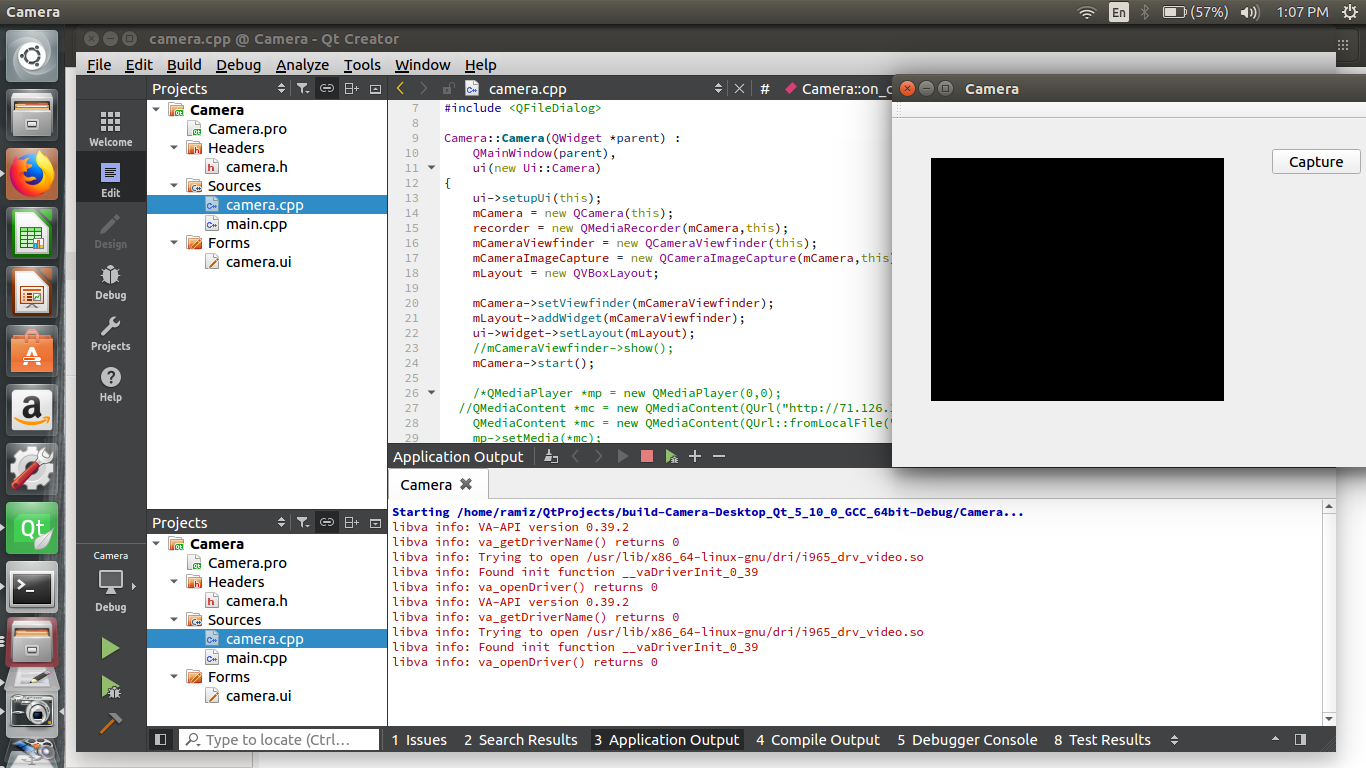
                @jsulm @SGaist I have solved that issue by updating the Linux version and now my camera opens but didn’t display anything as shown in picture.
                0_1519978249251_Screenshot from 2018-03-02 13-07-58.png

                Do you know what’s the issue now?

                jsulmJ 1 Reply Last reply
                0
                • R Ramiz

                  @jsulm @SGaist I have solved that issue by updating the Linux version and now my camera opens but didn’t display anything as shown in picture.
                  0_1519978249251_Screenshot from 2018-03-02 13-07-58.png

                  Do you know what’s the issue now?

                  jsulmJ Offline
                  jsulmJ Offline
                  jsulm
                  Lifetime Qt Champion
                  wrote on last edited by
                  #10

                  @Ramiz Did you try to use your camera with for example Cheese?

                  https://forum.qt.io/topic/113070/qt-code-of-conduct

                  1 Reply Last reply
                  0
                  • R Offline
                    R Offline
                    Ramiz
                    wrote on last edited by
                    #11

                    @jsulm Yes cheese is working fine and even when I run it from Qt the flash light of camera gets on or visible but no display.

                    1 Reply Last reply
                    0
                    • mranger90M Offline
                      mranger90M Offline
                      mranger90
                      wrote on last edited by
                      #12

                      Are you running on a native linux machine or are you in a Virtual Machine?
                      I ask because I usually get the same results as you do when in a VM.

                      1 Reply Last reply
                      0

                      • Login

                      • Login or register to search.
                      • First post
                        Last post
                      0
                      • Categories
                      • Recent
                      • Tags
                      • Popular
                      • Users
                      • Groups
                      • Search
                      • Get Qt
                      • Unsolved