
Skip to content
  • Categories
  • Recent
  • Tags
  • Popular
  • Users
  • Groups
  • Search
  • Get Qt
  • Unsolved
Collapse
qtws26_logo

The Qt Event of the Year: Qt World Summit 2026

Save Your Spot >
Brand Logo
  1. Home
  2. Qt Development
  3. General and Desktop
  4. How to record video in windows using Qt?
Qt 6.12 LTS is out! See what's new in the release blog

How to record video in windows using Qt?

Scheduled Pinned Locked Moved Unsolved General and Desktop
14 Posts 4 Posters 9.5k Views 2 Watching
  • Oldest to Newest
  • Newest to Oldest
  • Most Votes
Reply
  • Reply as topic
Log in to reply
This topic has been deleted. Only users with topic management privileges can see it.
  • R Ramiz

    It didnt work I connect it and found no error.

    jsulmJ Offline
    jsulmJ Offline
    jsulm
    Lifetime Qt Champion
    wrote on last edited by
    #4

    @Ramiz There are signals for state/status changes you should connect to them to see whether anything is happening.

    https://forum.qt.io/topic/113070/qt-code-of-conduct

    1 Reply Last reply
    0
    • R Offline
      R Offline
      Ramiz
      wrote on last edited by
      #5

      I am new to QT and what I did I create a button and on that button I write the camera recording code and image capturing code.Image capturing is working fine but recording is not.
      Also I write the connect function that you told me on button click.
      Did I do it right?

      jsulmJ 1 Reply Last reply
      0
      • R Ramiz

        I am new to QT and what I did I create a button and on that button I write the camera recording code and image capturing code.Image capturing is working fine but recording is not.
        Also I write the connect function that you told me on button click.
        Did I do it right?

        jsulmJ Offline
        jsulmJ Offline
        jsulm
        Lifetime Qt Champion
        wrote on last edited by
        #6

        @Ramiz Should be fine. Are your slots called? Recording video depends on availability of codecs, are you on Windows, MacOS or Linux?

        https://forum.qt.io/topic/113070/qt-code-of-conduct

        1 Reply Last reply
        0
        • R Offline
          R Offline
          Ramiz
          wrote on last edited by
          #7

          I am on windows 10 and Yes My slots are called.
          My camera works when slots are called also when I clicked on stop record it ask me where you want to save the file in mp4.
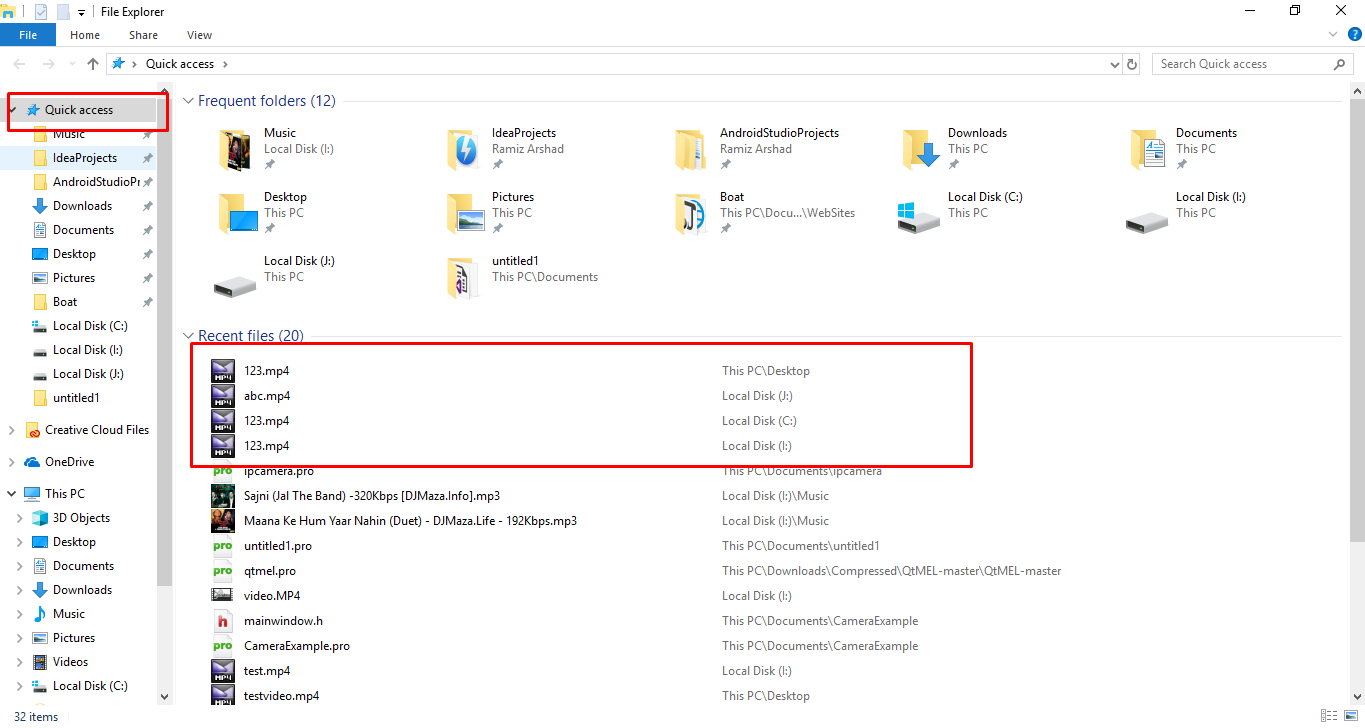
          After giving a directory to save I couldn't find the file as well but I can see the file in my Quick access.0_1519298755316_Screenshot_1.png
          jsulmJ 1 Reply Last reply
          0
          • R Ramiz

            I am on windows 10 and Yes My slots are called.
            My camera works when slots are called also when I clicked on stop record it ask me where you want to save the file in mp4.
            After giving a directory to save I couldn't find the file as well but I can see the file in my Quick access.0_1519298755316_Screenshot_1.png

            jsulmJ Offline
            jsulmJ Offline
            jsulm
            Lifetime Qt Champion
            wrote on last edited by
            #8

            @Ramiz So it actually recorded something? Can you open these files?
            And in your slots you should print out the state/status to see what happens.

            https://forum.qt.io/topic/113070/qt-code-of-conduct

            1 Reply Last reply
            0
            • R Offline
              R Offline
              Ramiz
              wrote on last edited by
              #9

              The size of these files are 0 bytes and they are not opening.Whenever I tried to open any of these files, get an error cant open file.

              jsulmJ 1 Reply Last reply
              0
              • R Ramiz

                The size of these files are 0 bytes and they are not opening.Whenever I tried to open any of these files, get an error cant open file.

                jsulmJ Offline
                jsulmJ Offline
                jsulm
                Lifetime Qt Champion
                wrote on last edited by
                #10

                @Ramiz Do you get QMediaRecorder::RecordingState or or QMediaRecorder::RecordingStatus or anything else?

                https://forum.qt.io/topic/113070/qt-code-of-conduct

                1 Reply Last reply
                0
                • R Offline
                  R Offline
                  Ramiz
                  wrote on last edited by
                  #11

                  No I didn't get QMediaRecorder::RecordingState or or QMediaRecorder::RecordingStatus

                  1 Reply Last reply
                  0
                  • M Offline
                    M Offline
                    mchinand
                    wrote on last edited by mchinand
                    #12

                    I don't think video recording with QT is possible on Windows, see: http://doc.qt.io/qt-5/qtmultimedia-windows.html

                    Also, check the return value of mCamera->isCaptureModeSupported(QCamera::CaptureVideo);.

                    1 Reply Last reply
                    2
                    • R Offline
                      R Offline
                      Ramiz
                      wrote on last edited by
                      #13

                      It means I cannot control an IP camera through QT on windows?

                      1 Reply Last reply
                      0
                      • SGaistS Offline
                        SGaistS Offline
                        SGaist
                        Lifetime Qt Champion
                        wrote on last edited by SGaist
                        #14

                        Hi,

                        Depending on the camera type and how it is seen by the system, you may have to write a small QCamera backend but it's doable.

                        Interested in AI ? www.idiap.ch
                        Please read the Qt Code of Conduct - https://forum.qt.io/topic/113070/qt-code-of-conduct

                        1 Reply Last reply
                        0

                        • Login

                        • Login or register to search.
                        • First post
                          Last post
                        0
                        • Categories
                        • Recent
                        • Tags
                        • Popular
                        • Users
                        • Groups
                        • Search
                        • Get Qt
                        • Unsolved