
Skip to content
  • Categories
  • Recent
  • Tags
  • Popular
  • Users
  • Groups
  • Search
  • Get Qt Extensions
  • Unsolved
Collapse
Brand Logo
  1. Home
  2. Qt Development
  3. General and Desktop
  4. Set to background Button on Label like C#
Qt 6.11 is out! See what's new in the release blog

Set to background Button on Label like C#

Scheduled Pinned Locked Moved Unsolved General and Desktop
20 Posts 5 Posters 4.7k Views 2 Watching
  • Oldest to Newest
  • Newest to Oldest
  • Most Votes
Reply
  • Reply as topic
Log in to reply
This topic has been deleted. Only users with topic management privileges can see it.
  • mrjjM Offline
    mrjjM Offline
    mrjj
    Lifetime Qt Champion
    wrote on last edited by
    #8

    Hi
    If you place a QLabel on the button, it would be hidden with the button :(
    So you issue is that when you flash the permission button, the layout moves
    the other buttons?

    1 Reply Last reply
    0
    • SGaistS Offline
      SGaistS Offline
      SGaist
      Lifetime Qt Champion
      wrote on last edited by
      #9

      There’s still QStackedLayout

      Interested in AI ? www.idiap.ch
      Please read the Qt Code of Conduct - https://forum.qt.io/topic/113070/qt-code-of-conduct

      1 Reply Last reply
      0
      • Z Offline
        Z Offline
        ZekDe
        wrote on last edited by
        #10

        Hi,

        button1 PermissionButton button2

        when the permissionButton is hide ,button1 and button2 is moving towards each other.I know this is normal.,but permissionButton have to flash in a specific time,and in during this time when the permission button is flashing ,user always can't see permissionButton's Text .I am doing it in C# like that.I put a label on permissionButton and I click in settings for label,set to background and so that if the permissionButton is hide, in this case label shows up.

        1 Reply Last reply
        0
        • mrjjM mrjj

          @ZekDe
          Oh, so the flashing of buttons is done by hide/show hide/show ?
          And it might be stopped in hide ?
          Sounds like you should rather flash text on button so it cant be hidden.
          It will be awful complicated if you use layouts as you cant have widgets on top of each other.
          So i would find a better flashing method.

          J.HilkJ Offline
          J.HilkJ Offline
          J.Hilk
          Moderators
          wrote on last edited by J.Hilk
          #11

          @mrjj said in Set to background Button on Label like C#:

          It will be awful complicated if you use layouts as you cant have widgets on top of each other.

          One can't do it using the designer, true. But you can stack widgets on top of each other in a Gridlayout:

          QGridLayout *gLayout = new QGridLayout(this);
          gLayout->addWidget(new QLabel("text below the Button",this),0,0);
          gLayout->addWidget(new QPushButton("Buttontext",this),0,0);
          

          this actually should help the OP, has because hiding the button will not cause a resize of the layout, as the label is still in the cell and being drawn


          Be aware of the Qt Code of Conduct, when posting : https://forum.qt.io/topic/113070/qt-code-of-conduct


          Q: What's that?
          A: It's blue light.
          Q: What does it do?
          A: It turns blue.

          mrjjM 1 Reply Last reply
          1
          • J.HilkJ J.Hilk

            @mrjj said in Set to background Button on Label like C#:

            It will be awful complicated if you use layouts as you cant have widgets on top of each other.

            One can't do it using the designer, true. But you can stack widgets on top of each other in a Gridlayout:

            QGridLayout *gLayout = new QGridLayout(this);
            gLayout->addWidget(new QLabel("text below the Button",this),0,0);
            gLayout->addWidget(new QPushButton("Buttontext",this),0,0);
            

            this actually should help the OP, has because hiding the button will not cause a resize of the layout, as the label is still in the cell and being drawn

            mrjjM Offline
            mrjjM Offline
            mrjj
            Lifetime Qt Champion
            wrote on last edited by
            #12

            @J.Hilk
            Oh, Gridlayout allow that. i had no idea :)
            Well that is then ;)

            Even i would still make it flash some way. :)

            1 Reply Last reply
            0
            • Z Offline
              Z Offline
              ZekDe
              wrote on last edited by
              #13

              Okay ,thanks to everyone, when I try ,I will notify

              1 Reply Last reply
              0
              • Z Offline
                Z Offline
                ZekDe
                wrote on last edited by ZekDe
                #14

                @J.Hilk said in Set to background Button on Label like C#:

                QGridLayout *gLayout = new QGridLayout(this);
                gLayout->addWidget(new QLabel("text below the Button",this),0,0);
                gLayout->addWidget(new QPushButton("Buttontext",this),0,0);

                Guys this is good solution but I am using ui , so that this is giving me a new object.Any better option?

                J.HilkJ 1 Reply Last reply
                0
                • Z ZekDe

                  @J.Hilk said in Set to background Button on Label like C#:

                  QGridLayout *gLayout = new QGridLayout(this);
                  gLayout->addWidget(new QLabel("text below the Button",this),0,0);
                  gLayout->addWidget(new QPushButton("Buttontext",this),0,0);

                  Guys this is good solution but I am using ui , so that this is giving me a new object.Any better option?

                  J.HilkJ Offline
                  J.HilkJ Offline
                  J.Hilk
                  Moderators
                  wrote on last edited by
                  #15

                  @ZekDe
                  that should be easy enough, instead of creating a new QGridlayout, you reference the one you created in your UI-file (via Designer)

                  //Assuming you placed already  a QPushbutton in your Gridlayout via Designer
                  
                  QGridLayout *gLayout = ui->GridLayoutObjectName;
                  gLayout->addWidget(new QLabel("text below the Button",this),0,0);
                  

                  Be aware of the Qt Code of Conduct, when posting : https://forum.qt.io/topic/113070/qt-code-of-conduct


                  Q: What's that?
                  A: It's blue light.
                  Q: What does it do?
                  A: It turns blue.

                  1 Reply Last reply
                  2
                  • Z Offline
                    Z Offline
                    ZekDe
                    wrote on last edited by
                    #16

                    Label and button must overlap.This is problem.I am already adding it in ui ,this is different I am using in code platform,but same thing.

                    1 Reply Last reply
                    0
                    • mrjjM Offline
                      mrjjM Offline
                      mrjj
                      Lifetime Qt Champion
                      wrote on last edited by
                      #17

                      Hi
                      If they dont overlap, check that the button is in fact at 0,0
                      it works here
                      DESIGNER
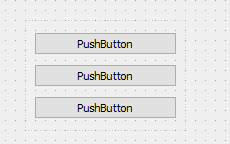
                      alt text
                      CODE
                      QGridLayout *gLayout = ui->gridLayout;
                      gLayout->addWidget(new QLabel("text below the Button",this),0,0);
                      RESULT
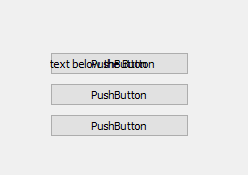
                      alt text

                      1 Reply Last reply
                      1
                      • Z Offline
                        Z Offline
                        ZekDe
                        wrote on last edited by
                        #18

                        0_1517838523725_Untitled.jpg

                        ui->horizontalLayout->addWidget(ui->DKCS_btn1);
                        ui->horizontalLayout->addWidget(new QLabel("text below the Button",this,0),0,0);
                        
                        J.HilkJ 1 Reply Last reply
                        0
                        • mrjjM Offline
                          mrjjM Offline
                          mrjj
                          Lifetime Qt Champion
                          wrote on last edited by
                          #19

                          Hi
                          If they still move a bit, its due to QLabel being other size that QButton

                          
                            QGridLayout* gLayout = ui->gridLayout;
                            QLabel *lab = new QLabel("text below the Button", this);
                            lab->setSizePolicy( ui->pushButton->sizePolicy() ); // use fixed
                            lab->setMinimumHeight(23); // same height
                            gLayout->addWidget(lab, 0, 0);
                            QTimer* tim = new QTimer(this);
                            connect (tim, &QTimer::timeout, [this]() {
                              (this->ui->pushButton->isVisible()) ? this->ui->pushButton->hide() : this->ui->pushButton->show();
                            });
                            tim->start(1000);
                          

                          result:
                          alt text

                          1 Reply Last reply
                          0
                          • Z ZekDe

                            0_1517838523725_Untitled.jpg

                            ui->horizontalLayout->addWidget(ui->DKCS_btn1);
                            ui->horizontalLayout->addWidget(new QLabel("text below the Button",this,0),0,0);
                            
                            J.HilkJ Offline
                            J.HilkJ Offline
                            J.Hilk
                            Moderators
                            wrote on last edited by
                            #20

                            @ZekDe I said previously that this trick only works with a QGridLayout if you call addwidget to a horizontal layout, that will always append the widget!


                            Be aware of the Qt Code of Conduct, when posting : https://forum.qt.io/topic/113070/qt-code-of-conduct


                            Q: What's that?
                            A: It's blue light.
                            Q: What does it do?
                            A: It turns blue.

                            1 Reply Last reply
                            1

                            • Login

                            • Login or register to search.
                            • First post
                              Last post
                            0
                            • Categories
                            • Recent
                            • Tags
                            • Popular
                            • Users
                            • Groups
                            • Search
                            • Get Qt Extensions
                            • Unsolved