Qt Creator: Code formatting and error checking
-
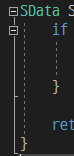
Is it possible to configure code block lines in Qt Creator?(like Visual Studio)
I couldn't find any options about it.Plus, there is a little problem about syntax error checking. I assigned value to undeclared variable but no error messages were displayed.
Is this Qt Creator's issue? I set up debugger correctly and other errors(ex. missing semicolon) are catched well. -
Is it possible to configure code block lines in Qt Creator?(like Visual Studio)
I couldn't find any options about it.Plus, there is a little problem about syntax error checking. I assigned value to undeclared variable but no error messages were displayed.
Is this Qt Creator's issue? I set up debugger correctly and other errors(ex. missing semicolon) are catched well.@JKrig said in Qt Creator: Code formatting and error checking:
Plus, there is a little problem about syntax error checking. I assigned value to undeclared variable but no error messages were displayed
It will be displayed as soon as you compile your application.
"Is it possible to configure code block lines in Qt Creator?" - not sure what you mean but maybe Options/Text Editor/Display/Highlight blocks"?
-
Hi @JKrig, welcome!
Plus, there is a little problem about syntax error checking. I assigned value to undeclared variable but no error messages were displayed.
If you enable the Clang Code Model under Help -> About Plugins, you'll get the warnings inline while editing code.
Be aware to not enable the Clang Refactoring Plugin for now, it is experimental and has some issues.
-
@JKrig said in Qt Creator: Code formatting and error checking:
Plus, there is a little problem about syntax error checking. I assigned value to undeclared variable but no error messages were displayed
It will be displayed as soon as you compile your application.
"Is it possible to configure code block lines in Qt Creator?" - not sure what you mean but maybe Options/Text Editor/Display/Highlight blocks"?