Skip to content
  • Categories
  • Recent
  • Tags
  • Popular
  • Users
  • Groups
  • Search
  • Get Qt Extensions
  • Unsolved
Collapse
Brand Logo
  1. Home
  2. Qt Development
  3. General and Desktop
  4. Resizing font size in QLCDNumber

Resizing font size in QLCDNumber

Scheduled Pinned Locked Moved Unsolved General and Desktop
13 Posts 2 Posters 11.0k Views 2 Watching
  • Oldest to Newest
  • Newest to Oldest
  • Most Votes
Reply
  • Reply as topic
Log in to reply
This topic has been deleted. Only users with topic management privileges can see it.
  • mrjjM Offline
    mrjjM Offline
    mrjj
    Lifetime Qt Champion
    wrote on last edited by mrjj
    #2

    Hi
    the digits follow its size
    so you can control it with setMinimumHeight

    As far as i know, its not really a font it uses.

    S 1 Reply Last reply
    1
    • mrjjM mrjj

      Hi
      the digits follow its size
      so you can control it with setMinimumHeight

      As far as i know, its not really a font it uses.

      S Offline
      S Offline
      ShinSat
      wrote on last edited by
      #3

      @mrjj Thanks for an update!
      Actually, I have multiple QLCDNumbers horizontally aligned and want to adjust the same larger font size.
      The issue is the font size changes based on the digit size. For example, with the same height, the font sizes are different between '2017'(smaller) and '12'.
      How can we cope with horizontally aligned multiple QLCDNumbers?

      Sat

      mrjjM 1 Reply Last reply
      0
      • S ShinSat

        @mrjj Thanks for an update!
        Actually, I have multiple QLCDNumbers horizontally aligned and want to adjust the same larger font size.
        The issue is the font size changes based on the digit size. For example, with the same height, the font sizes are different between '2017'(smaller) and '12'.
        How can we cope with horizontally aligned multiple QLCDNumbers?

        Sat

        mrjjM Offline
        mrjjM Offline
        mrjj
        Lifetime Qt Champion
        wrote on last edited by mrjj
        #4

        @ShinSat

        Can you show image ?
        Im not sure what you mean.

        What if you set all LCD to fixedsize?
        or setMinimumSize
        so they all stay same size.

        I think you will fixed with size of Widgt / layout setting and not anything font.

        S 1 Reply Last reply
        0
        • mrjjM mrjj

          @ShinSat

          Can you show image ?
          Im not sure what you mean.

          What if you set all LCD to fixedsize?
          or setMinimumSize
          so they all stay same size.

          I think you will fixed with size of Widgt / layout setting and not anything font.

          S Offline
          S Offline
          ShinSat
          wrote on last edited by
          #5

          @mrjj Thank you very much for your help.
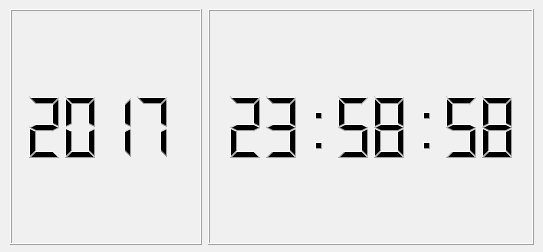
          OK, what is a smarter way to adjust the digit number size(width/height) in each GLCDNumber below?
          0_1513869872038_screen_cap.png

          Not 100% sure, but I thought dividing the numbers into 2 digits such as '20', '17', '12', and '59' would be a possible solution? Maybe??

          import sys, os, pprint, time
          from PyQt5.QtCore import *
          from PyQt5.QtGui import *
          from PyQt5.QtWidgets import *
          
          class NumberDisp(QWidget):
              def __init__(self):
                  super().__init__()
          
                  hbox = QHBoxLayout()
                  year = QLCDNumber()
                  year.setDigitCount(4)
                  year.display('2017')
                  year.setMinimumHeight(48)
          
                  timenum = QLCDNumber()
                  timenum.setDigitCount(8)
                  timenum.display('12:59:59')
                  timenum.setMinimumHeight(48)
          
                  hbox.addWidget(year)
                  hbox.addWidget(timenum)
          
                  self.setLayout(hbox)
          
          
          if __name__ == '__main__':
          
              import sys
          
              app = QApplication(sys.argv)
          
              wgt = NumberDisp()
              wgt.show()
          
              sys.exit(app.exec_())
          

          Sat

          mrjjM 1 Reply Last reply
          0
          • S ShinSat

            @mrjj Thank you very much for your help.
            OK, what is a smarter way to adjust the digit number size(width/height) in each GLCDNumber below?
            0_1513869872038_screen_cap.png

            Not 100% sure, but I thought dividing the numbers into 2 digits such as '20', '17', '12', and '59' would be a possible solution? Maybe??

            import sys, os, pprint, time
            from PyQt5.QtCore import *
            from PyQt5.QtGui import *
            from PyQt5.QtWidgets import *
            
            class NumberDisp(QWidget):
                def __init__(self):
                    super().__init__()
            
                    hbox = QHBoxLayout()
                    year = QLCDNumber()
                    year.setDigitCount(4)
                    year.display('2017')
                    year.setMinimumHeight(48)
            
                    timenum = QLCDNumber()
                    timenum.setDigitCount(8)
                    timenum.display('12:59:59')
                    timenum.setMinimumHeight(48)
            
                    hbox.addWidget(year)
                    hbox.addWidget(timenum)
            
                    self.setLayout(hbox)
            
            
            if __name__ == '__main__':
            
                import sys
            
                app = QApplication(sys.argv)
            
                wgt = NumberDisp()
                wgt.show()
            
                sys.exit(app.exec_())
            

            Sat

            mrjjM Offline
            mrjjM Offline
            mrjj
            Lifetime Qt Champion
            wrote on last edited by mrjj
            #6

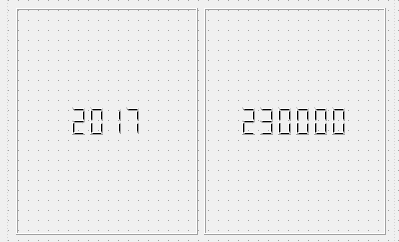
            @ShinSat
            Ah, now i understand.
            Well only thing i can think of is disable LCDs frame.
            Put the LCD in QFrames+layout and set (maybe different) max height (of LCD)
            so they are same size visually.
            Test Project
            https://www.dropbox.com/s/790v75hs1xi9g8n/LCDhax.zip?dl=0

            S 1 Reply Last reply
            3
            • mrjjM mrjj

              @ShinSat
              Ah, now i understand.
              Well only thing i can think of is disable LCDs frame.
              Put the LCD in QFrames+layout and set (maybe different) max height (of LCD)
              so they are same size visually.

              Test Project
              https://www.dropbox.com/s/790v75hs1xi9g8n/LCDhax.zip?dl=0

              S Offline
              S Offline
              ShinSat
              wrote on last edited by
              #7

              @mrjj It doesn't work.... May be, I need to switch the minimumHeight value according to the digits number. For example, '2014' vs '12:59:59'.... :<

              Sat

              mrjjM 1 Reply Last reply
              0
              • S ShinSat

                @mrjj It doesn't work.... May be, I need to switch the minimumHeight value according to the digits number. For example, '2014' vs '12:59:59'.... :<

                Sat

                mrjjM Offline
                mrjjM Offline
                mrjj
                Lifetime Qt Champion
                wrote on last edited by
                #8

                @ShinSat

                well now you can adjust the area of the LCD and let Frame area stay the same so
                it should be possible to get them same size visually.

                bte: I looked in LCD paint code. its not a font at all.

                S 1 Reply Last reply
                0
                • mrjjM mrjj

                  @ShinSat

                  well now you can adjust the area of the LCD and let Frame area stay the same so
                  it should be possible to get them same size visually.

                  bte: I looked in LCD paint code. its not a font at all.

                  S Offline
                  S Offline
                  ShinSat
                  wrote on last edited by
                  #9

                  @mrjj Thanks for an update.
                  Could you elaborate on how to adjust the sizes?
                  I found one way was to let setDigitCount(n) same in each LCD, which shows the LCD in the same visual size, however, it also extends the width of LCD.
                  How can I adjust both frame size's width and height to get the LCD contents same size visually?

                  Sat

                  1 Reply Last reply
                  0
                  • mrjjM Offline
                    mrjjM Offline
                    mrjj
                    Lifetime Qt Champion
                    wrote on last edited by mrjj
                    #10

                    Hi
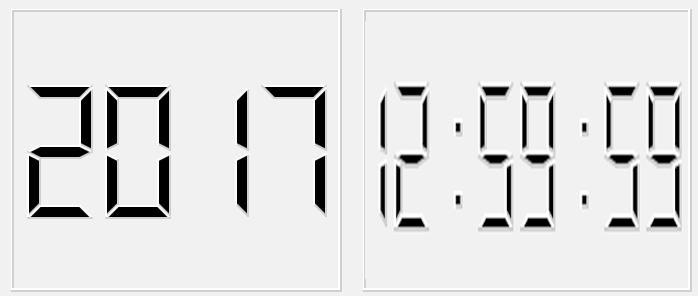
                    There is no way to have them same width and look the same when one
                    has 4 digits and other have 8 as far as i can see.

                    Using fixed size i got this
                    alt text
                    but you you seem to want same size also for the area which
                    seems impossible as the LCD will not draw distorted/other aspect
                    ratio for the digits.
                    like
                    alt text

                    S 1 Reply Last reply
                    1
                    • mrjjM mrjj

                      Hi
                      There is no way to have them same width and look the same when one
                      has 4 digits and other have 8 as far as i can see.

                      Using fixed size i got this
                      alt text
                      but you you seem to want same size also for the area which
                      seems impossible as the LCD will not draw distorted/other aspect
                      ratio for the digits.
                      like
                      alt text

                      S Offline
                      S Offline
                      ShinSat
                      wrote on last edited by
                      #11

                      Thanks a lot for sharing my issue, @mrjj!
                      Now I got the point. Yes, I've confirmed that fixed size is the key.
                      First, I thought this should be easy, but reality not.. hahahaha,,,
                      With same fixed height but doubled width for longer LCD, I can have them the same.

                      BTW, in this way, what do you think about auto-stretch on widget?
                      Generally speaking, having fixed size makes it impossible. May be,,,, I need to subclass the LCD and write custom paint code??

                      Best,
                      Sat

                      1 Reply Last reply
                      0
                      • mrjjM Offline
                        mrjjM Offline
                        mrjj
                        Lifetime Qt Champion
                        wrote on last edited by mrjj
                        #12

                        Hi
                        Depending on what the goal is, a custom paint might work.
                        There is really not the space to draw so it looks the same when more digits.
                        As you can see from the photoshopped image, it will then look distorted.
                        If that is ok, you could render it to image en paint the image scaled to get such effect.

                        Regarding the paining

                        void QLCDNumber::paintEvent(QPaintEvent *)
                        {
                            Q_D(QLCDNumber);
                            QPainter p(this);
                            drawFrame(&p);
                            p.setRenderHint(QPainter::Antialiasing);
                            if (d->shadow)
                                p.translate(0.5, 0.5);
                        
                            if (d->smallPoint)
                                d->drawString(d->digitStr, p, &d->points, false);
                            else
                                d->drawString(d->digitStr, p, 0, false);
                        }
                        
                        
                        void QLCDNumberPrivate::drawString(const QString &s, QPainter &p,
                                                           QBitArray *newPoints, bool newString)
                        {
                            Q_Q(QLCDNumber);
                            QPoint  pos;
                        
                            int digitSpace = smallPoint ? 2 : 1;
                            int xSegLen    = q->width()*5/(ndigits*(5 + digitSpace) + digitSpace);
                            int ySegLen    = q->height()*5/12;
                            int segLen     = ySegLen > xSegLen ? xSegLen : ySegLen;
                            int xAdvance   = segLen*(5 + digitSpace)/5;
                            int xOffset    = (q->width() - ndigits*xAdvance + segLen/5)/2;
                            int yOffset    = (q->height() - segLen*2)/2;
                        
                            for (int i=0;  i<ndigits; i++) {
                                pos = QPoint(xOffset + xAdvance*i, yOffset);
                                if (newString)
                                    drawDigit(pos, p, segLen, s[i].toLatin1(), digitStr[i].toLatin1());
                                else
                                    drawDigit(pos, p, segLen, s[i].toLatin1());
                                if (newPoints) {
                                    char newPoint = newPoints->testBit(i) ? '.' : ' ';
                                    if (newString) {
                                        char oldPoint = points.testBit(i) ? '.' : ' ';
                                        drawDigit(pos, p, segLen, newPoint, oldPoint);
                                    } else {
                                        drawDigit(pos, p, segLen, newPoint);
                                    }
                                }
                            }
                            if (newString) {
                                digitStr = s;
                                digitStr.truncate(ndigits);
                                if (newPoints)
                                    points = *newPoints;
                            }
                        }
                        
                        void QLCDNumberPrivate::drawDigit(const QPoint &pos, QPainter &p, int segLen,
                                                          char newCh, char oldCh)
                        {
                        // Draws and/or erases segments to change display of a single digit
                        // from oldCh to newCh
                        
                            char updates[18][2];        // can hold 2 times number of segments, only
                                                        // first 9 used if segment table is correct
                            int  nErases;
                            int  nUpdates;
                            const char *segs;
                            int  i,j;
                        
                            const char erase      = 0;
                            const char draw       = 1;
                            const char leaveAlone = 2;
                        
                            segs = getSegments(oldCh);
                            for (nErases=0; segs[nErases] != 99; nErases++) {
                                updates[nErases][0] = erase;            // get segments to erase to
                                updates[nErases][1] = segs[nErases];    // remove old char
                            }
                            nUpdates = nErases;
                            segs = getSegments(newCh);
                            for(i = 0 ; segs[i] != 99 ; i++) {
                                for (j=0;  j<nErases; j++)
                                    if (segs[i] == updates[j][1]) {   // same segment ?
                                        updates[j][0] = leaveAlone;     // yes, already on screen
                                        break;
                                    }
                                if (j == nErases) {                   // if not already on screen
                                    updates[nUpdates][0] = draw;
                                    updates[nUpdates][1] = segs[i];
                                    nUpdates++;
                                }
                            }
                            for (i=0; i<nUpdates; i++) {
                                if (updates[i][0] == draw)
                                    drawSegment(pos, updates[i][1], p, segLen);
                                if (updates[i][0] == erase)
                                    drawSegment(pos, updates[i][1], p, segLen, true);
                            }
                        }
                        

                        Its not a trivial matter to get it to draw differently.

                        What is the goal / acceptable solution?
                        Something like the image if it could be less ugly ?

                        S 1 Reply Last reply
                        0
                        • mrjjM mrjj

                          Hi
                          Depending on what the goal is, a custom paint might work.
                          There is really not the space to draw so it looks the same when more digits.
                          As you can see from the photoshopped image, it will then look distorted.
                          If that is ok, you could render it to image en paint the image scaled to get such effect.

                          Regarding the paining

                          void QLCDNumber::paintEvent(QPaintEvent *)
                          {
                              Q_D(QLCDNumber);
                              QPainter p(this);
                              drawFrame(&p);
                              p.setRenderHint(QPainter::Antialiasing);
                              if (d->shadow)
                                  p.translate(0.5, 0.5);
                          
                              if (d->smallPoint)
                                  d->drawString(d->digitStr, p, &d->points, false);
                              else
                                  d->drawString(d->digitStr, p, 0, false);
                          }
                          
                          
                          void QLCDNumberPrivate::drawString(const QString &s, QPainter &p,
                                                             QBitArray *newPoints, bool newString)
                          {
                              Q_Q(QLCDNumber);
                              QPoint  pos;
                          
                              int digitSpace = smallPoint ? 2 : 1;
                              int xSegLen    = q->width()*5/(ndigits*(5 + digitSpace) + digitSpace);
                              int ySegLen    = q->height()*5/12;
                              int segLen     = ySegLen > xSegLen ? xSegLen : ySegLen;
                              int xAdvance   = segLen*(5 + digitSpace)/5;
                              int xOffset    = (q->width() - ndigits*xAdvance + segLen/5)/2;
                              int yOffset    = (q->height() - segLen*2)/2;
                          
                              for (int i=0;  i<ndigits; i++) {
                                  pos = QPoint(xOffset + xAdvance*i, yOffset);
                                  if (newString)
                                      drawDigit(pos, p, segLen, s[i].toLatin1(), digitStr[i].toLatin1());
                                  else
                                      drawDigit(pos, p, segLen, s[i].toLatin1());
                                  if (newPoints) {
                                      char newPoint = newPoints->testBit(i) ? '.' : ' ';
                                      if (newString) {
                                          char oldPoint = points.testBit(i) ? '.' : ' ';
                                          drawDigit(pos, p, segLen, newPoint, oldPoint);
                                      } else {
                                          drawDigit(pos, p, segLen, newPoint);
                                      }
                                  }
                              }
                              if (newString) {
                                  digitStr = s;
                                  digitStr.truncate(ndigits);
                                  if (newPoints)
                                      points = *newPoints;
                              }
                          }
                          
                          void QLCDNumberPrivate::drawDigit(const QPoint &pos, QPainter &p, int segLen,
                                                            char newCh, char oldCh)
                          {
                          // Draws and/or erases segments to change display of a single digit
                          // from oldCh to newCh
                          
                              char updates[18][2];        // can hold 2 times number of segments, only
                                                          // first 9 used if segment table is correct
                              int  nErases;
                              int  nUpdates;
                              const char *segs;
                              int  i,j;
                          
                              const char erase      = 0;
                              const char draw       = 1;
                              const char leaveAlone = 2;
                          
                              segs = getSegments(oldCh);
                              for (nErases=0; segs[nErases] != 99; nErases++) {
                                  updates[nErases][0] = erase;            // get segments to erase to
                                  updates[nErases][1] = segs[nErases];    // remove old char
                              }
                              nUpdates = nErases;
                              segs = getSegments(newCh);
                              for(i = 0 ; segs[i] != 99 ; i++) {
                                  for (j=0;  j<nErases; j++)
                                      if (segs[i] == updates[j][1]) {   // same segment ?
                                          updates[j][0] = leaveAlone;     // yes, already on screen
                                          break;
                                      }
                                  if (j == nErases) {                   // if not already on screen
                                      updates[nUpdates][0] = draw;
                                      updates[nUpdates][1] = segs[i];
                                      nUpdates++;
                                  }
                              }
                              for (i=0; i<nUpdates; i++) {
                                  if (updates[i][0] == draw)
                                      drawSegment(pos, updates[i][1], p, segLen);
                                  if (updates[i][0] == erase)
                                      drawSegment(pos, updates[i][1], p, segLen, true);
                              }
                          }
                          

                          Its not a trivial matter to get it to draw differently.

                          What is the goal / acceptable solution?
                          Something like the image if it could be less ugly ?

                          S Offline
                          S Offline
                          ShinSat
                          wrote on last edited by ShinSat
                          #13

                          @mrjj said in Resizing font size in QLCDNumber:
                          I need to convert your codes to python and look into it as I'm not familiar with writing custom paint code.(any good learning material(s)?)

                          What is the goal / acceptable solution?
                          Something like the image if it could be less ugly ?

                          Yes, my goal is 'less ugly'.
                          Actually, I'm building a very complex application, which consists of multiple applications on ONE main widget. I want to have them the same look&operational feel including resizing(eg.stretching). SO,,, it looks like custom resizeEvent as well as paint would be necessary..

                          Sat

                          1 Reply Last reply
                          0

                          • Login

                          • Login or register to search.
                          • First post
                            Last post
                          0
                          • Categories
                          • Recent
                          • Tags
                          • Popular
                          • Users
                          • Groups
                          • Search
                          • Get Qt Extensions
                          • Unsolved