
QLCDnumber, slots, and my own complete loss of mental function...
-
apologies - i've just reverted to the files in the zip and they do not work, so reference to lcdNumber from relaycontroller.h has been removed and where "lcdNumber.display" was used in relayframe.cpp that has been replaced with
"ui->lcdNumber->display" to get the LCD display working for the on and off buttons.The UI element i'm trying to change is in relayframe rather than mainwindow. I'm now going to have a look at implementing your method.
-
@Aesgarth Hi,
I downloaded the zip file to take a look.
From hat I can see to far, you try to access the Mainwindow Ui element from a different class than mainwindow.
That is technically possible, but not something you should do.
my suggestion: in relaycontroller add a signal
signals:
    void lcdNumber(int number);
a private counter
private:
    QTimer *timer;
    bool state;
    int mPin;
    int cntState;
it get resetet by start
void start(){
        qDebug()<<"start";
        timer->start();
        cntState = 0;
        emit lcdNumber(0);
    }
and in you slot onTimeout you emit the new cnt
private slots:
    void onTimeout(){
        if(state){
            relayHigh();
            cntState++;
            emit lcdNumber(cntState);
        }
        else
            relayLow();
        state = !state;
    }
now you simply connect the signal to your lcd display
something like this should do it (in relayFrame),
connect(controller2 &RelayController::lcdNumber, this, [=](int number){lcdNumber.display(number);});@J.Hilk said in QLCDnumber, slots, and my own complete loss of mental function...:
@Aesgarth Hi,
I downloaded the zip file to take a look.
From hat I can see to far, you try to access the Mainwindow Ui element from a different class than mainwindow.
That is technically possible, but not something you should do.
my suggestion: in relaycontroller add a signal
signals:
    void lcdNumber(int number);
a private counter
private:
    QTimer *timer;
    bool state;
    int mPin;
    int cntState;
it get resetet by start
void start(){
        qDebug()<<"start";
        timer->start();
        cntState = 0;
        emit lcdNumber(0);
    }
and in you slot onTimeout you emit the new cnt
private slots:
    void onTimeout(){
        if(state){
            relayHigh();
            cntState++;
            emit lcdNumber(cntState);
        }
        else
            relayLow();
        state = !state;
    }
This all works out excellent, and i can get the count to output in qdebug
private slots:
    void onTimeout(){
        if(state){
            relayHigh();
	    cntState++;
            emit lcdNumber(cntState);
	    qDebug()<<cntState;
        }
        else
            relayLow();
        state = !state;
now you simply connect the signal to your lcd display
something like this should do it (in relayFrame),
connect(controller2 &RelayController::lcdNumber, this, [=](int number){lcdNumber.display(number);});However i'm struggling with this bit. I think the error was lcdNumber is protected..., i'll keep trying though and see if i can work it out.
-
@J.Hilk said in QLCDnumber, slots, and my own complete loss of mental function...:
@Aesgarth Hi,
I downloaded the zip file to take a look.
From hat I can see to far, you try to access the Mainwindow Ui element from a different class than mainwindow.
That is technically possible, but not something you should do.
my suggestion: in relaycontroller add a signal
signals:
    void lcdNumber(int number);
a private counter
private:
    QTimer *timer;
    bool state;
    int mPin;
    int cntState;
it get resetet by start
void start(){
        qDebug()<<"start";
        timer->start();
        cntState = 0;
        emit lcdNumber(0);
    }
and in you slot onTimeout you emit the new cnt
private slots:
    void onTimeout(){
        if(state){
            relayHigh();
            cntState++;
            emit lcdNumber(cntState);
        }
        else
            relayLow();
        state = !state;
    }
This all works out excellent, and i can get the count to output in qdebug
private slots:
    void onTimeout(){
        if(state){
            relayHigh();
	    cntState++;
            emit lcdNumber(cntState);
	    qDebug()<<cntState;
        }
        else
            relayLow();
        state = !state;
now you simply connect the signal to your lcd display
something like this should do it (in relayFrame),
connect(controller2 &RelayController::lcdNumber, this, [=](int number){lcdNumber.display(number);});However i'm struggling with this bit. I think the error was lcdNumber is protected..., i'll keep trying though and see if i can work it out.
mmh,
Lcd number is part of the relayframe ui so you should be able to use a normal/but overloaded connect statement
RelayFrame::RelayFrame(int pin, QWidget *parent) : QFrame(parent), ui(new Ui::RelayFrame) { ui->setupUi(this); //power cycle controller, 750ms delay controller = new RelayController(pin, 750); //heat cycle controller, 2 hour (5400000ms) delay controller2 = new RelayController(pin,5400000); connect(controller2 &RelayController::lcdNumber, ui->lcdNumber, QOverload<int>::of(&QLCDNumber::display)); } -
mmh,
Lcd number is part of the relayframe ui so you should be able to use a normal/but overloaded connect statement
RelayFrame::RelayFrame(int pin, QWidget *parent) : QFrame(parent), ui(new Ui::RelayFrame) { ui->setupUi(this); //power cycle controller, 750ms delay controller = new RelayController(pin, 750); //heat cycle controller, 2 hour (5400000ms) delay controller2 = new RelayController(pin,5400000); connect(controller2 &RelayController::lcdNumber, ui->lcdNumber, QOverload<int>::of(&QLCDNumber::display)); }@J.Hilk
getting what appears to be the same error with that.so what i'm currently working with is:
relayframe.h
#ifndef RELAYFRAME_H
#define RELAYFRAME_H

#include "relaycontroller.h"

#include <QFrame>

namespace Ui {
class RelayFrame;
}

class RelayFrame : public QFrame
{
    Q_OBJECT

public:
    explicit RelayFrame(int pin, QWidget *parent = 0);
    ~RelayFrame();

private slots:
    void on_powerBrtn_toggled(bool checked);

    void on_onBtn_clicked();

    void on_offBtn_clicked();

    void on_heatBtn_toggled(bool checked);

private:
    Ui::RelayFrame *ui;
    RelayController *controller;
    RelayController *controller2;
};

#endif // RELAYFRAME_H
relayframe.cpp
#include "relayframe.h"
#include "ui_relayframe.h"

#include <QPushButton>


//relayframe is a box with buttons and an LCD widget in it,
//created for each individual output pin. relayframe.ui is an XML
//file determining layout, code is in relayframe.h
RelayFrame::RelayFrame(int pin, QWidget *parent) :
    QFrame(parent),
    ui(new Ui::RelayFrame)
{
    ui->setupUi(this);
    //power cycle controller, 750ms delay
    controller = new RelayController(pin, 750);
	//heat cycle controller, 2 hour (5400000ms) delay
    controller2 = new RelayController(pin,5400000);
}

RelayFrame::~RelayFrame()
{
    delete ui;
}
// Power cycle button button
// While clicked controller initialised above, found in relaycontroller.h
// runs, when unchecked it stops (only one button per frame can be clicked
// at once, buttons auto toggle on)
void RelayFrame::on_powerBrtn_toggled(bool checked)
{
    if(checked)
        controller->start();
    else controller->stop();
}
// On button - turns on the pin relevant to this frame
void RelayFrame::on_onBtn_clicked()
{
    controller->relayHigh();
    //Set LCD to 1 while on...
	//this works
    ui->lcdNumber->display(1);
}
// Off button - turns off the pin relevant to this frame
void RelayFrame::on_offBtn_clicked()
{
    controller->relayLow();
	//Set LCD to 0 while off...
	//this works
	ui->lcdNumber->display(0);
}
// Heat cycle button
// While clicked controller2 initialised above, found in relaycontroller.h
// runs, when unchecked it stops (only one button per frame can be clicked
// at once, buttons auto toggle on.
void RelayFrame::on_heatBtn_toggled(bool checked)
{
    if(checked)
        controller2->start();
    else controller2->stop();
}
// Everything currently in here works
and relaycontroller.h
#ifndef RELAYCONTROLLER_H
#define RELAYCONTROLLER_H

#include <QObject>
#include <QTimer>
#include <wiringPi.h>
#include <QDebug>

class RelayController : public QObject
{
    Q_OBJECT

signals:
    void lcdNumber(int number);

public:
    explicit RelayController(int pin, int delay, QObject *parent = 0):QObject(parent){
        timer = new QTimer(this);
        state = false;
        timer->setInterval(delay);
        mPin = pin;
        connect(timer, SIGNAL(timeout()), this, SLOT(onTimeout()));
        pinMode (mPin, OUTPUT);
		//Sets relay to off on startup
        relayLow();
    }
    void start(){
        //qDebug()<<"start";
		//start timer
        timer->start();
		//sets counter to 0 at start. Works
        cntState = 0;
        emit lcdNumber(0);
    }
    void stop(){
        //qDebug()<<"stop";
		//
        timer->stop();
    }

    void relayLow(){
		//Turn off relay
        digitalWrite (mPin, LOW);
        //qDebug()<<"low";
    }
    void relayHigh(){
        //relay on
        digitalWrite(mPin, HIGH);
        //qDebug()<<"high";
    }
private slots:
    void onTimeout(){
        if(state){
			//turn on relay
            relayHigh();
			//increment counter
			cntState++;
			//
            emit lcdNumber(cntState);
			//debug output counter value. works.
			qDebug()<<cntState;
        }
        else
            relayLow();
        state = !state;
    }
private:
    QTimer *timer;
    bool state;
    int mPin;
	int cntState;
};


#endif // RELAYCONTROLLER_H
Posting this for my own reference point as much as anything else - so if i break it i know where to come back to.
-
I think i'm going to have to give up on this for the moment. I can't get it to work, and i don't have time to properly learn what i'm doing wrong as well as doing my actual job. If it wasn't for each compile taking up to 10 minutes i might be in with a chance. that and not being able to copy error codes off the remote device.
Really frustrating being this close, however i clearly don't understand what i'm doing... I'm going to have to try to set aside some time to properly learn how to use QT and come back to this.
-
Hi
it looks pretty close but hard to say without the actual error and line number :)
Let me know if you need a sample of talking to an LCD from other class.
The basic version is not that complicated, but can be hard the first times. -
Hi
it looks pretty close but hard to say without the actual error and line number :)
Let me know if you need a sample of talking to an LCD from other class.
The basic version is not that complicated, but can be hard the first times. -
@Aesgarth
Hi
Here is a very basic sample.
I has LCD in mainwindow and pops a dialog where u can enter number to have it display that.
It as basic as it can get as i try to have as little code as possible to focus on the signal and slot thing.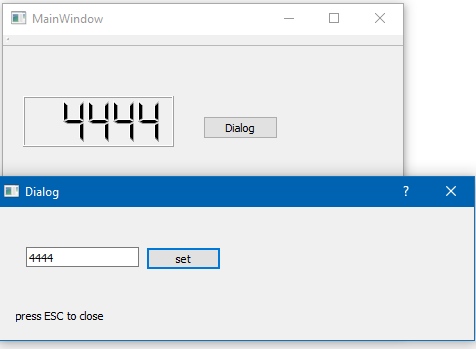
Test Project
https://www.dropbox.com/s/u94zqx9v9c8xfdf/LCDOtherClass.zip?dl=0(sorry its c++. I wish i could do python :)
Even its a MainWindow, the concept is 100% the same.
So slot in class that has LCD and signal in controller. -
@Aesgarth
Hi
Here is a very basic sample.
I has LCD in mainwindow and pops a dialog where u can enter number to have it display that.
It as basic as it can get as i try to have as little code as possible to focus on the signal and slot thing.Test Project
https://www.dropbox.com/s/u94zqx9v9c8xfdf/LCDOtherClass.zip?dl=0(sorry its c++. I wish i could do python :)
Even its a MainWindow, the concept is 100% the same.
So slot in class that has LCD and signal in controller.@mrjj
Excellent, that helps... I think i understand what's going on there...
however.... this bit...void MainWindow::on_pushButton_released() { Dialog dia; connect( &dia, &Dialog::SetLCD, this, &MainWindow::SetLCD ); dia.exec(); }i'm not sure where to put it in my version.
relaycontroller.h is where pretty much everything happens - switching of things and the counter...
#ifndef RELAYCONTROLLER_H
#define RELAYCONTROLLER_H

#include <QObject>
#include <QTimer>
#include <wiringPi.h>
#include <QDebug>

class RelayController : public QObject
{
    Q_OBJECT
public:
    explicit RelayController(int pin, int delay, QObject *parent = 0):QObject(parent){
        timer = new QTimer(this);
        state = false;
        timer->setInterval(delay);
        mPin = pin;
        //old style
        connect(timer, SIGNAL(timeout()), this, SLOT(onTimeout()));
        //new style
        //connect(timer, &QTimer::timeout, this, &RelayController::onTimeout);
        pinMode (mPin, OUTPUT);
        relayLow();
    }
    void start(){
        qDebug()<<"start";
        timer->start();
		//zero counter
		cntState = 0;
		//send to LCD
        emit setLCD(0);
    }
    void stop(){
        qDebug()<<"stop";
        timer->stop();
    }

    void relayLow(){
        digitalWrite (mPin, LOW);
        qDebug()<<"low";
    }
    void relayHigh(){
        //code here: relay on
        digitalWrite(mPin, HIGH);
        qDebug()<<"high";
    }
signals:
    void setLCD(int number);

private slots:
    void onTimeout(){
        if(state){
            relayHigh();
			//increment counter
			cntState++;
			//send to LCD
            emit setLCD(cntState);
			qDebug()<<cntState;
        }
        else
            relayLow();
        state = !state;
    }
private:
    QTimer *timer;
    bool state;
    int mPin;
	int cntState;
};


#endif // RELAYCONTROLLER_H
and RelayFrame is where the LCD is...
#include "relayframe.h"
#include "ui_relayframe.h"

#include <QPushButton>


//relayframe is a box with buttons and an LCD widget in it,
//created for each individual output pin. relayframe.ui is an XML
//file determining layout, code is in relayframe.h
RelayFrame::RelayFrame(int pin, QWidget *parent) :
    QFrame(parent),
    ui(new Ui::RelayFrame)
{
    ui->setupUi(this);
    //power cycle controller, 750ms delay
    controller = new RelayController(pin, 750);
    //heat cycle controller, 2 hour (5400000ms) delay
    controller2 = new RelayController(pin,5400000);
}

RelayFrame::~RelayFrame()
{
    delete ui;
}
// Power cycle button button
// While clicked controller initialised above, found in relaycontroller.h
// runs, when unchecked it stops (only one button per frame can be clicked
// at once, buttons auto toggle on)
void RelayFrame::on_powerBrtn_toggled(bool checked)
{
    if(checked)
        controller->start();
    else controller->stop();
}
// On button - turns on the pin relevant to this frame
void RelayFrame::on_onBtn_clicked()
{
    controller->relayHigh();
    //Set LCD to 1 while on...
    ui->lcdNumber->display(1);
}
// Off button - turns off the pin relevant to this frame
void RelayFrame::on_offBtn_clicked()
{
    controller->relayLow();
	ui->lcdNumber->display(0);
}
// Heat cycle button
// While clicked controller2 initialised above, found in relaycontroller.h
// runs, when unchecked it stops (only one button per frame can be clicked
// at once, buttons auto toggle on.
void RelayFrame::on_heatBtn_toggled(bool checked)
{
    if(checked)
        controller2->start();
    else controller2->stop();
}
//
void RelayFrame::SetLCD(int value)
{
  ui->lcdNumber->display( QString::number(value)  );
}
This compiles and runs - but obviously as setLCD in the 2 places are not connected as yet the LCD number doesn't update...
Edit: there's something odd going on with the indentation when i copy and paste - but it looks ok before i do that, and seems to work. The last few lines of RelayFrame are where the relevant code is...
-
Hi
the Dialog is the controller and
mainwindow is relayframeRelayFrame::RelayFrame(int pin, QWidget *parent) : QFrame(parent), ui(new Ui::RelayFrame) { ui->setupUi(this); controller = new RelayController(pin, 750); // connect here ! controller2 = new RelayController(pin,5400000); // and HERE too } -
Hi
the Dialog is the controller and
mainwindow is relayframeRelayFrame::RelayFrame(int pin, QWidget *parent) : QFrame(parent), ui(new Ui::RelayFrame) { ui->setupUi(this); controller = new RelayController(pin, 750); // connect here ! controller2 = new RelayController(pin,5400000); // and HERE too }OK, so i've probably done this wrong, but i have the following errors:
/home/pi/LampTesterV2/relayframe.cpp:17: error: ‘void RelayController::SetLCD(int)’ is protected within this context
  connect(&RelayController::SetLCD, this, &RelayFrame::SetLCD  );
                            ^~~~~~

/home/pi/LampTesterV2/relayframe.cpp:17: error: no matching function for call to ‘RelayFrame::connect(void (RelayController::*)(int), RelayFrame*, void (RelayFrame::*)(int))’
  connect(&RelayController::SetLCD, this, &RelayFrame::SetLCD  );
                                                               ^
in this bit...
RelayFrame::RelayFrame(int pin, QWidget *parent) :
    QFrame(parent),
    ui(new Ui::RelayFrame)
{
    ui->setupUi(this);
    //power cycle controller, 750ms delay
    controller = new RelayController(pin, 750);
	connect(&RelayController::SetLCD, this, &RelayFrame::SetLCD  );
    //heat cycle controller, 2 hour (5400000ms) delay
    controller2 = new RelayController(pin,5400000);
	connect(&RelayController::SetLCD, this, &RelayFrame::SetLCD  );
}
which doesn't look right to me anyway as i have the exact same thing twice...
-
OK, so i've probably done this wrong, but i have the following errors:
/home/pi/LampTesterV2/relayframe.cpp:17: error: ‘void RelayController::SetLCD(int)’ is protected within this context
  connect(&RelayController::SetLCD, this, &RelayFrame::SetLCD  );
                            ^~~~~~

/home/pi/LampTesterV2/relayframe.cpp:17: error: no matching function for call to ‘RelayFrame::connect(void (RelayController::*)(int), RelayFrame*, void (RelayFrame::*)(int))’
  connect(&RelayController::SetLCD, this, &RelayFrame::SetLCD  );
                                                               ^
in this bit...
RelayFrame::RelayFrame(int pin, QWidget *parent) :
    QFrame(parent),
    ui(new Ui::RelayFrame)
{
    ui->setupUi(this);
    //power cycle controller, 750ms delay
    controller = new RelayController(pin, 750);
	connect(&RelayController::SetLCD, this, &RelayFrame::SetLCD  );
    //heat cycle controller, 2 hour (5400000ms) delay
    controller2 = new RelayController(pin,5400000);
	connect(&RelayController::SetLCD, this, &RelayFrame::SetLCD  );
}
which doesn't look right to me anyway as i have the exact same thing twice...
-
That considerably reduced the error count, however....
/usr/include/qt4/QtCore/qobjectdefs.h:69: error: expected ‘:’ before ‘protected’
 #   define signals protected
                    ^

/home/pi/LampTesterV2/relaycontroller.h:47: in expansion of macro ‘signals’
 public signals:
        ^~~~~~~
Edited to include the next line.
-
That considerably reduced the error count, however....
/usr/include/qt4/QtCore/qobjectdefs.h:69: error: expected ‘:’ before ‘protected’
 #   define signals protected
                    ^

/home/pi/LampTesterV2/relaycontroller.h:47: in expansion of macro ‘signals’
 public signals:
        ^~~~~~~
Edited to include the next line.
-
I think the problem is with how i'm trying to connect the 2 - since using public signals: i get the same error with the connect lines commented out, but just using signals: (as per the example) works until i try to connect the signal and slot...
does this look right?
connect(&RelayController::SetLCD, this, &RelayFrame::SetLCD); -
I think the problem is with how i'm trying to connect the 2 - since using public signals: i get the same error with the connect lines commented out, but just using signals: (as per the example) works until i try to connect the signal and slot...
does this look right?
connect(&RelayController::SetLCD, this, &RelayFrame::SetLCD); -
OK... i'm totally convinced the above is not right as i should be trying to connect the signal from controller or controller2 to the slot in RelayFrame, rather than the signal from RelayController...
@Aesgarth
you miss the first part
connect(controller, &RelayController::SetLCD, this, &RelayFrame::SetLCD);
and
connect(controller2, &RelayController::SetLCD, this, &RelayFrame::SetLCD);the syntax is
connect ( pointer to object, function address , pointer to object, function address )
(unless you are using lambdas)
-
Thanks, that looks better but i'm back to
/home/pi/LampTesterV2/relayframe.cpp:17: error: ‘void RelayController::SetLCD(int)’ is protected within this context
  connect(&RelayController::SetLCD, this, &RelayFrame::SetLCD  );
                            ^~~~~~

/home/pi/LampTesterV2/relayframe.cpp:17: error: no matching function for call to ‘RelayFrame::connect(void (RelayController::*)(int), RelayFrame*, void (RelayFrame::*)(int))’
  connect(&RelayController::SetLCD, this, &RelayFrame::SetLCD  );
                                                               ^
And i only have access to the device for the next hour, so... I think i'll have a bit of a practice at home over Christmas and see if i can improve any, and come back to this next year. Thanks for all the help @mrjj and @J.Hilk
-
Thanks, that looks better but i'm back to
/home/pi/LampTesterV2/relayframe.cpp:17: error: ‘void RelayController::SetLCD(int)’ is protected within this context
  connect(&RelayController::SetLCD, this, &RelayFrame::SetLCD  );
                            ^~~~~~

/home/pi/LampTesterV2/relayframe.cpp:17: error: no matching function for call to ‘RelayFrame::connect(void (RelayController::*)(int), RelayFrame*, void (RelayFrame::*)(int))’
  connect(&RelayController::SetLCD, this, &RelayFrame::SetLCD  );
                                                               ^
And i only have access to the device for the next hour, so... I think i'll have a bit of a practice at home over Christmas and see if i can improve any, and come back to this next year. Thanks for all the help @mrjj and @J.Hilk
Hi
i think it says your RelayController::SetLCD is PROTECTED and not public.
Since you are in another class, you cant use a protected member.Ok. we nail it in 2018 ;)

