
Main windows suddenly stops accepting certian keystrokes
-
Before, some garbage. But I removed everything until now only the central widget remains, and I'm getting the same behavior.
@Trayon
hmm that is odd then as mainwindow should be the only widget.
Are you using
http://doc.qt.io/qt-5/qshortcut.html
in shortCuts ? -
No, I created my own shortcut class. Wasn't aware of this one. These are all single key strokes. I may upgrade in the future.
-
I'm thinking maybe there's a hidden delegate in the TreeView that's taking the inputs, because I did your test, and it seems that almost all non-text input gets registered.
Can you see the project I uploaded?
[0_1513715161369_Monstrocity.tar.gz](Uploading 100%)
-
I'm thinking maybe there's a hidden delegate in the TreeView that's taking the inputs, because I did your test, and it seems that almost all non-text input gets registered.
Can you see the project I uploaded?
[0_1513715161369_Monstrocity.tar.gz](Uploading 100%)
@Trayon
Nope, upload is broken. sorry.
Yes a treeview does take keys unless you set FocusPolicy to Nofocus
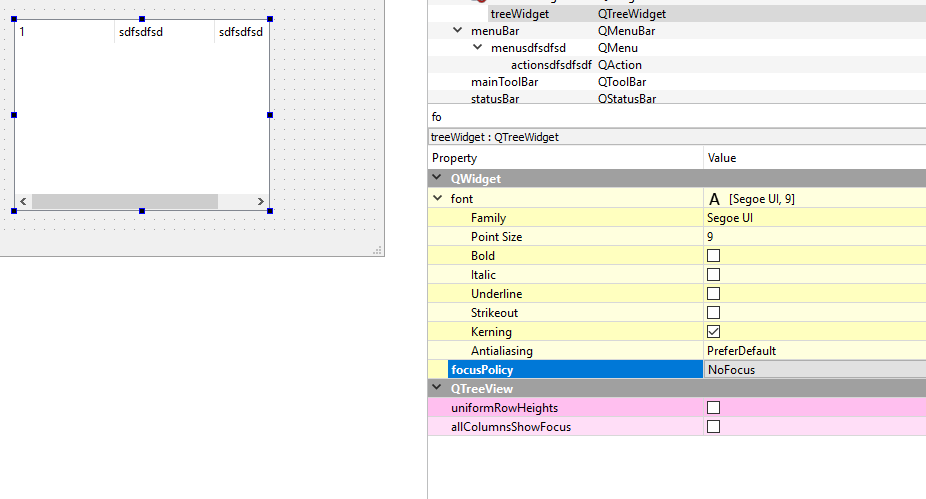
But what are you trying ?
Any key goes to active control and some might not reach MainWindow at all.
This is pr default.KeyPress in MainWindow is only called if it has focus. Its not a grabAll place.
-
How won't the keys reach MainWindow? Also, if "Key_Alt" works, why isn't 'q' working? Shouldn't it have focus for "Key_Alt" to work?
As for what I'm trying to do, think emacs. Just trying to make a bunch of shortcuts so that in the future, the majority of the program runs with keys instead of mouse clicks.
One last thing. I set the TreeView in code. I tried:
treeView.setFocus(Qt::FocusPolicy::StrongFocus);Which doesn't work. What's the proper way to use it?
-
How won't the keys reach MainWindow? Also, if "Key_Alt" works, why isn't 'q' working? Shouldn't it have focus for "Key_Alt" to work?
As for what I'm trying to do, think emacs. Just trying to make a bunch of shortcuts so that in the future, the majority of the program runs with keys instead of mouse clicks.
One last thing. I set the TreeView in code. I tried:
treeView.setFocus(Qt::FocusPolicy::StrongFocus);Which doesn't work. What's the proper way to use it?
@Trayon
Its how events propagate in the system.
Please see
http://doc.qt.io/qt-5/eventsandfilters.htmlI think you will find that
http://doc.qt.io/qt-5/qshortcut.html
works much better for a key driven application.treeView.setFocus(Qt::FocusPolicy::StrongFocus);
This is the default setting. if to disable it can have focus then
treeView.setFocus(Qt::FocusPolicy::NoFocus); -
Not sure if I should open a new thread for this, but for the sake of maintaining relevance, I think I'll follow up here.
I have this new function that establishes a 'connect' with the new syntax so that I can use a lambda. Problem is there isn't much information on the web about this 'triggered' function:
void HotKeyManager::setShortcuts(QWidget *parent)
{
    QShortcut *keyQ = new QShortcut(parent);

    QObject::connect(keyQ, &QAction::triggered, [this](){
        QModelIndex selection = treeview->selectionModel()->currentIndex();
        model->clearChildCopies(selection);
    });
}
Could you please explain how I should be using this trigger?
-
Not sure if I should open a new thread for this, but for the sake of maintaining relevance, I think I'll follow up here.
I have this new function that establishes a 'connect' with the new syntax so that I can use a lambda. Problem is there isn't much information on the web about this 'triggered' function:
void HotKeyManager::setShortcuts(QWidget *parent)
{
    QShortcut *keyQ = new QShortcut(parent);

    QObject::connect(keyQ, &QAction::triggered, [this](){
        QModelIndex selection = treeview->selectionModel()->currentIndex();
        model->clearChildCopies(selection);
    });
}
Could you please explain how I should be using this trigger?
Hi
The triggered is just like a buttons cliked().
The signal that is emitted when its keys is being pressed.
You can connect to any kind of slot like normally.So for a key driven app, i woul dmost like connect it to slots in mainwindow .

