
Skip to content
  • Categories
  • Recent
  • Tags
  • Popular
  • Users
  • Groups
  • Search
  • Get Qt
  • Unsolved
Collapse
qtws26_logo

The Qt Event of the Year: Qt World Summit 2026

Save Your Spot >
Brand Logo
  1. Home
  2. Qt Development
  3. General and Desktop
  4. Main windows suddenly stops accepting certian keystrokes
Qt 6.12 LTS is out! See what's new in the release blog

Main windows suddenly stops accepting certian keystrokes

Scheduled Pinned Locked Moved Unsolved General and Desktop
16 Posts 2 Posters 4.7k Views 1 Watching
  • Oldest to Newest
  • Newest to Oldest
  • Most Votes
Reply
  • Reply as topic
Log in to reply
This topic has been deleted. Only users with topic management privileges can see it.
  • TrayonT Offline
    TrayonT Offline
    Trayon
    wrote on last edited by
    #5

    Before, some garbage. But I removed everything until now only the central widget remains, and I'm getting the same behavior.

    mrjjM 1 Reply Last reply
    0
    • TrayonT Trayon

      Before, some garbage. But I removed everything until now only the central widget remains, and I'm getting the same behavior.

      mrjjM Offline
      mrjjM Offline
      mrjj
      Lifetime Qt Champion
      wrote on last edited by
      #6

      @Trayon
      hmm that is odd then as mainwindow should be the only widget.
      Are you using
      http://doc.qt.io/qt-5/qshortcut.html
      in shortCuts ?

      1 Reply Last reply
      0
      • TrayonT Offline
        TrayonT Offline
        Trayon
        wrote on last edited by
        #7

        No, I created my own shortcut class. Wasn't aware of this one. These are all single key strokes. I may upgrade in the future.

        mrjjM 1 Reply Last reply
        0
        • TrayonT Trayon

          No, I created my own shortcut class. Wasn't aware of this one. These are all single key strokes. I may upgrade in the future.

          mrjjM Offline
          mrjjM Offline
          mrjj
          Lifetime Qt Champion
          wrote on last edited by
          #8

          @Trayon
          Have you clean the build folder?
          If i make a default GUI project and do

          void MainWindow::keyPressEvent(QKeyEvent *event)
          {
              qDebug() << "KEY";
          }


          It gets all keys so you must have something that like keys around :)

          1 Reply Last reply
          0
          • TrayonT Offline
            TrayonT Offline
            Trayon
            wrote on last edited by
            #9

            I'm thinking maybe there's a hidden delegate in the TreeView that's taking the inputs, because I did your test, and it seems that almost all non-text input gets registered.

            Can you see the project I uploaded?

            [0_1513715161369_Monstrocity.tar.gz](Uploading 100%)

            mrjjM 1 Reply Last reply
            0
            • TrayonT Trayon

              I'm thinking maybe there's a hidden delegate in the TreeView that's taking the inputs, because I did your test, and it seems that almost all non-text input gets registered.

              Can you see the project I uploaded?

              [0_1513715161369_Monstrocity.tar.gz](Uploading 100%)

              mrjjM Offline
              mrjjM Offline
              mrjj
              Lifetime Qt Champion
              wrote on last edited by
              #10

              @Trayon
              Nope, upload is broken. sorry.
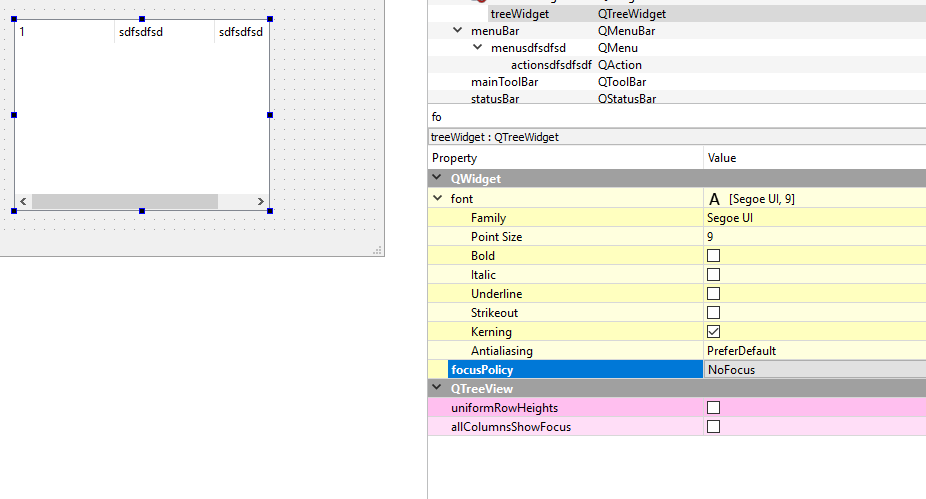
              Yes a treeview does take keys unless you set FocusPolicy to Nofocus
              alt text

              But what are you trying ?
              Any key goes to active control and some might not reach MainWindow at all.
              This is pr default.

              KeyPress in MainWindow is only called if it has focus. Its not a grabAll place.

              1 Reply Last reply
              0
              • TrayonT Offline
                TrayonT Offline
                Trayon
                wrote on last edited by
                #11

                How won't the keys reach MainWindow? Also, if "Key_Alt" works, why isn't 'q' working? Shouldn't it have focus for "Key_Alt" to work?

                As for what I'm trying to do, think emacs. Just trying to make a bunch of shortcuts so that in the future, the majority of the program runs with keys instead of mouse clicks.

                One last thing. I set the TreeView in code. I tried:

                treeView.setFocus(Qt::FocusPolicy::StrongFocus);
                

                Which doesn't work. What's the proper way to use it?

                mrjjM 1 Reply Last reply
                0
                • TrayonT Trayon

                  How won't the keys reach MainWindow? Also, if "Key_Alt" works, why isn't 'q' working? Shouldn't it have focus for "Key_Alt" to work?

                  As for what I'm trying to do, think emacs. Just trying to make a bunch of shortcuts so that in the future, the majority of the program runs with keys instead of mouse clicks.

                  One last thing. I set the TreeView in code. I tried:

                  treeView.setFocus(Qt::FocusPolicy::StrongFocus);
                  

                  Which doesn't work. What's the proper way to use it?

                  mrjjM Offline
                  mrjjM Offline
                  mrjj
                  Lifetime Qt Champion
                  wrote on last edited by
                  #12

                  @Trayon
                  Its how events propagate in the system.
                  Please see
                  http://doc.qt.io/qt-5/eventsandfilters.html

                  I think you will find that
                  http://doc.qt.io/qt-5/qshortcut.html
                  works much better for a key driven application.

                  treeView.setFocus(Qt::FocusPolicy::StrongFocus);
                  This is the default setting. if to disable it can have focus then
                  treeView.setFocus(Qt::FocusPolicy::NoFocus);

                  1 Reply Last reply
                  1
                  • TrayonT Offline
                    TrayonT Offline
                    Trayon
                    wrote on last edited by
                    #13

                    Thanks, I'll give that a shot. Let's hope it behaves better.

                    mrjjM 1 Reply Last reply
                    0
                    • TrayonT Trayon

                      Thanks, I'll give that a shot. Let's hope it behaves better.

                      mrjjM Offline
                      mrjjM Offline
                      mrjj
                      Lifetime Qt Champion
                      wrote on last edited by
                      #14

                      @Trayon
                      Well QShortcut are hooked into the event system and
                      can get keys even other widgets have focus so it will work far
                      better than KeyPress in mainwindow as it only take 1 lineEdit to steal all keys from mainwindow.

                      1 Reply Last reply
                      0
                      • TrayonT Offline
                        TrayonT Offline
                        Trayon
                        wrote on last edited by
                        #15

                        Not sure if I should open a new thread for this, but for the sake of maintaining relevance, I think I'll follow up here.

                        I have this new function that establishes a 'connect' with the new syntax so that I can use a lambda. Problem is there isn't much information on the web about this 'triggered' function:

                        void HotKeyManager::setShortcuts(QWidget *parent)
                        {
                            QShortcut *keyQ = new QShortcut(parent);
                        
                            QObject::connect(keyQ, &QAction::triggered, [this](){
                                QModelIndex selection = treeview->selectionModel()->currentIndex();
                                model->clearChildCopies(selection);
                            });
                        }
                        

                        Could you please explain how I should be using this trigger?

                        mrjjM 1 Reply Last reply
                        0
                        • TrayonT Trayon

                          Not sure if I should open a new thread for this, but for the sake of maintaining relevance, I think I'll follow up here.

                          I have this new function that establishes a 'connect' with the new syntax so that I can use a lambda. Problem is there isn't much information on the web about this 'triggered' function:

                          void HotKeyManager::setShortcuts(QWidget *parent)
                          {
                              QShortcut *keyQ = new QShortcut(parent);
                          
                              QObject::connect(keyQ, &QAction::triggered, [this](){
                                  QModelIndex selection = treeview->selectionModel()->currentIndex();
                                  model->clearChildCopies(selection);
                              });
                          }
                          

                          Could you please explain how I should be using this trigger?

                          mrjjM Offline
                          mrjjM Offline
                          mrjj
                          Lifetime Qt Champion
                          wrote on last edited by
                          #16

                          Hi
                          The triggered is just like a buttons cliked().
                          The signal that is emitted when its keys is being pressed.
                          You can connect to any kind of slot like normally.

                          So for a key driven app, i woul dmost like connect it to slots in mainwindow .

                          1 Reply Last reply
                          0

                          • Login

                          • Login or register to search.
                          • First post
                            Last post
                          0
                          • Categories
                          • Recent
                          • Tags
                          • Popular
                          • Users
                          • Groups
                          • Search
                          • Get Qt
                          • Unsolved