Skip to content
  • Categories
  • Recent
  • Tags
  • Popular
  • Users
  • Groups
  • Search
  • Get Qt Extensions
  • Unsolved
Collapse
Brand Logo
  1. Home
  2. Qt Development
  3. General and Desktop
  4. Symbolic links not supported; disabling -L

Symbolic links not supported; disabling -L

Scheduled Pinned Locked Moved Unsolved General and Desktop
13 Posts 4 Posters 7.7k Views 2 Watching
  • Oldest to Newest
  • Newest to Oldest
  • Most Votes
Reply
  • Reply as topic
Log in to reply
This topic has been deleted. Only users with topic management privileges can see it.
  • mrjjM Offline
    mrjjM Offline
    mrjj
    Lifetime Qt Champion
    wrote on last edited by
    #2

    Hi
    welcome to the forums.
    It sounds you put something in the .pro file that windows do not like.

    If you create a default GUI project, does it still say that?

    if NO, Please list your .pro file for the project

    1 Reply Last reply
    0
    • M Offline
      M Offline
      MR_mn
      wrote on last edited by
      #3

      This happens when I create a default GUI project, and when I try to run examples as well.
      When I open the compiler tab, it also says "no rule to make target .. . Stop" and won't let me run even a simple window project. The only thing that I added was the link to the GCC library because it was returning some other issues while compiling.

      Thanks

      1 Reply Last reply
      0
      • mrjjM Offline
        mrjjM Offline
        mrjj
        Lifetime Qt Champion
        wrote on last edited by
        #4

        Hi
        sounds like something wrong in/with your kits.

        http://wiki.qt.io/MinGW-64-bit

        Did you compile your own version of Qt ?

        1 Reply Last reply
        0
        • M Offline
          M Offline
          MR_mn
          wrote on last edited by
          #5

          Nope, I downloaded it from the website.
          I had read that page before, I’m using qt 5.9.2 with mingw-w 64 downloaded from the official mingw website. I maybe have to try the cross-compiled QT version?

          1 Reply Last reply
          0
          • SGaistS Offline
            SGaistS Offline
            SGaist
            Lifetime Qt Champion
            wrote on last edited by
            #6

            Hi and welcome to devnet,

            The Qt installer already provides the MinGW version used to build Qt, you should rather use that one.

            Interested in AI ? www.idiap.ch
            Please read the Qt Code of Conduct - https://forum.qt.io/topic/113070/qt-code-of-conduct

            mrjjM 1 Reply Last reply
            1
            • SGaistS SGaist

              Hi and welcome to devnet,

              The Qt installer already provides the MinGW version used to build Qt, you should rather use that one.

              mrjjM Offline
              mrjjM Offline
              mrjj
              Lifetime Qt Champion
              wrote on last edited by
              #7

              @SGaist
              Hi
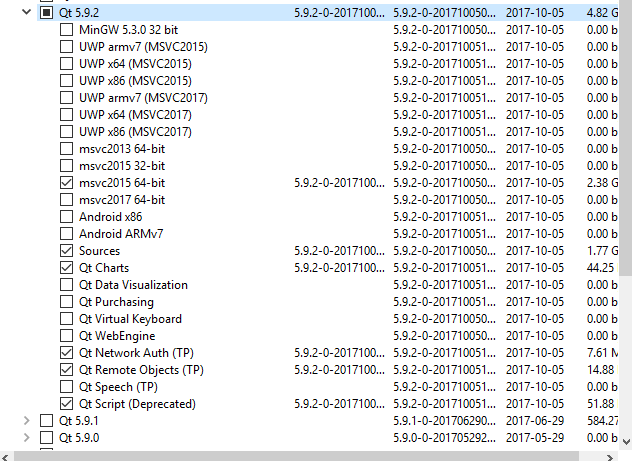
              Is that not only 32 bit versions ?
              Or did i miss something?
              alt text

              1 Reply Last reply
              0
              • SGaistS Offline
                SGaistS Offline
                SGaist
                Lifetime Qt Champion
                wrote on last edited by
                #8

                Indeed, but from its post, it seems the OP installed Qt for MinGW but use a compiler from somewhere else.

                Interested in AI ? www.idiap.ch
                Please read the Qt Code of Conduct - https://forum.qt.io/topic/113070/qt-code-of-conduct

                mrjjM 1 Reply Last reply
                1
                • SGaistS SGaist

                  Indeed, but from its post, it seems the OP installed Qt for MinGW but use a compiler from somewhere else.

                  mrjjM Offline
                  mrjjM Offline
                  mrjj
                  Lifetime Qt Champion
                  wrote on last edited by
                  #9

                  @SGaist
                  Ah, i read it as he needed to use mingw-64 bit :)

                  M 1 Reply Last reply
                  0
                  • mrjjM mrjj

                    @SGaist
                    Ah, i read it as he needed to use mingw-64 bit :)

                    M Offline
                    M Offline
                    MR_mn
                    wrote on last edited by
                    #10

                    Well..if I have a 64 bit OS shouldn’t I use Mingw-w64?

                    mrjjM 1 Reply Last reply
                    0
                    • M MR_mn

                      Well..if I have a 64 bit OS shouldn’t I use Mingw-w64?

                      mrjjM Offline
                      mrjjM Offline
                      mrjj
                      Lifetime Qt Champion
                      wrote on last edited by
                      #11

                      @MR_mn
                      Only if you want to build 64 bit programs.
                      Using mingw 32 bit works fine on 64 bit windows and
                      its much easier to get going as its directly supported.

                      1 Reply Last reply
                      1
                      • M Offline
                        M Offline
                        MR_mn
                        wrote on last edited by
                        #12

                        Ok I'm going to install QT with mingw 32 bit, the only thing is what if I want to build programs for 64 bit Windows?

                        Thanks

                        jsulmJ 1 Reply Last reply
                        0
                        • M MR_mn

                          Ok I'm going to install QT with mingw 32 bit, the only thing is what if I want to build programs for 64 bit Windows?

                          Thanks

                          jsulmJ Offline
                          jsulmJ Offline
                          jsulm
                          Lifetime Qt Champion
                          wrote on last edited by jsulm
                          #13

                          @MR_mn Then either use Visua Studio C++ compiler (you can get Visual Studio for free) or build Qt by yourself with MinGW (there are no official Qt builds for MinGW 64bit).

                          https://forum.qt.io/topic/113070/qt-code-of-conduct

                          1 Reply Last reply
                          1

                          • Login

                          • Login or register to search.
                          • First post
                            Last post
                          0
                          • Categories
                          • Recent
                          • Tags
                          • Popular
                          • Users
                          • Groups
                          • Search
                          • Get Qt Extensions
                          • Unsolved