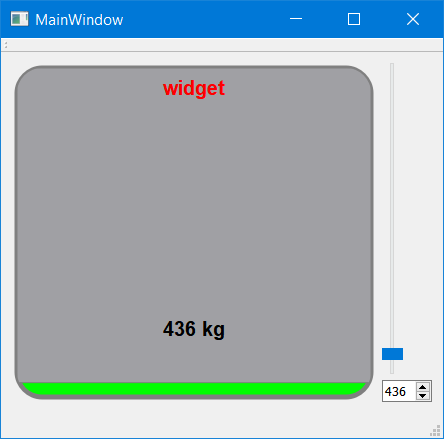
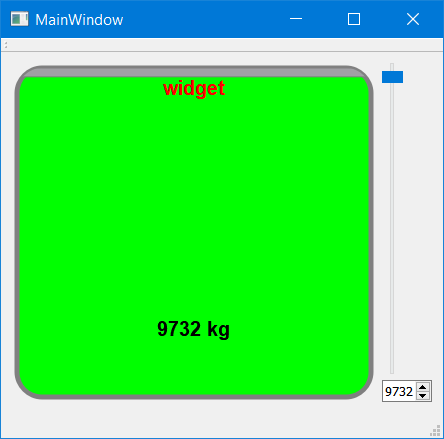
Tank widget problem...
-
Hi All,
My customer wants to see some values not by QProgressBar.. So I tried to make a widget for a week...
I achived to make a widget that runs that I wanted... but I have some problematic areas..
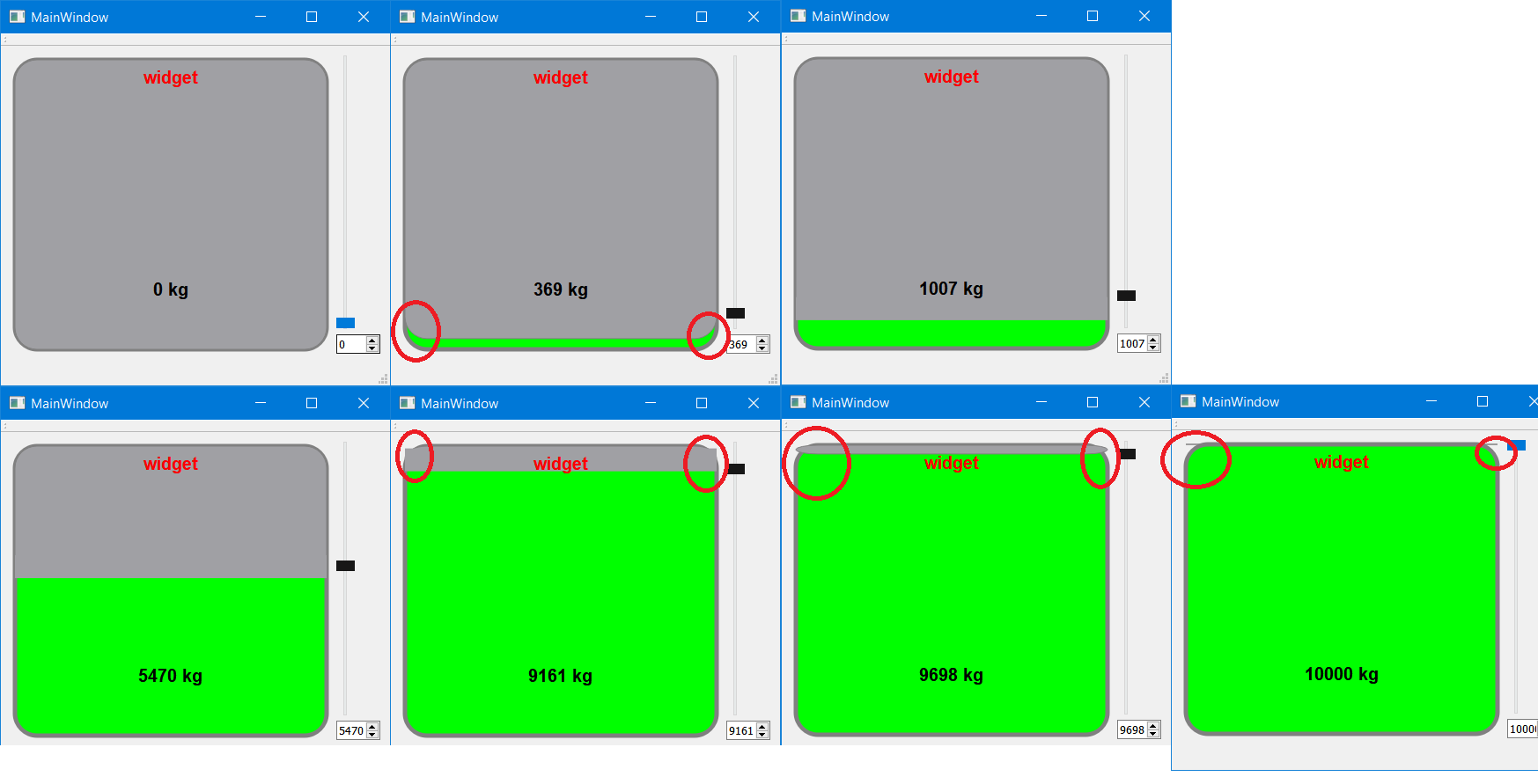
I draw a roudedrect first than I paint another empty rounded rect on it... then I fill the edge with a rect.. to make it clear..
Tha problemmatic areas are rouded red at the picture that I attached..
cedaTank.h
#ifndef CEDATANK_H
#define CEDATANK_H

#include <QWidget>

class cedaTank : public QWidget
{
    Q_OBJECT
public:
    explicit cedaTank(QWidget *parent = 0);

    int MaxValue = 10000;
    int MinValue = 0;
    int Padding = 5;
    QString Deger1Suffix = "kg";
    QString Deger2Suffix = "cm";
    bool ShowDeger2 = false;
    int Deger2 = 0;

protected:
    void paintEvent(QPaintEvent *);
signals:
    void valuechanged(int value);

public slots:
    void setValue(int value);
private:
   int w_value = 24;
   QRectF outlineRect;
   QRectF inlineRect;
   QRectF makeRect;
   QRectF Deger1Rect;
   QRectF Deger2Rect;

   int PenWidth = 5;
   QColor outColor = Qt::darkGray;
   QColor inColor = Qt::green;
   QColor EmptyColor = Qt::gray;
   QFont NameFont;
   void Calculate_inlineRect();
   void Calculate_outlineRect();
};

#endif // CEDATANK_H
and the cedaTank.cpp
#include "cedaTank.h"
#include <QPainter>
#include <QDebug>

cedaTank::cedaTank(QWidget *parent) : QWidget(parent)
{
  NameFont.setFamily("Arial");
  NameFont.setBold(true);
  NameFont.setPointSize(12);
}

void cedaTank::paintEvent(QPaintEvent *)
{

  QPainter myPainter(this);
  myPainter.setRenderHint(QPainter::Antialiasing);

  QPen BorderPen(outColor);
  QBrush inlineBrush(inColor);
  //Dış Çerçeve
  BorderPen.setWidth(PenWidth);
  myPainter.setPen(BorderPen);
  myPainter.setBrush(inlineBrush);
  Calculate_outlineRect();
  myPainter.drawRoundedRect(outlineRect, 25.0, 25.0);
  //İç Dolum
  BorderPen.setColor(outColor);
  BorderPen.setWidth(0);
  myPainter.setPen(BorderPen);

  inlineBrush.setColor(EmptyColor);
  myPainter.setBrush(EmptyColor);
  Calculate_inlineRect();
  myPainter.drawRoundedRect(inlineRect, 25.0, 25.0);

  myPainter.fillRect(makeRect,EmptyColor);
  //iç Yazı
  BorderPen.setColor(Qt::black);
  myPainter.setPen(BorderPen);
  myPainter.setFont(this->font());
  myPainter.drawText(Deger1Rect,Qt::AlignCenter,QString(QString::number(w_value) + " %1").arg(Deger1Suffix));
  if (ShowDeger2)
  myPainter.drawText(Deger2Rect,Qt::AlignCenter,QString(QString::number(Deger2) + " %1").arg(Deger2Suffix));
  Deger2Rect =  QRectF(outlineRect.x(),
                       outlineRect.y() + PenWidth,
                       outlineRect.width() ,
                       this->fontMetrics().height() + 5);
  BorderPen.setColor(Qt::red);
  myPainter.setPen(BorderPen);
  myPainter.setFont(NameFont);
  myPainter.drawText(Deger2Rect,Qt::AlignCenter,this->objectName());

}

void cedaTank::setValue(int value)
{
    if (w_value != value){
        if (value <= MaxValue){
            w_value = value;
            emit valuechanged(w_value);
        } else {
            value = MaxValue;
            emit valuechanged(w_value);
        }

    }
    repaint();
}

void cedaTank::Calculate_inlineRect()
{

    qreal carpan,theYOffset,Yukseklik,Genislik;
//    if ((w_value - MinValue) > 0){
        carpan = qreal(w_value - MinValue) / qreal(MaxValue - MinValue);
        theYOffset = outlineRect.y() + (outlineRect.height() - (carpan * outlineRect.height())) + qreal(PenWidth/2);
        Genislik = outlineRect.width() - qreal(PenWidth);
        //Yukseklik = (outlineRect.height() - (carpan * outlineRect.height()))-PenWidth;
        Yukseklik = (outlineRect.height() - (carpan * outlineRect.height()));
//    } else {
//        carpan = 0;
//        Yukseklik = 0;
//        Genislik = 0;
//    }

    if (Yukseklik >= (0.2 * outlineRect.height()) ) {
        Genislik = outlineRect.width() - (outlineRect.height()-Yukseklik);
    }

    inlineRect =  QRectF(outlineRect.x() , outlineRect.y() ,outlineRect.width(),Yukseklik );
    if ((Yukseklik >= (0.95 * outlineRect.height())) ||  (Yukseklik <= (0.07 * outlineRect.height())) ){
        makeRect = QRectF(inlineRect.x(), inlineRect.y() + (inlineRect.height() - 25 ),0,0);
    } else {
        makeRect = QRectF(inlineRect.x(), inlineRect.y() + (inlineRect.height() - 25 ),inlineRect.width(),26);
    }
    qDebug() << "outlineRect.x() :" << outlineRect.x() << "outlineRect.y() :" << outlineRect.y() << "outlineRect.width() :" << outlineRect.width() << "outlineRect.height() :" << outlineRect.height();

    qDebug() << "inlineRect.x() :" << inlineRect.x() << "inlineRect.y() :" << inlineRect.y() << "inlineRect.width() :" << inlineRect.width() << "inlineRect.height() :" << inlineRect.height();

}

void cedaTank::Calculate_outlineRect()
{
    outlineRect = QRectF(Padding,Padding,this->width() - (Padding * 2 ) , this->height()- (Padding * 2 ));
    Deger1Rect = QRectF(outlineRect.x(),
                        outlineRect.y() + (outlineRect.height() - (outlineRect.height() /4)),
                        outlineRect.width() ,
                        this->fontMetrics().height() + 5);
    Deger2Rect = QRectF(outlineRect.x(),
                        outlineRect.y() + (outlineRect.height() /4),
                        outlineRect.width() ,
                        this->fontMetrics().height() + 5);
}
is there an easy or better way to correct these.. An Idea to solve this?
Thanks Community..
-
Hi All,
My customer wants to see some values not by QProgressBar.. So I tried to make a widget for a week...
I achived to make a widget that runs that I wanted... but I have some problematic areas..
I draw a roudedrect first than I paint another empty rounded rect on it... then I fill the edge with a rect.. to make it clear..
Tha problemmatic areas are rouded red at the picture that I attached..
cedaTank.h
#ifndef CEDATANK_H
#define CEDATANK_H

#include <QWidget>

class cedaTank : public QWidget
{
    Q_OBJECT
public:
    explicit cedaTank(QWidget *parent = 0);

    int MaxValue = 10000;
    int MinValue = 0;
    int Padding = 5;
    QString Deger1Suffix = "kg";
    QString Deger2Suffix = "cm";
    bool ShowDeger2 = false;
    int Deger2 = 0;

protected:
    void paintEvent(QPaintEvent *);
signals:
    void valuechanged(int value);

public slots:
    void setValue(int value);
private:
   int w_value = 24;
   QRectF outlineRect;
   QRectF inlineRect;
   QRectF makeRect;
   QRectF Deger1Rect;
   QRectF Deger2Rect;

   int PenWidth = 5;
   QColor outColor = Qt::darkGray;
   QColor inColor = Qt::green;
   QColor EmptyColor = Qt::gray;
   QFont NameFont;
   void Calculate_inlineRect();
   void Calculate_outlineRect();
};

#endif // CEDATANK_H
and the cedaTank.cpp
#include "cedaTank.h"
#include <QPainter>
#include <QDebug>

cedaTank::cedaTank(QWidget *parent) : QWidget(parent)
{
  NameFont.setFamily("Arial");
  NameFont.setBold(true);
  NameFont.setPointSize(12);
}

void cedaTank::paintEvent(QPaintEvent *)
{

  QPainter myPainter(this);
  myPainter.setRenderHint(QPainter::Antialiasing);

  QPen BorderPen(outColor);
  QBrush inlineBrush(inColor);
  //Dış Çerçeve
  BorderPen.setWidth(PenWidth);
  myPainter.setPen(BorderPen);
  myPainter.setBrush(inlineBrush);
  Calculate_outlineRect();
  myPainter.drawRoundedRect(outlineRect, 25.0, 25.0);
  //İç Dolum
  BorderPen.setColor(outColor);
  BorderPen.setWidth(0);
  myPainter.setPen(BorderPen);

  inlineBrush.setColor(EmptyColor);
  myPainter.setBrush(EmptyColor);
  Calculate_inlineRect();
  myPainter.drawRoundedRect(inlineRect, 25.0, 25.0);

  myPainter.fillRect(makeRect,EmptyColor);
  //iç Yazı
  BorderPen.setColor(Qt::black);
  myPainter.setPen(BorderPen);
  myPainter.setFont(this->font());
  myPainter.drawText(Deger1Rect,Qt::AlignCenter,QString(QString::number(w_value) + " %1").arg(Deger1Suffix));
  if (ShowDeger2)
  myPainter.drawText(Deger2Rect,Qt::AlignCenter,QString(QString::number(Deger2) + " %1").arg(Deger2Suffix));
  Deger2Rect =  QRectF(outlineRect.x(),
                       outlineRect.y() + PenWidth,
                       outlineRect.width() ,
                       this->fontMetrics().height() + 5);
  BorderPen.setColor(Qt::red);
  myPainter.setPen(BorderPen);
  myPainter.setFont(NameFont);
  myPainter.drawText(Deger2Rect,Qt::AlignCenter,this->objectName());

}

void cedaTank::setValue(int value)
{
    if (w_value != value){
        if (value <= MaxValue){
            w_value = value;
            emit valuechanged(w_value);
        } else {
            value = MaxValue;
            emit valuechanged(w_value);
        }

    }
    repaint();
}

void cedaTank::Calculate_inlineRect()
{

    qreal carpan,theYOffset,Yukseklik,Genislik;
//    if ((w_value - MinValue) > 0){
        carpan = qreal(w_value - MinValue) / qreal(MaxValue - MinValue);
        theYOffset = outlineRect.y() + (outlineRect.height() - (carpan * outlineRect.height())) + qreal(PenWidth/2);
        Genislik = outlineRect.width() - qreal(PenWidth);
        //Yukseklik = (outlineRect.height() - (carpan * outlineRect.height()))-PenWidth;
        Yukseklik = (outlineRect.height() - (carpan * outlineRect.height()));
//    } else {
//        carpan = 0;
//        Yukseklik = 0;
//        Genislik = 0;
//    }

    if (Yukseklik >= (0.2 * outlineRect.height()) ) {
        Genislik = outlineRect.width() - (outlineRect.height()-Yukseklik);
    }

    inlineRect =  QRectF(outlineRect.x() , outlineRect.y() ,outlineRect.width(),Yukseklik );
    if ((Yukseklik >= (0.95 * outlineRect.height())) ||  (Yukseklik <= (0.07 * outlineRect.height())) ){
        makeRect = QRectF(inlineRect.x(), inlineRect.y() + (inlineRect.height() - 25 ),0,0);
    } else {
        makeRect = QRectF(inlineRect.x(), inlineRect.y() + (inlineRect.height() - 25 ),inlineRect.width(),26);
    }
    qDebug() << "outlineRect.x() :" << outlineRect.x() << "outlineRect.y() :" << outlineRect.y() << "outlineRect.width() :" << outlineRect.width() << "outlineRect.height() :" << outlineRect.height();

    qDebug() << "inlineRect.x() :" << inlineRect.x() << "inlineRect.y() :" << inlineRect.y() << "inlineRect.width() :" << inlineRect.width() << "inlineRect.height() :" << inlineRect.height();

}

void cedaTank::Calculate_outlineRect()
{
    outlineRect = QRectF(Padding,Padding,this->width() - (Padding * 2 ) , this->height()- (Padding * 2 ));
    Deger1Rect = QRectF(outlineRect.x(),
                        outlineRect.y() + (outlineRect.height() - (outlineRect.height() /4)),
                        outlineRect.width() ,
                        this->fontMetrics().height() + 5);
    Deger2Rect = QRectF(outlineRect.x(),
                        outlineRect.y() + (outlineRect.height() /4),
                        outlineRect.width() ,
                        this->fontMetrics().height() + 5);
}
is there an easy or better way to correct these.. An Idea to solve this?
Thanks Community..
-
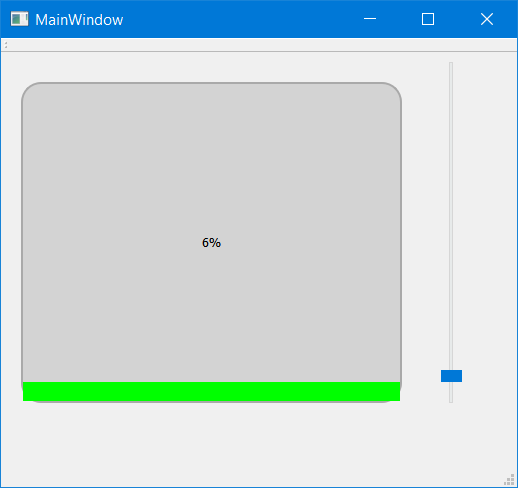
same issiue with my widget. at bottom :)
QProgressBar{
	border: solid;
	border-width:2px;
	margin:10px ;
	border-color:darkgray;
	text-align:center;
	border-radius:20px;
	background-color: lightgrey; }
QProgressBar::chunk {
	background-color:rgb(0, 255, 0) ;

	border-radius:20px
 }
//your code here
Linux Mint 20.04 64 Bit QT6.0.1
-
same issiue with my widget. at bottom :)
QProgressBar{
	border: solid;
	border-width:2px;
	margin:10px ;
	border-color:darkgray;
	text-align:center;
	border-radius:20px;
	background-color: lightgrey; }
QProgressBar::chunk {
	background-color:rgb(0, 255, 0) ;

	border-radius:20px
 }
//your code here
-
Clipping is the answer to your problems:
#include "widget.h"

#include <QRectF>
#include <QPainter>
#include <QPainterPath>
#include <QPaintEvent>

Widget::Widget(QWidget *parent)
    : QWidget(parent)
{}

Widget::~Widget(){}

QSize Widget::sizeHint() const {
    return QSize(200,200);
}

void Widget::paintEvent(QPaintEvent *event){
    QPainter painter(this);
    painter.setRenderHint(QPainter::Antialiasing);

    QRectF rect(event->rect().adjusted(10,10,-10,-10));
    QPainterPath painterPath;
    painterPath.addRoundedRect(rect,10,10);
    painter.setClipPath(painterPath);

    painter.setPen(Qt::NoPen);
    painter.setBrush(Qt::white);
    painter.drawRect(rect);

    QRectF levelRect=rect.adjusted(0,rect.height()/2,0,0);
    painter.setBrush(Qt::green);
    painter.drawRect(levelRect);

    painter.strokePath(painterPath, QPen(Qt::black));

    painter.setClipping(false);

    painter.end();
}
Setting the clipping path means that no pixels will be drawn outside the specified area (event if you tell it to!). In this case I set the clipping path to have the rounded corners and then draw normal square rectangles; the clipping path ensures the corners are not rendered.
Hope this helps :)
-
@jazzycamel said in Tank widget problem...:
thanks @jazzycamel the problem solved...
And this is the new code maybe some one need this kind of thing..
#ifndef CEDATANK_H
#define CEDATANK_H

#include <QWidget>

class cedaTank : public QWidget
{
    Q_OBJECT
public:
    explicit cedaTank(QWidget *parent = 0);

    int MaxValue = 10000;
    int MinValue = 0;
    int Padding = 5;
    QString Deger1Suffix = "kg";
    QString Deger2Suffix = "cm";
    bool ShowDeger2 = false;
    int Deger2 = 0;

protected:
    void paintEvent(QPaintEvent *);
signals:
    void valuechanged(int value);

public slots:
    void setValue(int value);
private:
   int w_value = 24;
   QRectF outlineRect;
   QRectF inlineRect;

   QRectF Deger1Rect;
   QRectF Deger2Rect;

   int PenWidth = 5;
   QColor outColor = Qt::darkGray;
   QColor inColor = Qt::green;
   QColor EmptyColor = Qt::gray;
   QFont NameFont;
   void Calculate_inlineRect();
   void Calculate_outlineRect();
};


#endif // CEDATANK_H
and the cpp
#include "cedaTank.h"
#include <QPainter>
#include <QDebug>
#include <QPaintEvent>

cedaTank::cedaTank(QWidget *parent) : QWidget(parent)
{
  NameFont.setFamily("Arial");
  NameFont.setBold(true);
  NameFont.setPointSize(12);
}

void cedaTank::paintEvent(QPaintEvent *)
{

  QPainter myPainter(this);
  myPainter.setRenderHint(QPainter::Antialiasing);

  QPen BorderPen(outColor);
  QBrush inlineBrush(inColor);
  //Dış Çerçeve
  BorderPen.setWidth(PenWidth);
  myPainter.setPen(BorderPen);
  myPainter.setBrush(inlineBrush);
  Calculate_outlineRect();
  myPainter.drawRoundedRect(outlineRect, 25.0, 25.0);
  QPainterPath painterPath;
  painterPath.addRoundedRect(outlineRect,25,25);
  myPainter.setClipPath(painterPath);

  //İç Dolum
  BorderPen.setColor(outColor);
  BorderPen.setWidth(0);
  myPainter.setPen(BorderPen);

  inlineBrush.setColor(EmptyColor);
  myPainter.setBrush(EmptyColor);
  Calculate_inlineRect();
  myPainter.drawRect(inlineRect);

  //myPainter.fillRect(makeRect,EmptyColor);
  //iç Yazı
  BorderPen.setColor(Qt::black);
  myPainter.setPen(BorderPen);
  myPainter.setFont(this->font());
  myPainter.drawText(Deger1Rect,Qt::AlignCenter,QString(QString::number(w_value) + " %1").arg(Deger1Suffix));
  if (ShowDeger2)
  myPainter.drawText(Deger2Rect,Qt::AlignCenter,QString(QString::number(Deger2) + " %1").arg(Deger2Suffix));
  Deger2Rect =  QRectF(outlineRect.x(),
                       outlineRect.y() + PenWidth,
                       outlineRect.width() ,
                       this->fontMetrics().height() + 5);
  BorderPen.setColor(Qt::red);
  myPainter.setPen(BorderPen);
  myPainter.setFont(NameFont);
  myPainter.drawText(Deger2Rect,Qt::AlignCenter,this->objectName());
  myPainter.setClipping(false);
  myPainter.end();
}

void cedaTank::setValue(int value)
{
    if (w_value != value){
        if (value <= MaxValue){
            w_value = value;
            emit valuechanged(w_value);
        } else {
            value = MaxValue;
            emit valuechanged(w_value);
        }

    }
    repaint();
}

void cedaTank::Calculate_inlineRect()
{

    qreal carpan,theYOffset,Yukseklik,Genislik;
    carpan = qreal(w_value - MinValue) / qreal(MaxValue - MinValue);
    theYOffset = outlineRect.y() + (outlineRect.height() - (carpan * outlineRect.height())) + qreal(PenWidth/2);
    Genislik = outlineRect.width() - qreal(PenWidth);
    Yukseklik = (outlineRect.height() - (carpan * outlineRect.height()));

    inlineRect =  QRectF(outlineRect.x() , outlineRect.y() ,outlineRect.width(),Yukseklik );

//    qDebug() << "outlineRect.x() :" << outlineRect.x() << "outlineRect.y() :" << outlineRect.y() << "outlineRect.width() :" << outlineRect.width() << "outlineRect.height() :" << outlineRect.height();
//    qDebug() << "inlineRect.x() :" << inlineRect.x() << "inlineRect.y() :" << inlineRect.y() << "inlineRect.width() :" << inlineRect.width() << "inlineRect.height() :" << inlineRect.height();

}

void cedaTank::Calculate_outlineRect()
{
    outlineRect = QRectF(Padding,Padding,this->width() - (Padding * 2 ) , this->height()- (Padding * 2 ));
    Deger1Rect = QRectF(outlineRect.x(),
                        outlineRect.y() + (outlineRect.height() - (outlineRect.height() /4)),
                        outlineRect.width() ,
                        this->fontMetrics().height() + 5);
    Deger2Rect = QRectF(outlineRect.x(),
                        outlineRect.y() + (outlineRect.height() /4),
                        outlineRect.width() ,
                        this->fontMetrics().height() + 5);
}