Skip to content
  • Categories
  • Recent
  • Tags
  • Popular
  • Users
  • Groups
  • Search
  • Get Qt Extensions
  • Unsolved
Collapse
Brand Logo
  1. Home
  2. Qt Development
  3. General and Desktop
  4. Could not insert data into Sqlite database
Qt 6.11 is out! See what's new in the release blog

Could not insert data into Sqlite database

Scheduled Pinned Locked Moved Unsolved General and Desktop
38 Posts 5 Posters 30.1k Views 2 Watching
  • Oldest to Newest
  • Newest to Oldest
  • Most Votes
Reply
  • Reply as topic
Log in to reply
This topic has been deleted. Only users with topic management privileges can see it.
  • F Fuel

    ok i see. i made a mistake. but why you create the necessary table after the insert queries?

    M Offline
    M Offline
    mark_ua_1999
    wrote on last edited by mark_ua_1999
    #5

    @Fuel I paste it to show the structure of the table

    1 Reply Last reply
    0
    • mrjjM Offline
      mrjjM Offline
      mrjj
      Lifetime Qt Champion
      wrote on last edited by
      #6

      Hi
      query.exec() returns true/false
      and you can use
      http://doc.qt.io/qt-5/qsqlquery.html#lastError
      to see why it went wrong.

      M 1 Reply Last reply
      2
      • F Offline
        F Offline
        Fuel
        wrote on last edited by
        #7

        INSERT INTO " +dataB +"(depart_city,arrival_city,firstname,lastname,bot,vagon,place,privilages,distance,ticket_price)"

        Maybe try to add a White Space before (depart_city

        because actually your query looks like this.

        INSERT INTO _people(depart_city,arrival_city,firstname,lastname,bot,vagon,place,privilages,distance,ticket_price)"

        1 Reply Last reply
        0
        • mrjjM mrjj

          Hi
          query.exec() returns true/false
          and you can use
          http://doc.qt.io/qt-5/qsqlquery.html#lastError
          to see why it went wrong.

          M Offline
          M Offline
          mark_ua_1999
          wrote on last edited by mark_ua_1999
          #8

          @mrjj I have tried the following code
          if(!q.exec("INSERT INTO " +dataB +"
          (depart_city,arrival_city,firstname,lastname,bot,vagon,place,privilages,distance,ticket_price)"
          +"values('"+T.passangers[i].left_city+"','"+T.passangers[i].arrival_city+"','"+T.passangers[i].name+"','"
          +T.passangers[i].surname+"','"+bot+"','"+T.passangers[i].wagon+"','"+T.passangers[i].place+"','"+privilages+"','"+T.passangers[i].way_distance+"','"+T.passangers[i].ticket_cost+"')"))
          {
          ui->textBrowser_2->append(q.lastError().text()+" "+QString::number(q.lastError().number()));
          }
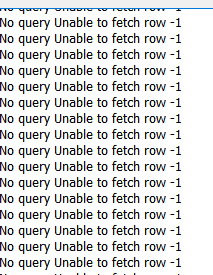
          but the output is only -1 without any description

          mrjjM 1 Reply Last reply
          0
          • F Offline
            F Offline
            Fuel
            wrote on last edited by
            #9

            try db.lastError()

            1 Reply Last reply
            1
            • M mark_ua_1999

              @mrjj I have tried the following code
              if(!q.exec("INSERT INTO " +dataB +"
              (depart_city,arrival_city,firstname,lastname,bot,vagon,place,privilages,distance,ticket_price)"
              +"values('"+T.passangers[i].left_city+"','"+T.passangers[i].arrival_city+"','"+T.passangers[i].name+"','"
              +T.passangers[i].surname+"','"+bot+"','"+T.passangers[i].wagon+"','"+T.passangers[i].place+"','"+privilages+"','"+T.passangers[i].way_distance+"','"+T.passangers[i].ticket_cost+"')"))
              {
              ui->textBrowser_2->append(q.lastError().text()+" "+QString::number(q.lastError().number()));
              }
              but the output is only -1 without any description

              mrjjM Offline
              mrjjM Offline
              mrjj
              Lifetime Qt Champion
              wrote on last edited by
              #10

              @mark_ua_1999
              So q.lastError().text() do not give any text?
              even exec fails?

              You can also try
              QString QSqlQuery::lastQuery() const
              to see what all that code becomes.
              Its most likely something trivial.

              Are there any reason you are not using bound parameters to get a cleaner looking code ?

               QSqlQuery query;
                  query.prepare("INSERT INTO person (id, forename, surname) "
                                "VALUES (:id, :forename, :surname)");
                  query.bindValue(":id", 1001);
                  query.bindValue(":forename", "Bart");
                  query.bindValue(":surname", "Simpson");
                  query.exec();
              
              M 1 Reply Last reply
              1
              • mrjjM mrjj

                @mark_ua_1999
                So q.lastError().text() do not give any text?
                even exec fails?

                You can also try
                QString QSqlQuery::lastQuery() const
                to see what all that code becomes.
                Its most likely something trivial.

                Are there any reason you are not using bound parameters to get a cleaner looking code ?

                 QSqlQuery query;
                    query.prepare("INSERT INTO person (id, forename, surname) "
                                  "VALUES (:id, :forename, :surname)");
                    query.bindValue(":id", 1001);
                    query.bindValue(":forename", "Bart");
                    query.bindValue(":surname", "Simpson");
                    query.exec();
                
                M Offline
                M Offline
                mark_ua_1999
                wrote on last edited by
                #11

                @mrjj I have tried but failed my code0_1510603768737_Capture.PNG

                mrjjM 1 Reply Last reply
                0
                • M mark_ua_1999

                  @mrjj I have tried but failed my code0_1510603768737_Capture.PNG

                  mrjjM Offline
                  mrjjM Offline
                  mrjj
                  Lifetime Qt Champion
                  wrote on last edited by
                  #12

                  @mark_ua_1999
                  Check if prepare returns true

                  M 1 Reply Last reply
                  0
                  • SGaistS Offline
                    SGaistS Offline
                    SGaist
                    Lifetime Qt Champion
                    wrote on last edited by
                    #13

                    Hi,

                    Before anything, check that the database opens successfully and print what happens if it fails. Also please post the configuration you used for your database.

                    Interested in AI ? www.idiap.ch
                    Please read the Qt Code of Conduct - https://forum.qt.io/topic/113070/qt-code-of-conduct

                    1 Reply Last reply
                    0
                    • mrjjM Offline
                      mrjjM Offline
                      mrjj
                      Lifetime Qt Champion
                      wrote on last edited by
                      #14

                      Hi
                      as a note
                      http://sqlitebrowser.org/
                      is very useful if db is sqllite. To examine database and test queries

                      1 Reply Last reply
                      1
                      • mrjjM mrjj

                        @mark_ua_1999
                        Check if prepare returns true

                        M Offline
                        M Offline
                        mark_ua_1999
                        wrote on last edited by
                        #15

                        @mrjj I change my QSqlDatabase object (before I could not open the bd now can) my code but now got another problem "Parameter count mismatch" mayby it
                        will be more clear for you to see where

                        1 Reply Last reply
                        0
                        • SGaistS Offline
                          SGaistS Offline
                          SGaist
                          Lifetime Qt Champion
                          wrote on last edited by
                          #16

                          Which version of Qt are you using ?

                          Interested in AI ? www.idiap.ch
                          Please read the Qt Code of Conduct - https://forum.qt.io/topic/113070/qt-code-of-conduct

                          M 1 Reply Last reply
                          0
                          • SGaistS SGaist

                            Which version of Qt are you using ?

                            M Offline
                            M Offline
                            mark_ua_1999
                            wrote on last edited by
                            #17

                            @SGaist Qt 5.3

                            1 Reply Last reply
                            0
                            • SGaistS Offline
                              SGaistS Offline
                              SGaist
                              Lifetime Qt Champion
                              wrote on last edited by
                              #18

                              Then change to positional placeholders. Support for named placeholder for the sqlite driver has been added to Qt 5.10 IIRC.

                              Interested in AI ? www.idiap.ch
                              Please read the Qt Code of Conduct - https://forum.qt.io/topic/113070/qt-code-of-conduct

                              M 1 Reply Last reply
                              0
                              • SGaistS SGaist

                                Then change to positional placeholders. Support for named placeholder for the sqlite driver has been added to Qt 5.10 IIRC.

                                M Offline
                                M Offline
                                mark_ua_1999
                                wrote on last edited by mark_ua_1999
                                #19

                                @SGaist , @mrjj,@Fuel
                                Thanks all for help now I could insert lines and have another question- about the performence, it takes a lot of time to read the data(it could disturb the user) do you have any ideas about it?(Maybe it depends on tables count in db)

                                mrjjM 1 Reply Last reply
                                0
                                • M mark_ua_1999

                                  @SGaist , @mrjj,@Fuel
                                  Thanks all for help now I could insert lines and have another question- about the performence, it takes a lot of time to read the data(it could disturb the user) do you have any ideas about it?(Maybe it depends on tables count in db)

                                  mrjjM Offline
                                  mrjjM Offline
                                  mrjj
                                  Lifetime Qt Champion
                                  wrote on last edited by
                                  #20

                                  @mark_ua_1999
                                  How many rows do you have?
                                  And how are you reading it ?
                                  Normally its pretty fast but if you loop all rows and say add as text
                                  to a textbrowser it can be really slow.

                                  So please show what you are doing :)

                                  M 1 Reply Last reply
                                  0
                                  • mrjjM mrjj

                                    @mark_ua_1999
                                    How many rows do you have?
                                    And how are you reading it ?
                                    Normally its pretty fast but if you loop all rows and say add as text
                                    to a textbrowser it can be really slow.

                                    So please show what you are doing :)

                                    M Offline
                                    M Offline
                                    mark_ua_1999
                                    wrote on last edited by mark_ua_1999
                                    #21

                                    @mrjj CODE - mainwindow Dialog
                                    In dialog I create train route in main I show available train routes responding time is very long (when add new train)
                                    ;0_1510610088594_Capture21.PNG
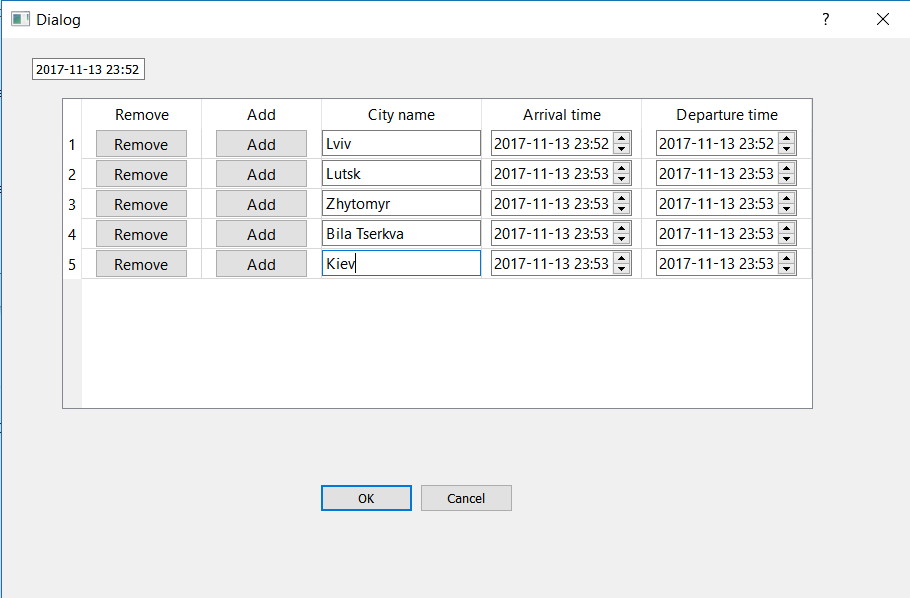
                                    0_1510610169017_Capture22.PNG

                                    1 Reply Last reply
                                    0
                                    • mrjjM Offline
                                      mrjjM Offline
                                      mrjj
                                      Lifetime Qt Champion
                                      wrote on last edited by mrjj
                                      #22

                                      Hi
                                      setCellWidget can be heavy.
                                      But you only show 5 row here.
                                      How many do you have?

                                      Is it the on_actionAdd_train_triggered that takes time?

                                      M 1 Reply Last reply
                                      1
                                      • mrjjM mrjj

                                        Hi
                                        setCellWidget can be heavy.
                                        But you only show 5 row here.
                                        How many do you have?

                                        Is it the on_actionAdd_train_triggered that takes time?

                                        M Offline
                                        M Offline
                                        mark_ua_1999
                                        wrote on last edited by
                                        #23

                                        @mrjj When I click ok in Dialog window it takes a lot of time to add new row in mainwindow have no ideas why

                                        mrjjM 1 Reply Last reply
                                        0
                                        • M mark_ua_1999

                                          @mrjj When I click ok in Dialog window it takes a lot of time to add new row in mainwindow have no ideas why

                                          mrjjM Offline
                                          mrjjM Offline
                                          mrjj
                                          Lifetime Qt Champion
                                          wrote on last edited by
                                          #24

                                          @mark_ua_1999
                                          well you loop a file in on_actionAdd_train_triggered but do nothing with what it reads.
                                          I do not think reading from database is the slow part and setCellWidget x5 should be that heavy unless its
                                          a Pi board or slower pc.

                                          M 1 Reply Last reply
                                          0

                                          • Login

                                          • Login or register to search.
                                          • First post
                                            Last post
                                          0
                                          • Categories
                                          • Recent
                                          • Tags
                                          • Popular
                                          • Users
                                          • Groups
                                          • Search
                                          • Get Qt Extensions
                                          • Unsolved