Skip to content
  • Categories
  • Recent
  • Tags
  • Popular
  • Users
  • Groups
  • Search
  • Get Qt
  • Unsolved
Collapse
Brand Logo
  1. Home
  2. Qt Development
  3. General and Desktop
  4. Centering Qlabel on screen
Qt 6.12 LTS is out! See what's new in the release blog

Centering Qlabel on screen

Scheduled Pinned Locked Moved Solved General and Desktop
31 Posts 7 Posters 33.9k Views 3 Watching
  • Oldest to Newest
  • Newest to Oldest
  • Most Votes
Reply
  • Reply as topic
Log in to reply
This topic has been deleted. Only users with topic management privileges can see it.
  • G gabor53

    @mrjj
    Please show me an example how to do it in this case. Thank you.

    jsulmJ Offline
    jsulmJ Offline
    jsulm
    Lifetime Qt Champion
    wrote on last edited by
    #17

    @gabor53 said in Centering Qlabel on screen:

    Please show me an example how to do it in this case. Thank you.

    It's all in the documentation: http://doc.qt.io/qt-5/qlabel.html#alignment-prop

    https://forum.qt.io/topic/113070/qt-code-of-conduct

    1 Reply Last reply
    3
    • Vinod KuntojiV Offline
      Vinod KuntojiV Offline
      Vinod Kuntoji
      wrote on last edited by Vinod Kuntoji
      #18

      @gabor53 ,

      Put the label in a layout, and set the alignment.

      QMovie* movie = new QMovie(":/images/ajax-loader.gif");
      QVBoxLayout *layout = new QVBoxLayout;
      if(!movie->isValid ()) {
          qDebug() << "Movie doesn't work.";
      } else {
          QLabel* label = new QLabel(this);
          label->setMovie (movie);
          movie->start ();
          label->show ();
          layout->addWidget(label);
          layout->setAlignment(Qt::AlignCenter);
      }
      

      this->setLayout(layout);

      C++, Qt, Qt Quick Developer,
      PthinkS, Bangalore

      G 1 Reply Last reply
      1
      • Vinod KuntojiV Vinod Kuntoji

        @gabor53 ,

        Put the label in a layout, and set the alignment.

        QMovie* movie = new QMovie(":/images/ajax-loader.gif");
        QVBoxLayout *layout = new QVBoxLayout;
        if(!movie->isValid ()) {
            qDebug() << "Movie doesn't work.";
        } else {
            QLabel* label = new QLabel(this);
            label->setMovie (movie);
            movie->start ();
            label->show ();
            layout->addWidget(label);
            layout->setAlignment(Qt::AlignCenter);
        }
        

        this->setLayout(layout);

        G Offline
        G Offline
        gabor53
        wrote on last edited by
        #19

        @Vinod-Kuntoji
        Thank you. This puts the movie in the top left corner:
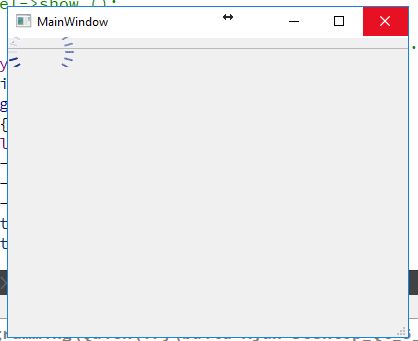
        0_1509977217031_Capture.JPG

        1 Reply Last reply
        0
        • JKSHJ JKSH

          @gabor53 said in Centering Qlabel on screen:

          @JKSH
          Screen width: 1280
          Screen height: 768
          x: 320
          y: 144

          (320, 144) is very far from the center of 1280 x 768.

          Can you explain why you got x=320 and y=144?

          If your QLabel is 66x66, then you want

          • Global X = (1280-66)/2 = 607
          • Global Y = (768-66)/2 = 351

          Make sure your code calculates the correct x and y values first.

          G Offline
          G Offline
          gabor53
          wrote on last edited by
          #20

          @JKSH
          You were right, the calculation was incorrect. The following code puts the movie in the center:

           QLabel* label = new QLabel();
            label->setGeometry (0, 0, 66, 66);
            QRect screenGeometry = QApplication::desktop ()->screenGeometry ();
            int x = (screenGeometry.width () - label->width ()) / 2;
            int y = (screenGeometry.height () - label->height ()) / 2;
          
            QMovie* movie = new QMovie(":/images/ajax-loader.gif");
          
            if(!movie->isValid ()) {
              qDebug() << "Movie doesn't work.";
            } else {
              qDebug() << "Screen width: " << screenGeometry.width ();
              qDebug() << "Screen height: " << screenGeometry.height ();
              qDebug() << "x: " << x;
              qDebug() << "y: " << y;
          
              label->setGeometry (x, y, 66, 66);
              label->setMovie (movie);
          
              movie->start ();
              label->show ();
           }
          

          Now it look like this:
          0_1509977961950_Capture.JPG
          Any way to delete the window controls from the movie?
          Thank you.

          J.HilkJ 1 Reply Last reply
          1
          • G gabor53

            @JKSH
            You were right, the calculation was incorrect. The following code puts the movie in the center:

             QLabel* label = new QLabel();
              label->setGeometry (0, 0, 66, 66);
              QRect screenGeometry = QApplication::desktop ()->screenGeometry ();
              int x = (screenGeometry.width () - label->width ()) / 2;
              int y = (screenGeometry.height () - label->height ()) / 2;
            
              QMovie* movie = new QMovie(":/images/ajax-loader.gif");
            
              if(!movie->isValid ()) {
                qDebug() << "Movie doesn't work.";
              } else {
                qDebug() << "Screen width: " << screenGeometry.width ();
                qDebug() << "Screen height: " << screenGeometry.height ();
                qDebug() << "x: " << x;
                qDebug() << "y: " << y;
            
                label->setGeometry (x, y, 66, 66);
                label->setMovie (movie);
            
                movie->start ();
                label->show ();
             }
            

            Now it look like this:
            0_1509977961950_Capture.JPG
            Any way to delete the window controls from the movie?
            Thank you.

            J.HilkJ Offline
            J.HilkJ Offline
            J.Hilk
            Moderators
            wrote on last edited by SGaist
            #21

            Oh, I finally figured out what you try to accomplish @gabor53 !

            I have a slightly different solution for you, that way you can use it as anywhere else, later in your code as well.

            #ifndef BUSYANIMATION_H
            #define BUSYANIMATION_H
            
            #include <QLabel>
            
            class BusyAnimation : public QLabel
            {
                Q_OBJECT
            public:
                explicit jhLogo(QWidget *parent = nullptr) : QLabel(parent){
                      setWindowFlag(Qt::FramelessWindowHint, true);
                      setFixedSize(QSize(66,66));
                      QMovie* movie = new QMovie(":/images/ajax-loader.gif");
                      setMovie(movie);
                      movie->start();
                }
            }
            
            #endif
            
            //Main.cpp
            
            #include <QApplication>
            #include "BusyAnimation.h"
            
            int main(int argc, char *argv[])
            {
                QApplication::setAttribute(Qt::AA_Use96Dpi);
                QApplication a(argc, argv);
            
                BusyAnimation w; 
                w.show();
               
                return a.exec();
            }
            

            [edit: fixed typo in QSize SGaist]


            Be aware of the Qt Code of Conduct, when posting : https://forum.qt.io/topic/113070/qt-code-of-conduct


            Q: What's that?
            A: It's blue light.
            Q: What does it do?
            A: It turns blue.

            JKSHJ G 3 Replies Last reply
            4
            • mrjjM Offline
              mrjjM Offline
              mrjj
              Lifetime Qt Champion
              wrote on last edited by
              #22

              Hi
              just a note
              Who is going to delete movie?
              QMovie* movie = new QMovie

              http://doc.qt.io/qt-5/qlabel.html#setMovie
              states that label do not take ownership.

              1 Reply Last reply
              4
              • J.HilkJ J.Hilk

                Oh, I finally figured out what you try to accomplish @gabor53 !

                I have a slightly different solution for you, that way you can use it as anywhere else, later in your code as well.

                #ifndef BUSYANIMATION_H
                #define BUSYANIMATION_H
                
                #include <QLabel>
                
                class BusyAnimation : public QLabel
                {
                    Q_OBJECT
                public:
                    explicit jhLogo(QWidget *parent = nullptr) : QLabel(parent){
                          setWindowFlag(Qt::FramelessWindowHint, true);
                          setFixedSize(QSize(66,66));
                          QMovie* movie = new QMovie(":/images/ajax-loader.gif");
                          setMovie(movie);
                          movie->start();
                    }
                }
                
                #endif
                
                //Main.cpp
                
                #include <QApplication>
                #include "BusyAnimation.h"
                
                int main(int argc, char *argv[])
                {
                    QApplication::setAttribute(Qt::AA_Use96Dpi);
                    QApplication a(argc, argv);
                
                    BusyAnimation w; 
                    w.show();
                   
                    return a.exec();
                }
                

                [edit: fixed typo in QSize SGaist]

                JKSHJ Offline
                JKSHJ Offline
                JKSH
                Moderators
                wrote on last edited by
                #23

                @J.Hilk said in Centering Qlabel on screen:

                explicit jhLogo(QWidget *parent = nullptr) : QLabel(parent){
                

                "jhLogo" -> "BusyAnimation"

                      setFixedSize(QSite(66,66));
                

                "QSite" -> "QSize"

                Or, just use the other overload: QWidget::setFixedSize(int x, int y)

                @mrjj said in Centering Qlabel on screen:

                http://doc.qt.io/qt-5/qlabel.html#setMovie
                states that label do not take ownership.

                Ooh, I didn't know that!

                BusyAnimation needs to delete the QMovie it in its destructor then

                Qt Doc Search for browsers: forum.qt.io/topic/35616/web-browser-extension-for-improved-doc-searches

                J.HilkJ 1 Reply Last reply
                3
                • J.HilkJ J.Hilk

                  Oh, I finally figured out what you try to accomplish @gabor53 !

                  I have a slightly different solution for you, that way you can use it as anywhere else, later in your code as well.

                  #ifndef BUSYANIMATION_H
                  #define BUSYANIMATION_H
                  
                  #include <QLabel>
                  
                  class BusyAnimation : public QLabel
                  {
                      Q_OBJECT
                  public:
                      explicit jhLogo(QWidget *parent = nullptr) : QLabel(parent){
                            setWindowFlag(Qt::FramelessWindowHint, true);
                            setFixedSize(QSize(66,66));
                            QMovie* movie = new QMovie(":/images/ajax-loader.gif");
                            setMovie(movie);
                            movie->start();
                      }
                  }
                  
                  #endif
                  
                  //Main.cpp
                  
                  #include <QApplication>
                  #include "BusyAnimation.h"
                  
                  int main(int argc, char *argv[])
                  {
                      QApplication::setAttribute(Qt::AA_Use96Dpi);
                      QApplication a(argc, argv);
                  
                      BusyAnimation w; 
                      w.show();
                     
                      return a.exec();
                  }
                  

                  [edit: fixed typo in QSize SGaist]

                  G Offline
                  G Offline
                  gabor53
                  wrote on last edited by
                  #24

                  @J.Hilk
                  I started to implement the new class, but ended up with this error message:
                  C:\Programming\Quick\Try\Ajax\busyanimation.h:11: error: invalid conversion from 'QObject' to 'QWidget' [-fpermissive]
                  explicit BusyAnimation(QObject
                  parent = nullptr) : QLabel(parent) {
                  ***

                  Is there any way to fix this issue?

                  jsulmJ 1 Reply Last reply
                  0
                  • Vinod KuntojiV Offline
                    Vinod KuntojiV Offline
                    Vinod Kuntoji
                    wrote on last edited by
                    #25

                    @gabor53 ,

                    QMovie* movie = new QMovie(":/images/ajax-loader.gif");
                    QVBoxLayout *layout = new QVBoxLayout;
                    
                    if(!movie->isValid ()) {
                        qDebug() << "Movie doesn't work.";
                    } else {
                        QLabel* label = new QLabel(this);
                        label->setMovie (movie);
                        movie->start ();
                        label->show ();
                        layout->addWidget(label);
                        layout->setAlignment(Qt::AlignCenter);
                    }
                    QWidget *central = new QWidget;
                    central->setLayout(layout);
                    this->setCentralWidget(central);
                    

                    C++, Qt, Qt Quick Developer,
                    PthinkS, Bangalore

                    1 Reply Last reply
                    0
                    • G gabor53

                      @J.Hilk
                      I started to implement the new class, but ended up with this error message:
                      C:\Programming\Quick\Try\Ajax\busyanimation.h:11: error: invalid conversion from 'QObject' to 'QWidget' [-fpermissive]
                      explicit BusyAnimation(QObject
                      parent = nullptr) : QLabel(parent) {
                      ***

                      Is there any way to fix this issue?

                      jsulmJ Offline
                      jsulmJ Offline
                      jsulm
                      Lifetime Qt Champion
                      wrote on last edited by
                      #26

                      @gabor53
                      If you take a look at the documentation (http://doc.qt.io/qt-5/qlabel.html) you will see that QLabel constructor takes a QWidget* as parent, so just change:

                      explicit BusyAnimation(QWidget* parent = nullptr) : QLabel(parent) 
                      

                      https://forum.qt.io/topic/113070/qt-code-of-conduct

                      1 Reply Last reply
                      1
                      • JKSHJ JKSH

                        @J.Hilk said in Centering Qlabel on screen:

                        explicit jhLogo(QWidget *parent = nullptr) : QLabel(parent){
                        

                        "jhLogo" -> "BusyAnimation"

                              setFixedSize(QSite(66,66));
                        

                        "QSite" -> "QSize"

                        Or, just use the other overload: QWidget::setFixedSize(int x, int y)

                        @mrjj said in Centering Qlabel on screen:

                        http://doc.qt.io/qt-5/qlabel.html#setMovie
                        states that label do not take ownership.

                        Ooh, I didn't know that!

                        BusyAnimation needs to delete the QMovie it in its destructor then

                        J.HilkJ Offline
                        J.HilkJ Offline
                        J.Hilk
                        Moderators
                        wrote on last edited by
                        #27

                        @JKSH said in Centering Qlabel on screen:

                        @J.Hilk said in Centering Qlabel on screen:

                        explicit jhLogo(QWidget *parent = nullptr) : QLabel(parent){
                        

                        "jhLogo" -> "BusyAnimation"

                        UUUPS, Copy Paste Error 0_1510034437365_Emojee1.png


                        Be aware of the Qt Code of Conduct, when posting : https://forum.qt.io/topic/113070/qt-code-of-conduct


                        Q: What's that?
                        A: It's blue light.
                        Q: What does it do?
                        A: It turns blue.

                        1 Reply Last reply
                        0
                        • J.HilkJ J.Hilk

                          Oh, I finally figured out what you try to accomplish @gabor53 !

                          I have a slightly different solution for you, that way you can use it as anywhere else, later in your code as well.

                          #ifndef BUSYANIMATION_H
                          #define BUSYANIMATION_H
                          
                          #include <QLabel>
                          
                          class BusyAnimation : public QLabel
                          {
                              Q_OBJECT
                          public:
                              explicit jhLogo(QWidget *parent = nullptr) : QLabel(parent){
                                    setWindowFlag(Qt::FramelessWindowHint, true);
                                    setFixedSize(QSize(66,66));
                                    QMovie* movie = new QMovie(":/images/ajax-loader.gif");
                                    setMovie(movie);
                                    movie->start();
                              }
                          }
                          
                          #endif
                          
                          //Main.cpp
                          
                          #include <QApplication>
                          #include "BusyAnimation.h"
                          
                          int main(int argc, char *argv[])
                          {
                              QApplication::setAttribute(Qt::AA_Use96Dpi);
                              QApplication a(argc, argv);
                          
                              BusyAnimation w; 
                              w.show();
                             
                              return a.exec();
                          }
                          

                          [edit: fixed typo in QSize SGaist]

                          G Offline
                          G Offline
                          gabor53
                          wrote on last edited by gabor53
                          #28

                          @J.Hilk
                          Hi,
                          I finally ended p with the following:
                          busyanimation.h:

                          #ifndef BUSYANIMATION_H
                          #define BUSYANIMATION_H
                          
                          #include "mainwindow.h"
                          #include <QObject>
                          #include <QWidget>
                          #include <QLabel>
                          #include <QMovie>
                          #include <QDebug>
                          
                          class BusyAnimation : public QLabel {
                            Q_OBJECT
                           public:
                            explicit BusyAnimation(QWidget* parent = nullptr) ;
                          
                          };
                          
                          #endif // BUSYANIMATION_H


                          busyanimaion.cpp:

                          #include "busyanimation.h"
                          
                          
                          BusyAnimation::BusyAnimation(QWidget* parent) :  QLabel(parent) {
                          
                            setWindowFlag (Qt::FramelessWindowHint, true);
                            QMainWindow* wndow = new QMainWindow;
                            int width = wndow->width ();
                            int height = wndow->height ();
                            int x = ((width - 66) / 2 - 120) ;
                            int y = (height / 2 - 132);
                          
                            qDebug() << "Window size: " << width << "," << height;
                            qDebug() << "x,y: " << x << "," << y;
                          
                            setFixedSize (66, 66);
                            setGeometry (x, y, 66, 66);
                            setWindowModality (Qt::WindowModal);
                            QMovie* movie = new QMovie(":/images/ajax-loader.gif");
                            setMovie (movie);
                            movie->start ();
                          

                          I know this aligns on MainWindow and not the screen. If it aligned to the screen the busyanimation window always underneath MainWinow; I was not able to make it the top window.

                          What I don't understand is why

                            int x = ((width - 66) / 2 ) ;
                            int y = ((height -66)/ 2 );
                          

                          doesn't come even come close centering BusyAnimation. Please let me know if there is an error in the code. Thank you.

                          J.HilkJ jsulmJ 2 Replies Last reply
                          0
                          • G gabor53

                            @J.Hilk
                            Hi,
                            I finally ended p with the following:
                            busyanimation.h:

                            #ifndef BUSYANIMATION_H
                            #define BUSYANIMATION_H
                            
                            #include "mainwindow.h"
                            #include <QObject>
                            #include <QWidget>
                            #include <QLabel>
                            #include <QMovie>
                            #include <QDebug>
                            
                            class BusyAnimation : public QLabel {
                              Q_OBJECT
                             public:
                              explicit BusyAnimation(QWidget* parent = nullptr) ;
                            
                            };
                            
                            #endif // BUSYANIMATION_H


                            busyanimaion.cpp:

                            #include "busyanimation.h"
                            
                            
                            BusyAnimation::BusyAnimation(QWidget* parent) :  QLabel(parent) {
                            
                              setWindowFlag (Qt::FramelessWindowHint, true);
                              QMainWindow* wndow = new QMainWindow;
                              int width = wndow->width ();
                              int height = wndow->height ();
                              int x = ((width - 66) / 2 - 120) ;
                              int y = (height / 2 - 132);
                            
                              qDebug() << "Window size: " << width << "," << height;
                              qDebug() << "x,y: " << x << "," << y;
                            
                              setFixedSize (66, 66);
                              setGeometry (x, y, 66, 66);
                              setWindowModality (Qt::WindowModal);
                              QMovie* movie = new QMovie(":/images/ajax-loader.gif");
                              setMovie (movie);
                              movie->start ();
                            

                            I know this aligns on MainWindow and not the screen. If it aligned to the screen the busyanimation window always underneath MainWinow; I was not able to make it the top window.

                            What I don't understand is why

                              int x = ((width - 66) / 2 ) ;
                              int y = ((height -66)/ 2 );
                            

                            doesn't come even come close centering BusyAnimation. Please let me know if there is an error in the code. Thank you.

                            J.HilkJ Offline
                            J.HilkJ Offline
                            J.Hilk
                            Moderators
                            wrote on last edited by
                            #29

                            @gabor53 Hi,
                            ok you're doing a few things wrong here. First of, let's take care of the previously stated memory leak issue

                            //in.h
                            class BusyAnimation : public QLabel {
                              Q_OBJECT
                             public:
                              explicit BusyAnimation(QWidget* parent = nullptr) ;
                            ~BusyAnimation();
                            
                            private:
                                QMovie* movie = Q_NULLPTR;
                            };
                            
                            //in .cpp
                            
                            BusyAnimation::~BusyAnimation(){
                                if(movie)
                                    movie->deleteLater();
                            }
                            

                            Ok, what ever this, is:

                            QMainWindow* wndow = new QMainWindow;
                            int width = wndow->width ();
                            int height = wndow->height ();

                            its defenitly not doing what you want it to do:

                            you have to consider 2 situations The Animation has a parent window and the animation has no parent window. Either way, the positioning should be handled by the QWidget that creates BusyAnimation

                            In your specific case QMainWindow. You could to it, by taking the width and height from parent but that only works if parent != 0 and does not automatically update with size changes of the parent.

                            So, delte this stuff:

                            QMainWindow* wndow = new QMainWindow;
                              int width = wndow->width ();
                              int height = wndow->height ();
                              int x = ((width - 66) / 2 - 120) ;
                              int y = (height / 2 - 132);
                            
                              qDebug() << "Window size: " << width << "," << height;
                              qDebug() << "x,y: " << x << "," << y;
                            
                            //...
                                setGeometry (x, y, 66, 66);
                            

                            In your Mainwindow .cpp you handle the position of the busy animation:

                            //MainWindow.cpp
                            #include "busyanimation.h"
                            
                            MainWindow::MainWindow(QWidget *parent) :
                                QMainWindow(parent),
                                ui(new Ui::MainWindow)
                            {
                                ui->setupUi(this);
                                resize(500,500); //To give it a decent default size
                                
                                BusyAnimation *bAnim = new BusyAnimation(this);// create animation
                                bAnim->show();//technically only needed when  BusyAnimation has no parent
                                bAnim->move((width()-bAnim->width())/2, (height()-bAnim->heigh())/2); //move it to the center of QMainwindow
                                connect(qApp, &QApplication::aboutToQuit, bAnim, & BusyAnimation::deleteLater); //Frees Memory at program stop
                            }
                            

                            This will position BusyAnimation in the center of QMainWindow, and stay there, even if you drag the Window around. However it will not stay centered if you resize QMainWindow. You'll have to manually adjust the position for that.

                            If you give BusyAnimation no parent, than you'll have to handle the positioning during QMainWindow-drags as well.


                            Be aware of the Qt Code of Conduct, when posting : https://forum.qt.io/topic/113070/qt-code-of-conduct


                            Q: What's that?
                            A: It's blue light.
                            Q: What does it do?
                            A: It turns blue.

                            1 Reply Last reply
                            1
                            • G gabor53

                              @J.Hilk
                              Hi,
                              I finally ended p with the following:
                              busyanimation.h:

                              #ifndef BUSYANIMATION_H
                              #define BUSYANIMATION_H
                              
                              #include "mainwindow.h"
                              #include <QObject>
                              #include <QWidget>
                              #include <QLabel>
                              #include <QMovie>
                              #include <QDebug>
                              
                              class BusyAnimation : public QLabel {
                                Q_OBJECT
                               public:
                                explicit BusyAnimation(QWidget* parent = nullptr) ;
                              
                              };
                              
                              #endif // BUSYANIMATION_H


                              busyanimaion.cpp:

                              #include "busyanimation.h"
                              
                              
                              BusyAnimation::BusyAnimation(QWidget* parent) :  QLabel(parent) {
                              
                                setWindowFlag (Qt::FramelessWindowHint, true);
                                QMainWindow* wndow = new QMainWindow;
                                int width = wndow->width ();
                                int height = wndow->height ();
                                int x = ((width - 66) / 2 - 120) ;
                                int y = (height / 2 - 132);
                              
                                qDebug() << "Window size: " << width << "," << height;
                                qDebug() << "x,y: " << x << "," << y;
                              
                                setFixedSize (66, 66);
                                setGeometry (x, y, 66, 66);
                                setWindowModality (Qt::WindowModal);
                                QMovie* movie = new QMovie(":/images/ajax-loader.gif");
                                setMovie (movie);
                                movie->start ();
                              

                              I know this aligns on MainWindow and not the screen. If it aligned to the screen the busyanimation window always underneath MainWinow; I was not able to make it the top window.

                              What I don't understand is why

                                int x = ((width - 66) / 2 ) ;
                                int y = ((height -66)/ 2 );
                              

                              doesn't come even come close centering BusyAnimation. Please let me know if there is an error in the code. Thank you.

                              jsulmJ Offline
                              jsulmJ Offline
                              jsulm
                              Lifetime Qt Champion
                              wrote on last edited by
                              #30

                              @gabor53 said in Centering Qlabel on screen:

                              QMainWindow* wndow = new QMainWindow;
                              int width = wndow->width ();
                              int height = wndow->height ();

                              Why do you create a NEW main window here?

                              https://forum.qt.io/topic/113070/qt-code-of-conduct

                              G 1 Reply Last reply
                              0
                              • jsulmJ jsulm

                                @gabor53 said in Centering Qlabel on screen:

                                QMainWindow* wndow = new QMainWindow;
                                int width = wndow->width ();
                                int height = wndow->height ();

                                Why do you create a NEW main window here?

                                G Offline
                                G Offline
                                gabor53
                                wrote on last edited by
                                #31

                                @jsulm
                                I thought I ad to.

                                1 Reply Last reply
                                0

                                • Login

                                • Login or register to search.
                                • First post
                                  Last post
                                0
                                • Categories
                                • Recent
                                • Tags
                                • Popular
                                • Users
                                • Groups
                                • Search
                                • Get Qt
                                • Unsolved