Skip to content
  • Categories
  • Recent
  • Tags
  • Popular
  • Users
  • Groups
  • Search
  • Get Qt Extensions
  • Unsolved
Collapse
Brand Logo
  1. Home
  2. Qt Development
  3. General and Desktop
  4. Use QTreeWidget with non-static data.
Qt 6.11 is out! See what's new in the release blog

Use QTreeWidget with non-static data.

Scheduled Pinned Locked Moved Solved General and Desktop
30 Posts 4 Posters 10.1k Views 2 Watching
  • Oldest to Newest
  • Newest to Oldest
  • Most Votes
Reply
  • Reply as topic
Log in to reply
This topic has been deleted. Only users with topic management privileges can see it.
  • Z ZiketCPP

    @mrjj Hi,
    In 5.9 version QTreeWidget does not have any method addIem()
    http://doc.qt.io/qt-5/qtreewidget.html
    Maybe I dont say that

    ui->treeWidget
    

    is a QTreeWidget.
    Thanks!

    jsulmJ Offline
    jsulmJ Offline
    jsulm
    Lifetime Qt Champion
    wrote on last edited by
    #6

    @ZiketCPP "Before items can be added to the tree widget, the number of columns must be set with setColumnCount()."
    See http://doc.qt.io/qt-5/qtreewidget.html
    Did you?

    https://forum.qt.io/topic/113070/qt-code-of-conduct

    1 Reply Last reply
    2
    • Z Offline
      Z Offline
      ZiketCPP
      wrote on last edited by ZiketCPP
      #7

      @jsulm
      Yes, in the constructor I use this
      CONTRUCTOR:

      ui->setupUi(this);
      ui->treeWidget->setColumnCount(2);
      ui->treeWidget->setHeaderLabels(QStringList() << "Name" << "Type");
      

      Function Insert item

      //I set this item as header in the tree widget
      QTreeWidgetItem *treeItem = new QTreeWidgetItem(ui->treeWidget);
      treeItem->setText(0, "Pepedfsdf");
      treeItem->setText(1, "Descdfsdfsdf");
      

      The real question is if I can insert, in any time, elements into QTreeWidget and display it, because it seems that I can't. Maybe I have to call a special function to update the tree or anything, i don't know...

      1 Reply Last reply
      0
      • VRoninV Offline
        VRoninV Offline
        VRonin
        wrote on last edited by VRonin
        #8
        QAbstractItemModel* const mdl= ui->treeWidget->model();
        const int rowCount =mdl->rowCount();
        if(mdl->insertRow(rowCount))){
        qDebug("Row Inserted!");
        if(mdl->setData(mdl->index(rowCount,0),"Pepedfsdf"))
        qDebug("Pepedfsdf Written");
        if(mdl->setData(mdl->index(rowCount,1),"Descdfsdfsdf"))
        qDebug("Descdfsdfsdf Written");
        }
        

        "La mort n'est rien, mais vivre vaincu et sans gloire, c'est mourir tous les jours"
        ~Napoleon Bonaparte

        On a crusade to banish setIndexWidget() from the holy land of Qt

        1 Reply Last reply
        2
        • Z Offline
          Z Offline
          ZiketCPP
          wrote on last edited by ZiketCPP
          #9

          @VRonin
          As I suppose, this code only works in the constructor of my class. I will post the code with the changes done.

          Header.h

          #ifndef TREENODESUI_H
          #define TREENODESUI_H
          
          #include <QWidget>
          #include <QTreeWidgetItem>
          namespace Ui {
             class TreeNodesUI;
          }
          
          class TreeNodesUI: public QWidget
          {
                Q_OBJECT
          
             public:
                explicit TreeNodesUI(QWidget *parent = 0);
                ~TreeNodesUI();
                void addTreeChild(Node* node_to_add, QString name, QString description);
          
             private:
                Ui::TreeNodesUI *ui;
          };
          
          #endif // TREENODESUI_H
          

          Source.cpp

          #include "treenodesui.h"
          #include "ui_treenodesui.h"
          #include <QStringList>
          #include <QAbstractItemModel>
          
          
          TreeNodesUI::TreeNodesUI(QWidget *parent) :
             QWidget(parent),
             ui(new Ui::TreeNodesUI)
          {
             ui->setupUi(this);
             ui->treeWidget->setColumnCount(2);
             ui->treeWidget->setHeaderLabels(QStringList() << "Name" << "Type");
             ui->treeWidget->setUpdatesEnabled(true);
             //This is working only in the constructor
             QAbstractItemModel* const mdl= ui->treeWidget->model();
             const int rowCount =mdl->rowCount();
             if(mdl->insertRow(rowCount)){
                qDebug("Row Inserted!");
                if(mdl->setData(mdl->index(rowCount,0),"Pepedfsdf"))
                   qDebug("Pepedfsdf Written");
                if(mdl->setData(mdl->index(rowCount,1),"Descdfsdfsdf"))
                   qDebug("Descdfsdfsdf Written");
             }
            //This is working only in the constructor
             QTreeWidgetItem *treeItem = new QTreeWidgetItem(ui->treeWidget);
             treeItem->setText(0, "Pepedfsdf");
             treeItem->setText(1, "Descdfsdfsdf");
          }
          
          TreeNodesUI::~TreeNodesUI()
          {
             delete ui;
          }
          //Take a look at the comments
          //IGNORE THE INPUT PARAMETERS---------------------------------------------------
          void TreeNodesUI::addTreeChild(Node *node_to_add, QString name, QString description)
          {
            //ALL INSERTED HERE WILL NOT WORK (its called in some point of the program, I debug this)
             QAbstractItemModel* const mdl= ui->treeWidget->model();
             const int rowCount =mdl->rowCount();
             if(mdl->insertRow(rowCount)){
                qDebug("Row Inserted!");
                if(mdl->setData(mdl->index(rowCount,0),"Pepedfsdf"))
                   qDebug("Pepedfsdf Written");
                if(mdl->setData(mdl->index(rowCount,1),"Descdfsdfsdf"))
                   qDebug("Descdfsdfsdf Written");
             }
            
            //Another test
             QTreeWidgetItem *treeItem = new QTreeWidgetItem(ui->treeWidget);
             treeItem->setText(0, "Pepedfsdf");
             treeItem->setText(1, "Descdfsdfsdf");
            //With some probes calling updates functions
             ui->treeWidget->repaint();
             QWidget::update();
             repaint();
             return;
          }
          
          
          1 Reply Last reply
          0
          • VRoninV Offline
            VRoninV Offline
            VRonin
            wrote on last edited by
            #10

            Don't mix the APIs

            #include "treenodesui.h"
            #include "ui_treenodesui.h"
            #include <QStringList>
            #include <QAbstractItemModel>
            
            
            TreeNodesUI::TreeNodesUI(QWidget *parent) :
               QWidget(parent),
               ui(new Ui::TreeNodesUI)
            {
               ui->setupUi(this);
               ui->treeWidget->setColumnCount(2);
               ui->treeWidget->setHeaderLabels(QStringList() << "Name" << "Type");
              
               //This is working only in the constructor
               QAbstractItemModel* const mdl= ui->treeWidget->model();
               const int rowCount =mdl->rowCount();
               if(mdl->insertRow(rowCount)){
                  qDebug("Row Inserted!");
                  if(mdl->setData(mdl->index(rowCount,0),"Pepedfsdf"))
                     qDebug("Pepedfsdf Written");
                  if(mdl->setData(mdl->index(rowCount,1),"Descdfsdfsdf"))
                     qDebug("Descdfsdfsdf Written");
               }
            }
            
            TreeNodesUI::~TreeNodesUI()
            {
               delete ui;
            }
            //Take a look at the comments
            //IGNORE THE INPUT PARAMETERS---------------------------------------------------
            void TreeNodesUI::addTreeChild(Node *node_to_add, QString name, QString description)
            {
               QAbstractItemModel* const mdl= ui->treeWidget->model();
               const int rowCount =mdl->rowCount();
               if(mdl->insertRow(rowCount)){
                  qDebug("Row Inserted!");
                  if(mdl->setData(mdl->index(rowCount,0),"Pepedfsdf"))
                     qDebug("Pepedfsdf Written");
                  if(mdl->setData(mdl->index(rowCount,1),"Descdfsdfsdf"))
                     qDebug("Descdfsdfsdf Written");
               }
            }
            

            "La mort n'est rien, mais vivre vaincu et sans gloire, c'est mourir tous les jours"
            ~Napoleon Bonaparte

            On a crusade to banish setIndexWidget() from the holy land of Qt

            1 Reply Last reply
            2
            • Z Offline
              Z Offline
              ZiketCPP
              wrote on last edited by
              #11

              @VRonin said in Use QTreeWidget with non-static data.:

              Don't mix the APIs

              I don't really understand what I did wrong, mix the APIs? Where? I copy-paste your code and still doesn't work. What should I add in addTreeChild to work? @VRonin, you put the same code as me. I have the conclusion that the QTreeWidget only admit new rows in the constructor, all after this will not display. So if you have any simple code or project to add items (i.e. when you click a button inserts a new row) please explain me how

              VRoninV 1 Reply Last reply
              0
              • Z ZiketCPP

                @VRonin said in Use QTreeWidget with non-static data.:

                Don't mix the APIs

                I don't really understand what I did wrong, mix the APIs? Where? I copy-paste your code and still doesn't work. What should I add in addTreeChild to work? @VRonin, you put the same code as me. I have the conclusion that the QTreeWidget only admit new rows in the constructor, all after this will not display. So if you have any simple code or project to add items (i.e. when you click a button inserts a new row) please explain me how

                VRoninV Offline
                VRoninV Offline
                VRonin
                wrote on last edited by
                #12

                @ZiketCPP said in Use QTreeWidget with non-static data.:

                mix the APIs?

                You were using the QTreeItem API, I used the QAbstractItemModel one.

                I have the conclusion that the QTreeWidget only admit new rows in the constructor

                this clearly can't be. QTreeWidget doesn't even know you are in a constructor.

                can you try this minimal example?

                
                #include <QApplication>
                #include <QWidget>
                #include <QTreeWidget>
                #include <QAbstractItemModel>
                #include <QVBoxLayout>
                int main(int argc, char *argv[])
                {
                        QApplication app(argc,argv);
                        QWidget wid;
                        QPushButton* addTreeBtn=new QPushButton("Add Row",&wid);
                        QTreeWidget* treeWid=new QTreeWidget(&wid);
                        treeWid->setColumnCount(2);
                        treeWid->setHeaderLabels(QStringList() << "Name" << "Type");
                        QObject::connect(addTreeBtn,&QPushButton::clicked,treeWid,[treeWid](){
                            QAbstractItemModel* const mdl= treeWid->model();
                            const int rowCount =mdl->rowCount();
                            if(mdl->insertRow(rowCount)){
                                qDebug("Row Inserted!");
                                if(mdl->setData(mdl->index(rowCount,0),"Pepedfsdf"))
                                    qDebug("Pepedfsdf Written");
                                if(mdl->setData(mdl->index(rowCount,1),"Descdfsdfsdf"))
                                    qDebug("Descdfsdfsdf Written");
                            }
                        });
                        QVBoxLayout* widlay=new QVBoxLayout(&wid);
                        widlay->addWidget(addTreeBtn);
                        widlay->addWidget(treeWid);
                        wid.show();
                        return app.exec();
                }
                

                "La mort n'est rien, mais vivre vaincu et sans gloire, c'est mourir tous les jours"
                ~Napoleon Bonaparte

                On a crusade to banish setIndexWidget() from the holy land of Qt

                1 Reply Last reply
                2
                • Z Offline
                  Z Offline
                  ZiketCPP
                  wrote on last edited by
                  #13

                  @VRonin that code works perfectly, maybe the cause is the Signal & Slot event? I don't know... Anyone can explain to me what's the difference between the @VRonin code (the insert method) and mine, and why doesn't work the code?
                  Really thank you @VRonin :)

                  1 Reply Last reply
                  0
                  • Z Offline
                    Z Offline
                    ZiketCPP
                    wrote on last edited by
                    #14

                    It's incredible, it only displays the info if the info is called with any Signal/Slot function. If you try to do this for example in the update of your program (call a function that inserts a new Row) it will not work... Any idea why? Or any idea doing calling a function in the update for example? Thank you :D

                    VRoninV 1 Reply Last reply
                    0
                    • Z ZiketCPP

                      It's incredible, it only displays the info if the info is called with any Signal/Slot function. If you try to do this for example in the update of your program (call a function that inserts a new Row) it will not work... Any idea why? Or any idea doing calling a function in the update for example? Thank you :D

                      VRoninV Offline
                      VRoninV Offline
                      VRonin
                      wrote on last edited by
                      #15

                      @ZiketCPP said in Use QTreeWidget with non-static data.:

                      If you try to do this for example in the update

                      That's just an infinite loop.

                      Update inserts a row -> the view detects the row change -> the view calls update -> loop

                      "La mort n'est rien, mais vivre vaincu et sans gloire, c'est mourir tous les jours"
                      ~Napoleon Bonaparte

                      On a crusade to banish setIndexWidget() from the holy land of Qt

                      1 Reply Last reply
                      3
                      • Z Offline
                        Z Offline
                        ZiketCPP
                        wrote on last edited by
                        #16

                        @VRonin if you try to create a class with the functions

                        void InsertElement() {
                           QAbstractItemModel* const mdl= treeWid->model();
                                    const int rowCount =mdl->rowCount();
                                    if(mdl->insertRow(rowCount)){
                                        qDebug("Row Inserted!");
                                        if(mdl->setData(mdl->index(rowCount,0),"Pepedfsdf"))
                                            qDebug("Pepedfsdf Written");
                                        if(mdl->setData(mdl->index(rowCount,1),"Descdfsdfsdf"))
                                            qDebug("Descdfsdfsdf Written");
                                    }
                        }
                        

                        Insert this in any class with an UI file (with the TreeWidget), if you don't insert the elements using the Signal/Slot this does not work

                        1 Reply Last reply
                        0
                        • VRoninV Offline
                          VRoninV Offline
                          VRonin
                          wrote on last edited by
                          #17

                          Where do you call InsertElement from?

                          "La mort n'est rien, mais vivre vaincu et sans gloire, c'est mourir tous les jours"
                          ~Napoleon Bonaparte

                          On a crusade to banish setIndexWidget() from the holy land of Qt

                          1 Reply Last reply
                          1
                          • Z Offline
                            Z Offline
                            ZiketCPP
                            wrote on last edited by
                            #18

                            @VRonin from the update function (for example), try it, remember my code (I posted it in this discussion), it does not work. You only can update the TreeWidget if you insert rows inside Slot/Signal function.... try it, really

                            1 Reply Last reply
                            0
                            • VRoninV Offline
                              VRoninV Offline
                              VRonin
                              wrote on last edited by VRonin
                              #19

                              update function

                              That's too generic.

                              You only can update the TreeWidget if you insert rows inside Slot/Signal function

                              Signals and slots are just terms used by moc that then converts them into pure C++. there is no difference between a slot and a normal method/function:

                              #include <QApplication>
                              #include <QWidget>
                              #include <QTreeWidget>
                              #include <QAbstractItemModel>
                              #include <QVBoxLayout>
                              void insertRow(QAbstractItemModel* const mdl){
                                          const int rowCount =mdl->rowCount();
                                          if(mdl->insertRow(rowCount)){
                                              qDebug("Row Inserted!");
                                              if(mdl->setData(mdl->index(rowCount,0),"Pepedfsdf"))
                                                  qDebug("Pepedfsdf Written");
                                              if(mdl->setData(mdl->index(rowCount,1),"Descdfsdfsdf"))
                                                  qDebug("Descdfsdfsdf Written");
                                          }
                              }
                              int main(int argc, char *argv[])
                              {
                                      QApplication app(argc,argv);
                                      QWidget wid;
                                      QTreeWidget* treeWid=new QTreeWidget(&wid);
                                      treeWid->setColumnCount(2);
                                      treeWid->setHeaderLabels(QStringList() << "Name" << "Type");
                                     for(int i=0;i<10;i++){
                                          insertRow(treeWid->model());
                                      }
                                      QVBoxLayout* widlay=new QVBoxLayout(&wid);
                                      widlay->addWidget(addTreeBtn);
                                      widlay->addWidget(treeWid);
                                      wid.show();
                                      return app.exec();
                              }
                              

                              My guess is that you are blocking the event loop somehow

                              "La mort n'est rien, mais vivre vaincu et sans gloire, c'est mourir tous les jours"
                              ~Napoleon Bonaparte

                              On a crusade to banish setIndexWidget() from the holy land of Qt

                              1 Reply Last reply
                              2
                              • Z Offline
                                Z Offline
                                ZiketCPP
                                wrote on last edited by
                                #20

                                @VRonin all of this is before the update/draw happens (in the wid.show() function), if you do this while the program is running, in the UPDATE function of the program, this function "insertRow()" won't work. Ok, I will try to explain myself.
                                Try to call this function in the main loop of the render for example. I don't know if the class MainWindow has an update function and u can override it.

                                1 Reply Last reply
                                0
                                • Z Offline
                                  Z Offline
                                  ZiketCPP
                                  wrote on last edited by
                                  #21

                                  @VRonin take a care that all u did is before the show() function or is inside the Signal/Slot button function that you created.

                                  mrjjM 1 Reply Last reply
                                  0
                                  • Z ZiketCPP

                                    @VRonin take a care that all u did is before the show() function or is inside the Signal/Slot button function that you created.

                                    mrjjM Offline
                                    mrjjM Offline
                                    mrjj
                                    Lifetime Qt Champion
                                    wrote on last edited by mrjj
                                    #22

                                    in the main loop of the render for example.

                                    What render do you mean ?

                                    Qt is controlled by events which are distributed with this function
                                    return app.exec(); << loops around here
                                    http://doc.qt.io/qt-5/qapplication.html#exec

                                    So if you mean it only works if you let the the event loop run, you are correct.
                                    if you make a tight for loop and never leave it, it cannot work.

                                    If you create a button

                                    void MainWindow::on_pushButton_clicked()
                                    {
                                        for(;;);
                                    
                                    }


                                    You will have 100% killed the program and it cant move or draw itself.

                                    Also its perfectly fine to show the widget first then add Items.

                                    int main(int argc, char *argv[])
                                    {
                                            QApplication app(argc,argv);
                                            QWidget wid;
                                            wid.show(); // show first
                                    
                                            QTreeWidget* treeWid=new QTreeWidget(&wid);
                                            treeWid->setColumnCount(2);
                                            treeWid->setHeaderLabels(QStringList() << "Name" << "Type");
                                           for(int i=0;i<10;i++){
                                                insertRow(treeWid->model());
                                            }
                                            QVBoxLayout* widlay=new QVBoxLayout(&wid);
                                            widlay->addWidget(treeWid);
                                    
                                            return app.exec(); // first here it will be drawn anyway
                                    }
                                    

                                    Also a slot function is a normal c++ function.
                                    There is no difference.

                                    So if you call it insertRow from somewhere and its not working, its either a
                                    plain bug OR you are blocking the event loop by use for/while statement that
                                    never terminates. ( as VRonin says)

                                    Inserting rows works outside constructors and member functions used as slot.

                                    If you see otherwise, please post the whole code where you call
                                    insertRow and we can try help spot what is going on.

                                    1 Reply Last reply
                                    3
                                    • Z Offline
                                      Z Offline
                                      ZiketCPP
                                      wrote on last edited by
                                      #23

                                      @mrjj no, i am not blocking the update. One question, with the @VRonin code, is there a possibilitty to call via c++ the pushButton->clicked() function? If you connect the click function to the lambda and then u call PushButton->clicked() nothing will appear in the tree (supposedly it would have to appear one row).
                                      If this can be, how can I pass user data throw the function, as a parameter? Thank you!!!!

                                      mrjjM 1 Reply Last reply
                                      0
                                      • Z ZiketCPP

                                        @mrjj no, i am not blocking the update. One question, with the @VRonin code, is there a possibilitty to call via c++ the pushButton->clicked() function? If you connect the click function to the lambda and then u call PushButton->clicked() nothing will appear in the tree (supposedly it would have to appear one row).
                                        If this can be, how can I pass user data throw the function, as a parameter? Thank you!!!!

                                        mrjjM Offline
                                        mrjjM Offline
                                        mrjj
                                        Lifetime Qt Champion
                                        wrote on last edited by mrjj
                                        #24

                                        @ZiketCPP

                                        Hi
                                        The button clicked() is a signal ánd is called internally by
                                        emit Clicked()
                                        one dont call like a normal functions as its a signal and emit must be use.

                                        Not sure you can emit it from outside and why would you ?
                                        I think its possible with meta calls but i never tried.
                                        You can call it like

                                        QMetaObject::invokeMethod(addTreeBtn, "clicked",
                                           Qt::QueuedConnection,
                                           Q_ARG(QString, "p1"),
                                           Q_ARG(QString, "p2"));
                                        

                                        But it will say
                                        QMetaObject::invokeMethod: No such method QPushButton::clicked(QString,QString)
                                        Candidates are:
                                        clicked(bool)
                                        clicked()

                                        Only
                                        QMetaObject::invokeMethod(addTreeBtn, "clicked", Qt::QueuedConnection );
                                        will work.

                                        Clicked() do not have parameters so you cannot add new ones as then
                                        the buttons real clicked() could not work. How would it get the parameters?

                                        Can I ask what you are trying ? it seems sort of reverse.

                                        If you want to be able to call it both from a function and use with a button, simply use
                                        a normal slot function and not a lambda. Then you can both call the slot or let a button do it.
                                        But i repeat. The clicked() signal has no parameters and you cannot just add some.

                                        so the void insertRow(QAbstractItemModel* const mdl) seems like a good idea.

                                        Also, if you want to use slot & Signals, the main is not a good place as moc only runs on .h files.
                                        (hax included, see last line)

                                        But since it causing you so much issues there must be something going on we don't see.

                                        i also wondered about

                                        • if you don't insert the elements using the Signal/Slot this does not work

                                        So in what way are you trying then ?

                                        Also all ways are possible

                                        
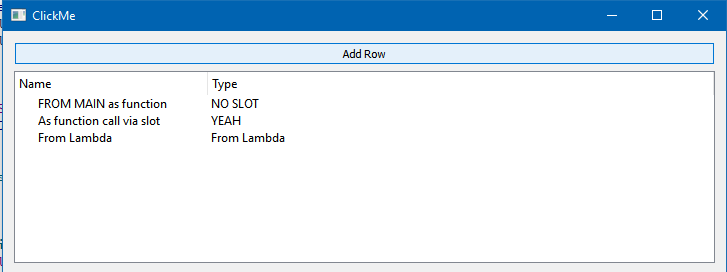
                                        void insertRow(QAbstractItemModel* const mdl, const QString& ColData1, const QString& ColData2) {
                                          const int rowCount = mdl->rowCount();
                                          if(mdl->insertRow(rowCount)) {
                                            qDebug("Row Inserted!");
                                            mdl->setData(mdl->index(rowCount, 0), ColData1);
                                            mdl->setData(mdl->index(rowCount, 1), ColData2);
                                          }
                                        }
                                        
                                        class SlotHolder : public QObject {
                                          Q_OBJECT
                                        public slots:
                                          void AddRowsWithParam(QAbstractItemModel* const mdl, const QString& ColData1, const QString& ColData2) {
                                            insertRow(mdl, ColData1, ColData2);
                                          }
                                        };
                                        
                                        int main(int argc, char* argv[]) {
                                          QApplication app(argc, argv);
                                          QWidget wid;
                                          QPushButton* addTreeBtn = new QPushButton("Add Row", &wid);
                                          QTreeWidget* treeWid = new QTreeWidget(&wid);
                                          treeWid->setColumnCount(2);
                                          treeWid->setHeaderLabels(QStringList() << "Name" << "Type");
                                          QObject::connect(addTreeBtn, &QPushButton::clicked, treeWid, [treeWid]() {
                                            insertRow(treeWid->model(), "From Lambda", "From Lambda");
                                        
                                          });
                                        
                                          insertRow(treeWid->model(), "FROM MAIN as function", "NO SLOT");
                                        
                                          SlotHolder dummy;
                                          dummy.AddRowsWithParam(treeWid->model(), "As function call via slot", "YEAH");
                                        
                                          QVBoxLayout* widlay = new QVBoxLayout(&wid);
                                          widlay->addWidget(addTreeBtn);
                                          widlay->addWidget(treeWid);
                                          wid.show();
                                          return app.exec();
                                        }
                                        
                                        #include "main.moc" // HAX TO MAKE MOC RUN ON . CPP run qmake manually


                                        alt text

                                        1 Reply Last reply
                                        2
                                        • Z Offline
                                          Z Offline
                                          ZiketCPP
                                          wrote on last edited by
                                          #25

                                          @mrjj ok, I am trying to create a custom Graphic Engine (like Unreal 4), at this moment I have a big structure to use all the OpenGL functionality without the knowledge about it (user interface communicates with the Opengl class).
                                          I have one class that inherits from QOpenGLWidget & QOpenglFunctions.
                                          The real problem is that I have to insert rows AFTER the app.exec() call, that means if the user wants to create a simple cube and drag it to the "scene"(the render widget), it has to appear in the QTreeWidget. That is my problem, I don't want the functionality inside this button CreateCube, I want, for example: If the user clicks on the CreateCube button,inside the class QOpenglFunction that I have, create a simple function that receives a simple insertRow(void userdata)*.
                                          That seems impossible, the function won't work. And I repeat, I don't pause the updates with an infinite loop.

                                          At this moment of the discussion, I have a TreeNodesManager.ui with the correspondent .h that has the function InsertRow(void* UserData), and inside the ui file I have the QTreeWidget pointer.
                                          In the other side I have my InterfaceRender.h that inherits from QOpenglWidget & OpenGL and if I want to test something: I override the PaintGL() function and put this

                                          class InterfaceRender : public QOpenglFunctions, public QOpenglWidget {
                                          public:
                                           //THE CLASS IS NOT COMPLETE
                                          void PainGL()override {
                                            //And here insert one row per frame (only to test my case) with my own data
                                            PointerTo TreeNodesManager->insertRow(&cubeWithParallaxMapping);
                                          }
                                          
                                          }
                                          

                                          And here my class that manages the QTreeWidget, keep in mind that the QTreeWidget is in the UI file:

                                          class TreeNodesManager : public QWidget {
                                          public:
                                            
                                           TreeNodesManager(QWidget* parent), QWidget(parent) {
                                              ui->setupUi(this);
                                              ui->treeWidget->setColumnCount(2);
                                              ui->treeWidget->setHeaderLabels(QStringList() << "Name" << "Type");
                                              
                                            }
                                            //And the fantastic function
                                            void InsertRow(void* UserData) {
                                              //Cast the user data to anything, I don't care
                                              QAbstractItemModel* const mdl= ui->treeWidget->model();
                                               const int rowCount =mdl->rowCount();
                                               if(mdl->insertRow(rowCount)){
                                                  qDebug("Row Inserted!");
                                                  if(mdl->setData(mdl->index(rowCount,0), UserData->name))
                                                     qDebug("name Written");
                                                  if(mdl->setData(mdl->index(rowCount,1),UserData->description))
                                                     qDebug("description Written");
                                               }
                                            }
                                          }
                                          

                                          Look the last function insertData, ALL THE qDEBUG is called.
                                          Please explain me how can I insert data AFTER the app.exec() is called (at runtime). I try this in the PainGL() function that is called one time per frame and it doesn't work

                                          mrjjM 1 Reply Last reply
                                          0

                                          • Login

                                          • Login or register to search.
                                          • First post
                                            Last post
                                          0
                                          • Categories
                                          • Recent
                                          • Tags
                                          • Popular
                                          • Users
                                          • Groups
                                          • Search
                                          • Get Qt Extensions
                                          • Unsolved