Skip to content
  • Categories
  • Recent
  • Tags
  • Popular
  • Users
  • Groups
  • Search
  • Get Qt Extensions
  • Unsolved
Collapse
Brand Logo
  1. Home
  2. Qt Development
  3. General and Desktop
  4. QPushbutton movable Dynamically
Qt 6.11 is out! See what's new in the release blog

QPushbutton movable Dynamically

Scheduled Pinned Locked Moved Unsolved General and Desktop
52 Posts 6 Posters 54.3k Views 2 Watching
  • Oldest to Newest
  • Newest to Oldest
  • Most Votes
Reply
  • Reply as topic
Log in to reply
This topic has been deleted. Only users with topic management privileges can see it.
  • ? Offline
    ? Offline
    A Former User
    wrote on last edited by
    #35

    @jsulm said in QPushbutton movable Dynamically:

    @Apeksha I still don't understand why you position this button manually...

    I second that. I'm so curious, pretty please with sugar on top, explain your use case.

    A 1 Reply Last reply
    1
    • ? A Former User

      @jsulm said in QPushbutton movable Dynamically:

      @Apeksha I still don't understand why you position this button manually...

      I second that. I'm so curious, pretty please with sugar on top, explain your use case.

      A Offline
      A Offline
      Apeksha
      wrote on last edited by
      #36

      @Wieland

      ui->contentWidget->setStyleSheet("QWidget {background-color:#C0C0C0;}");
      ui->contentWidget->setMinimumSize( 820, 150 );
      QHBoxLayout *ConfigurationLayout = new QHBoxLayout;
      QScrollArea *scrollArea = new QScrollArea;
      // scrollArea->setStyleSheet("QScrollArea {background-color:#C0C0C0;}");
      scrollArea->setVerticalScrollBarPolicy(Qt::ScrollBarAsNeeded);
      scrollArea->setHorizontalScrollBarPolicy(Qt::ScrollBarAsNeeded);
      scrollArea->setWidget(ui->contentWidget);
      scrollArea->setWidgetResizable(true);
      ConfigurationLayout->addWidget(scrollArea);
      mainBoxLayout->addLayout(ConfigurationLayout);

      This is my part of code where button movable is required, I had widget and scrollArea and some buttons.
      So when my app is minimized, one of the button position should change, when gui is minized it have to display on top of widget. I hope you got my requirement.

      1 Reply Last reply
      0
      • mrjjM mrjj

        @Apeksha
        it always say false ? or in what way "not working"

        A Offline
        A Offline
        Apeksha
        wrote on last edited by
        #37

        @mrjj

        Yes, it always say false?

        mrjjM 1 Reply Last reply
        0
        • A Apeksha

          @mrjj

          Yes, it always say false?

          mrjjM Offline
          mrjjM Offline
          mrjj
          Lifetime Qt Champion
          wrote on last edited by
          #38

          @Apeksha

          ok didnt check it lately , i assume its because the NewSize from event has not yep been applied.

          I think i get your use case now
          the button show sort of go to next col if there is no room to be below.
          So its not on top of the other but on top in new col?
          like this
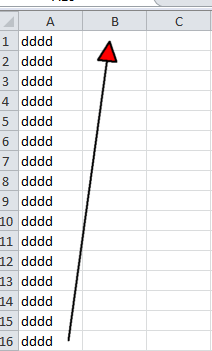
          alt text

          A 1 Reply Last reply
          0
          • mrjjM mrjj

            @Apeksha

            ok didnt check it lately , i assume its because the NewSize from event has not yep been applied.

            I think i get your use case now
            the button show sort of go to next col if there is no room to be below.
            So its not on top of the other but on top in new col?
            like this
            alt text

            A Offline
            A Offline
            Apeksha
            wrote on last edited by
            #39

            @mrjj

            So what to do now? what is the solution?

            mrjjM 1 Reply Last reply
            0
            • A Apeksha

              @mrjj

              So what to do now? what is the solution?

              mrjjM Offline
              mrjjM Offline
              mrjj
              Lifetime Qt Champion
              wrote on last edited by
              #40

              @Apeksha
              you can use
              const QSize &QResizeEvent::oldSize() const
              const QSize &QResizeEvent::size() const
              to check what size window has and had.

              Based on those numbers , you can do the right thing, store button pos
              or to restore the button to old pos.

              you can use qDebug() << "size" << event.oldSize() << " to " << event.Size();

              to get an idea of what numbers you will see.

              You can use
              http://doc.qt.io/qt-5/qdesktopwidget.html#availableGeometry

              to get how big screen is.

              A 1 Reply Last reply
              0
              • mrjjM mrjj

                @Apeksha
                you can use
                const QSize &QResizeEvent::oldSize() const
                const QSize &QResizeEvent::size() const
                to check what size window has and had.

                Based on those numbers , you can do the right thing, store button pos
                or to restore the button to old pos.

                you can use qDebug() << "size" << event.oldSize() << " to " << event.Size();

                to get an idea of what numbers you will see.

                You can use
                http://doc.qt.io/qt-5/qdesktopwidget.html#availableGeometry

                to get how big screen is.

                A Offline
                A Offline
                Apeksha
                wrote on last edited by
                #41

                @mrjj

                I understood saving of old position and new position, but how to restore i.e hoe to set button old position to restore?

                jsulmJ 1 Reply Last reply
                0
                • A Apeksha

                  @mrjj

                  I understood saving of old position and new position, but how to restore i.e hoe to set button old position to restore?

                  jsulmJ Offline
                  jsulmJ Offline
                  jsulm
                  Lifetime Qt Champion
                  wrote on last edited by jsulm
                  #42

                  @Apeksha Like this maybe?

                  ui->pushButton->move(oldX, oldY);
                  

                  https://forum.qt.io/topic/113070/qt-code-of-conduct

                  A 1 Reply Last reply
                  0
                  • jsulmJ jsulm

                    @Apeksha Like this maybe?

                    ui->pushButton->move(oldX, oldY);
                    
                    A Offline
                    A Offline
                    Apeksha
                    wrote on last edited by Apeksha
                    #43

                    @jsulm

                    I have used the same, but it's not working.

                    void MainWindow::resizeEvent(QResizeEvent* event)
                    {
                    qDebug() << "old size" << event->oldSize() << " to " << event->size();
                    int oldx,oldy;
                    oldpos=ui->pushButton->geometry();
                    oldx=oldpos.x();
                    oldy=oldpos.y();
                    qDebug()<<"oldpos x is"<<oldx<<"oldpos y is:"<<oldy;
                    if (!firstTime) {
                    ui->pushButton->move(50,100);
                    }

                        else {
                             ui->pushButton->move(oldx,oldy);
                               firstTime = false;
                    
                        }
                    
                        QMainWindow::resizeEvent(event);
                    

                    }

                    jsulmJ 1 Reply Last reply
                    0
                    • A Apeksha

                      @jsulm

                      I have used the same, but it's not working.

                      void MainWindow::resizeEvent(QResizeEvent* event)
                      {
                      qDebug() << "old size" << event->oldSize() << " to " << event->size();
                      int oldx,oldy;
                      oldpos=ui->pushButton->geometry();
                      oldx=oldpos.x();
                      oldy=oldpos.y();
                      qDebug()<<"oldpos x is"<<oldx<<"oldpos y is:"<<oldy;
                      if (!firstTime) {
                      ui->pushButton->move(50,100);
                      }

                          else {
                               ui->pushButton->move(oldx,oldy);
                                 firstTime = false;
                      
                          }
                      
                          QMainWindow::resizeEvent(event);
                      

                      }

                      jsulmJ Offline
                      jsulmJ Offline
                      jsulm
                      Lifetime Qt Champion
                      wrote on last edited by
                      #44

                      @Apeksha "it's not working" doesn't help to solve the problem.
                      Did you analyse why it is not working? You can print out the values oldX, oldY for example.

                      https://forum.qt.io/topic/113070/qt-code-of-conduct

                      A 1 Reply Last reply
                      0
                      • jsulmJ jsulm

                        @Apeksha "it's not working" doesn't help to solve the problem.
                        Did you analyse why it is not working? You can print out the values oldX, oldY for example.

                        A Offline
                        A Offline
                        Apeksha
                        wrote on last edited by
                        #45

                        @jsulm

                        void MainWindow::resizeEvent(QResizeEvent* event)
                        {
                        qDebug() << "old size" << event->oldSize() << " to " << event->size();
                        int oldx,oldy;
                        oldpos=ui->pushButton->geometry();
                        oldx=oldpos.x();
                        oldy=oldpos.y();
                        qDebug()<<"oldpos x is"<<oldx<<"oldpos y is:"<<oldy;
                        if (!firstTime) {
                        ui->pushButton->move(50,100);
                        }

                        else {
                             ui->pushButton->move(oldx,oldy);
                               firstTime = false;
                        
                        }
                        
                        QMainWindow::resizeEvent(event);
                        

                        }

                        A 1 Reply Last reply
                        0
                        • A Apeksha

                          @jsulm

                          void MainWindow::resizeEvent(QResizeEvent* event)
                          {
                          qDebug() << "old size" << event->oldSize() << " to " << event->size();
                          int oldx,oldy;
                          oldpos=ui->pushButton->geometry();
                          oldx=oldpos.x();
                          oldy=oldpos.y();
                          qDebug()<<"oldpos x is"<<oldx<<"oldpos y is:"<<oldy;
                          if (!firstTime) {
                          ui->pushButton->move(50,100);
                          }

                          else {
                               ui->pushButton->move(oldx,oldy);
                                 firstTime = false;
                          
                          }
                          
                          QMainWindow::resizeEvent(event);
                          

                          }

                          A Offline
                          A Offline
                          Apeksha
                          wrote on last edited by Apeksha
                          #46

                          Hi,

                          please can anybody help me to solve this issue?

                          Thanks in advance.

                          jsulmJ 1 Reply Last reply
                          0
                          • A Apeksha

                            Hi,

                            please can anybody help me to solve this issue?

                            Thanks in advance.

                            jsulmJ Offline
                            jsulmJ Offline
                            jsulm
                            Lifetime Qt Champion
                            wrote on last edited by
                            #47

                            @Apeksha Your current resizeEvent is wrong: you read CURRENT button geometry and use it as OLD geometry! You need to store the old posx/posy before and restore it later when needed.

                            https://forum.qt.io/topic/113070/qt-code-of-conduct

                            A 1 Reply Last reply
                            0
                            • jsulmJ jsulm

                              @Apeksha Your current resizeEvent is wrong: you read CURRENT button geometry and use it as OLD geometry! You need to store the old posx/posy before and restore it later when needed.

                              A Offline
                              A Offline
                              Apeksha
                              wrote on last edited by
                              #48

                              @jsulm

                              K i uderstood , Initially I will save oldx and oldy in constructor and where actually i have to use this oldx and oldy to restore. In above code If I use this oldx and oldy , its not restoring. I am attaching code:

                              void MainWindow::resizeEvent(QResizeEvent* event)
                              {
                              if (!firstTime) {
                              ui->pushButton->move(50,100);
                              }

                                  else {             
                                      ui->pushButton->move(oldx,oldy);  ---->This oldx and oldy Iam  storing in constructor.
                                         firstTime = false;
                                  }
                              
                                  QMainWindow::resizeEvent(event);
                              

                              }

                              jsulmJ 1 Reply Last reply
                              0
                              • A Apeksha

                                @jsulm

                                K i uderstood , Initially I will save oldx and oldy in constructor and where actually i have to use this oldx and oldy to restore. In above code If I use this oldx and oldy , its not restoring. I am attaching code:

                                void MainWindow::resizeEvent(QResizeEvent* event)
                                {
                                if (!firstTime) {
                                ui->pushButton->move(50,100);
                                }

                                    else {             
                                        ui->pushButton->move(oldx,oldy);  ---->This oldx and oldy Iam  storing in constructor.
                                           firstTime = false;
                                    }
                                
                                    QMainWindow::resizeEvent(event);
                                

                                }

                                jsulmJ Offline
                                jsulmJ Offline
                                jsulm
                                Lifetime Qt Champion
                                wrote on last edited by
                                #49

                                @Apeksha Did you verify the else block was executed? Did you check the oldx/oldy values?

                                https://forum.qt.io/topic/113070/qt-code-of-conduct

                                A 1 Reply Last reply
                                0
                                • jsulmJ jsulm

                                  @Apeksha Did you verify the else block was executed? Did you check the oldx/oldy values?

                                  A Offline
                                  A Offline
                                  Apeksha
                                  wrote on last edited by
                                  #50

                                  @jsulm

                                  Very first time it was executing, when I am resizing it was not executing.

                                  1 Reply Last reply
                                  0
                                  • D Offline
                                    D Offline
                                    dsba
                                    wrote on last edited by
                                    #51

                                    @Apeksha

                                    I think, Problem seems to be with enabling of flag "firsttime".

                                    CAN YOU TRY THIS?

                                    int oldX,oldY,fstFlag=1;

                                    void MainWindow::resizeEvent(QResizeEvent *event)
                                    {
                                    if(!fstFlag)
                                    {
                                    oldX=0;
                                    oldY=0;
                                    fstFlag=1;
                                    }
                                    else
                                    {
                                    fstFlag=0;
                                    oldX=50;
                                    oldY=100;
                                    }
                                    ui->pushbutton->move(oldX,oldY);
                                    }

                                    A 1 Reply Last reply
                                    0
                                    • D dsba

                                      @Apeksha

                                      I think, Problem seems to be with enabling of flag "firsttime".

                                      CAN YOU TRY THIS?

                                      int oldX,oldY,fstFlag=1;

                                      void MainWindow::resizeEvent(QResizeEvent *event)
                                      {
                                      if(!fstFlag)
                                      {
                                      oldX=0;
                                      oldY=0;
                                      fstFlag=1;
                                      }
                                      else
                                      {
                                      fstFlag=0;
                                      oldX=50;
                                      oldY=100;
                                      }
                                      ui->pushbutton->move(oldX,oldY);
                                      }

                                      A Offline
                                      A Offline
                                      Apeksha
                                      wrote on last edited by Apeksha
                                      #52

                                      @dsba

                                      Thanks a lot.
                                      Its fine, but when I am resizing my app slowly button is blinking.

                                      1 Reply Last reply
                                      1

                                      • Login

                                      • Login or register to search.
                                      • First post
                                        Last post
                                      0
                                      • Categories
                                      • Recent
                                      • Tags
                                      • Popular
                                      • Users
                                      • Groups
                                      • Search
                                      • Get Qt Extensions
                                      • Unsolved