Skip to content
  • Categories
  • Recent
  • Tags
  • Popular
  • Users
  • Groups
  • Search
  • Get Qt
  • Unsolved
Collapse
qtws26_logo

The Qt Event of the Year: Qt World Summit 2026

Save Your Spot >
Brand Logo
  1. Home
  2. Qt Development
  3. General and Desktop
  4. Plugin loading failed
Qt 6.12 LTS is out! See what's new in the release blog

Plugin loading failed

Scheduled Pinned Locked Moved Unsolved General and Desktop
15 Posts 5 Posters 5.4k Views 2 Watching
  • Oldest to Newest
  • Newest to Oldest
  • Most Votes
Reply
  • Reply as topic
Log in to reply
This topic has been deleted. Only users with topic management privileges can see it.
  • N nhatquang

    @jsulm Thank you, could please tell me more in details. I'm new with QT.

    mrjjM Offline
    mrjjM Offline
    mrjj
    Lifetime Qt Champion
    wrote on last edited by mrjj
    #6

    @nhatquang
    Hi
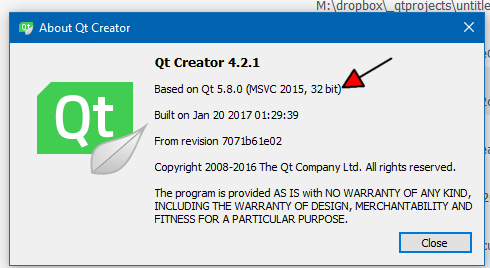
    For plugins to be be loadable for Creator, it must be compiled with visual studio compiler.
    (on the windows platform. On linux is gcc)
    Mingw compiler won't work. ( on windows )

    Look in Help->About Creator
    alt text

    So to make plugins for this creator, you must be using vs 2015 32 bit to compile plugin
    and it should be in release mode.

    N 1 Reply Last reply
    2
    • Vinod KuntojiV Vinod Kuntoji

      @nhatquang ,

      Have you provided the dll path in .pro file?

      win32: LIBS += -L$$PWD/../../../../bin/ -ledDesigner
      DEPENDPATH += $$PWD/../../../../bin/

      N Offline
      N Offline
      nhatquang
      wrote on last edited by
      #7

      @Vinod-Kuntoji said in Plugin loading failed:

      @nhatquang ,

      Have you provided the dll path in .pro file?

      win32: LIBS += -L$$PWD/../../../../bin/ -ledDesigner
      DEPENDPATH += $$PWD/../../../../bin/

      Thanks, i will try

      1 Reply Last reply
      0
      • mrjjM mrjj

        @nhatquang
        Hi
        For plugins to be be loadable for Creator, it must be compiled with visual studio compiler.
        (on the windows platform. On linux is gcc)
        Mingw compiler won't work. ( on windows )

        Look in Help->About Creator
        alt text

        So to make plugins for this creator, you must be using vs 2015 32 bit to compile plugin
        and it should be in release mode.

        N Offline
        N Offline
        nhatquang
        wrote on last edited by
        #8

        @mrjj said in Plugin loading failed:

        @nhatquang
        Hi
        For plugins to be be loadable for Creator, it must be compiled with visual studio compiler.
        (on the windows platform. On linux is gcc)
        Mingw compiler won't work. ( on windows )

        Look in Help->About Creator
        alt text

        So to make plugins for this creator, you must be using vs 2015 32 bit to compile plugin
        and it should be in release mode.

        Thank you, but I'm using VS2017 without QT addin support. It mean, i can't build plugin?

        mrjjM 1 Reply Last reply
        0
        • N nhatquang

          @mrjj said in Plugin loading failed:

          @nhatquang
          Hi
          For plugins to be be loadable for Creator, it must be compiled with visual studio compiler.
          (on the windows platform. On linux is gcc)
          Mingw compiler won't work. ( on windows )

          Look in Help->About Creator
          alt text

          So to make plugins for this creator, you must be using vs 2015 32 bit to compile plugin
          and it should be in release mode.

          Thank you, but I'm using VS2017 without QT addin support. It mean, i can't build plugin?

          mrjjM Offline
          mrjjM Offline
          mrjj
          Lifetime Qt Champion
          wrote on last edited by mrjj
          #9

          @nhatquang
          Hi. No there is 1 (one) exception. Vs 2017 should be compatible with VS2015
          as far as i understand.
          Should be 32 bit though.
          Remember to check your Creator just to be sure.

          N 1 Reply Last reply
          1
          • mrjjM mrjj

            @nhatquang
            Hi. No there is 1 (one) exception. Vs 2017 should be compatible with VS2015
            as far as i understand.
            Should be 32 bit though.
            Remember to check your Creator just to be sure.

            N Offline
            N Offline
            nhatquang
            wrote on last edited by
            #10

            @mrjj said in Plugin loading failed:

            @nhatquang
            Hi. No there is 1 (one) exception. Vs 2017 should be compatible with VS2015
            as far as i understand.
            Should be 32 bit though.
            Remember to check your Creator just to be sure.

            But QtCreator 4.3 built based on Qt 5.8, not 5.9. How can i solve?

            mrjjM jsulmJ 2 Replies Last reply
            0
            • N nhatquang

              @mrjj said in Plugin loading failed:

              @nhatquang
              Hi. No there is 1 (one) exception. Vs 2017 should be compatible with VS2015
              as far as i understand.
              Should be 32 bit though.
              Remember to check your Creator just to be sure.

              But QtCreator 4.3 built based on Qt 5.8, not 5.9. How can i solve?

              mrjjM Offline
              mrjjM Offline
              mrjj
              Lifetime Qt Champion
              wrote on last edited by mrjj
              #11

              @nhatquang
              That should work anyway. Might not be correct.
              Its the visual studio version that is important.
              But vs2015 works as vs2017. ( for the first time ever)

              update:
              Seems i was too optimistic

              Better to use 5.8 then for compiling the plugin.

              1 Reply Last reply
              3
              • N nhatquang

                @mrjj said in Plugin loading failed:

                @nhatquang
                Hi. No there is 1 (one) exception. Vs 2017 should be compatible with VS2015
                as far as i understand.
                Should be 32 bit though.
                Remember to check your Creator just to be sure.

                But QtCreator 4.3 built based on Qt 5.8, not 5.9. How can i solve?

                jsulmJ Offline
                jsulmJ Offline
                jsulm
                Lifetime Qt Champion
                wrote on last edited by
                #12

                @nhatquang Install Qt 5.8 and use it for your plug-in. You can keep Qt 5.9 ass QtCreator can handle many Qt versions.

                https://forum.qt.io/topic/113070/qt-code-of-conduct

                mrjjM 1 Reply Last reply
                4
                • jsulmJ jsulm

                  @nhatquang Install Qt 5.8 and use it for your plug-in. You can keep Qt 5.9 ass QtCreator can handle many Qt versions.

                  mrjjM Offline
                  mrjjM Offline
                  mrjj
                  Lifetime Qt Champion
                  wrote on last edited by
                  #13

                  @jsulm
                  So the 5.8 -> 5.9 will be too much version span for plugin to load ?

                  jsulmJ 1 Reply Last reply
                  0
                  • mrjjM mrjj

                    @jsulm
                    So the 5.8 -> 5.9 will be too much version span for plugin to load ?

                    jsulmJ Offline
                    jsulmJ Offline
                    jsulm
                    Lifetime Qt Champion
                    wrote on last edited by
                    #14

                    @mrjj I guess so. 5.8.0 -> 5.8.1 should be OK, but 5.8 -> 5.9 probably not.

                    https://forum.qt.io/topic/113070/qt-code-of-conduct

                    N 1 Reply Last reply
                    2
                    • jsulmJ jsulm

                      @mrjj I guess so. 5.8.0 -> 5.8.1 should be OK, but 5.8 -> 5.9 probably not.

                      N Offline
                      N Offline
                      nhatquang
                      wrote on last edited by
                      #15

                      I'm stuck ! I can't do successfully

                      1 Reply Last reply
                      0

                      • Login

                      • Login or register to search.
                      • First post
                        Last post
                      0
                      • Categories
                      • Recent
                      • Tags
                      • Popular
                      • Users
                      • Groups
                      • Search
                      • Get Qt
                      • Unsolved