
How to get QT Creator to recognize std::chrono_literals?
-
Hello, I created this simple program
#include <stdio.h>
#include <thread>
#include <chrono>
using namespace std;

int main(int argc, char *argv[])
{
    using namespace std::chrono_literals;
    this_thread::sleep_for(10s);
    cout << "Hello World!" << endl;
    return 0;
}
Qt tells me
expected token ';' got '<error>'on the line which uses
10schrono literal.
I can actually compile the project fine with no issues, run it, and everything works. The IDE itself does not however recognize this. How do I get QT creator recognize this syntax as valid?Note I'm using a QT creator c++ console application using cmake. I have no .pro file because of this.
-
Hello, I created this simple program
#include <stdio.h>
#include <thread>
#include <chrono>
using namespace std;

int main(int argc, char *argv[])
{
    using namespace std::chrono_literals;
    this_thread::sleep_for(10s);
    cout << "Hello World!" << endl;
    return 0;
}
Qt tells me
expected token ';' got '<error>'on the line which uses
10schrono literal.
I can actually compile the project fine with no issues, run it, and everything works. The IDE itself does not however recognize this. How do I get QT creator recognize this syntax as valid?Note I'm using a QT creator c++ console application using cmake. I have no .pro file because of this.
@Stoke said in How to get QT Creator to recognize std::chrono_literals?:
Qt tells me
For sure not: Qt isn't a compiler.
Where exactly do you get this? I guess in QtCreator?
You can try to activate ClangStaticAnalyzer (go to "Help/About Pligins..."). -
@Stoke said in How to get QT Creator to recognize std::chrono_literals?:
Qt tells me
For sure not: Qt isn't a compiler.
Where exactly do you get this? I guess in QtCreator?
You can try to activate ClangStaticAnalyzer (go to "Help/About Pligins...").@jsulm said in How to get QT Creator to recognize std::chrono_literals?:
For sure not: Qt isn't a compiler.
@jsulm yes it does, you want me to screen shot this for you? QT creator, the IDE, definitively tells me "expected token ';' got '<error>'" and underlines this section (
this_thread::sleep_for(10s);), even though compilation and execution works fine, I don't know what QT uses internally to recognize this, but the parser is not recgonizing this as proper syntax with in QT.@jsulm said in How to get QT Creator to recognize std::chrono_literals?:
Where exactly do you get this? I guess in QtCreator?
Yes? did I imply something else? I said in the title and in the post itself I get this in QT Creator. Here is what is happening http://imgur.com/a/XEwrY, as you can see i compile and run fine, QT just doesn't understand the syntax.
@jsulm said in How to get QT Creator to recognize std::chrono_literals?:
You can try to activate ClangStaticAnalyzer (go to "Help/About Pligins...").
It is already activated.
-
@jsulm said in How to get QT Creator to recognize std::chrono_literals?:
For sure not: Qt isn't a compiler.
@jsulm yes it does, you want me to screen shot this for you? QT creator, the IDE, definitively tells me "expected token ';' got '<error>'" and underlines this section (
this_thread::sleep_for(10s);), even though compilation and execution works fine, I don't know what QT uses internally to recognize this, but the parser is not recgonizing this as proper syntax with in QT.@jsulm said in How to get QT Creator to recognize std::chrono_literals?:
Where exactly do you get this? I guess in QtCreator?
Yes? did I imply something else? I said in the title and in the post itself I get this in QT Creator. Here is what is happening http://imgur.com/a/XEwrY, as you can see i compile and run fine, QT just doesn't understand the syntax.
@jsulm said in How to get QT Creator to recognize std::chrono_literals?:
You can try to activate ClangStaticAnalyzer (go to "Help/About Pligins...").
It is already activated.
Ahh, i see . It's not compiler error you get but Qt Creator's flagging of
invalid stuff ? ( its syntax checker) ( it has red line and if u tooltip it says the error ?)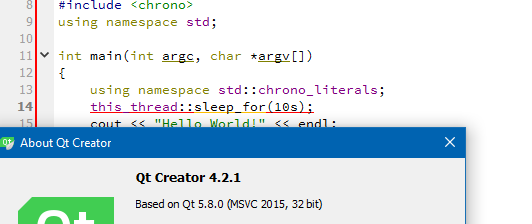
Maybe it will be fixed in later version , especially if you you can open bug report.
-
Ahh, i see . It's not compiler error you get but Qt Creator's flagging of
invalid stuff ? ( its syntax checker) ( it has red line and if u tooltip it says the error ?)Maybe it will be fixed in later version , especially if you you can open bug report.
@mrjj Yes the syntax checker doesn't properly parse them.
Also it was already reported nearly a year ago, I'm probably going to leave QT creator for now since I can't guarantee base modern C++ support. Its strange since you can use chrono literals in other qt constructs, so the idea that they can't parse in the IDE them seems a bit odd.
-
@mrjj Yes the syntax checker doesn't properly parse them.
Also it was already reported nearly a year ago, I'm probably going to leave QT creator for now since I can't guarantee base modern C++ support. Its strange since you can use chrono literals in other qt constructs, so the idea that they can't parse in the IDE them seems a bit odd.
-
@Stoke ¨
So it will not color it red in other constructs ?
I have not used literal much yet.Hmm, its Not Evaluated still. So nope, no fix anytime soon.
I agree its annoying as u grow to trust the red lines.
@mrjj I'm not sure it has issue with user defined literals, but those are c++11, as well, I haven't noticed it with other standard c++11 constructs or c++14 libraries (it will, for example, not understand what std::chrono_literals are if I set cmake file to use c++11 explicitly, but if I use c++14 or what ever Cmake does by default, it knows that at least std::chrono_literals exists). This piece of code
auto lambda = [](auto a, auto b) { return a * b; };which is apparently only valid in c++14 for example is not marked is wrong. So I think this is just a lack of support for parsing literals that don't have _ prefix (ie those introduced in c++14) -
@mrjj Yes the syntax checker doesn't properly parse them.
Also it was already reported nearly a year ago, I'm probably going to leave QT creator for now since I can't guarantee base modern C++ support. Its strange since you can use chrono literals in other qt constructs, so the idea that they can't parse in the IDE them seems a bit odd.
@Stoke Clang Code model is not enabled by default for whatever reason. I opened several bugs and many of them were closed after saying that Clang Code Model fixes it and your bug report is closed for same reason.
Qt is probably making a full transition to Clang code model. Use "Hlp->About plugins" to enable it, restart.
-
@Stoke Clang Code model is not enabled by default for whatever reason. I opened several bugs and many of them were closed after saying that Clang Code Model fixes it and your bug report is closed for same reason.
Qt is probably making a full transition to Clang code model. Use "Hlp->About plugins" to enable it, restart.

