Skip to content
  • Categories
  • Recent
  • Tags
  • Popular
  • Users
  • Groups
  • Search
  • Get Qt
  • Unsolved
Collapse
qtws26_logo

The Qt Event of the Year: Qt World Summit 2026

Save Your Spot >
Brand Logo
  1. Home
  2. Qt Development
  3. General and Desktop
  4. Is it possible to have a window in a window?
Qt 6.12 LTS is out! See what's new in the release blog

Is it possible to have a window in a window?

Scheduled Pinned Locked Moved Solved General and Desktop
14 Posts 5 Posters 6.5k Views 2 Watching
  • Oldest to Newest
  • Newest to Oldest
  • Most Votes
Reply
  • Reply as topic
Log in to reply
This topic has been deleted. Only users with topic management privileges can see it.
  • SGaistS Offline
    SGaistS Offline
    SGaist
    Lifetime Qt Champion
    wrote on last edited by
    #3

    Hi,

    Do you mean QDockWidgets in a QMainWindow ?

    Interested in AI ? www.idiap.ch
    Please read the Qt Code of Conduct - https://forum.qt.io/topic/113070/qt-code-of-conduct

    1 Reply Last reply
    0
    • G Offline
      G Offline
      Gerd
      wrote on last edited by
      #4

      Hi,
      that could be done with QMdiArea and QMdiSubWindow.

      AsimovA 1 Reply Last reply
      1
      • AsimovA Offline
        AsimovA Offline
        Asimov
        wrote on last edited by Asimov
        #5

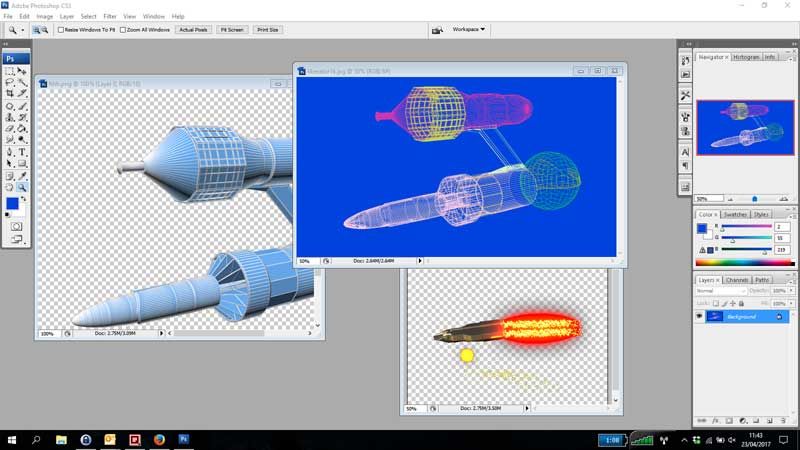
        This is a screenshot of photoshop and this is the kind of thing I am looking for. Resizable and closable windows inside the application window.

        0_1492944407626_windowinwindow.jpg

        1 Reply Last reply
        0
        • SGaistS Offline
          SGaistS Offline
          SGaist
          Lifetime Qt Champion
          wrote on last edited by
          #6

          The image upload is currently broken. See here for how to share images.

          Interested in AI ? www.idiap.ch
          Please read the Qt Code of Conduct - https://forum.qt.io/topic/113070/qt-code-of-conduct

          1 Reply Last reply
          1
          • AsimovA Offline
            AsimovA Offline
            Asimov
            wrote on last edited by
            #7

            @SGaist
            I know you said it is broken, but I can see the image. When you told me it was broken I cleared my cache, shut down mozilla and then restarted it, and the image still shows up in QT.

            Will however look at that link you posted for me.

            1 Reply Last reply
            0
            • SGaistS Offline
              SGaistS Offline
              SGaist
              Lifetime Qt Champion
              wrote on last edited by
              #8

              You can see it without any problem for a while. However others might not be able to do that as it's the case now.

              Interested in AI ? www.idiap.ch
              Please read the Qt Code of Conduct - https://forum.qt.io/topic/113070/qt-code-of-conduct

              1 Reply Last reply
              1
              • AsimovA Offline
                AsimovA Offline
                Asimov
                wrote on last edited by Asimov
                #9

                @SGaist
                I hope you can see this one. Sent it to photobucket. This is the kind of thing I want to achieve. Multiple windows in my application, but inside my main window.
                WindowInWindow

                1 Reply Last reply
                1
                • SGaistS Offline
                  SGaistS Offline
                  SGaist
                  Lifetime Qt Champion
                  wrote on last edited by
                  #10

                  Then take a look at @Gerd class suggestions, they are what you are looking for.

                  Interested in AI ? www.idiap.ch
                  Please read the Qt Code of Conduct - https://forum.qt.io/topic/113070/qt-code-of-conduct

                  1 Reply Last reply
                  0
                  • G Gerd

                    Hi,
                    that could be done with QMdiArea and QMdiSubWindow.

                    AsimovA Offline
                    AsimovA Offline
                    Asimov
                    wrote on last edited by Asimov
                    #11

                    @Gerd
                    I will look into QMdiArea and QMdiSubWindow.

                    Thanks

                    PS. Found this tutorial. It is all in a foreign languge, but I got the gist of it, so QMidiArea is the one I need to use
                    https://www.youtube.com/watch?v=Rh64jrrx0bw

                    1 Reply Last reply
                    0
                    • SGaistS Offline
                      SGaistS Offline
                      SGaist
                      Lifetime Qt Champion
                      wrote on last edited by
                      #12

                      Good

                      Since these classes are what you were looking for, please mark the thread as solved using the "Topic Tools" button so that other forum users may know a solution has been found :)

                      Interested in AI ? www.idiap.ch
                      Please read the Qt Code of Conduct - https://forum.qt.io/topic/113070/qt-code-of-conduct

                      1 Reply Last reply
                      1
                      • AsimovA Offline
                        AsimovA Offline
                        Asimov
                        wrote on last edited by
                        #13

                        @SGaist
                        Yes sorry, meant to mark it as solved yesterday, but didn't get around to it. Will do it now.

                        1 Reply Last reply
                        0
                        • AsimovA Offline
                          AsimovA Offline
                          Asimov
                          wrote on last edited by
                          #14

                          @Gerd & @SGaist
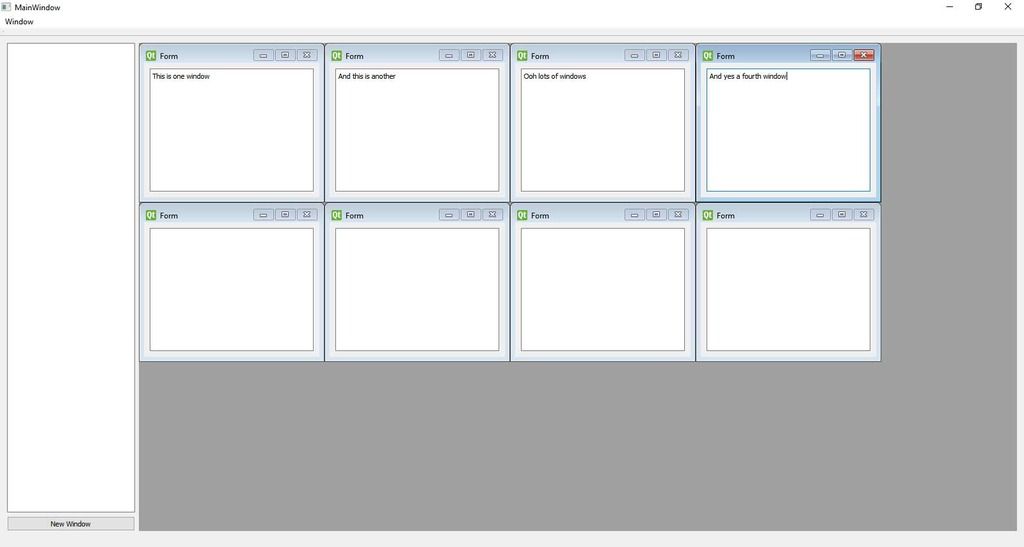
                          Thanks for the help and I thought I would show you this screenshot. I only got it working woohoo.
                          This will be the start of my second application in QT. I am taking baby steps with this one though, but this is a start.
                          windowinwindow

                          1 Reply Last reply
                          3

                          • Login

                          • Login or register to search.
                          • First post
                            Last post
                          0
                          • Categories
                          • Recent
                          • Tags
                          • Popular
                          • Users
                          • Groups
                          • Search
                          • Get Qt
                          • Unsolved