
Skip to content
  • Categories
  • Recent
  • Tags
  • Popular
  • Users
  • Groups
  • Search
  • Get Qt Extensions
  • Unsolved
Collapse
Brand Logo
  1. Home
  2. Qt Development
  3. General and Desktop
  4. Change the icon size to a QAction
Qt 6.11 is out! See what's new in the release blog

Change the icon size to a QAction

Scheduled Pinned Locked Moved Solved General and Desktop
14 Posts 3 Posters 10.5k Views 4 Watching
  • Oldest to Newest
  • Newest to Oldest
  • Most Votes
Reply
  • Reply as topic
Log in to reply
This topic has been deleted. Only users with topic management privileges can see it.
  • SGaistS Offline
    SGaistS Offline
    SGaist
    Lifetime Qt Champion
    wrote on last edited by
    #2

    Hi,

    How are you building your actions and icons ?
    Where are your actions located in your UI ?

    Interested in AI ? www.idiap.ch
    Please read the Qt Code of Conduct - https://forum.qt.io/topic/113070/qt-code-of-conduct

    BlasterB 1 Reply Last reply
    0
    • SGaistS SGaist

      Hi,

      How are you building your actions and icons ?
      Where are your actions located in your UI ?

      BlasterB Offline
      BlasterB Offline
      Blaster
      wrote on last edited by
      #3

      @SGaist said in Change the icon size to a QAction:

      a

      hi...I have a button to which I put a menu with dynamic actions created in a cycle. Then the most significant of the actions should be the icon that is what identifies them, so I need to resize to be able to see the image better. Do you think you can help me?

      1 Reply Last reply
      0
      • SGaistS Offline
        SGaistS Offline
        SGaist
        Lifetime Qt Champion
        wrote on last edited by
        #4

        Maybe but showing your code where you are making your QIcon objects would help a lot.

        Interested in AI ? www.idiap.ch
        Please read the Qt Code of Conduct - https://forum.qt.io/topic/113070/qt-code-of-conduct

        1 Reply Last reply
        0
        • BlasterB Offline
          BlasterB Offline
          Blaster
          wrote on last edited by
          #5

          this is the code:

          QMenu *menu = new QMenu;
          for(int i = 0; i < TotalAction; i++)
          {
                 QAction *action = new QAction(QIcon("icon_path"), "name");
                 menu->addAction(action);
          }
          pushbutton->setMenu(menu);
          

          the I want to resize the icon.. please HELP ME

          1 Reply Last reply
          0
          • SGaistS Offline
            SGaistS Offline
            SGaist
            Lifetime Qt Champion
            wrote on last edited by
            #6

            What icon size do you have in mind ?
            What is the size of the image you are loading ?

            Interested in AI ? www.idiap.ch
            Please read the Qt Code of Conduct - https://forum.qt.io/topic/113070/qt-code-of-conduct

            1 Reply Last reply
            0
            • BlasterB Offline
              BlasterB Offline
              Blaster
              wrote on last edited by
              #7

              I want to resize the icon of the QAction, so it can be visible in detail.
              The size of the uploaded image is 55x40 pixels

              1 Reply Last reply
              0
              • SGaistS Offline
                SGaistS Offline
                SGaist
                Lifetime Qt Champion
                wrote on last edited by
                #8

                Then again, what size do you have in mind ?

                Interested in AI ? www.idiap.ch
                Please read the Qt Code of Conduct - https://forum.qt.io/topic/113070/qt-code-of-conduct

                1 Reply Last reply
                0
                • BlasterB Offline
                  BlasterB Offline
                  Blaster
                  wrote on last edited by
                  #9

                  I want the original size of the image. The problem is that the size of the QAction icon is very small, because it resizes that image size

                  1 Reply Last reply
                  0
                  • SGaistS Offline
                    SGaistS Offline
                    SGaist
                    Lifetime Qt Champion
                    wrote on last edited by
                    #10

                    One thing that passed me by: you are setting your icon on a menu. The size used for the icon in this case is decided by the style to follow the platform standard. If you want to customise that part you'll have to implement your own style.

                    Interested in AI ? www.idiap.ch
                    Please read the Qt Code of Conduct - https://forum.qt.io/topic/113070/qt-code-of-conduct

                    1 Reply Last reply
                    0
                    • SGaistS Offline
                      SGaistS Offline
                      SGaist
                      Lifetime Qt Champion
                      wrote on last edited by
                      #11

                      Or use a QProxyStyle

                      Interested in AI ? www.idiap.ch
                      Please read the Qt Code of Conduct - https://forum.qt.io/topic/113070/qt-code-of-conduct

                      BlasterB 1 Reply Last reply
                      1
                      • SGaistS SGaist

                        Or use a QProxyStyle

                        BlasterB Offline
                        BlasterB Offline
                        Blaster
                        wrote on last edited by
                        #12

                        @SGaist show me an example

                        mrjjM 1 Reply Last reply
                        0
                        • BlasterB Blaster

                          @SGaist show me an example

                          mrjjM Offline
                          mrjjM Offline
                          mrjj
                          Lifetime Qt Champion
                          wrote on last edited by mrjj
                          #13

                          The doc have sample :) Just after important info..

                          Anyway, what you are after is something like

                          
                          #include <QProxyStyle>
                          class MyProxyStyle: public QProxyStyle {
                            Q_OBJECT
                           public:
                            MyProxyStyle(QStyle* style = 0) : QProxyStyle(style) { }
                            MyProxyStyle(const QString& key) : QProxyStyle(key) { }
                            virtual int pixelMetric(QStyle::PixelMetric metric, const QStyleOption* option = 0, const QWidget* widget = 0 ) const {
                              switch ( metric ) {
                                case QStyle::PM_SmallIconSize:
                                  return 200; // here u want pixmaps size i assume
                                default:
                                  return QProxyStyle::pixelMetric( metric, option, widget ); // return default values for the rest
                              }
                            }
                          };
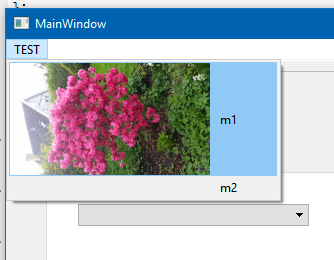
                          

                          alt text

                          Note that you violate most user interface guidelines by this.
                          However, i have done it to make menus good for touch activation so it has its use cases but
                          it also means that you app will not play well with a platform that it self have adjusted heights.
                          Like for seeing impaired etc.

                          To use

                          int main(int argc, char* argv[]) {
                            QApplication a(argc, argv);
                            a.setStyle(new MyProxyStyle() );
                            MainWindow w;
                            w.show();
                          
                            return a.exec();
                          }
                          
                          BlasterB 1 Reply Last reply
                          2
                          • mrjjM mrjj

                            The doc have sample :) Just after important info..

                            Anyway, what you are after is something like

                            
                            #include <QProxyStyle>
                            class MyProxyStyle: public QProxyStyle {
                              Q_OBJECT
                             public:
                              MyProxyStyle(QStyle* style = 0) : QProxyStyle(style) { }
                              MyProxyStyle(const QString& key) : QProxyStyle(key) { }
                              virtual int pixelMetric(QStyle::PixelMetric metric, const QStyleOption* option = 0, const QWidget* widget = 0 ) const {
                                switch ( metric ) {
                                  case QStyle::PM_SmallIconSize:
                                    return 200; // here u want pixmaps size i assume
                                  default:
                                    return QProxyStyle::pixelMetric( metric, option, widget ); // return default values for the rest
                                }
                              }
                            };
                            

                            alt text

                            Note that you violate most user interface guidelines by this.
                            However, i have done it to make menus good for touch activation so it has its use cases but
                            it also means that you app will not play well with a platform that it self have adjusted heights.
                            Like for seeing impaired etc.

                            To use

                            int main(int argc, char* argv[]) {
                              QApplication a(argc, argv);
                              a.setStyle(new MyProxyStyle() );
                              MainWindow w;
                              w.show();
                            
                              return a.exec();
                            }
                            
                            BlasterB Offline
                            BlasterB Offline
                            Blaster
                            wrote on last edited by
                            #14

                            @mrjj All good, but there is a problem which is that in the application I have another menu that I do not want to resize to the icons

                            1 Reply Last reply
                            0

                            • Login

                            • Login or register to search.
                            • First post
                              Last post
                            0
                            • Categories
                            • Recent
                            • Tags
                            • Popular
                            • Users
                            • Groups
                            • Search
                            • Get Qt Extensions
                            • Unsolved