
Skip to content
  • Categories
  • Recent
  • Tags
  • Popular
  • Users
  • Groups
  • Search
  • Get Qt Extensions
  • Unsolved
Collapse
Brand Logo
  1. Home
  2. Qt Development
  3. General and Desktop
  4. Purely in C++ or Designer mode
Qt 6.11 is out! See what's new in the release blog

Purely in C++ or Designer mode

Scheduled Pinned Locked Moved Unsolved General and Desktop
21 Posts 12 Posters 11.2k Views 10 Watching
  • Oldest to Newest
  • Newest to Oldest
  • Most Votes
Reply
  • Reply as topic
Log in to reply
This topic has been deleted. Only users with topic management privileges can see it.
  • ? Offline
    ? Offline
    A Former User
    wrote on last edited by A Former User
    #2

    Hi! I think a mixture of both is common. Most forms have pretty static content, so for these using the Designer is the easiest way. On the other hand, if you have forms where the content / layout, number of buttons etc, depend on run-time decisions, you'll use hand-written C++ code.

    1 Reply Last reply
    2
    • K Offline
      K Offline
      koahnig
      wrote on last edited by
      #3

      Both.
      Details are basically the same as those from @Wieland

      Vote the answer(s) that helped you to solve your issue(s)

      1 Reply Last reply
      1
      • mrjjM Offline
        mrjjM Offline
        mrjj
        Lifetime Qt Champion
        wrote on last edited by
        #4

        Hi

        I use mostly Designer. :)

        Even when i need something dynamic,
        I design the layout/look in Designer and simply
        take the c++ code from setupUI().

        For me its much easier to visually design with layouts and WYSIWYG
        than coding it. For others, it is reversed.

        Also the promote feature of Creator makes designing with own Widgets very easy and
        thereby make Designer useful most of the time.

        tomyT 1 Reply Last reply
        1
        • VRoninV Offline
          VRoninV Offline
          VRonin
          wrote on last edited by VRonin
          #5

          I use 100% hand written code, I find it faster to do than than .ui but it's just because I'm not used to creator. You have to be careful to separate translatable text

          "La mort n'est rien, mais vivre vaincu et sans gloire, c'est mourir tous les jours"
          ~Napoleon Bonaparte

          On a crusade to banish setIndexWidget() from the holy land of Qt

          raven-worxR 1 Reply Last reply
          2
          • Chris KawaC Offline
            Chris KawaC Offline
            Chris Kawa
            Lifetime Qt Champion
            wrote on last edited by
            #6

            I mostly code, but I try to keep the classes small. If a larger ui is required I'll use the designer just to keep the boilerplate code smaller. The designer also lacks certain features I happen to use often in my uis and I don't like to have it half here and half there.

            1 Reply Last reply
            2
            • tomyT tomy

              Hi guys,

              How do you create apps, using Qt Designer or purely in
              C++ please?

              A Offline
              A Offline
              ambershark
              wrote on last edited by
              #7

              @tomy Almost exclusively in code. Unless someone else in the project uses the designer.

              My L-GPL'd C++ Logger github.com/ambershark-mike/sharklog

              1 Reply Last reply
              1
              • VRoninV VRonin

                I use 100% hand written code, I find it faster to do than than .ui but it's just because I'm not used to creator. You have to be careful to separate translatable text

                raven-worxR Offline
                raven-worxR Offline
                raven-worx
                Moderators
                wrote on last edited by
                #8

                @VRonin said in Purely in C++ or Designer mode:

                I use 100% hand written code, I find it faster to do than than .ui but it's just because I'm not used to creator. You have to be careful to separate translatable text

                same.
                I also prefer to have "full" control over my code and keep it to as minimal as required.

                --- SUPPORT REQUESTS VIA CHAT WILL BE IGNORED ---
                If you have a question please use the forum so others can benefit from the solution in the future

                1 Reply Last reply
                2
                • P Offline
                  P Offline
                  Pamplemousse MK 2
                  wrote on last edited by
                  #9

                  Both for us.

                  • We use the Designer when the UI is static.
                  • If the UI needs to be dynamically configured by our XML init file (i.e. a number of spinboxes configurable by the user), we use the designer to add the static widgets, then a layout or a custom container widget. This container widget is implemented and could be designed in C++ or also in Qt Designer.
                  1 Reply Last reply
                  0
                  • VRoninV Offline
                    VRoninV Offline
                    VRonin
                    wrote on last edited by
                    #10

                    Has to be pointed out that using code only shields you from any issue in uic: https://bugreports.qt.io/browse/QTBUG/component/19443/?selectedTab=com.atlassian.jira.jira-projects-plugin:component-issues-panel

                    "La mort n'est rien, mais vivre vaincu et sans gloire, c'est mourir tous les jours"
                    ~Napoleon Bonaparte

                    On a crusade to banish setIndexWidget() from the holy land of Qt

                    1 Reply Last reply
                    1
                    • the_T Offline
                      the_T Offline
                      the_
                      wrote on last edited by
                      #11

                      I am with @Wieland and @koahnig.

                      Basic layout and static content with the help of Designer but as I have a lot of dynamic content the rest of the UI is handwritten.

                      -- No support in PM --

                      1 Reply Last reply
                      0
                      • tomyT Offline
                        tomyT Offline
                        tomy
                        wrote on last edited by
                        #12

                        @Wieland said in Purely in C++ or Designer mode:

                        Hi! I think a mixture of both is common. Most forms have pretty static content, so for these using the Designer is the easiest way. On the other hand, if you have forms where the content / layout, number of buttons etc, depend on run-time decisions, you'll use hand-written C++ code.

                        Hi!
                        First, what do you mean by pretty static content please?
                        And Do you generally mean that it depends on the app we want to create? That is, we first consider the means we use to create an app and then we choose hand-writing C++ or Designer?

                        1 Reply Last reply
                        0
                        • mrjjM mrjj

                          Hi

                          I use mostly Designer. :)

                          Even when i need something dynamic,
                          I design the layout/look in Designer and simply
                          take the c++ code from setupUI().

                          For me its much easier to visually design with layouts and WYSIWYG
                          than coding it. For others, it is reversed.

                          Also the promote feature of Creator makes designing with own Widgets very easy and
                          thereby make Designer useful most of the time.

                          tomyT Offline
                          tomyT Offline
                          tomy
                          wrote on last edited by tomy
                          #13

                          @mrjj said in Purely in C++ or Designer mode:

                          Hi

                          I use mostly Designer. :)

                          Even when i need something dynamic,
                          I design the layout/look in Designer and simply
                          take the c++ code from setupUI().

                          For me its much easier to visually design with layouts and WYSIWYG
                          than coding it. For others, it is reversed.

                          Also the promote feature of Creator makes designing with own Widgets very easy and
                          thereby make Designer useful most of the time.

                          Hi mrjj. :) Thanks.

                          Please consider the experience I got. I'm studying the formal book on Qt4.x. I'm in chapter 2. The scenario for making programs have been this way:

                          Using code:
                          1- Making a .h file
                          2- Making a C++ file.
                          3- Making a main.cpp and then running qmake. Now the app can be run.

                          Using Designer:
                          1- Creating a Form
                          2- Making a main.cpp (running qmake)
                          3- Making a .h file
                          4- Making a .cpp file. Now the app can be run.

                          The difference, to me, is that using Designer needs one more step and also the other steps are more complex than hand-code.
                          Do you not agree?

                          mrjjM 1 Reply Last reply
                          0
                          • tomyT Offline
                            tomyT Offline
                            tomy
                            wrote on last edited by
                            #14

                            By reading the answers I think I concluded that when we have static contents we had better use Designer. And when we have dynamic contents we should use hand-coding. Is it right?

                            raven-worxR kshegunovK 2 Replies Last reply
                            0
                            • tomyT tomy

                              By reading the answers I think I concluded that when we have static contents we had better use Designer. And when we have dynamic contents we should use hand-coding. Is it right?

                              raven-worxR Offline
                              raven-worxR Offline
                              raven-worx
                              Moderators
                              wrote on last edited by
                              #15

                              @tomy said in Purely in C++ or Designer mode:

                              By reading the answers I think I concluded that when we have static contents we had better use Designer. And when we have dynamic contents we should use hand-coding. Is it right?

                              There is no direct wrong or right. You got opinions/recommendations as answers.
                              Use whatever you feel comfortable with. If you need quick and functional results there is nothing wrong in using the designer.
                              IMO you may get a better understanding of the Qt mechanisms when coding directly.
                              But build your own opinion ;)

                              --- SUPPORT REQUESTS VIA CHAT WILL BE IGNORED ---
                              If you have a question please use the forum so others can benefit from the solution in the future

                              1 Reply Last reply
                              2
                              • tomyT tomy

                                @mrjj said in Purely in C++ or Designer mode:

                                Hi

                                I use mostly Designer. :)

                                Even when i need something dynamic,
                                I design the layout/look in Designer and simply
                                take the c++ code from setupUI().

                                For me its much easier to visually design with layouts and WYSIWYG
                                than coding it. For others, it is reversed.

                                Also the promote feature of Creator makes designing with own Widgets very easy and
                                thereby make Designer useful most of the time.

                                Hi mrjj. :) Thanks.

                                Please consider the experience I got. I'm studying the formal book on Qt4.x. I'm in chapter 2. The scenario for making programs have been this way:

                                Using code:
                                1- Making a .h file
                                2- Making a C++ file.
                                3- Making a main.cpp and then running qmake. Now the app can be run.

                                Using Designer:
                                1- Creating a Form
                                2- Making a main.cpp (running qmake)
                                3- Making a .h file
                                4- Making a .cpp file. Now the app can be run.

                                The difference, to me, is that using Designer needs one more step and also the other steps are more complex than hand-code.
                                Do you not agree?

                                mrjjM Offline
                                mrjjM Offline
                                mrjj
                                Lifetime Qt Champion
                                wrote on last edited by mrjj
                                #16

                                @tomy
                                Hi
                                You can make a full running app very easy.
                                No need to add .h or .cpp by hand.
                                You get mainwindow.cpp /h and main.cpp
                                Use "New File or Project" from File
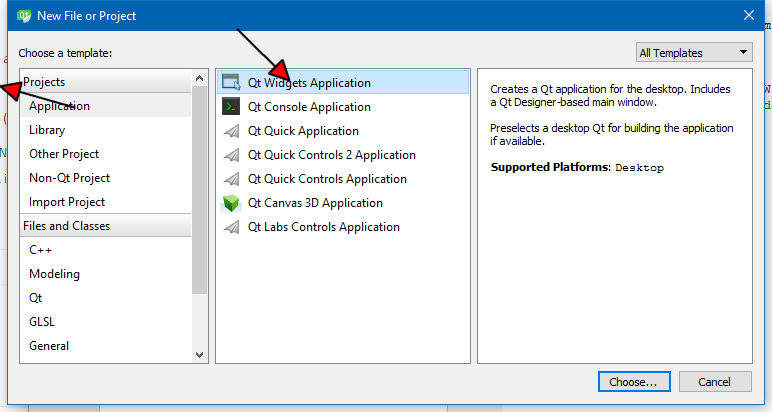
                                alt text

                                You can also insert new form with class so there is both UI , cpp and h.
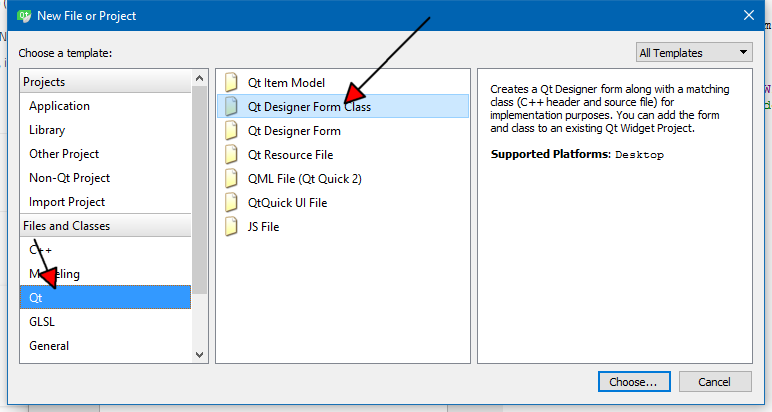
                                alt text

                                So adding it by hand is by far more time consuming for me. :)

                                But yes, if you app is so small that creating the interface in main.cpp seems the
                                best way, then Creator might be overkill.

                                If you plan on multiple forms ( windows ) and a more complex setup then
                                Creator might become more useful.

                                Also, even if you use UI files, its not something really different from code since it just creates
                                the c++ code for you.
                                So if you later, thinks. hey UI is lame. Then its not so hard to use hand written code.

                                There is one thing to consider if you work in teams.
                                Those on the team not using Qt for interface will have to know Qt in details to add say a
                                button in pure code. I actually tested this in small scale and it took lookup in help and
                                even more help adding the connect. Whereas Dragging it from right side to some place on a
                                form , right click and select goto slot was far less involving
                                and allows them to add a button etc to test some backbone function.

                                This is often called Anecdotal evidence and its not meant as truth about
                                how it works for other teams but for us its a huge bonus that
                                it is WYSIWYG and not heaps of code.

                                as @raven-worx says, its good learning doing by hand! And since you cannot do everything in Creator
                                there will be code too along the way.

                                So you should definitely try both and see what feels best to you.
                                Both are valid approaches and there is nothing you can do in Creator that code can't so
                                nothing to lose :)

                                A 1 Reply Last reply
                                3
                                • mrjjM mrjj

                                  @tomy
                                  Hi
                                  You can make a full running app very easy.
                                  No need to add .h or .cpp by hand.
                                  You get mainwindow.cpp /h and main.cpp
                                  Use "New File or Project" from File
                                  alt text

                                  You can also insert new form with class so there is both UI , cpp and h.
                                  alt text

                                  So adding it by hand is by far more time consuming for me. :)

                                  But yes, if you app is so small that creating the interface in main.cpp seems the
                                  best way, then Creator might be overkill.

                                  If you plan on multiple forms ( windows ) and a more complex setup then
                                  Creator might become more useful.

                                  Also, even if you use UI files, its not something really different from code since it just creates
                                  the c++ code for you.
                                  So if you later, thinks. hey UI is lame. Then its not so hard to use hand written code.

                                  There is one thing to consider if you work in teams.
                                  Those on the team not using Qt for interface will have to know Qt in details to add say a
                                  button in pure code. I actually tested this in small scale and it took lookup in help and
                                  even more help adding the connect. Whereas Dragging it from right side to some place on a
                                  form , right click and select goto slot was far less involving
                                  and allows them to add a button etc to test some backbone function.

                                  This is often called Anecdotal evidence and its not meant as truth about
                                  how it works for other teams but for us its a huge bonus that
                                  it is WYSIWYG and not heaps of code.

                                  as @raven-worx says, its good learning doing by hand! And since you cannot do everything in Creator
                                  there will be code too along the way.

                                  So you should definitely try both and see what feels best to you.
                                  Both are valid approaches and there is nothing you can do in Creator that code can't so
                                  nothing to lose :)

                                  A Offline
                                  A Offline
                                  ambershark
                                  wrote on last edited by
                                  #17

                                  @mrjj said in Purely in C++ or Designer mode:

                                  There is one thing to consider if you work in teams.
                                  Those on the team not using Qt for interface will have to know Qt in details to add say a
                                  button in pure code. I actually tested this in small scale and it took lookup in help and

                                  This is usually when I end up with lots of .ui in my projects is when I work on teams that don't want to hand code everything.

                                  I agree sometimes it is faster to use the designer, but usually I can put together a UI in code as fast as someone else can in the designer. Then I don't have to worry about coding the parts the designer can't handle since they are already written.

                                  I also type at 115wpm though so that helps when coding easy things like UIs. :) I find it slower to take my hands off the keyboard and use my mouse for things in the designer, especially signals/slots.

                                  But as I get older my typing is slowing down.. I was 120wpm 10 years ago, so maybe in a few more years I'll be in the designer more, lol. My wife even teased me the other day when I scored a 108 on a typing test with a new keyboard I was testing... she's like oh you're getting slow. :P

                                  My L-GPL'd C++ Logger github.com/ambershark-mike/sharklog

                                  1 Reply Last reply
                                  2
                                  • BuckwheatB Offline
                                    BuckwheatB Offline
                                    Buckwheat
                                    wrote on last edited by
                                    #18

                                    @tomy

                                    I use both. I started using only C++ because I found using the Designer a little daunting and what I needed was simple. As time went on I learned the ins/outs of designer and now do even the smaller UI components with it. This gives me maintainability over just C++. It is purely a design decision!

                                    As a wish-list item... I would love to see Qt have an XRC-like (wxWidgets) component to create UI at runtime with the .UI files instead of generating code for them. This would make things like branding (when a style sheet just will not do) and testing new components much simpler. *** Food for though ***

                                    Dave Fileccia

                                    Chris KawaC 1 Reply Last reply
                                    2
                                    • BuckwheatB Buckwheat

                                      @tomy

                                      I use both. I started using only C++ because I found using the Designer a little daunting and what I needed was simple. As time went on I learned the ins/outs of designer and now do even the smaller UI components with it. This gives me maintainability over just C++. It is purely a design decision!

                                      As a wish-list item... I would love to see Qt have an XRC-like (wxWidgets) component to create UI at runtime with the .UI files instead of generating code for them. This would make things like branding (when a style sheet just will not do) and testing new components much simpler. *** Food for though ***

                                      Chris KawaC Offline
                                      Chris KawaC Offline
                                      Chris Kawa
                                      Lifetime Qt Champion
                                      wrote on last edited by
                                      #19

                                      @Buckwheat I'm not a wxWidgets user but do you mean QUiLoader?

                                      1 Reply Last reply
                                      3
                                      • BuckwheatB Offline
                                        BuckwheatB Offline
                                        Buckwheat
                                        wrote on last edited by
                                        #20

                                        @Chris-Kawa

                                        Why yes, yes I do mean that! Thank you. I love learning something knew every day!

                                        Dave Fileccia

                                        1 Reply Last reply
                                        1
                                        • tomyT tomy

                                          By reading the answers I think I concluded that when we have static contents we had better use Designer. And when we have dynamic contents we should use hand-coding. Is it right?

                                          kshegunovK Offline
                                          kshegunovK Offline
                                          kshegunov
                                          Moderators
                                          wrote on last edited by
                                          #21

                                          Hey, I'll chime in here too. I personally almost exclusively use the designer and almost exclusively don't derive from QWidget. I only derive from the widget when I want to have a custom widget, otherwise I initialize everything from a QObject subclass. Also I prefer to use the designer even with "dynamic" content, where I prepare a "prototype" of the repeatable pattern and initialize a generic QWidget object with the form.

                                          Read and abide by the Qt Code of Conduct

                                          1 Reply Last reply
                                          3

                                          • Login

                                          • Login or register to search.
                                          • First post
                                            Last post
                                          0
                                          • Categories
                                          • Recent
                                          • Tags
                                          • Popular
                                          • Users
                                          • Groups
                                          • Search
                                          • Get Qt Extensions
                                          • Unsolved