
One-Button GUI to Run C++ Application
-
Update: I'm novice and know how to design basic GUI on QT Creator. But was just wondering how do I get the whole C++ application as the slot of the button on GUI (signal: when clicked.)
@Haris1 It is not really clear what you want to do:
- Start that CLI application as its own process as soon as the user presses the button, or
- Integrate the CLI app into your GUI app?
In case it is 1 take a look at http://doc.qt.io/qt-5/qprocess.html
-
Thanks for the response @jsulm
I'd like to integrate the CLI app into my GUI app. What direction shall I look into?
-
one low tech way would be
make new folder for GUI version ( called new folder here after)
Use
File->New File or Project (Dialog)
Choose Application, then Qt widget application
Give it good name and point it to the new folder.
Rest you can Next, Next.. ;)Then copy all CLI files to new folder.
EXCEPT any files called main.xxx ( you have a new one)Now, go back to Creator.
In the new GUI project, right clicks its name and select Add existing files
Add the CLI files .cpp and .h
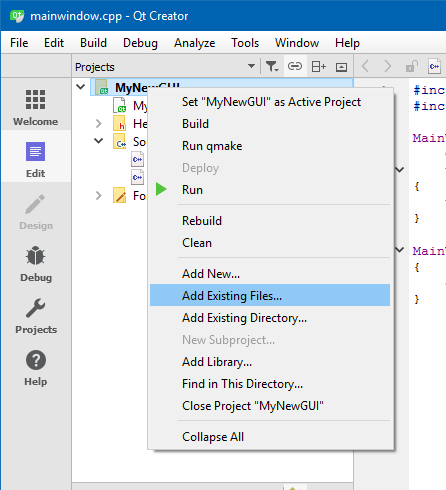
Lets add the button:
Open form folder in project view.
Double click the mainwindow.ui file
(Designer opens)
Find in right side a PushButton
Drag it to the screen
Right click the button and select Goto Slot
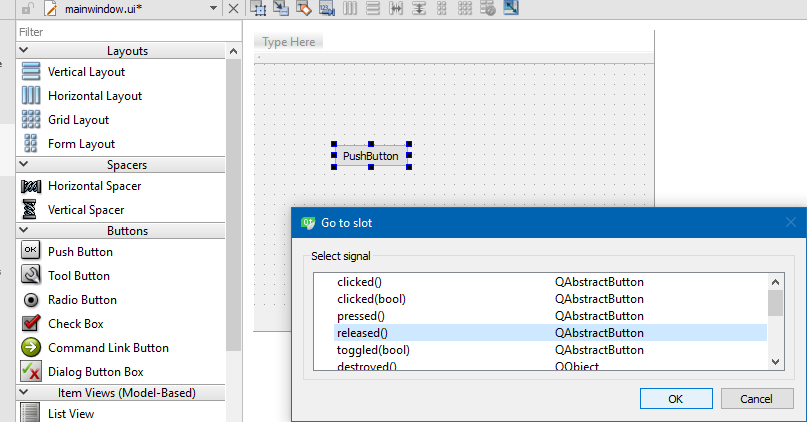
Select Released() ( its called/send when user lift finger)
This opens the code editor with:void MainWindow::on_pushButton_released()
{
Take the code from the CLI and put here.
}Remember to add the #includes to mainwindow so it know CLI stuff
Before anything, run qmake from the Build menu.Now you should have a cli->gui project.
Needs more love but should be a starter ? :)
-
one low tech way would be
make new folder for GUI version ( called new folder here after)
Use
File->New File or Project (Dialog)
Choose Application, then Qt widget application
Give it good name and point it to the new folder.
Rest you can Next, Next.. ;)Then copy all CLI files to new folder.
EXCEPT any files called main.xxx ( you have a new one)Now, go back to Creator.
In the new GUI project, right clicks its name and select Add existing files
Add the CLI files .cpp and .h
Lets add the button:
Open form folder in project view.
Double click the mainwindow.ui file
(Designer opens)
Find in right side a PushButton
Drag it to the screen
Right click the button and select Goto Slot
Select Released() ( its called/send when user lift finger)
This opens the code editor with:void MainWindow::on_pushButton_released()
{
Take the code from the CLI and put here.
}Remember to add the #includes to mainwindow so it know CLI stuff
Before anything, run qmake from the Build menu.Now you should have a cli->gui project.
Needs more love but should be a starter ? :)
@mrjj Thanks for the elaborate response. Being a novice I am, this surely helped me set my direction right. I should also have mentioned this before thatI'm not much skilled in C++ either.
When I try to paste the CLI code (which has function declarations etc in it) into the slot of my GUI button I get errors.
***void MainWindow::on_pushButton_released()
{
Take the code from the CLI and put here.
}***```
Now I'm looking at methods to go around this issue and see how I can paste my code within void MainWindow::on_pushButton_released()
-
Hi, super.
- When I try to paste the CLI code (which has function declarations etc in it) into the slot of my GUI button I get errors.
Well, showing the actual error will help us , help you :)
Also if you show the code you must move, we can give suggestions.
It can work the same as in the cli program
but its hard to guess or give suggestions when not seeing the CLI code. :) -
Hi, super.
- When I try to paste the CLI code (which has function declarations etc in it) into the slot of my GUI button I get errors.
Well, showing the actual error will help us , help you :)
Also if you show the code you must move, we can give suggestions.
It can work the same as in the cli program
but its hard to guess or give suggestions when not seeing the CLI code. :)@jsulm Thanks for the response.
I could copy and save the whole code as a .h file and then call that under the button-press function but feels as if it wouldn't be a good way.
Anyway, here's the CLI code. I rename the void main when I use it in QT. Any help will be appreciated. : )
``` #include <stdint.h> #include <stdio.h> #include <stdlib.h> #include "MyException.h" #include "FlashImageFactory.h" #include "FlashProgrammerFactory.h" #include "BdmInterfaceFactory.h" #include "DeviceInterface.h" #include "UsbdmWxConstants.h" /*! Check error code from USBDM API function * * @param rc - error code to access * * An error message is printed with line # and the program exited if rc indicates any error */ void check(USBDM_ErrorCode rc, const char *file = NULL, unsigned lineNum = 0) { if (rc == BDM_RC_OK) { fprintf(stderr, "OK, [%s:#%4d]\n", file, lineNum); return; } char buff[1000]; snprintf(buff, sizeof(buff), "Failed, [%s:#%4d] Reason= %s", file, lineNum, UsbdmSystem::getErrorString(rc)); fprintf(stderr, "%s\n", buff); UsbdmSystem::Log::print("%s\n", buff); throw MyException(buff); } /*! * Convenience macro to add line number information to check() */ #define CHECK(x) check((x), __FILE__, __LINE__) class Logger { public: Logger() { UsbdmSystem::Log::openLogFile("result.log"); } ~Logger() { UsbdmSystem::Log::closeLogFile(); } }; /*! * This callback will cause connections etc to fail quietly on error rather * than use a WxWidget dialogue */ long nullCallback(std::string message, std::string caption, long style) { fprintf(stderr, "Failing on error message %s:%s\n", caption.c_str(), message.c_str()); return UsbdmWxConstants::NO; } int main(void) { Logger logger; const TargetType_t TARGET_TYPE = T_ARM; const char* FLASH_IMAGE = "TestMK20.elf"; const char* INTERFACE = "USBDM-OPENSDA-61168"; const char* DEVICE = "FRDM_K20D50M"; try { fprintf(stderr, "Creating interface\n"); BdmInterfacePtr bdmInterface(BdmInterfaceFactory::createInterface(TARGET_TYPE, nullCallback)); bdmInterface->setBdmSerialNumber(INTERFACE, false); fprintf(stderr, "Changing interface options\n"); USBDM_ExtendedOptions_t &bdmOptions(bdmInterface->getBdmOptions()); bdmOptions.targetVdd = BDM_TARGET_VDD_3V3; bdmOptions.leaveTargetPowered = true; fprintf(stderr, "Creating empty flash image\n"); FlashImagePtr flashImage(FlashImageFactory::createFlashImage(TARGET_TYPE)); fprintf(stderr, "Loading image from \'%s\' \n", FLASH_IMAGE); CHECK(flashImage->loadFile(FLASH_IMAGE, TARGET_TYPE)); fprintf(stderr, "Creating device database\n"); DeviceInterfacePtr deviceInterface(new DeviceInterface(TARGET_TYPE)); fprintf(stderr, "Selecting device \'%s\'\n", DEVICE); CHECK(deviceInterface->setCurrentDeviceByName(DEVICE)); fprintf(stderr, "Creating programmer\n"); FlashProgrammerPtr flashProgrammer(FlashProgrammerFactory::createFlashProgrammer(bdmInterface)); fprintf(stderr, "Setting programmer device data \'%s\'\n", deviceInterface->getCurrentDevice()->getTargetName().c_str()); CHECK(flashProgrammer->setDeviceData(deviceInterface->getCurrentDevice())); fprintf(stderr, "Initialising BDM interface\n"); CHECK(bdmInterface->initBdm()); fprintf(stderr, "Programming\n"); CHECK(flashProgrammer->programFlash(flashImage)); fprintf(stderr, "Resetting target\n"); CHECK(bdmInterface->reset((TargetMode_t)(RESET_NORMAL|RESET_DEFAULT))); fprintf(stderr, "Done - Target should be executing\n"); } catch(MyException &error) { fprintf(stderr, "Exception %s \n", error.what()); } catch(MyException *error) { fprintf(stderr, "Exception %s \n", error->what()); } catch(std::runtime_error &error) { fprintf(stderr, "Exception %s \n", error.what()); } } ``` ```~~~~ -
@jsulm Thanks for the response.
I could copy and save the whole code as a .h file and then call that under the button-press function but feels as if it wouldn't be a good way.
Anyway, here's the CLI code. I rename the void main when I use it in QT. Any help will be appreciated. : )
``` #include <stdint.h> #include <stdio.h> #include <stdlib.h> #include "MyException.h" #include "FlashImageFactory.h" #include "FlashProgrammerFactory.h" #include "BdmInterfaceFactory.h" #include "DeviceInterface.h" #include "UsbdmWxConstants.h" /*! Check error code from USBDM API function * * @param rc - error code to access * * An error message is printed with line # and the program exited if rc indicates any error */ void check(USBDM_ErrorCode rc, const char *file = NULL, unsigned lineNum = 0) { if (rc == BDM_RC_OK) { fprintf(stderr, "OK, [%s:#%4d]\n", file, lineNum); return; } char buff[1000]; snprintf(buff, sizeof(buff), "Failed, [%s:#%4d] Reason= %s", file, lineNum, UsbdmSystem::getErrorString(rc)); fprintf(stderr, "%s\n", buff); UsbdmSystem::Log::print("%s\n", buff); throw MyException(buff); } /*! * Convenience macro to add line number information to check() */ #define CHECK(x) check((x), __FILE__, __LINE__) class Logger { public: Logger() { UsbdmSystem::Log::openLogFile("result.log"); } ~Logger() { UsbdmSystem::Log::closeLogFile(); } }; /*! * This callback will cause connections etc to fail quietly on error rather * than use a WxWidget dialogue */ long nullCallback(std::string message, std::string caption, long style) { fprintf(stderr, "Failing on error message %s:%s\n", caption.c_str(), message.c_str()); return UsbdmWxConstants::NO; } int main(void) { Logger logger; const TargetType_t TARGET_TYPE = T_ARM; const char* FLASH_IMAGE = "TestMK20.elf"; const char* INTERFACE = "USBDM-OPENSDA-61168"; const char* DEVICE = "FRDM_K20D50M"; try { fprintf(stderr, "Creating interface\n"); BdmInterfacePtr bdmInterface(BdmInterfaceFactory::createInterface(TARGET_TYPE, nullCallback)); bdmInterface->setBdmSerialNumber(INTERFACE, false); fprintf(stderr, "Changing interface options\n"); USBDM_ExtendedOptions_t &bdmOptions(bdmInterface->getBdmOptions()); bdmOptions.targetVdd = BDM_TARGET_VDD_3V3; bdmOptions.leaveTargetPowered = true; fprintf(stderr, "Creating empty flash image\n"); FlashImagePtr flashImage(FlashImageFactory::createFlashImage(TARGET_TYPE)); fprintf(stderr, "Loading image from \'%s\' \n", FLASH_IMAGE); CHECK(flashImage->loadFile(FLASH_IMAGE, TARGET_TYPE)); fprintf(stderr, "Creating device database\n"); DeviceInterfacePtr deviceInterface(new DeviceInterface(TARGET_TYPE)); fprintf(stderr, "Selecting device \'%s\'\n", DEVICE); CHECK(deviceInterface->setCurrentDeviceByName(DEVICE)); fprintf(stderr, "Creating programmer\n"); FlashProgrammerPtr flashProgrammer(FlashProgrammerFactory::createFlashProgrammer(bdmInterface)); fprintf(stderr, "Setting programmer device data \'%s\'\n", deviceInterface->getCurrentDevice()->getTargetName().c_str()); CHECK(flashProgrammer->setDeviceData(deviceInterface->getCurrentDevice())); fprintf(stderr, "Initialising BDM interface\n"); CHECK(bdmInterface->initBdm()); fprintf(stderr, "Programming\n"); CHECK(flashProgrammer->programFlash(flashImage)); fprintf(stderr, "Resetting target\n"); CHECK(bdmInterface->reset((TargetMode_t)(RESET_NORMAL|RESET_DEFAULT))); fprintf(stderr, "Done - Target should be executing\n"); } catch(MyException &error) { fprintf(stderr, "Exception %s \n", error.what()); } catch(MyException *error) { fprintf(stderr, "Exception %s \n", error->what()); } catch(std::runtime_error &error) { fprintf(stderr, "Exception %s \n", error.what()); } } ``` ```~~~~ -
well if you rename
int main(void)
to something more meaningful
and simply call this from button click, im
not sure why you dont like it? -
well if you rename
int main(void)
to something more meaningful
and simply call this from button click, im
not sure why you dont like it?

