
Qt Creator crashes when I edit main.cpp
-
Hi snowflake123, I have not solved the issue yet, so I'll be glad if you find a solution. I suspect the graphics driver is at fault, because this is not the only strange behavior I noticed on my OS and others seem to be related to graphics, but I haven't found a solution. My graphic card is nVidia GM107M [GeForce GTX 850M], do you have a similar one?
-
Hi, i have an integrated intel graphics card. lspci says that that it loaded the i915 driver for it.
I did some testing. I installed QT in a virtual machine (Linux Mint 17.3) as a workaround and it works. I observed no crash. Then i installed Mint 18 into a virtual machine, and installed QT 5.7 into that virtual machine. And... surprise! QTCreater did not crash after editing mainwindow.cpp. So it seems it must be something low level/hardware related.
Note: I wasn't able to get the guest additions running in Mint 18, so it was running software rendering mode.
-
Updated to qtcreator 4.1.0. The problem persists. Attached myself with gdb to the QTCreator process and catched a segmentation fault.
Thread 1 "qtcreator" received signal SIGSEGV, Segmentation fault.
0x00007efd3409fe08 in QSortFilterProxyModel::parent(QModelIndex const&) const () from /home/node/qtcreator-4.1.0/bin/../lib/Qt/lib/libQt5Core.so.5I then did a backtrace, see bellow. I do not have a symbol table, so i cannot include the locals in the backtrace. It seems glib is returning something it isnt supposed to.
(gdb) bt
#0 0x00007efd3409fe08 in QSortFilterProxyModel::parent(QModelIndex const&) const () from /home/node/qtcreator-4.1.0/bin/../lib/Qt/lib/libQt5Core.so.5
#1 0x00007efd3564efbb in QTreeView::isIndexHidden(QModelIndex const&) const () from /home/node/qtcreator-4.1.0/bin/../lib/Qt/lib/libQt5Widgets.so.5
#2 0x00007efd3565188f in QTreeView::visualRect(QModelIndex const&) const () from /home/node/qtcreator-4.1.0/bin/../lib/Qt/lib/libQt5Widgets.so.5
#3 0x00007efd355fbdfa in ?? () from /home/node/qtcreator-4.1.0/bin/../lib/Qt/lib/libQt5Widgets.so.5
#4 0x00007efd355fc70a in ?? () from /home/node/qtcreator-4.1.0/bin/../lib/Qt/lib/libQt5Widgets.so.5
#5 0x00007efd2c9b7b59 in ?? () from /home/node/qtcreator-4.1.0/lib/Qt/lib/libQt5XcbQpa.so.5
#6 0x00007efd2c9b82bb in ?? () from /home/node/qtcreator-4.1.0/lib/Qt/lib/libQt5XcbQpa.so.5
#7 0x00007efd2c9bc73c in ?? () from /home/node/qtcreator-4.1.0/lib/Qt/lib/libQt5XcbQpa.so.5
#8 0x00007efd2b4f9ece in ?? () from /home/node/qtcreator-4.1.0/lib/Qt/lib/libQt5DBus.so.5
#9 0x00007efd2b4fcc0e in ?? () from /home/node/qtcreator-4.1.0/lib/Qt/lib/libQt5DBus.so.5
#10 0x00007efd340f861a in QObject::event(QEvent) () from /home/node/qtcreator-4.1.0/bin/../lib/Qt/lib/libQt5Core.so.5
#11 0x00007efd353d952c in QApplicationPrivate::notify_helper(QObject, QEvent*) () from /home/node/qtcreator-4.1.0/bin/../lib/Qt/lib/libQt5Widgets.so.5
#12 0x00007efd353e0220 in QApplication::notify(QObject*, QEvent*) () from /home/node/qtcreator-4.1.0/bin/../lib/Qt/lib/libQt5Widgets.so.5
#13 0x00007efd340cfae0 in QCoreApplication::notifyInternal2(QObject*, QEvent*) () from /home/node/qtcreator-4.1.0/bin/../lib/Qt/lib/libQt5Core.so.5
#14 0x00007efd340d251b in QCoreApplicationPrivate::sendPostedEvents(QObject*, int, QThreadData*) () from /home/node/qtcreator-4.1.0/bin/../lib/Qt/lib/libQt5Core.so.5
#15 0x00007efd3411cc53 in ?? () from /home/node/qtcreator-4.1.0/bin/../lib/Qt/lib/libQt5Core.so.5
#16 0x00007efd2fa491a7 in g_main_context_dispatch () from /lib/x86_64-linux-gnu/libglib-2.0.so.0
#17 0x00007efd2fa49400 in ?? () from /lib/x86_64-linux-gnu/libglib-2.0.so.0
#18 0x00007efd2fa494ac in g_main_context_iteration () from /lib/x86_64-linux-gnu/libglib-2.0.so.0
#19 0x00007efd3411d047 in QEventDispatcherGlib::processEvents(QFlagsQEventLoop::ProcessEventsFlag) () from /home/node/qtcreator-4.1.0/bin/../lib/Qt/lib/libQt5Core.so.5
#20 0x00007efd340cddca in QEventLoop::exec(QFlagsQEventLoop::ProcessEventsFlag) () from /home/node/qtcreator-4.1.0/bin/../lib/Qt/lib/libQt5Core.so.5
#21 0x00007efd340d5bad in QCoreApplication::exec() () from /home/node/qtcreator-4.1.0/bin/../lib/Qt/lib/libQt5Core.so.5
#22 0x0000000000409a2c in ?? ()
#23 0x00007efd32d86830 in __libc_start_main (main=0x406d60, argc=1, argv=0x7ffc1aa2fb48, init=<optimized out>, fini=<optimized out>, rtld_fini=<optimized out>, stack_end=0x7ffc1aa2fb38)
at ../csu/libc-start.c:291
#24 0x000000000040a291 in ?? ()
#25 0x00007ffc1aa2fb38 in ?? ()
#26 0x000000000000001c in ?? ()
#27 0x0000000000000001 in ?? ()
#28 0x00007ffc1aa318b8 in ?? ()
#29 0x0000000000000000 in ?? ()** -
This bug in arch linux looks very similar (Same backtrace).
I installed QT from the ubuntu repository (QTcreator 3.5.1) and it also crashes with the same backtrace.
-
I don't experience anything of the sort on debian. What kernels/window managers are you running?
-
$ inxi -FxzSystem: Host: node-Extensa-5620 Kernel: 4.4.0-21-generic x86_64 (64 bit gcc: 5.3.1)
Desktop: Cinnamon 3.0.7 (Gtk 3.18.9-1ubuntu3.1) Distro: Linux Mint 18 Sarah
Machine: System: Acer product: V5-131 v: V2.18
Mobo: Acer model: Mimic v: Type2 - Board Version Bios: Acer v: V2.18 date: 09/02/2013
CPU: Dual core Intel Celeron 1017U (-MCP-) cache: 2048 KB
flags: (lm nx sse sse2 sse3 sse4_1 sse4_2 ssse3 vmx) bmips: 6385
clock speeds: max: 1600 MHz 1: 895 MHz 2: 811 MHz
Graphics: Card: Intel 3rd Gen Core processor Graphics Controller bus-ID: 00:02.0
Display Server: X.Org 1.18.3 drivers: intel (unloaded: fbdev,vesa) Resolution: 1366x768@60.02hz
GLX Renderer: Mesa DRI Intel Ivybridge Mobile GLX Version: 3.0 Mesa 11.2.0 Direct Rendering: Yes
Audio: Card Intel 7 Series/C210 Series Family High Definition Audio Controller
driver: snd_hda_intel bus-ID: 00:1b.0
Sound: Advanced Linux Sound Architecture v: k4.4.0-21-generic
Network: Card-1: Broadcom NetLink BCM57785 Gigabit Ethernet PCIe driver: tg3 v: 3.137 bus-ID: 04:00.0
IF: enp4s0f0 state: down mac: <filter>
Card-2: Ralink RT5370 Wireless Adapter driver: rt2800usb v: 2.3.0 usb-ID: 002-087
IF: wlxc83a35c800d3 state: N/A mac: N/A
Drives: HDD Total Size: 1000.2GB (66.3% used) ID-1: /dev/sda model: TOSHIBA_MQ01ABD1 size: 1000.2GB
Partition: ID-1: / size: 914G used: 615G (71%) fs: ext4 dev: /dev/dm-1
ID-2: /boot size: 472M used: 60M (14%) fs: ext2 dev: /dev/sda1
ID-3: swap-1 size: 3.21GB used: 0.03GB (1%) fs: swap dev: /dev/dm-3
RAID: No RAID devices: /proc/mdstat, md_mod kernel module present
Sensors: System Temperatures: cpu: 49.0C mobo: N/A
Fan Speeds (in rpm): cpu: N/A
Info: Processes: 278 Uptime: 20 days Memory: 1263.1/7803.9MB Init: systemd runlevel: 5 Gcc sys: 5.4.0
Client: Shell (bash 4.3.421) inxi: 2.2.35I made some progress. In the arch linux bug report (link above) it is written that if he launches QTcreator as root the issue does not occur. So i tested it. Its true if i launch QTCreater as root it works flawlessly. No seg faults. This might be some sort of permission issue.
I also made a second test, logged out and logged back in in software rendering mode (I was able to run QTCreator in a mint18 virtual machine in software rendering mode without the issue, see above).But in the host system, even in software rendering mode, qtcreator crashes. So this does does not seem to be a graphics driver issue as intially anticipated.
-
$ inxi -FxzSystem: Host: node-Extensa-5620 Kernel: 4.4.0-21-generic x86_64 (64 bit gcc: 5.3.1)
Desktop: Cinnamon 3.0.7 (Gtk 3.18.9-1ubuntu3.1) Distro: Linux Mint 18 Sarah
Machine: System: Acer product: V5-131 v: V2.18
Mobo: Acer model: Mimic v: Type2 - Board Version Bios: Acer v: V2.18 date: 09/02/2013
CPU: Dual core Intel Celeron 1017U (-MCP-) cache: 2048 KB
flags: (lm nx sse sse2 sse3 sse4_1 sse4_2 ssse3 vmx) bmips: 6385
clock speeds: max: 1600 MHz 1: 895 MHz 2: 811 MHz
Graphics: Card: Intel 3rd Gen Core processor Graphics Controller bus-ID: 00:02.0
Display Server: X.Org 1.18.3 drivers: intel (unloaded: fbdev,vesa) Resolution: 1366x768@60.02hz
GLX Renderer: Mesa DRI Intel Ivybridge Mobile GLX Version: 3.0 Mesa 11.2.0 Direct Rendering: Yes
Audio: Card Intel 7 Series/C210 Series Family High Definition Audio Controller
driver: snd_hda_intel bus-ID: 00:1b.0
Sound: Advanced Linux Sound Architecture v: k4.4.0-21-generic
Network: Card-1: Broadcom NetLink BCM57785 Gigabit Ethernet PCIe driver: tg3 v: 3.137 bus-ID: 04:00.0
IF: enp4s0f0 state: down mac: <filter>
Card-2: Ralink RT5370 Wireless Adapter driver: rt2800usb v: 2.3.0 usb-ID: 002-087
IF: wlxc83a35c800d3 state: N/A mac: N/A
Drives: HDD Total Size: 1000.2GB (66.3% used) ID-1: /dev/sda model: TOSHIBA_MQ01ABD1 size: 1000.2GB
Partition: ID-1: / size: 914G used: 615G (71%) fs: ext4 dev: /dev/dm-1
ID-2: /boot size: 472M used: 60M (14%) fs: ext2 dev: /dev/sda1
ID-3: swap-1 size: 3.21GB used: 0.03GB (1%) fs: swap dev: /dev/dm-3
RAID: No RAID devices: /proc/mdstat, md_mod kernel module present
Sensors: System Temperatures: cpu: 49.0C mobo: N/A
Fan Speeds (in rpm): cpu: N/A
Info: Processes: 278 Uptime: 20 days Memory: 1263.1/7803.9MB Init: systemd runlevel: 5 Gcc sys: 5.4.0
Client: Shell (bash 4.3.421) inxi: 2.2.35I made some progress. In the arch linux bug report (link above) it is written that if he launches QTcreator as root the issue does not occur. So i tested it. Its true if i launch QTCreater as root it works flawlessly. No seg faults. This might be some sort of permission issue.
I also made a second test, logged out and logged back in in software rendering mode (I was able to run QTCreator in a mint18 virtual machine in software rendering mode without the issue, see above).But in the host system, even in software rendering mode, qtcreator crashes. So this does does not seem to be a graphics driver issue as intially anticipated.
Well, I'm running a 4.6.4 kernel, but if I had to guess the graphics driver would be my top suspect (which is actually strengthened by your virtual machine experiment). Possibly some "security feature" of the distribution ... I remember that with Mint one has to manually edit an OS configuration file just to allow debuggers to attach.
-
Same problem with Qt5.7.0 off-line installer
Mint 18 cinnamon 64 bitsGraphics: Card-1: NVIDIA GF119 [NVS 315] bus-ID: 0f:00.0
Card-2: NVIDIA GF119 [NVS 315] bus-ID: 28:00.0
Display Server: X.Org 1.18.3 drivers: nouveau (unloaded: fbdev,vesa)
Resolution: 1920x1200@59.95hz, 1920x1200@59.95hz, 1280x1024@60.02hz
GLX Renderer: Gallium 0.4 on NVD9
GLX Version: 3.0 Mesa 11.2.0 Direct Rendering: Yeskernel : 4.4.0-21-generic
I noticed that the problem is due to the CppEditor plugin. If you uncheck it, it will not crash anymore
-
Hi all,
I just installed the Qt framework on my new laptop running Ubuntu 16.04 by using the online Qt Project online install tool. I loaded my project on Qt Creator (version: 4.0.3 based on Qt 5.7.0), everything seems to be working smoothly, except that Qt Creator crashes as soon as I start editing my main.cpp file. Strangely, that seems to only happen for the main.cpp file.
When I run Qt Creator from the terminal, here is what I can read:
(when I open my project: )
SOFT ASSERT: "!binary.isEmpty()" in file /work/build/qt-creator/src/libs/utils/shellcommand.cpp, line 474
(and as soon as I start editing the main.cpp file: )
Segmentation fault (core dumped)*Anyone can help me fix this?
@seubri Can you please show the output of
lspci -nnk | grep "VGA\|'Kern'\|3D\|Display" -A3which will show the card and current used kernel-module. If you have an Intel card (no Skylake, but it may also work) you may use UXA instead of SNA.
Open up a terminal, edit the 20-intel.conf with root-access.
sudo nano /usr/share/X11/xorg.conf.d/20-intel.confCopy and paste following code and insert it:
Section "Device"
	Identifier	"Intel Graphics"
	Driver		"i915"
	Option		"AccelMethod"  "uxa"
EndSection
and reboot.
There are sometimes (often?) problems with the newer SNA-acceleration. UXA is the old one which seems to be more stable.@LinuxMint-Users: You are all alone :) Mint is NOT Ubuntu, it is just sharing the base. In some basics, they are equal but I am quite sure that this doesn't match graphics. I do not know what they have changed or edited, so you have to do a research yourself or just try it out.
-
@seubri Can you please show the output of
lspci -nnk | grep "VGA\|'Kern'\|3D\|Display" -A3which will show the card and current used kernel-module. If you have an Intel card (no Skylake, but it may also work) you may use UXA instead of SNA.
Open up a terminal, edit the 20-intel.conf with root-access.
sudo nano /usr/share/X11/xorg.conf.d/20-intel.confCopy and paste following code and insert it:
Section "Device"
	Identifier	"Intel Graphics"
	Driver		"i915"
	Option		"AccelMethod"  "uxa"
EndSection
and reboot.
There are sometimes (often?) problems with the newer SNA-acceleration. UXA is the old one which seems to be more stable.@LinuxMint-Users: You are all alone :) Mint is NOT Ubuntu, it is just sharing the base. In some basics, they are equal but I am quite sure that this doesn't match graphics. I do not know what they have changed or edited, so you have to do a research yourself or just try it out.
@Tschikkn Hi, I'm sorry for not answering you sooner. I appreciate you trying to help.
My problem still remains, and your suggestion did not help, unfortunately. It seemed to make the graphics worse (more unstable).
Here is the output of lspci -nnk | grep "VGA|'Kern'|3D|Display" -A3:
00:02.0 VGA compatible controller [0300]: Intel Corporation HD Graphics 530 [8086:191b] (rev 06) DeviceName: Onboard IGD Subsystem: Dell HD Graphics 530 [1028:06e4] Kernel driver in use: i915 -- 01:00.0 3D controller [0302]: NVIDIA Corporation GM107M [GeForce GTX 960M] [10de:139b] (rev ff) Kernel modules: nvidiafb, nouveau, nvidia_367, nvidia_367_drm 02:00.0 Network controller [0280]: Broadcom Limited BCM43602 802.11ac Wireless LAN SoC [14e4:43ba] (rev 01) Subsystem: Dell BCM43602 802.11ac Wireless LAN SoC [1028:0024] -
Can you test starting Qt Creator with
-noload Welcomeas a parameter ? -
-
I have the same problem on a Linux Mint 17.2 machine (segmentation fault). I have tried all suggestions and found that the problem s gone when I:
- run qtcreator as root
OR - remove the cppeditor plugin
Is there already any solution to this problem?
- run qtcreator as root
-
Hi
We are sitting 6 people on Mint 18.1 and have seen none such issues
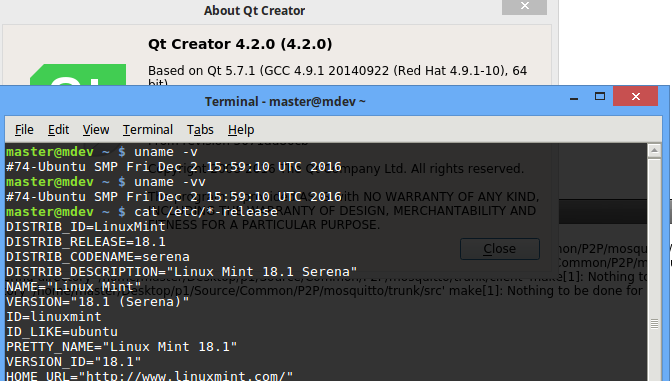
This is however in a virtual machine so not using a real nvidia driver
but VGA compatible controller [0300]: VMware SVGA II Adapter [15ad:0405]
( it can run QML apps/openGL is supported) -
Hi All,
Qt 4.2.1 crashes at random times on my Lenovo laptop - once when opening a project, often while simply editing a file.
Has anyone found a definitive solution for this?
Thanks,
~ Mike
-
Hi,
The most straightforward would be to test a more recent version of Qt Creator, the current is 4.4.


