Skip to content
  • Categories
  • Recent
  • Tags
  • Popular
  • Users
  • Groups
  • Search
  • Get Qt Extensions
  • Unsolved
Collapse
Brand Logo
  1. Home
  2. Qt Development
  3. General and Desktop
  4. How to resize QMessageBox

How to resize QMessageBox

Scheduled Pinned Locked Moved Solved General and Desktop
14 Posts 7 Posters 11.9k Views 3 Watching
  • Oldest to Newest
  • Newest to Oldest
  • Most Votes
Reply
  • Reply as topic
Log in to reply
This topic has been deleted. Only users with topic management privileges can see it.
  • VRoninV Offline
    VRoninV Offline
    VRonin
    wrote on last edited by
    #2

    Images upload in this forum does not work I'm afraid you have to use an external uploader if you want us to see images.

    The first thing that tingles my ear is non-ascii characters in a literal.

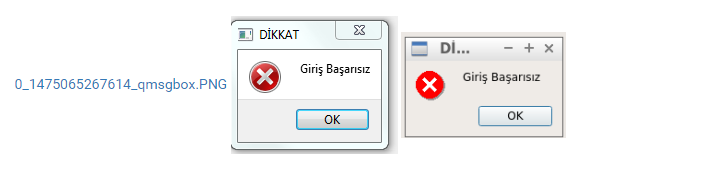
    Could you try and replace "DİKKAT" with "Warning" and "Giriş Başarısız" with "Login Failed" and see if the size is correct?

    "La mort n'est rien, mais vivre vaincu et sans gloire, c'est mourir tous les jours"
    ~Napoleon Bonaparte

    On a crusade to banish setIndexWidget() from the holy land of Qt

    1 Reply Last reply
    1
    • A Offline
      A Offline
      alper39
      wrote on last edited by alper39
      #3

      I tried and replaced but no change size of QmessageBox

      1 Reply Last reply
      0
      • mrjjM Offline
        mrjjM Offline
        mrjj
        Lifetime Qt Champion
        wrote on last edited by
        #4

        for some reason i could see them

        1 Reply Last reply
        3
        • m.sueM Offline
          m.sueM Offline
          m.sue
          wrote on last edited by
          #5

          Hi,
          you can pad the text in the body of the message box with blanks on the left and right to not get "Dİ..." in the title.
          -Michael.

          1 Reply Last reply
          1
          • A Offline
            A Offline
            alper39
            wrote on last edited by
            #6

            Hi Michael,
            I put blank on the left and right but no change in this situation.

            kshegunovK m.sueM 2 Replies Last reply
            1
            • A alper39

              Hi Michael,
              I put blank on the left and right but no change in this situation.

              kshegunovK Offline
              kshegunovK Offline
              kshegunov
              Moderators
              wrote on last edited by
              #7

              @alper39

              QMessageBox messageBox(icon, title, text, QMessageBox::Ok, parent);
              messageBox.setMinimumSize(200, 0);
              if (messageBox.exec() == QMessageBox::Ok)  {
                  // Ok clicked
              }
              

              Read and abide by the Qt Code of Conduct

              1 Reply Last reply
              2
              • R Offline
                R Offline
                Rondog
                wrote on last edited by Rondog
                #8

                I wanted to have a fixed width QMessageBox back in the 4.x days of Qt but I couldn't do this without subclassing QMessageBox and updating the width in the resizeEvent():

                void TMessageBox::resizeEvent(QResizeEvent *Event)
                {
                    QMessageBox::resizeEvent(Event);
                    this->setFixedWidth(d_FixedWidth);
                }
                // where 'd_FixedWidth' is the width in pixels.
                

                I still use this and it works fine (currently Qt 5.6.0) but I probably should revisit this 'hack'. My goal was to have better control over the message box width and to have something that had a (somewhat) unique visual style.

                ? 1 Reply Last reply
                0
                • R Rondog

                  I wanted to have a fixed width QMessageBox back in the 4.x days of Qt but I couldn't do this without subclassing QMessageBox and updating the width in the resizeEvent():

                  void TMessageBox::resizeEvent(QResizeEvent *Event)
                  {
                      QMessageBox::resizeEvent(Event);
                      this->setFixedWidth(d_FixedWidth);
                  }
                  // where 'd_FixedWidth' is the width in pixels.
                  

                  I still use this and it works fine (currently Qt 5.6.0) but I probably should revisit this 'hack'. My goal was to have better control over the message box width and to have something that had a (somewhat) unique visual style.

                  ? Offline
                  ? Offline
                  A Former User
                  wrote on last edited by
                  #9

                  @Rondog I can't tell you how much I hate it when applications do that. As soon as someone uses a different font for the desktop theme than you the UI is broken.

                  1 Reply Last reply
                  1
                  • R Offline
                    R Offline
                    Rondog
                    wrote on last edited by
                    #10

                    @Wieland I agree this is bad in general but, sometimes, having an application specific theme is a desirable goal and can be positive.

                    For example I was working with one software where everything (dialog's, windows, background images, and even the window controls) where unique to the application. It can give it a certain feel and appeal which didn't seem too bad. It can be horrible if taken too far but if done properly it can be quite decent. Even Qt supports this idea somewhat (you can use the 'Fusion' theme in your Qt application if you are so inclined across all OS's).

                    Using a modified QMessageBox should not be a big deal provided it works. I would never have done this if the Windows version of the QMessageBox was not so annoyingly ugly.

                    kshegunovK 1 Reply Last reply
                    0
                    • R Rondog

                      @Wieland I agree this is bad in general but, sometimes, having an application specific theme is a desirable goal and can be positive.

                      For example I was working with one software where everything (dialog's, windows, background images, and even the window controls) where unique to the application. It can give it a certain feel and appeal which didn't seem too bad. It can be horrible if taken too far but if done properly it can be quite decent. Even Qt supports this idea somewhat (you can use the 'Fusion' theme in your Qt application if you are so inclined across all OS's).

                      Using a modified QMessageBox should not be a big deal provided it works. I would never have done this if the Windows version of the QMessageBox was not so annoyingly ugly.

                      kshegunovK Offline
                      kshegunovK Offline
                      kshegunov
                      Moderators
                      wrote on last edited by
                      #11

                      He was referring to the fixed size of the dialog. It may very well happen (and it does) that the contents don't fit in the fixed width if the font is changed from the default.

                      Read and abide by the Qt Code of Conduct

                      1 Reply Last reply
                      0
                      • R Offline
                        R Offline
                        Rondog
                        wrote on last edited by
                        #12

                        @kshegunov The width of the QMessageBox is fixed (not the height). If the text doesn't fit it wraps to the next line and the QMessageBox grows in height. If the font is set so big that it cannot be displayed then there are other issues - lol.

                        I agree stuff like this should be avoided but in this case it is a low risk. I didn't start this thread so I assume others don't like the ugly QMessageBox dialogs on Windows either.

                        1 Reply Last reply
                        0
                        • A alper39

                          Hi Michael,
                          I put blank on the left and right but no change in this situation.

                          m.sueM Offline
                          m.sueM Offline
                          m.sue
                          wrote on last edited by
                          #13

                          @alper39 said in How to resize QMessageBox:

                          Hi Michael,
                          I put blank on the left and right but no change in this situation.

                          On Windows this works using simple blanks:

                          QMessageBox::critical(nullptr, qa("title"), qa("              text             "));
                          

                          If it does not work on other systems I would consider it to be a bug.
                          -Michael.

                          1 Reply Last reply
                          1
                          • A Offline
                            A Offline
                            alper39
                            wrote on last edited by A Former User
                            #14

                            @m-sue
                            Thank you Michael,
                            You said true.

                            QMessageBox::critical(this, "Warning", " Login Failed ");

                            Firstly, I put blank on the left and right "Warning" but no change in this situation.
                            Later, I put blank on the left and right " Login Failed "
                            It is ok

                            1 Reply Last reply
                            0

                            • Login

                            • Login or register to search.
                            • First post
                              Last post
                            0
                            • Categories
                            • Recent
                            • Tags
                            • Popular
                            • Users
                            • Groups
                            • Search
                            • Get Qt Extensions
                            • Unsolved