Skip to content
  • Categories
  • Recent
  • Tags
  • Popular
  • Users
  • Groups
  • Search
  • Get Qt Extensions
  • Unsolved
Collapse
Brand Logo
  1. Home
  2. Qt Development
  3. General and Desktop
  4. how to set background transparent of button, lineedit?

how to set background transparent of button, lineedit?

Scheduled Pinned Locked Moved Unsolved General and Desktop
16 Posts 3 Posters 9.3k Views 2 Watching
  • Oldest to Newest
  • Newest to Oldest
  • Most Votes
Reply
  • Reply as topic
Log in to reply
This topic has been deleted. Only users with topic management privileges can see it.
  • T takoo

    I want to make transparent to default White background of button and lineedit .

    mrjjM Offline
    mrjjM Offline
    mrjj
    Lifetime Qt Champion
    wrote on last edited by mrjj
    #5

    @takoo

    Can be made with a stylesheet and
    "background: transparent"

    T 1 Reply Last reply
    3
    • mrjjM mrjj

      @takoo

      Can be made with a stylesheet and
      "background: transparent"

      T Offline
      T Offline
      takoo
      wrote on last edited by
      #6

      @mrjj ``` still same :(
      QLineEdit
      {
      background:transparent;
      }

      I just write code ------- (-_-) ----------

      1 Reply Last reply
      0
      • mrjjM Offline
        mrjjM Offline
        mrjj
        Lifetime Qt Champion
        wrote on last edited by
        #7

        Dont set directly on LineEdit
        Set on its parent. (dialog/mainwind)
        Then it works.
        Or set as no Type
        Try right click LineEdit, change stylesheet, and paste
        background:transparent;
        directly also works.

        For some reason, i have yet to learn, setting
        QLineEdit
        {
        background:transparent;
        }
        directly on Edit. Do not work. (for me).
        Only via parent.

        T 1 Reply Last reply
        0
        • mrjjM mrjj

          Dont set directly on LineEdit
          Set on its parent. (dialog/mainwind)
          Then it works.
          Or set as no Type
          Try right click LineEdit, change stylesheet, and paste
          background:transparent;
          directly also works.

          For some reason, i have yet to learn, setting
          QLineEdit
          {
          background:transparent;
          }
          directly on Edit. Do not work. (for me).
          Only via parent.

          T Offline
          T Offline
          takoo
          wrote on last edited by
          #8

          @mrjj said in how to set background transparent of button, lineedit?:

          background:transparent;

          i tried all but did not work anything

          I just write code ------- (-_-) ----------

          1 Reply Last reply
          0
          • mrjjM Offline
            mrjjM Offline
            mrjj
            Lifetime Qt Champion
            wrote on last edited by
            #9

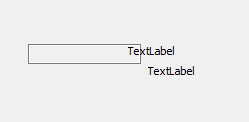
            hi
            try this test proj
            https://www.dropbox.com/s/kfzvp58ko4iz53n/my_trans_edit.zip?dl=0
            T 1 Reply Last reply
            1
            • mrjjM mrjj

              hi
              try this test proj
              https://www.dropbox.com/s/kfzvp58ko4iz53n/my_trans_edit.zip?dl=0

              T Offline
              T Offline
              takoo
              wrote on last edited by
              #10

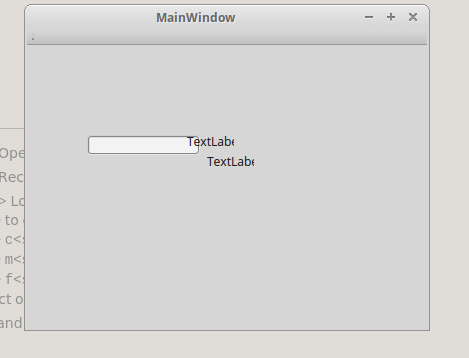
              @mrjj NOT alt text

              I just write code ------- (-_-) ----------

              1 Reply Last reply
              1
              • mrjjM Offline
                mrjjM Offline
                mrjj
                Lifetime Qt Champion
                wrote on last edited by mrjj
                #11

                ok, u must override it from the other stylesheet then ?
                Else i dont know.

                Is that the sample ?
                No changes, just run it?
                If yes, then what platform you are on, might not support it or the
                Qt version you are using is having a bug on that platform.

                T 1 Reply Last reply
                0
                • mrjjM mrjj

                  ok, u must override it from the other stylesheet then ?
                  Else i dont know.

                  Is that the sample ?
                  No changes, just run it?
                  If yes, then what platform you are on, might not support it or the
                  Qt version you are using is having a bug on that platform.

                  T Offline
                  T Offline
                  takoo
                  wrote on last edited by
                  #12

                  @mrjj i am using linux mint 17.3 and qt 5.5.1

                  I just write code ------- (-_-) ----------

                  mrjjM 1 Reply Last reply
                  0
                  • T takoo

                    @mrjj i am using linux mint 17.3 and qt 5.5.1

                    mrjjM Offline
                    mrjjM Offline
                    mrjj
                    Lifetime Qt Champion
                    wrote on last edited by
                    #13

                    @takoo
                    ok. I have had issue on mint with xfce4.
                    Some stuff that worked in Kubuntu and windows did render differently on mint.
                    That was also 5.5.
                    Not sure if bug or what.

                    Could you test on other windows manager?

                    T 1 Reply Last reply
                    0
                    • mrjjM mrjj

                      @takoo
                      ok. I have had issue on mint with xfce4.
                      Some stuff that worked in Kubuntu and windows did render differently on mint.
                      That was also 5.5.
                      Not sure if bug or what.

                      Could you test on other windows manager?

                      T Offline
                      T Offline
                      takoo
                      wrote on last edited by
                      #14

                      @mrjj ok i will test another window manager :) thanks for help

                      I just write code ------- (-_-) ----------

                      mrjjM 1 Reply Last reply
                      1
                      • T takoo

                        @mrjj ok i will test another window manager :) thanks for help

                        mrjjM Offline
                        mrjjM Offline
                        mrjj
                        Lifetime Qt Champion
                        wrote on last edited by
                        #15

                        @takoo
                        Super if possible.
                        I love mint + xfce4 but i did have some issues with rendering and dialogs
                        that fall behind parent.

                        So test transparent on other setup if u can and see if that is different :)

                        T 1 Reply Last reply
                        0
                        • mrjjM mrjj

                          @takoo
                          Super if possible.
                          I love mint + xfce4 but i did have some issues with rendering and dialogs
                          that fall behind parent.

                          So test transparent on other setup if u can and see if that is different :)

                          T Offline
                          T Offline
                          takoo
                          wrote on last edited by
                          #16

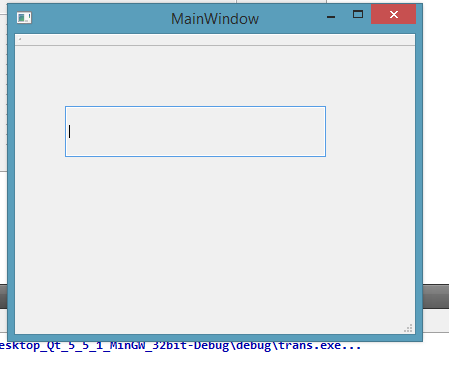
                          @mrjj it works for windows alt text

                          I just write code ------- (-_-) ----------

                          1 Reply Last reply
                          0

                          • Login

                          • Login or register to search.
                          • First post
                            Last post
                          0
                          • Categories
                          • Recent
                          • Tags
                          • Popular
                          • Users
                          • Groups
                          • Search
                          • Get Qt Extensions
                          • Unsolved