Skip to content
  • Categories
  • Recent
  • Tags
  • Popular
  • Users
  • Groups
  • Search
  • Get Qt Extensions
  • Unsolved
Collapse
Brand Logo
  1. Home
  2. Qt Development
  3. General and Desktop
  4. Build Telegram Desktop Source

Build Telegram Desktop Source

Scheduled Pinned Locked Moved Solved General and Desktop
telegrambuildconfigure
13 Posts 3 Posters 9.4k Views 2 Watching
  • Oldest to Newest
  • Newest to Oldest
  • Most Votes
Reply
  • Reply as topic
Log in to reply
This topic has been deleted. Only users with topic management privileges can see it.
  • A AliReza Beytari

    @mrjj There is not "Src" folder in "C:\Qt\Qt5.7.0\5.7" for me: http://uploads.im/Z9Wt8.png

    mrjjM Offline
    mrjjM Offline
    mrjj
    Lifetime Qt Champion
    wrote on last edited by mrjj
    #4

    @AliReza-Beytari
    it should be around there.
    if possible go to
    https://ninite.com/
    (safe site! nothing bad there)

    install
    Everything ( actual name, i dont mean all :)
    from the "others" category.
    its fast search tool and just type
    configure.* into it.
    and it should show.
    You can use normal windows search tool too - i just love
    everything.ese for its speed. :)

    1 Reply Last reply
    1
    • A AliReza Beytari

      @mrjj There is not "Src" folder in "C:\Qt\Qt5.7.0\5.7" for me: http://uploads.im/Z9Wt8.png

      veryqtpersonV Offline
      veryqtpersonV Offline
      veryqtperson
      wrote on last edited by
      #5

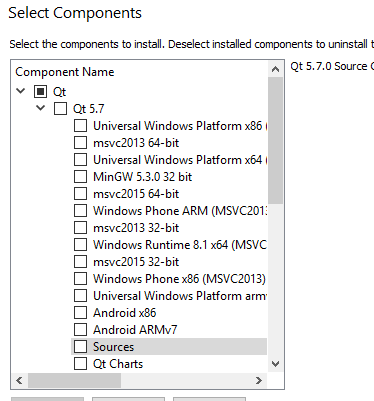
      Probably, you've installed Qt without sources? Mark it in MaintenanceTool.

      mrjjM A 2 Replies Last reply
      2
      • veryqtpersonV veryqtperson

        Probably, you've installed Qt without sources? Mark it in MaintenanceTool.

        mrjjM Offline
        mrjjM Offline
        mrjj
        Lifetime Qt Champion
        wrote on last edited by
        #6

        @veryqtperson
        good point :)

        1 Reply Last reply
        1
        • veryqtpersonV veryqtperson

          Probably, you've installed Qt without sources? Mark it in MaintenanceTool.

          A Offline
          A Offline
          AliReza Beytari
          wrote on last edited by
          #7

          @veryqtperson Which one do I have to chose ?! https://s31.postimg.org/d5fsfw5y3/Qt2.png

          mrjjM 1 Reply Last reply
          0
          • A AliReza Beytari

            @veryqtperson Which one do I have to chose ?! https://s31.postimg.org/d5fsfw5y3/Qt2.png

            mrjjM Offline
            mrjjM Offline
            mrjj
            Lifetime Qt Champion
            wrote on last edited by mrjj
            #8

            @AliReza-Beytari

            A 1 Reply Last reply
            2
            • mrjjM mrjj

              @AliReza-Beytari

              A Offline
              A Offline
              AliReza Beytari
              wrote on last edited by
              #9

              @mrjj But I don't have this item !! :(

              mrjjM 1 Reply Last reply
              0
              • A AliReza Beytari

                @mrjj But I don't have this item !! :(

                mrjjM Offline
                mrjjM Offline
                mrjj
                Lifetime Qt Champion
                wrote on last edited by
                #10

                @AliReza-Beytari
                ok, thats really odd.
                You do select Add/remove and NOt update ?

                A 1 Reply Last reply
                1
                • mrjjM mrjj

                  @AliReza-Beytari
                  ok, thats really odd.
                  You do select Add/remove and NOt update ?

                  A Offline
                  A Offline
                  AliReza Beytari
                  wrote on last edited by
                  #11

                  @mrjj I select "Add or remove components". When I select "Update components" it shows me an error: "could not retrieve remote tree: ."

                  mrjjM 1 Reply Last reply
                  0
                  • mrjjM Offline
                    mrjjM Offline
                    mrjj
                    Lifetime Qt Champion
                    wrote on last edited by
                    #12

                    hmm sounds like Mtool is not 100% happy.

                    anyway u can also grab source from
                    https://www.qt.io/download-open-source/#section-2

                    http://download.qt.io/official_releases/qt/5.7/5.7.0/single/qt-everywhere-opensource-src-5.7.0.zip.mirrorlist

                    1 Reply Last reply
                    1
                    • A AliReza Beytari

                      @mrjj I select "Add or remove components". When I select "Update components" it shows me an error: "could not retrieve remote tree: ."

                      mrjjM Offline
                      mrjjM Offline
                      mrjj
                      Lifetime Qt Champion
                      wrote on last edited by
                      #13

                      @AliReza-Beytari

                      Ps. are you sure this works with 5.7 ?
                      Only Qt 5.6 is mentioned.

                      1 Reply Last reply
                      1

                      • Login

                      • Login or register to search.
                      • First post
                        Last post
                      0
                      • Categories
                      • Recent
                      • Tags
                      • Popular
                      • Users
                      • Groups
                      • Search
                      • Get Qt Extensions
                      • Unsolved