Skip to content
  • Categories
  • Recent
  • Tags
  • Popular
  • Users
  • Groups
  • Search
  • Get Qt
  • Unsolved
Collapse
Brand Logo
  1. Home
  2. Qt Development
  3. General and Desktop
  4. Declaration of function and use it
Qt 6.12 LTS is out! See what's new in the release blog

Declaration of function and use it

Scheduled Pinned Locked Moved Unsolved General and Desktop
93 Posts 4 Posters 174.2k Views 1 Watching
  • Oldest to Newest
  • Newest to Oldest
  • Most Votes
Reply
  • Reply as topic
Log in to reply
This topic has been deleted. Only users with topic management privileges can see it.
  • G gauravsharma0190

    @jsulm
    but i am not defining ontrack_clicked in push button its different.

    mrjjM Offline
    mrjjM Offline
    mrjj
    Lifetime Qt Champion
    wrote on last edited by
    #41

    @gauravsharma0190

    Are you sure ?
    it really, really looks like you do :)

    G 1 Reply Last reply
    1
    • mrjjM mrjj

      @gauravsharma0190

      Are you sure ?
      it really, really looks like you do :)

      G Offline
      G Offline
      gauravsharma0190
      wrote on last edited by
      #42

      @mrjj
      sir i again improving it.
      as

      void MainWindow::on_pushButton_6_clicked()
      {
         /* Mat src , dst;
      
      
       //   char* source_window = "Source image";
         // char* equalized_window = "Equalized Image";
      
          /// Load image
          src = imread( "/home/pi/Desktop/b4.jpg" );


          /// Convert to grayscale
          cvtColor( src, src, CV_BGR2GRAY );
      
          /// Apply Histogram Equalization
          equalizeHist( src, dst );
      
          /// Display results
          namedWindow( "source", CV_WINDOW_NORMAL );
          namedWindow( "equalized", CV_WINDOW_NORMAL );
      
          imshow( "source", src );
          imshow( "equalized", dst );
      
          /// Wait until user exits the program
        //  waitKey(0);*/


          Mat src_base, hsv_base;
          Mat src_test1, hsv_test1;
          Mat src_test2, hsv_test2;
          Mat hsv_half_down;
      
          /// Load three images with different environment settings
      
          src_base = imread( "/home/pi/Desktop/b4.jpg" );
          src_test1 = imread( "/home/pi/Desktop/b4.jpg" );
          src_test2 = imread( "/home/pi/Desktop/b3.jpg" );
      
          /// Convert to HSV
          cvtColor( src_base, hsv_base, COLOR_BGR2HSV );
          cvtColor( src_test1, hsv_test1, COLOR_BGR2HSV );
          cvtColor( src_test2, hsv_test2, COLOR_BGR2HSV );
      
          hsv_half_down = hsv_base( Range( hsv_base.rows/2, hsv_base.rows - 1 ), Range( 0, hsv_base.cols - 1 ) );
      
          /// Using 50 bins for hue and 60 for saturation
          int h_bins = 50; int s_bins = 60;
          int histSize[] = { h_bins, s_bins };
      
          // hue varies from 0 to 179, saturation from 0 to 255
          float h_ranges[] = { 0, 180 };
          float s_ranges[] = { 0, 256 };
      
          const float* ranges[] = { h_ranges, s_ranges };
      
          // Use the o-th and 1-st channels
          int channels[] = { 0, 1 };
      
      
          /// Histograms
          MatND hist_base;
          MatND hist_half_down;
          MatND hist_test1;
          MatND hist_test2;
      
          /// Calculate the histograms for the HSV images
          calcHist( &hsv_base, 1, channels, Mat(), hist_base, 2, histSize, ranges, true, false );
          normalize( hist_base, hist_base, 0, 1, NORM_MINMAX, -1, Mat() );
      
          calcHist( &hsv_half_down, 1, channels, Mat(), hist_half_down, 2, histSize, ranges, true, false );
          normalize( hist_half_down, hist_half_down, 0, 1, NORM_MINMAX, -1, Mat() );
      
          calcHist( &hsv_test1, 1, channels, Mat(), hist_test1, 2, histSize, ranges, true, false );
          normalize( hist_test1, hist_test1, 0, 1, NORM_MINMAX, -1, Mat() );
      
          calcHist( &hsv_test2, 1, channels, Mat(), hist_test2, 2, histSize, ranges, true, false );
          normalize( hist_test2, hist_test2, 0, 1, NORM_MINMAX, -1, Mat() );
      
          /// Apply the histogram comparison methods
          for( int i = 0; i < 4; i++ )
          {
              int compare_method = i;
              double base_base = compareHist( hist_base, hist_base, compare_method );
              double base_half = compareHist( hist_base, hist_half_down, compare_method );
              double base_test1 = compareHist( hist_base, hist_test1, compare_method );
              double base_test2 = compareHist( hist_base, hist_test2, compare_method );
      
              printf( " Method [%d] Perfect, Base-Half, Base-Test(1), Base-Test(2) : %f, %f, %f, %f \n", i, base_base, base_half , base_test1, base_test2 );
          }


          }


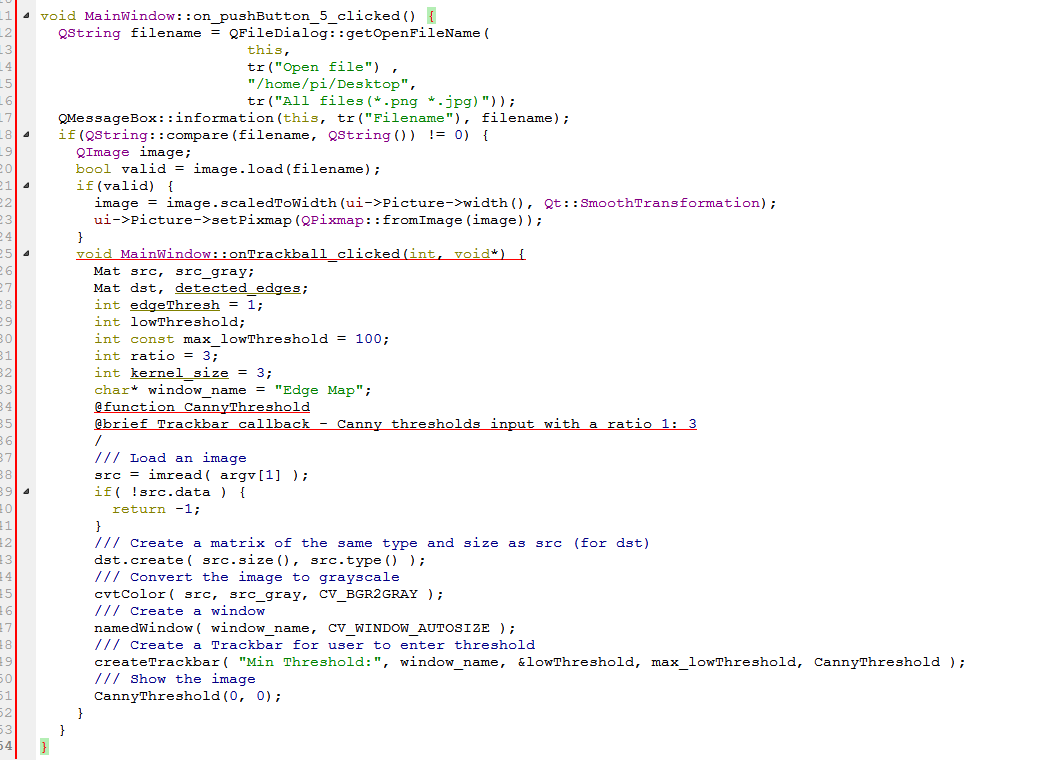
      void MainWindow::on_onTrackball_clicked()
      {
      
          Mat src, src_gray;
          Mat dst, detected_edges;
      
          int edgeThresh = 1;
          int lowThreshold;
          int const max_lowThreshold = 100;
          int ratio = 3;
          int kernel_size = 3;
          char* window_name = "Edge Map";


          /// Load image
          src = imread( "/home/pi/Desktop/b4.jpg");
           /// Create a matrix of the same type and size as src (for dst)


          dst.create( src.size(), src.type() );
      
          /// Convert the image to grayscale
          cvtColor( src, src_gray, CV_BGR2GRAY );
      
          /// Create a window
          namedWindow( window_name, CV_WINDOW_NORMAL );
      
          /// Create a Trackbar for user to enter threshold
        //  createTrackbar( "Min Threshold:", window_name, &lowThreshold, max_lowThreshold, CannyThreshold );
      
          /// Show the image
          CannyThreshold(0, 0);
      
      
          /// Separate the image in 3 places ( B, G and R )
          vector<Mat> bgr_planes;
          split( src, bgr_planes );
      
          /// Establish the number of bins
          int histSize = 256;
      
          /// Set the ranges ( for B,G,R) )
          float range[] = { 0, 256 } ;
          const float* histRange = { range };
      
          bool uniform = true;
          bool accumulate = false;
      
          Mat b_hist, g_hist, r_hist;
      
          /// Compute the histograms:
          calcHist( &bgr_planes[0], 1, 0, Mat(), b_hist, 1, &histSize, &histRange, uniform, accumulate );
          calcHist( &bgr_planes[1], 1, 0, Mat(), g_hist, 1, &histSize, &histRange, uniform, accumulate );
          calcHist( &bgr_planes[2], 1, 0, Mat(), r_hist, 1, &histSize, &histRange, uniform, accumulate );
      
          // Draw the histograms for B, G and R
          int hist_w = 512; int hist_h = 400;
         int bin_w = cvRound( (double) hist_w/histSize );
      
          Mat histImage( hist_h, hist_w, CV_8UC3, Scalar( 0,0,0) );
      
          /// Normalize the result to [ 0, histImage.rows ]
          normalize(b_hist, b_hist, 0, histImage.rows, NORM_MINMAX, -1, Mat() );
          normalize(g_hist, g_hist, 0, histImage.rows, NORM_MINMAX, -1, Mat() );
          normalize(r_hist, r_hist, 0, histImage.rows, NORM_MINMAX, -1, Mat() );
      
          /// Draw for each channel
          for( int i = 1; i < histSize; i++ )
          {
              line( histImage, Point( bin_w*(i-1), hist_h - cvRound(b_hist.at<float>(i-1)) ) ,
                               Point( bin_w*(i), hist_h - cvRound(b_hist.at<float>(i)) ),
                               Scalar( 255, 0, 0), 2, 8, 0  );
              line( histImage, Point( bin_w*(i-1), hist_h - cvRound(g_hist.at<float>(i-1)) ) ,
                               Point( bin_w*(i), hist_h - cvRound(g_hist.at<float>(i)) ),
                               Scalar( 0, 255, 0), 2, 8, 0  );
              line( histImage, Point( bin_w*(i-1), hist_h - cvRound(r_hist.at<float>(i-1)) ) ,
                               Point( bin_w*(i), hist_h - cvRound(r_hist.at<float>(i)) ),
                               Scalar( 0, 0, 255), 2, 8, 0  );
          }
      
          /// Display
          namedWindow("calcHist Demo", CV_WINDOW_AUTOSIZE );
          imshow("calcHist Demo", histImage );
        imwrite("calcHist Demo2.jpg", histImage);
          waitKey(-1);
      
      
        }
      
      
      ...
      This is new improved code .but there are error or build issue
      1.In member function'void mainwindow::on_on_trackball_clicked()
      ****canny Thresol was not declered in this scope .(function which i declare and define in .h and .c file.
      unsed variable 'edgeThresh'.
      1 Reply Last reply
      0
      • mrjjM Offline
        mrjjM Offline
        mrjj
        Lifetime Qt Champion
        wrote on last edited by
        #43

        @gauravsharma0190 said:

        CannyThreshold

        this function ?
        CannyThreshold
        that you call with
        CannyThreshold(0, 0);

        and you do include the .h file where its defined?

        G 1 Reply Last reply
        0
        • mrjjM mrjj

          @gauravsharma0190 said:

          CannyThreshold

          this function ?
          CannyThreshold
          that you call with
          CannyThreshold(0, 0);

          and you do include the .h file where its defined?

          G Offline
          G Offline
          gauravsharma0190
          wrote on last edited by
          #44

          @mrjj
          it is defined as

          ///ontrack.h///
          
          #ifndef __ONTRACK_h
          #define __ONTRACK_h
          void cannyThresold(int,void*);
          #endif
          ......
          
          ///ontrack.cpp
          #include "ontrack.h"
          #include<opencv2/opencv.hpp>
          #include <opencv2/highgui/highgui.hpp>
          #include <opencv2/core/core.hpp>
          void CannyThreshold(int, void*)
          {
          /// Reduce noise with a kernel 3x3
          blur( src_gray, detected_edges, Size(3,3) );
          /// Canny detector
          Canny( detected_edges, detected_edges, lowThreshold, lowThreshold*ratio, kernel_size );
          
          /// Using Canny's output as a mask, we display our result
          dst = Scalar::all(0);
          
          src.copyTo( dst, detected_edges);
          imshow( window_name, dst );
          }
          

          .....
          thus i include ontrack.h in mainwindow.cpp code.
          but error occurs.
          Why??
          i can't understand.

          jsulmJ 1 Reply Last reply
          0
          • mrjjM Offline
            mrjjM Offline
            mrjj
            Lifetime Qt Champion
            wrote on last edited by
            #45

            I dont understand either.
            Seems fine.
            try to define a test function
            as in
            ontrack.h
            void mytest();
            and call that from main.

            If that is still not known, it means that mainwinow do not really include ontrack.h for some reason.

            1 Reply Last reply
            0
            • G gauravsharma0190

              @mrjj
              it is defined as

              ///ontrack.h///
              
              #ifndef __ONTRACK_h
              #define __ONTRACK_h
              void cannyThresold(int,void*);
              #endif
              ......
              
              ///ontrack.cpp
              #include "ontrack.h"
              #include<opencv2/opencv.hpp>
              #include <opencv2/highgui/highgui.hpp>
              #include <opencv2/core/core.hpp>
              void CannyThreshold(int, void*)
              {
              /// Reduce noise with a kernel 3x3
              blur( src_gray, detected_edges, Size(3,3) );
              /// Canny detector
              Canny( detected_edges, detected_edges, lowThreshold, lowThreshold*ratio, kernel_size );
              
              /// Using Canny's output as a mask, we display our result
              dst = Scalar::all(0);
              
              src.copyTo( dst, detected_edges);
              imshow( window_name, dst );
              }
              

              .....
              thus i include ontrack.h in mainwindow.cpp code.
              but error occurs.
              Why??
              i can't understand.

              jsulmJ Offline
              jsulmJ Offline
              jsulm
              Lifetime Qt Champion
              wrote on last edited by
              #46

              @gauravsharma0190 You call it like this CannyThreshold(0, 0); and in ontrack.cpp it is defined like void CannyThreshold(int, void*). But in ontrack.h it is void cannyThresold(int,void*); please fix the name of the function.

              https://forum.qt.io/topic/113070/qt-code-of-conduct

              mrjjM G 2 Replies Last reply
              1
              • jsulmJ jsulm

                @gauravsharma0190 You call it like this CannyThreshold(0, 0); and in ontrack.cpp it is defined like void CannyThreshold(int, void*). But in ontrack.h it is void cannyThresold(int,void*); please fix the name of the function.

                mrjjM Offline
                mrjjM Offline
                mrjj
                Lifetime Qt Champion
                wrote on last edited by
                #47

                @jsulm
                heh Good spotted. completely missed "old" :)

                G 1 Reply Last reply
                1
                • mrjjM mrjj

                  @jsulm
                  heh Good spotted. completely missed "old" :)

                  G Offline
                  G Offline
                  gauravsharma0190
                  wrote on last edited by
                  #48

                  @mrjj
                  I fix canny as Canny in .h file
                  but again error occurs.

                  1 Reply Last reply
                  0
                  • jsulmJ jsulm

                    @gauravsharma0190 You call it like this CannyThreshold(0, 0); and in ontrack.cpp it is defined like void CannyThreshold(int, void*). But in ontrack.h it is void cannyThresold(int,void*); please fix the name of the function.

                    G Offline
                    G Offline
                    gauravsharma0190
                    wrote on last edited by
                    #49

                    @jsulm
                    Hey i fixed it .But again error.

                    jsulmJ 1 Reply Last reply
                    0
                    • G gauravsharma0190

                      @jsulm
                      Hey i fixed it .But again error.

                      jsulmJ Offline
                      jsulmJ Offline
                      jsulm
                      Lifetime Qt Champion
                      wrote on last edited by
                      #50

                      @gauravsharma0190 "But again error" - why don't you say what error you get now?

                      https://forum.qt.io/topic/113070/qt-code-of-conduct

                      G 1 Reply Last reply
                      2
                      • jsulmJ jsulm

                        @gauravsharma0190 "But again error" - why don't you say what error you get now?

                        G Offline
                        G Offline
                        gauravsharma0190
                        wrote on last edited by
                        #51

                        @jsulm
                        yes it tells undefined reference to 'CannyThresold(int,void*)'.
                        collect2:error ld returned 1 exit status.

                        jsulmJ 1 Reply Last reply
                        0
                        • G gauravsharma0190

                          @jsulm
                          yes it tells undefined reference to 'CannyThresold(int,void*)'.
                          collect2:error ld returned 1 exit status.

                          jsulmJ Offline
                          jsulmJ Offline
                          jsulm
                          Lifetime Qt Champion
                          wrote on last edited by
                          #52

                          @gauravsharma0190 Is ontrack.cpp part of your project and is it built?
                          "undefined reference to 'CannyThresold(int,void*)" - means linker cannot find CannyThresold(int,void*)

                          https://forum.qt.io/topic/113070/qt-code-of-conduct

                          G 1 Reply Last reply
                          1
                          • jsulmJ jsulm

                            @gauravsharma0190 Is ontrack.cpp part of your project and is it built?
                            "undefined reference to 'CannyThresold(int,void*)" - means linker cannot find CannyThresold(int,void*)

                            G Offline
                            G Offline
                            gauravsharma0190
                            wrote on last edited by
                            #53

                            @jsulm
                            Actually i put .h and .cpp file in my qt project folder.

                            jsulmJ 1 Reply Last reply
                            0
                            • G gauravsharma0190

                              @jsulm
                              Actually i put .h and .cpp file in my qt project folder.

                              jsulmJ Offline
                              jsulmJ Offline
                              jsulm
                              Lifetime Qt Champion
                              wrote on last edited by
                              #54

                              @gauravsharma0190 But did you add them to your project?
                              They should be in the PRO file, like:

                              SOURCES += main.cpp\
                                      mainwindow.cpp\
                                      ontrack.cpp
                              
                              HEADERS  += mainwindow.h\
                                      ontrack.h
                              

                              https://forum.qt.io/topic/113070/qt-code-of-conduct

                              G 1 Reply Last reply
                              1
                              • jsulmJ jsulm

                                @gauravsharma0190 But did you add them to your project?
                                They should be in the PRO file, like:

                                SOURCES += main.cpp\
                                        mainwindow.cpp\
                                        ontrack.cpp
                                
                                HEADERS  += mainwindow.h\
                                        ontrack.h
                                
                                G Offline
                                G Offline
                                gauravsharma0190
                                wrote on last edited by
                                #55

                                @jsulm
                                i added it but gives error as
                                parse error onTrack.cpp
                                Makefile error 3

                                jsulmJ 1 Reply Last reply
                                0
                                • G gauravsharma0190

                                  @jsulm
                                  i added it but gives error as
                                  parse error onTrack.cpp
                                  Makefile error 3

                                  jsulmJ Offline
                                  jsulmJ Offline
                                  jsulm
                                  Lifetime Qt Champion
                                  wrote on last edited by
                                  #56

                                  @gauravsharma0190 After changing PRO file you need to rerun qmake (right-click on the project in QtCreator and then "Run qmake". Then do a rebuild.

                                  https://forum.qt.io/topic/113070/qt-code-of-conduct

                                  G 1 Reply Last reply
                                  0
                                  • jsulmJ jsulm

                                    @gauravsharma0190 After changing PRO file you need to rerun qmake (right-click on the project in QtCreator and then "Run qmake". Then do a rebuild.

                                    G Offline
                                    G Offline
                                    gauravsharma0190
                                    wrote on last edited by
                                    #57

                                    @jsulm
                                    I done it
                                    Now gives many error regarding onTrack.cpp file.

                                    jsulmJ 1 Reply Last reply
                                    0
                                    • G gauravsharma0190

                                      @jsulm
                                      I done it
                                      Now gives many error regarding onTrack.cpp file.

                                      jsulmJ Offline
                                      jsulmJ Offline
                                      jsulm
                                      Lifetime Qt Champion
                                      wrote on last edited by
                                      #58

                                      @gauravsharma0190 Well, I guess you have many issues there...

                                      https://forum.qt.io/topic/113070/qt-code-of-conduct

                                      G 3 Replies Last reply
                                      0
                                      • jsulmJ jsulm

                                        @gauravsharma0190 Well, I guess you have many issues there...

                                        G Offline
                                        G Offline
                                        gauravsharma0190
                                        wrote on last edited by
                                        #59

                                        @jsulm
                                        Yeap.
                                        are they function's issuses or anything.
                                        I can't undersatnd everything is all right so Why all these issuses are there.
                                        I will send you these issue.

                                        G 1 Reply Last reply
                                        0
                                        • G gauravsharma0190

                                          @jsulm
                                          Yeap.
                                          are they function's issuses or anything.
                                          I can't undersatnd everything is all right so Why all these issuses are there.
                                          I will send you these issue.

                                          G Offline
                                          G Offline
                                          gauravsharma0190
                                          wrote on last edited by
                                          #60

                                          @gauravsharma0190
                                          Here are all the errors
                                          ...

                                          /home/pi/Desktop/qt/Desktop1/onTrackBall.cpp:9: error: 'blur' was not declared in this scope
                                               blur(gray, edge, Size(3,3));
                                                                         ^
                                          /home/pi/Desktop/qt/Desktop1/onTrackBall.cpp:6: error: 'Mat' does not name a type
                                           Mat image, gray, edge, cedge;
                                           ^
                                          /home/pi/Desktop/qt/Desktop1/onTrackBall.cpp:7: error: 'void CannyThreshold(int, void*)' was declared 'extern' and later 'static' [-fpermissive]
                                             static void CannyThreshold(int, void*)
                                                                                  ^
                                          /home/pi/Desktop/qt/Desktop1/onTrackBall.cpp:-1: In function 'void CannyThreshold(int, void*)':
                                          
                                          /home/pi/Desktop/qt/Desktop1/onTrackBall.cpp:9: error: 'edge' was not declared in this scope
                                               blur(gray, edge, Size(3,3));
                                                          ^
                                          /home/pi/Desktop/qt/Desktop1/onTrackBall.cpp:9: error: 'edge' was not declared in this scope
                                               blur(gray, edge, Size(3,3));
                                                          ^
                                          /home/pi/Desktop/qt/Desktop1/onTrackBall.cpp:9: error: 'blur' was not declared in this scope
                                               blur(gray, edge, Size(3,3));
                                                                         ^
                                          
                                          /home/pi/Desktop/qt/Desktop1/onTrackBall.cpp:12: error: 'Canny' was not declared in this scope
                                               Canny(edge, edge, edgeThresh, edgeThresh*3, 3);
                                                                                            ^
                                          /home/pi/Desktop/qt/Desktop1/onTrackBall.cpp:13: error: 'cedge' was not declared in this scope
                                               cedge = Scalar::all(0);
                                               ^
                                          /home/pi/Desktop/qt/Desktop1/onTrackBall.cpp:15: error: 'src' was not declared in this scope
                                               src.copyTo(cedge, edge);
                                               ^
                                          /home/pi/Desktop/qt/Desktop1/onTrackBall.cpp:16: error: 'imshow' was not declared in this scope
                                               imshow("Edge map", cedge);
                                                                       ^
                                          /usr/local/include/opencv2/highgui/highgui.hpp:78: note:   'cv::imshow'
                                           CV_EXPORTS_W void imshow(const string& winname, InputArray mat);
                                          
                                          1 Reply Last reply
                                          0

                                          • Login

                                          • Login or register to search.
                                          • First post
                                            Last post
                                          0
                                          • Categories
                                          • Recent
                                          • Tags
                                          • Popular
                                          • Users
                                          • Groups
                                          • Search
                                          • Get Qt
                                          • Unsolved