
GridLayout and custom component
-
Hi
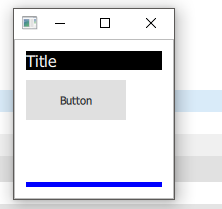
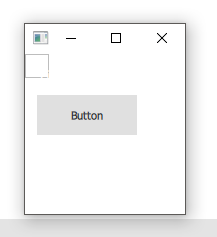
I have a custom component that displays correctly if used directly, but if I place it inside a gridlayout it is not.I would appreciate an explanation of how I can get my custom component correctly displayed in a layout
Many thanks
Here is my custom component
import QtQuick 2.0
import QtQuick.Controls 2.5

Frame {
    id: frame
    Label {
        id: label
        text: qsTr("Title")
        anchors.right: parent.right
        anchors.rightMargin: 0
        anchors.top: parent.top
        anchors.topMargin: 0
        anchors.left: parent.left
        anchors.leftMargin: 0
        font.pointSize: 12
        color: "white"
        background: Rectangle {
            color: "black"
        }
    }

    Loader {
        id: loader
        anchors.top: label.bottom
        anchors.topMargin: 10
        source: "/Frame1.qml"
    }

    Rectangle {
        anchors.right: parent.right
        anchors.rightMargin: 0
        anchors.left: parent.left
        anchors.leftMargin: 0
        anchors.bottom: parent.bottom
        anchors.bottomMargin: 0

        height: 5

        color: "blue"
    }
}
In use
import QtQuick 2.9
import QtQuick.Window 2.2
import QtQuick.Controls 2.3
import QtQuick.Layouts 1.3
import Qt.labs.location 1.0

ApplicationWindow {
    id: applicationWindow
    visible: true
    title: "Basic layouts"
    property int margin: 11

    GridLayout {
        RegionFrame {
            id: regionFrame
            Layout.fillHeight: true
            Layout.fillWidth: true
        }
    }

}
Without layout
With layout
-
All of your anchors inside the component are missing at least one side. So when the layout reshapes Frame, all the children get disorganized. Make sure your anchors are good (all sides set or 3 sides + width, or 2 sides + width and height).
To test your component, you can do this:
ApplicationWindow {
  RegionFrame {
    anchors.fill: parent
  }
}
Now you can run the app, and start resizing the window in all directions - if you set all anchors right, your component will always fill the whole window and resize without glitches.
