
QTableWidget
-
-
This remains unsolved and I ran into this same issue in 2025 with pyside6 and so far nothing has resolved it. I am implementing a dark mode in my python 3.12 application and getting an annoying white box in the top corner of the displayed database table. I was able to target it with a workaround while I kept styling inline but once I migrated to using dark.qss as an external stylesheet to homogonise my application styling it became unfixable and so far I have been unable to target it to change its color.
The red circle below is not needed but I was discussing it with LLM and precision was required.
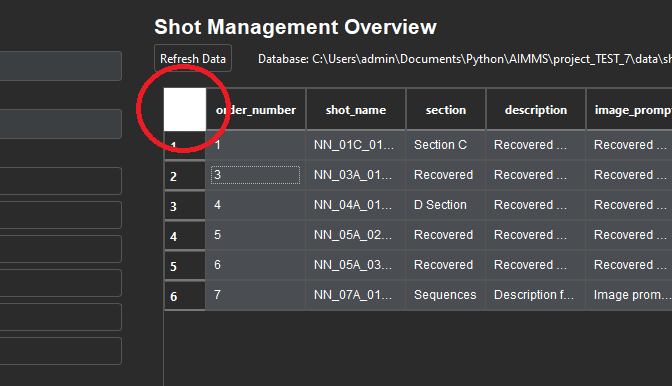
I'll go through the link from Vronin to see if I can find new approaches to solving this. If anyone has a solution please share else I will bring whatever I discover back and post it here once I find a workaround, or if I don't.
-
Well thanks @VRonin as it provided the solution that was unsolvable before. Here is a summary of my problem and how this solved it for the record.
When using a dark stylesheet (dark.qss) the top-left corner button remains untargettable with styling. Calling
findChild(QAbstractButton)and forcing a stylesheet in code helped for a moment, but the white square came back on resize, theme change, or first show.Root cause seemed to be Qt treats that corner button as part of the table header, not as a normal button. Header pieces are styled with the selector
QHeaderView::section. The corner is a special header piece calledQTableCornerButton::section. If you never tell Qt what colour that piece should be, it falls back to the system’s light colour even in dark mode which seems to be white.After hacking workarounds in the code and doing all sorts, I was still unable to resolve it permanently until approaching it treating the top-left select-all button as a header, not a button. Styling it with
QTableWidget QTableCornerButton::sectionin my QSS and that was pretty much it. In my case adding this into mydark.qsstheme file:/* Dark-theme top-left corner (select-all button) */ QTableWidget QTableCornerButton::section { background-color: #2b2b2b; /* same as table background */ border: 1px solid #555555; /* same as table border */ border-bottom: 2px solid #777777; /* optional – matches header underline */ }also adding into the python script:
app.setStyle("Fusion")and loading the stylesheet after the style is set.
a simple example as a test was:
import sys
from PySide6.QtWidgets import QApplication, QTableWidget
from pathlib import Path

app = QApplication(sys.argv)
app.setStyle("Fusion")

# ---- dark.qss (only the relevant part) ----
qss = """
QTableWidget { background-color: #2b2b2b; color: #e0e0e0; }
QHeaderView::section { background-color: #2b2b2b; color: #e0e0e0; border: 1px solid #555555; }
QTableWidget QTableCornerButton::section {
    background-color: #2b2b2b;
    border: 1px solid #555555;
    border-bottom: 2px solid #777777;
}
"""
app.setStyleSheet(qss)

w = QTableWidget(5, 3)
w.show()
app.exec()
I hope that helps anyone running into this problem which clearly still exists in 2025 and until I found the info in the link shared by Vronin I was struggling to solve.

