Skip to content
  • Categories
  • Recent
  • Tags
  • Popular
  • Users
  • Groups
  • Search
  • Get Qt Extensions
  • Unsolved
Collapse
Brand Logo
  1. Home
  2. Qt Development
  3. General and Desktop
  4. How to set the size of the handle in a QSlider?
Qt 6.11 is out! See what's new in the release blog

How to set the size of the handle in a QSlider?

Scheduled Pinned Locked Moved Solved General and Desktop
3 Posts 2 Posters 8.6k Views 1 Watching
  • Oldest to Newest
  • Newest to Oldest
  • Most Votes
Reply
  • Reply as topic
Log in to reply
This topic has been deleted. Only users with topic management privileges can see it.
  • K Offline
    K Offline
    kitfox
    wrote on last edited by
    #1

    I'm trying to add some style to a QSlider I want to use a custom image as the handle that the user drags back and forth. While I've figured out how to use style sheets to have a custom icon drawn where the handle should be, the image is being drawn much too small and I cannot figure out how to make it larger.

    Setting width and height seem to do nothing. I've tried using image, border-image and background-image, but none give me the ability to set the size of the handle image. Does anyone know how to do this?

    This is the style sheet that I've been adding to my QSlider in QtDesigner:

    QSlider::handle:vertical {
        image: url(:/data/icons/mixer-slider-handle.svg);
        width:64px;
        height:64px;
    }
    
    1 Reply Last reply
    0
    • mrjjM Offline
      mrjjM Offline
      mrjj
      Lifetime Qt Champion
      wrote on last edited by mrjj
      #2

      Hi
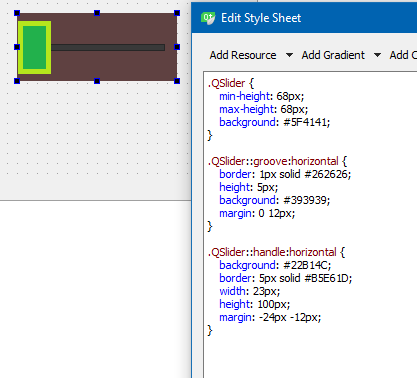
      Try with this
      alt text

      https://stackoverflow.com/questions/47691972/qslider-increase-handle-size

      The height of slider handle is linked to height in QSlider::groove:horizontal
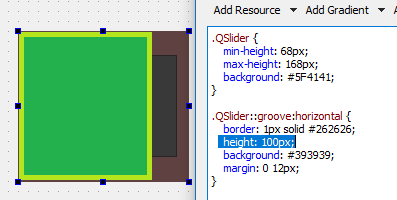
      alt text

      K 1 Reply Last reply
      1
      • mrjjM mrjj

        Hi
        Try with this
        alt text

        https://stackoverflow.com/questions/47691972/qslider-increase-handle-size

        The height of slider handle is linked to height in QSlider::groove:horizontal
        alt text

        K Offline
        K Offline
        kitfox
        wrote on last edited by kitfox
        #3

        @mrjj

        Okay - this helped. The base size of the image is being set by the groove, but you can also further enlarge the handle image via the margin property on .QSlider::groove:vertical.

        1 Reply Last reply
        0

        • Login

        • Login or register to search.
        • First post
          Last post
        0
        • Categories
        • Recent
        • Tags
        • Popular
        • Users
        • Groups
        • Search
        • Get Qt Extensions
        • Unsolved