Skip to content
  • Categories
  • Recent
  • Tags
  • Popular
  • Users
  • Groups
  • Search
  • Get Qt Extensions
  • Unsolved
Collapse
Brand Logo
  1. Home
  2. Qt Development
  3. General and Desktop
  4. How to add stackwidget to a scrollArea?
Qt 6.11 is out! See what's new in the release blog

How to add stackwidget to a scrollArea?

Scheduled Pinned Locked Moved Unsolved General and Desktop
2 Posts 2 Posters 471 Views 1 Watching
  • Oldest to Newest
  • Newest to Oldest
  • Most Votes
Reply
  • Reply as topic
Log in to reply
This topic has been deleted. Only users with topic management privileges can see it.
  • S Offline
    S Offline
    Sriu1
    wrote on last edited by
    #1

    I have a vertical layout Box on top of a stackwidget which is on top of scrollArea.How to add vlayoutBox to stackwidget and how to add this stackwidget further to scrollArea.?My stackwidget,verticalLayoutBox and scrollarea are all created in designer mode.Please suggest

    1 Reply Last reply
    0
    • mrjjM Offline
      mrjjM Offline
      mrjj
      Lifetime Qt Champion
      wrote on last edited by mrjj
      #2

      Hi
      What is issue ?
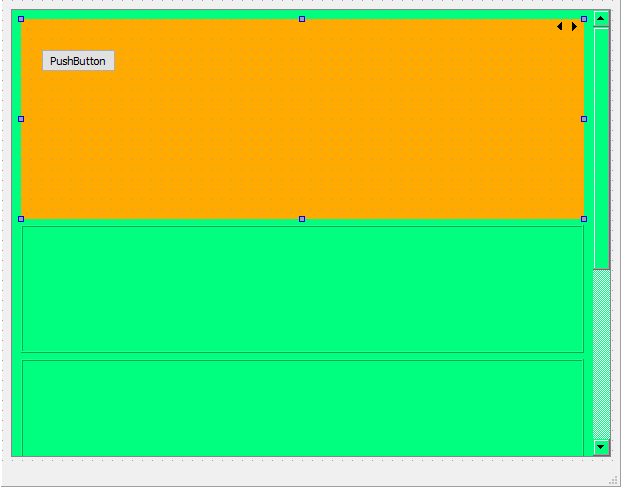
      you can just do it
      Add scrollArea to form
      Add Stacked to scrollArea
      right click free area in scrollarea and choose layout in menu
      Add something to stacked
      Right click stacked in free area, and select layout from menu
      ?
      alt text

      1 Reply Last reply
      1

      • Login

      • Login or register to search.
      • First post
        Last post
      0
      • Categories
      • Recent
      • Tags
      • Popular
      • Users
      • Groups
      • Search
      • Get Qt Extensions
      • Unsolved