Skip to content
  • Categories
  • Recent
  • Tags
  • Popular
  • Users
  • Groups
  • Search
  • Get Qt Extensions
  • Unsolved
Collapse
Brand Logo
  1. Home
  2. Qt Development
  3. 3rd Party Software
  4. QtCharts is it posible to have gradient lines?
Forum Updated to NodeBB v4.3 + New Features

QtCharts is it posible to have gradient lines?

Scheduled Pinned Locked Moved Solved 3rd Party Software
7 Posts 3 Posters 3.2k Views 2 Watching
  • Oldest to Newest
  • Newest to Oldest
  • Most Votes
Reply
  • Reply as topic
Log in to reply
This topic has been deleted. Only users with topic management privileges can see it.
  • L Offline
    L Offline
    linuxTown
    wrote on last edited by
    #1

    Hi,

    Could I achieve this kind of spline chart with QTCharts, where color changes according to y chart value?

    example:
    alt text

    1 Reply Last reply
    0
    • mrjjM Offline
      mrjjM Offline
      mrjj
      Lifetime Qt Champion
      wrote on last edited by mrjj
      #2

      Hi
      Maybe you can use
      https://doc.qt.io/qt-5.10/qtcharts-customchart-example.html
      and draw the gradient as background and let graph be transparent on the actual
      plot values.
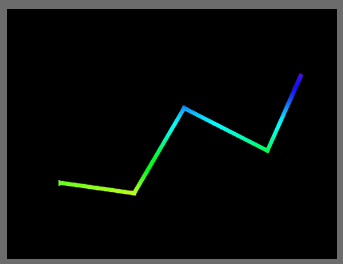
      alt text

      1 Reply Last reply
      2
      • L Offline
        L Offline
        linuxTown
        wrote on last edited by
        #3

        Ok, I will try to do that, thanks

        1 Reply Last reply
        0
        • L Offline
          L Offline
          linuxTown
          wrote on last edited by
          #4

          How to make line be transparent like in that picture? Because if I set it like this:

          QPen green(QColor(0, 0, 0, 0x00));
          green.setWidth(2);
          m_series->setPen(green);

          line just becomes invisible. If I set chart background like this:
          QBrush brush (QImage(":image/image.png"));
          chart->setPlotAreaBackgroundBrush(brush);
          chart->setPlotAreaBackgroundVisible(true);
          whole chart area then has that image and line is still invisible. if I setPlotAreaBackgroundVisible(false) background disappears, but line is still invisible. How to have, that only chart line shows that background?

          1 Reply Last reply
          0
          • L Offline
            L Offline
            linuxTown
            wrote on last edited by
            #5

            So it means it's impossible to achieve this with QT charts?

            1 Reply Last reply
            0
            • VRoninV Offline
              VRoninV Offline
              VRonin
              wrote on last edited by VRonin
              #6

              Starting from the aforementioned example, replace

              // Customize series
              QPen pen(QRgb(0xfdb157));
                  pen.setWidth(5);
                  series->setPen(pen);
              

              with

              QLinearGradient lineGradient;
                  lineGradient.setStart(QPointF(0, 1));
                  lineGradient.setFinalStop(QPointF(1, 0));
                  lineGradient.setColorAt(0.0, Qt::blue);
                  lineGradient.setColorAt(1.0, Qt::red);
                  lineGradient.setCoordinateMode(QGradient::StretchToDeviceMode);
                  series->setPen(QPen(QBrush(lineGradient),5));

              

              "La mort n'est rien, mais vivre vaincu et sans gloire, c'est mourir tous les jours"
              ~Napoleon Bonaparte

              On a crusade to banish setIndexWidget() from the holy land of Qt

              1 Reply Last reply
              4
              • L Offline
                L Offline
                linuxTown
                wrote on last edited by
                #7

                Hi VRonin,

                Thank you a lot, that works perfectly!!!

                1 Reply Last reply
                0

                • Login

                • Login or register to search.
                • First post
                  Last post
                0
                • Categories
                • Recent
                • Tags
                • Popular
                • Users
                • Groups
                • Search
                • Get Qt Extensions
                • Unsolved