
TableView doesnt' change cell text?
-
I created my own model deriving from QSqlQueryModel
This is flags()
Qt::ItemFlags MyModel::flags(const QModelIndex& index) const
{
    if(MainWindow::isConstColumn(index.column()))
        return QAbstractItemModel::flags(index) & (~Qt::ItemIsEditable);

    else
        return QAbstractItemModel::flags(index) | Qt::ItemIsEditable;
}
This is setData()
bool MyModel::setData(const QModelIndex& index, const QVariant& value, int role)
{
    if (index.isValid() && role == Qt::EditRole)
    {
        qDebug() << "data changed!";

        emit dataChanged(index, index);
        return true;
    }

    return false;
}
This is the signal that I use on the TableView
connect(ui->tableView, SIGNAL(doubleClicked(const QModelIndex&)), this, SLOT(onTableClicked(const QModelIndex&)));I can successfully doubleClick the cells and insert new text in it
The problem is that when I press enter, the text I entered is not applied... the original text is displayed instead.
How can I apply the change?
Thanks in advance.
-
I created my own model deriving from QSqlQueryModel
This is flags()
Qt::ItemFlags MyModel::flags(const QModelIndex& index) const
{
    if(MainWindow::isConstColumn(index.column()))
        return QAbstractItemModel::flags(index) & (~Qt::ItemIsEditable);

    else
        return QAbstractItemModel::flags(index) | Qt::ItemIsEditable;
}
This is setData()
bool MyModel::setData(const QModelIndex& index, const QVariant& value, int role)
{
    if (index.isValid() && role == Qt::EditRole)
    {
        qDebug() << "data changed!";

        emit dataChanged(index, index);
        return true;
    }

    return false;
}
This is the signal that I use on the TableView
connect(ui->tableView, SIGNAL(doubleClicked(const QModelIndex&)), this, SLOT(onTableClicked(const QModelIndex&)));I can successfully doubleClick the cells and insert new text in it
The problem is that when I press enter, the text I entered is not applied... the original text is displayed instead.
How can I apply the change?
Thanks in advance.
@devhobby
is this the whole implementation of your setData() method? If yes, it should be obvious why no data is actually changed.Did you also consider using QSqlTableModel instead of QSqlQueryModel?
It already implements the setData() method.--- SUPPORT REQUESTS VIA CHAT WILL BE IGNORED ---
If you have a question please use the forum so others can benefit from the solution in the future -
@raven-worx said in TableView doesnt' change cell text?:
@devhobby
is this the whole implementation of your setData() method? If yes, it should be obvious why no data is actually changed.Yes. What is missing for making the data visually change?
-
@raven-worx said in TableView doesnt' change cell text?:
@devhobby
is this the whole implementation of your setData() method? If yes, it should be obvious why no data is actually changed.Yes. What is missing for making the data visually change?
@devhobby
you need to set the value back to the database (using a query). But anyway i don't know/think that you can update any currently cached data in the model.
You can try to get the sql-record using QSqlQueryModel::record() and update it's corresponding value, afterwards call dataChanged (like you already do). But i think you don't change the data inside the model with this way.But again, why don't you just use a QSqlTableModel which already has read/write support implemented?!
--- SUPPORT REQUESTS VIA CHAT WILL BE IGNORED ---
If you have a question please use the forum so others can benefit from the solution in the future -
@devhobby
you need to set the value back to the database (using a query). But anyway i don't know/think that you can update any currently cached data in the model.
You can try to get the sql-record using QSqlQueryModel::record() and update it's corresponding value, afterwards call dataChanged (like you already do). But i think you don't change the data inside the model with this way.But again, why don't you just use a QSqlTableModel which already has read/write support implemented?!
@raven-worx said in TableView doesnt' change cell text?:
@devhobby
you need to set the value back to the database (using a query).I did it using QSqlQuery
You can try to get the sql-record using QSqlQueryModel::record() and update it's corresponding value, afterwards call dataChanged (like you already do). But i think you don't change the data inside the model with this way.
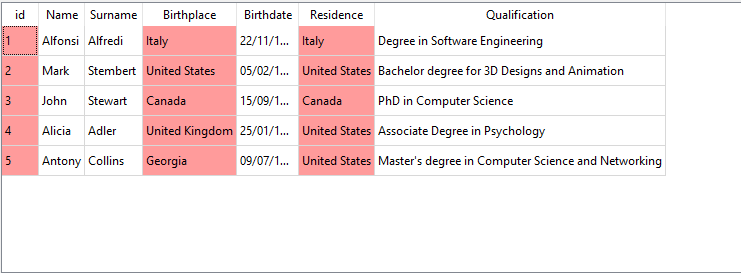
After sending the query, the database gets updated but the Table View still displays the old information.
QSqlQueryModel::record(index.row()).setValue("Name", value)does nothing.
Even by typing "name" instead of "Name"
-
@raven-worx said in TableView doesnt' change cell text?:
@devhobby
you need to set the value back to the database (using a query).I did it using QSqlQuery
You can try to get the sql-record using QSqlQueryModel::record() and update it's corresponding value, afterwards call dataChanged (like you already do). But i think you don't change the data inside the model with this way.
After sending the query, the database gets updated but the Table View still displays the old information.
QSqlQueryModel::record(index.row()).setValue("Name", value)does nothing.
Even by typing "name" instead of "Name"
@devhobby said in TableView doesnt' change cell text?:
does nothing.
just as i said. You don't have access to the model internal data, so you wont be able to modify it, unless you reload the complete model from the database (which also means you will loose the current selection).
But you still refuse to tell why you don't use a QSqlTableModel. So i can't help you anymore.
--- SUPPORT REQUESTS VIA CHAT WILL BE IGNORED ---
If you have a question please use the forum so others can benefit from the solution in the future -
@devhobby said in TableView doesnt' change cell text?:
does nothing.
just as i said. You don't have access to the model internal data, so you wont be able to modify it, unless you reload the complete model from the database (which also means you will loose the current selection).
But you still refuse to tell why you don't use a QSqlTableModel. So i can't help you anymore.
@raven-worx said in TableView doesnt' change cell text?:
@devhobby said in TableView doesnt' change cell text?:
does nothing.
just as i said. You don't have access to the model internal data, so you wont be able to modify it, unless you reload the complete model from the database (which also means you will loose the current selection).
Is it really the only way?
From Qt Documentation
The model is read-only by default. To make it read-write, you must subclass it and reimplement setData() and flags(). Another option is to use QSqlTableModel
It says to reimplement setData() but I did... i'm just missing the part where the data is changed inside the Table
Also, it says ANOTHER option is to use QSqlTableModel
But you still refuse to tell why you don't use a QSqlTableModel. So i can't help you anymore.
I prefer QSqlQueryModel because I use the method setQuery() which is protected inside QSqlTableModel.
The latter only wants a table
-
@raven-worx said in TableView doesnt' change cell text?:
@devhobby said in TableView doesnt' change cell text?:
does nothing.
just as i said. You don't have access to the model internal data, so you wont be able to modify it, unless you reload the complete model from the database (which also means you will loose the current selection).
Is it really the only way?
From Qt Documentation
The model is read-only by default. To make it read-write, you must subclass it and reimplement setData() and flags(). Another option is to use QSqlTableModel
It says to reimplement setData() but I did... i'm just missing the part where the data is changed inside the Table
Also, it says ANOTHER option is to use QSqlTableModel
But you still refuse to tell why you don't use a QSqlTableModel. So i can't help you anymore.
I prefer QSqlQueryModel because I use the method setQuery() which is protected inside QSqlTableModel.
The latter only wants a table
@devhobby
see yourself. The data() method just returns the data directly from the QSqlQuery.a workaround could be
- cache the modified data (passed to setData()) - but still update the value to the DB
- override data() and if there is cached data return it, otherwise simply return the base-class implementation
- on a model reset clear the cached data again
--- SUPPORT REQUESTS VIA CHAT WILL BE IGNORED ---
If you have a question please use the forum so others can benefit from the solution in the future -
@devhobby
see yourself. The data() method just returns the data directly from the QSqlQuery.a workaround could be
- cache the modified data (passed to setData()) - but still update the value to the DB
- override data() and if there is cached data return it, otherwise simply return the base-class implementation
- on a model reset clear the cached data again
@raven-worx said in TableView doesnt' change cell text?:
@devhobby
see yourself. The data() method just returns the data directly from the QSqlQuery.a workaround could be
- cache the modified data (passed to setData()) - but still update the value to the DB
- override data() and if there is cached data return it, otherwise simply return the base-class implementation
- on a model reset clear the cached data again
One thing I forgot to tell you.
The data() function grabs the item and the role.
If the role is QtBackground color the cell Blue if it has been edited
QVariant MyModel::data(const QModelIndex& item, int role) const
{
    if (!item.isValid())
        return QVariant();

    if(role == Qt::BackgroundRole)
    {
        if(MainWindow::cellsEdited.contains(item))
            return QColor(66, 197, 244, 150);
    }

    return QSqlQueryModel::data(item, role);
}
If not, return the base class data()
Is there something I need to do here?
-
@devhobby said in TableView doesnt' change cell text?:
MainWindow::cellsEdited.contains(item)What's this?
"La mort n'est rien, mais vivre vaincu et sans gloire, c'est mourir tous les jours"
~Napoleon BonaparteOn a crusade to banish setIndexWidget() from the holy land of Qt
-
@devhobby said in TableView doesnt' change cell text?:
MainWindow::cellsEdited.contains(item)What's this?
@VRonin said in TableView doesnt' change cell text?:
@devhobby said in TableView doesnt' change cell text?:
MainWindow::cellsEdited.contains(item)What's this?
The slot onTableClicked() gets called when a cell of the Table View gets edited.
When that happens, I insert in the cellsEdited array the cell (which is a QModelIndex)
In data() I check if the cell is one of the edited ones. If yes, color that cell with Blue
-
Any idea?
I saw in the QSqlTableModel source code that the method setData() calls QSqlTableModelPrivate::setGeneratedValue to set the field in the table view.
QSqlQueryModel has no such method. But then, how the hell do I change the field text?
-
Any idea?
I saw in the QSqlTableModel source code that the method setData() calls QSqlTableModelPrivate::setGeneratedValue to set the field in the table view.
QSqlQueryModel has no such method. But then, how the hell do I change the field text?
@devhobby said in TableView doesnt' change cell text?:
QSqlQueryModel has no such method. But then, how the hell do I change the field text?
you need to return your cached data in the data() method for the
Qt::DisplayRole
Also you shouldn't useQModelIndexfor persiting purposes. UseQPersistentModelIndexfor such cases.--- SUPPORT REQUESTS VIA CHAT WILL BE IGNORED ---
If you have a question please use the forum so others can benefit from the solution in the future -
@devhobby said in TableView doesnt' change cell text?:
QSqlQueryModel has no such method. But then, how the hell do I change the field text?
you need to return your cached data in the data() method for the
Qt::DisplayRole
Also you shouldn't useQModelIndexfor persiting purposes. UseQPersistentModelIndexfor such cases.@raven-worx said in TableView doesnt' change cell text?:
@devhobby said in TableView doesnt' change cell text?:
QSqlQueryModel has no such method. But then, how the hell do I change the field text?
you need to return your cached data in the data() method for the
Qt::DisplayRoleI tried and worked! But tell me if I used the right approach
I used a QMap<QModelIndex, QVariant> to assign each index its new data
When data() is called, if the role is DisplayRole and there is cached data for the index, return its variant
Also you shouldn't use
QModelIndexfor persiting purposes. UseQPersistentModelIndexfor such cases.Could you explain this point a little more? Also, the overriding functions require a QModelIndex
-
@raven-worx said in TableView doesnt' change cell text?:
@devhobby said in TableView doesnt' change cell text?:
QSqlQueryModel has no such method. But then, how the hell do I change the field text?
you need to return your cached data in the data() method for the
Qt::DisplayRoleI tried and worked! But tell me if I used the right approach
I used a QMap<QModelIndex, QVariant> to assign each index its new data
When data() is called, if the role is DisplayRole and there is cached data for the index, return its variant
Also you shouldn't use
QModelIndexfor persiting purposes. UseQPersistentModelIndexfor such cases.Could you explain this point a little more? Also, the overriding functions require a QModelIndex
@devhobby said in TableView doesnt' change cell text?:
Could you explain this point a little more? Also, the overriding functions require a QModelIndex
Just replace
QMap<QModelIndex, QVariant>withQMap<QPersistentModelIndex, QVariant>.
You can use a QPersistentModelIndex everywhere where a QModelIndex is expcted - no conversion needed.


