
Maximize QGraphicsView
-
What exactly do you want to maximize (the GraphicsView or the Image), and what exactly do you mean by that? How should it look?
-
What exactly do you want to maximize (the GraphicsView or the Image), and what exactly do you mean by that? How should it look?
This is that I want:
When I doubleclick the image, I want to show it fullscreen and, doubleclicking again, I want to restore the default interface. Do you understand me? I know my english is not very good.
-
If I understand you correctly, it's only zooming in onto the image, and then zooming out again.
If you show the image within a QGraphicsItem (e.g. a QGraphicsPixmap item), you can use QGraphicsView::fitInView to show this image in full view. Before that, you can remember the position and zoom level by saving QGraphicsView::transform().
If you -
If I understand you correctly, it's only zooming in onto the image, and then zooming out again.
If you show the image within a QGraphicsItem (e.g. a QGraphicsPixmap item), you can use QGraphicsView::fitInView to show this image in full view. Before that, you can remember the position and zoom level by saving QGraphicsView::transform().
If you@Asperamanca I am trying to get this effect:
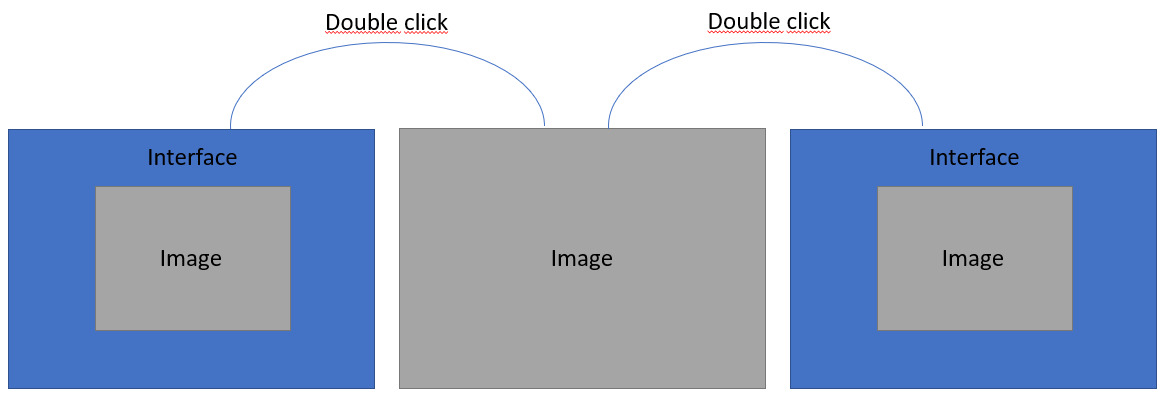
The image is a QGraphicPixmapItem in a QGraphicsScene in a QGraphicsView.
I tryed this line in the mouseDoubleClickEvent():
void imageView::mouseDoubleClickEvent(QMouseEvent *event) {
    fitInView(QApplication::desktop()->availableGeometry(-1), Qt::IgnoreAspectRatio);
}
but it doesn't works.
Thank you very much
-
How big is your GraphicsView in the first picture? Does it already fill the whole rectangle (but the image is smaller), or does it only fill the gray area in the middle?
Because if the GraphicsView does not fill the whole interface, you first need to maximize that. For this, you might get some info in this article: https://stackoverflow.com/questions/9412971/how-to-set-qwidget-fullscreen-but-real-fullscreen-change-resolution-set-mod#9413140 -
How big is your GraphicsView in the first picture? Does it already fill the whole rectangle (but the image is smaller), or does it only fill the gray area in the middle?
Because if the GraphicsView does not fill the whole interface, you first need to maximize that. For this, you might get some info in this article: https://stackoverflow.com/questions/9412971/how-to-set-qwidget-fullscreen-but-real-fullscreen-change-resolution-set-mod#9413140@Asperamanca The QGraphicsView and the image have the same size. In the QGraphicsView's showEvent, I put this line:
fitInView(this->scene->sceneRect(), Qt::IgnoreAspectRatio);The 'this' pointer is the QGraphicsView. I have tryed this lines, but it doesn't work:
void imageView::mouseDoubleClickEvent(QMouseEvent *event) {
    this->setWindowState(Qt::WindowFullScreen);
    this->showFullScreen();
    fitInView(QApplication::desktop()->availableGeometry(-1), Qt::IgnoreAspectRatio);
}
imageView is the QGraphicsView.
Do you know what could be the problem?? Thank you again!!
-
First, this line in double click is unnecessary:
fitInView(QApplication::desktop()->availableGeometry(-1), Qt::IgnoreAspectRatio);because your image should already be fully zoomed in from the constructor.
Second, try to change the line in showEvent to the following
fitInView(myGraphicsPixmapItem, Qt::IgnoreAspectRatio);Finally, what do you mean by "it doesn't work": Is the whole window not maximized? Or is the image not large enough within the window?
-
First, this line in double click is unnecessary:
fitInView(QApplication::desktop()->availableGeometry(-1), Qt::IgnoreAspectRatio);because your image should already be fully zoomed in from the constructor.
Second, try to change the line in showEvent to the following
fitInView(myGraphicsPixmapItem, Qt::IgnoreAspectRatio);Finally, what do you mean by "it doesn't work": Is the whole window not maximized? Or is the image not large enough within the window?
@Asperamanca I mean that the image doesn't maximize. Now, when I doubleclick the image, the image gets small and then fill the QGraphicsView, but it doesn't fill in fullscreen, only the image square that I drew before.
-
Okay, so your QGraphicsView is made fullscreen, but the image stays the same size.
This is because by default, when you resize a QGraphicsView, the content stays the same size.
You can find information on how to resize the content when you resize the GraphicsView in this article: https://stackoverflow.com/questions/24738458/qt-qgraphicsview-how-to-hook-to-resize-event#24738962 -
Okay, so your QGraphicsView is made fullscreen, but the image stays the same size.
This is because by default, when you resize a QGraphicsView, the content stays the same size.
You can find information on how to resize the content when you resize the GraphicsView in this article: https://stackoverflow.com/questions/24738458/qt-qgraphicsview-how-to-hook-to-resize-event#24738962@Asperamanca No, sorry. The QGraphicsView has always the same size. It doesn't maximize. QgraphicsView and image have always the same size both.
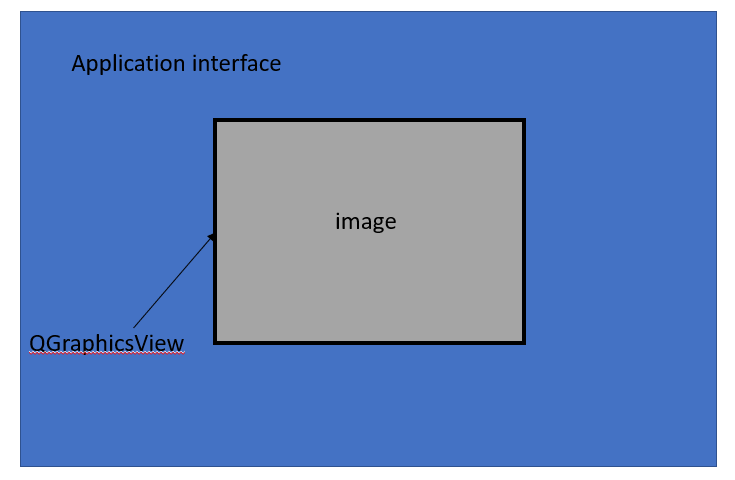
The QGraphicsView never maximizes.
-
@ivanicy said in Maximize QGraphicsView:
showFullScreen
Docs for showFullScreen state:
"Shows the widget in full-screen mode.
Calling this function only affects windows."Check whether your QGraphicsView' isWindow() method returns true. If not, I believe you need to specify the flag Qt::Window in the constructor.
Or you make a QDialog or QMainWindow (which are a window by default), and insert the QGraphicsView as a full-size child window.
